Solved CPU 100% usage

russellhigley

New member
Local time
7:58 AM
Messages
13
Location
White Plains
Can any one help. My CPU is running at or near 100% since last night, sudden onset, after watching a live game on my computer (I switched batteries and then went back to Ethernet connection). Advised, and I have disabling Windows Update, Windows Search, Gadgets and it was of no significant help. I have performed a Malware scan, TDSSRoot (Kaspersky) scan and am now in the process of performing a Kaspersky anti-virus scan with my installed program (which can take 12 hours). Could there be a program running in the background that I do not know about? I have a lot of instances svchost.exe running but do not have the skills to determine which I can disable. The cursor runs constantly in the background (the little circle turning all the time). Internet browsing is impossible, with pages hanging up, etc.

I posted this new thread an hour or more ago, but cannot locate it anywhere on the website, so I am trying again, here.

Anyone who can help me, I'd surely appreciate it.:confused:
 

My Computer

Computer type
Laptop
Computer Manufacturer/Model Number
Dell Studio XPS
OS
Windows 7 Home Premium, 64 bit
CPU
Intel Core 2 Duo
Memory
8 Gb.
Antivirus
Kapersky
Browser
Internet 11
Open an elevated cmd window, then copy & paste the code below into it, and press enter.

The code exports the last 50 events from eventviewer into eventlog.txt in \Windows\System32 and we can examine that to see if we can trace the CPU usage.

Code:
WEVTUtil query-events System /count:50 /rd:true /format:text > eventlog.txt

Attach eventlog.txt in your next reply.
 

My Computer

Computer type
PC/Desktop
Computer Manufacturer/Model Number
Golden Mk. I.4
OS
Windows 10 Pro x64 ; Xubuntu x64
CPU
Intel i7 860 @ 2.80 GHz O/C'ed to 4.0GHz
Motherboard
Gigabyte P55A-UD3R Rev.1. Award BIOS F13
Memory
16GB Corsair Vengance DDR3 @ 661 MHz Dual Channel (9-9-9-24)
Graphics Card(s)
EVGA NVidia GTX 560 1024MB
Sound Card
Realtek Integrated
Monitor(s) Displays
Dual Samsung SyncMaster 2494HS
Screen Resolution
1920*1080 and 1920*1080
Hard Drives
1*Samsung 840 EVO 120GB SSD;
1*OCZ Vertex 2 60GB SSD;
2*Samsung F3 SpinPoint 1TB in RAID0;
1*Samsung F1 SpinPoint 1TB;
2*Western Digital 1TB External USB 3.0
1*Western Digital 500GB External USB 3.0
1*Seagate 500GB External USB 2.0
PSU
Thermaltake ToughPower QFan 750W
Case
Thermaltake Element S VK60001W2Z
Cooling
Corsair H60 Water Cooling, 2*230mm and 2*80mm case fans
Keyboard
Logitech G110
Mouse
Logitech MX518
I would suggest to disable Kaspersky an reboot and see if that helps I tried Kaspersky yesterday on my laptop and it slowed it to a crawl try another ativirus
 

My Computer

Computer type
PC/Desktop
Computer Manufacturer/Model Number
Compac
OS
Microsoft Windows 7 Ultimate 32-bit 7601
CPU
Intel(R) Pentium(R) Dual CPU E2160 @ 1.80GHz
Motherboard
MSI Boston
Memory
4.00 GB
Graphics Card(s)
(1) VNC Mirror Driver (2) Intel(R) G33/G31 Express Chipset
Sound Card
Disabled
Monitor(s) Displays
Headless
Screen Resolution
1280 x 960 x 32 bits (4294967296 colors) @ 60 Hz
Hard Drives
ST3320820AS ATA Device
Keyboard
Headless
Mouse
Headless
Antivirus
Malwarebytes pro
Other Info
Also
Windows 8.1 Laptop and Desktop both Acer
Open a Run dialog with [Windows keyboard button] + R or type into the search box on your Start menu: perfmon.exe

Switch to the CPU tab and sort the Processes list by "Average CPU". If the name in the Image column says "svchost.exe", then open the Services list and sort that by "Average CPU" as well. That will at least tell us WHAT is using up your CPU.
 

My Computer

Computer type
Laptop
OS
Windows 7 Ultimate x86
Thank you so much, Golden, I really appreciate your kindness. I am trying to figure out what you mean by "opening" an elevated cmd window. Does that mean the search programs and files in the lower left corner of my tool bar. I am now 60% through a total computer Kaspersky anti-virus program scan which has already taken 8 hours, reporting an estimated 4 hours left. I see you are in Australia. Very cool. You are very kind to help me. (I will soon have to go to bed (very late here right now, USA Eastern time zone, Saturday night, approaching Sunday morning.) If I can figure out how to access the information you are requesting, and then transfer that information to this "quick reply," I am only too happy to do so. ?Copy and paste will work??? First, I have to display the info you requested. Thanks again, Golden. Russell.
 

My Computer

Computer type
Laptop
Computer Manufacturer/Model Number
Dell Studio XPS
OS
Windows 7 Home Premium, 64 bit
CPU
Intel Core 2 Duo
Memory
8 Gb.
Antivirus
Kapersky
Browser
Internet 11
And thank you, ZeDingo. I am trying to follow all of these instructions as best I can. Thank you all for your patience.
 

My Computer

Computer type
Laptop
Computer Manufacturer/Model Number
Dell Studio XPS
OS
Windows 7 Home Premium, 64 bit
CPU
Intel Core 2 Duo
Memory
8 Gb.
Antivirus
Kapersky
Browser
Internet 11
I finally accessed event viewer and see a list of the events under "log summary," but am unable to copy and paste the log here for you to see. There are many logs available, and I am in Overview and Summary, Log Summary. I cannot find a way to put that information here. There are too many to open all of them, and some date back a couple of years, while many are from today's date, but are not in order.
 

My Computer

Computer type
Laptop
Computer Manufacturer/Model Number
Dell Studio XPS
OS
Windows 7 Home Premium, 64 bit
CPU
Intel Core 2 Duo
Memory
8 Gb.
Antivirus
Kapersky
Browser
Internet 11
I am in the process of collecting the DM Log Collector as requested, and will attempt to upload it into the next message, if I can figure out how to do so. Thanks again, for your patience.
 

My Computer

Computer type
Laptop
Computer Manufacturer/Model Number
Dell Studio XPS
OS
Windows 7 Home Premium, 64 bit
CPU
Intel Core 2 Duo
Memory
8 Gb.
Antivirus
Kapersky
Browser
Internet 11
Process completed DM Log Collector, as instructed. I will now attempt to attach the file from my desktop to this message. Thank you again, for your patience.

I got it! I was able to complete the process with your excellent instructions (email) and have successfully attached the DM Log Collector file below. Thanks a lot!! I really appreciate it. (My Kaspersky anti-virus complete scan has about 2 hours left. I am allowing it to continue to run to see if there is a virus on my computer, even though Malware and TDKKRoot remover found nothing.
 

Attachments

My Computer

Computer type
Laptop
Computer Manufacturer/Model Number
Dell Studio XPS
OS
Windows 7 Home Premium, 64 bit
CPU
Intel Core 2 Duo
Memory
8 Gb.
Antivirus
Kapersky
Browser
Internet 11
1. Click Start
orb.png

2. In the search box, type cmd
3. In the list that appears, right-click on cmd.exe and choose Run as administrator
4. In the command window that opens, paste this:

WEVTUtil query-events System /count:50 /rd:true /format:text > eventlog.txt

5. Now press enter.
6. Go to C:\Windows\System32 and find eventlog.txt

Attach it here using this: (ignore the .zip file in the picture)

picture.php
 

My Computer

Computer type
PC/Desktop
Computer Manufacturer/Model Number
Golden Mk. I.4
OS
Windows 10 Pro x64 ; Xubuntu x64
CPU
Intel i7 860 @ 2.80 GHz O/C'ed to 4.0GHz
Motherboard
Gigabyte P55A-UD3R Rev.1. Award BIOS F13
Memory
16GB Corsair Vengance DDR3 @ 661 MHz Dual Channel (9-9-9-24)
Graphics Card(s)
EVGA NVidia GTX 560 1024MB
Sound Card
Realtek Integrated
Monitor(s) Displays
Dual Samsung SyncMaster 2494HS
Screen Resolution
1920*1080 and 1920*1080
Hard Drives
1*Samsung 840 EVO 120GB SSD;
1*OCZ Vertex 2 60GB SSD;
2*Samsung F3 SpinPoint 1TB in RAID0;
1*Samsung F1 SpinPoint 1TB;
2*Western Digital 1TB External USB 3.0
1*Western Digital 500GB External USB 3.0
1*Seagate 500GB External USB 2.0
PSU
Thermaltake ToughPower QFan 750W
Case
Thermaltake Element S VK60001W2Z
Cooling
Corsair H60 Water Cooling, 2*230mm and 2*80mm case fans
Keyboard
Logitech G110
Mouse
Logitech MX518
Golden, Did you receive the DM Log Collector I attached to the last post? Were you able to "open" and read the information? Anything useful? I am trying to follow your instructions for the most recent request, cmd.
 

My Computer

Computer type
Laptop
Computer Manufacturer/Model Number
Dell Studio XPS
OS
Windows 7 Home Premium, 64 bit
CPU
Intel Core 2 Duo
Memory
8 Gb.
Antivirus
Kapersky
Browser
Internet 11
Does the DM Log Collector attached to a previous post supply the information you require?
 

My Computer

Computer type
Laptop
Computer Manufacturer/Model Number
Dell Studio XPS
OS
Windows 7 Home Premium, 64 bit
CPU
Intel Core 2 Duo
Memory
8 Gb.
Antivirus
Kapersky
Browser
Internet 11
That last one just contains .dmp files, but they are useful for Blue Screen crashes, which I don't think you have been having....and would likely not explain CPU usage.
 

My Computer

Computer type
PC/Desktop
Computer Manufacturer/Model Number
Golden Mk. I.4
OS
Windows 10 Pro x64 ; Xubuntu x64
CPU
Intel i7 860 @ 2.80 GHz O/C'ed to 4.0GHz
Motherboard
Gigabyte P55A-UD3R Rev.1. Award BIOS F13
Memory
16GB Corsair Vengance DDR3 @ 661 MHz Dual Channel (9-9-9-24)
Graphics Card(s)
EVGA NVidia GTX 560 1024MB
Sound Card
Realtek Integrated
Monitor(s) Displays
Dual Samsung SyncMaster 2494HS
Screen Resolution
1920*1080 and 1920*1080
Hard Drives
1*Samsung 840 EVO 120GB SSD;
1*OCZ Vertex 2 60GB SSD;
2*Samsung F3 SpinPoint 1TB in RAID0;
1*Samsung F1 SpinPoint 1TB;
2*Western Digital 1TB External USB 3.0
1*Western Digital 500GB External USB 3.0
1*Seagate 500GB External USB 2.0
PSU
Thermaltake ToughPower QFan 750W
Case
Thermaltake Element S VK60001W2Z
Cooling
Corsair H60 Water Cooling, 2*230mm and 2*80mm case fans
Keyboard
Logitech G110
Mouse
Logitech MX518
Golden, I have tried repeatedly to copy and paste the command above into the cmd and it is impossible to paste, so I typed the command repeatedly, exactly as above, and it rejects the command saying inoperable, or not recognized, etc.
 

My Computer

Computer type
Laptop
Computer Manufacturer/Model Number
Dell Studio XPS
OS
Windows 7 Home Premium, 64 bit
CPU
Intel Core 2 Duo
Memory
8 Gb.
Antivirus
Kapersky
Browser
Internet 11
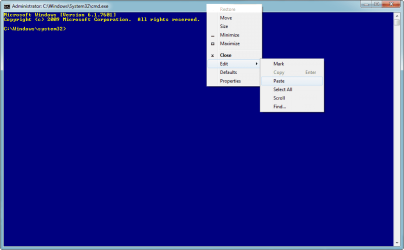
To paste, you need to right-click on the top bar of the cmd window, then select paste from the context menu.

1.png
 

My Computer

Computer type
PC/Desktop
Computer Manufacturer/Model Number
Golden Mk. I.4
OS
Windows 10 Pro x64 ; Xubuntu x64
CPU
Intel i7 860 @ 2.80 GHz O/C'ed to 4.0GHz
Motherboard
Gigabyte P55A-UD3R Rev.1. Award BIOS F13
Memory
16GB Corsair Vengance DDR3 @ 661 MHz Dual Channel (9-9-9-24)
Graphics Card(s)
EVGA NVidia GTX 560 1024MB
Sound Card
Realtek Integrated
Monitor(s) Displays
Dual Samsung SyncMaster 2494HS
Screen Resolution
1920*1080 and 1920*1080
Hard Drives
1*Samsung 840 EVO 120GB SSD;
1*OCZ Vertex 2 60GB SSD;
2*Samsung F3 SpinPoint 1TB in RAID0;
1*Samsung F1 SpinPoint 1TB;
2*Western Digital 1TB External USB 3.0
1*Western Digital 500GB External USB 3.0
1*Seagate 500GB External USB 2.0
PSU
Thermaltake ToughPower QFan 750W
Case
Thermaltake Element S VK60001W2Z
Cooling
Corsair H60 Water Cooling, 2*230mm and 2*80mm case fans
Keyboard
Logitech G110
Mouse
Logitech MX518
Golden, I followed your instructions exactly, and was able to copy and paste the information you provided. Your instructions were perfect. After pasting the line you provided, the following appears (a repeat every time) C:\Windows\system32> Nothing else happens. Every time I paste the line you provided, C:\Windows\system32> appears again.
 

My Computer

Computer type
Laptop
Computer Manufacturer/Model Number
Dell Studio XPS
OS
Windows 7 Home Premium, 64 bit
CPU
Intel Core 2 Duo
Memory
8 Gb.
Antivirus
Kapersky
Browser
Internet 11
Golden, in searching for answers, and my CPU usage is high, the problem is that the cursor is spinning constantly, meaning that some program (in the background) must be running or seeking constantly. I think that might be the problem. Finding that program is not easy! Sudden onset 2 days ago. Something is constantly running or attempting to open, in the background.
 

My Computer

Computer type
Laptop
Computer Manufacturer/Model Number
Dell Studio XPS
OS
Windows 7 Home Premium, 64 bit
CPU
Intel Core 2 Duo
Memory
8 Gb.
Antivirus
Kapersky
Browser
Internet 11
Golden, Thanks to you and all who helped me with this annoying and disabling problem.

By searching Windows Seven Forums for "constantly spinning cursor," I found the solution, posted by Saurabh A (member Dell): Control panel, mouse settings, return to "default." Problem solved! CPU usage is back to normal! I wish I knew how to contact Saurabh A with a message and offer my gratitude for his post, February 11, 2013, more than 2 years ago.

As in medicine, often the most obvious solution is the one that is most simple, and "cures" the problem (without creating more problems). (To reduce CPU usage, I disabled Gadgets from the services menu, cannot relocate it to start Gadgets again, so will have to do without this feature.)

Thanks to all of the kind people, and you Golden, for reaching out across the oceans, to offer your expert assistance. I really appreciate it. What a wonderful group of people! And I learned a lot from my contact with all of you.

Kindest regards, and thank you,

Russell.
 

My Computer

Computer type
Laptop
Computer Manufacturer/Model Number
Dell Studio XPS
OS
Windows 7 Home Premium, 64 bit
CPU
Intel Core 2 Duo
Memory
8 Gb.
Antivirus
Kapersky
Browser
Internet 11
:thumbsup:
 

My Computer

Computer type
PC/Desktop
Computer Manufacturer/Model Number
Golden Mk. I.4
OS
Windows 10 Pro x64 ; Xubuntu x64
CPU
Intel i7 860 @ 2.80 GHz O/C'ed to 4.0GHz
Motherboard
Gigabyte P55A-UD3R Rev.1. Award BIOS F13
Memory
16GB Corsair Vengance DDR3 @ 661 MHz Dual Channel (9-9-9-24)
Graphics Card(s)
EVGA NVidia GTX 560 1024MB
Sound Card
Realtek Integrated
Monitor(s) Displays
Dual Samsung SyncMaster 2494HS
Screen Resolution
1920*1080 and 1920*1080
Hard Drives
1*Samsung 840 EVO 120GB SSD;
1*OCZ Vertex 2 60GB SSD;
2*Samsung F3 SpinPoint 1TB in RAID0;
1*Samsung F1 SpinPoint 1TB;
2*Western Digital 1TB External USB 3.0
1*Western Digital 500GB External USB 3.0
1*Seagate 500GB External USB 2.0
PSU
Thermaltake ToughPower QFan 750W
Case
Thermaltake Element S VK60001W2Z
Cooling
Corsair H60 Water Cooling, 2*230mm and 2*80mm case fans
Keyboard
Logitech G110
Mouse
Logitech MX518
Thank you. This is a terrific forum. One has to work at it, search, and not give up, showing that with the help and support of this wonderful website, persistence pays off.:D
 

My Computer

Computer type
Laptop
Computer Manufacturer/Model Number
Dell Studio XPS
OS
Windows 7 Home Premium, 64 bit
CPU
Intel Core 2 Duo
Memory
8 Gb.
Antivirus
Kapersky
Browser
Internet 11
Back
Top