Solved CPU Exceeding Specs (HWMonitor) 21GHz!?

TheDeerDude

New member
Power User
VIP
Local time
4:32 PM
Messages
204
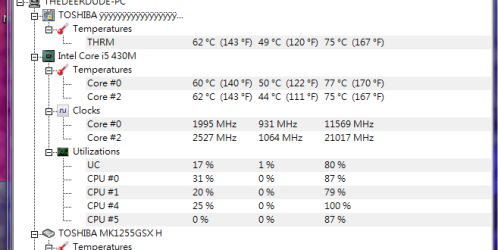
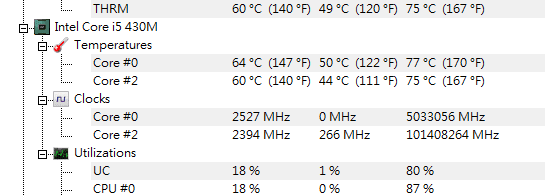
i5-m430 here, max speed with turbo-boost is 2.53GHz, this is a laptop, there's no way to overclock it. HWMonitor presented me with these values: (please see the attachment)

How is this even possible?

EDIT: see the other attachment too... o-o

Okay, it MUST be a software glitch. Eh, didn't expect that from CPUID, honestly
 

Attachments
  • 42.png
    42.png
    28.3 KB · Views: 0
  • wtf.PNG
    wtf.PNG
    12.9 KB · Views: 19
  • k.PNG
    k.PNG
    5.6 KB · Views: 18

My Computer My Computer

OS
Windows 7 x64
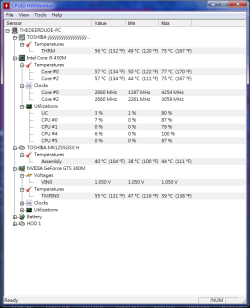
Hiyya DD yes mate I have a L550 Satelitte with that exact CPU and I prefer to use this ditty of mine and close the annoying update window and you will see the cores running - have a read about this as you might find it handy to get details of other components

Using HW Info
PART A:
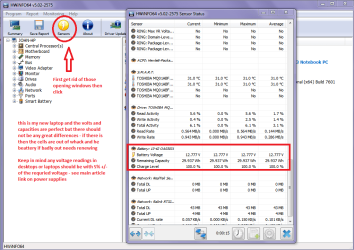
You can test the volts on the PSU with HW Info HWiNFO, HWiNFO32/64 - Download < download the right bit version and close the right hand window select Sensors and scroll down to the power section where you will see what the volts are doing see my pic. Now the section you want will be labelled- fpr example Asus boards usually have "Nuvoton" and Gigabyte boards"ITE" in any case the section you want will have Vbatt or VBAT in it(dead give away)
The original right hand window shows the machine running and is handy for thatbut for looking at the components in some detail close it and use the main lefthand side panel
FOR OTHER COMPONENTS
PART B:
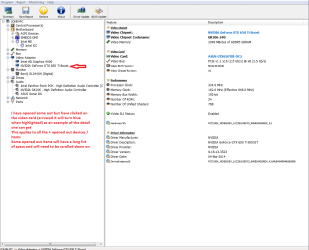
Open each small square with + in it on the section the components are in andthen click on the individual component/s (it will highlight in blue) - in theright hand side will appear all sorts of details including brands speeds andother essential info that particular device. See pic for example.
When you open the [program close that annoying update window and you will see your cores working away.

This is a program I use all the time and you can get an enormous amount of detail on any of your components.

For laptop power supplies ie the battery use PART A: and scroll right down to the bottom of the Sensors window see pic ;) Oh I included another one just to show you how you can get really detailed specs / info
 

Attachments

  • HW LAPTOP BATTERY.PNG
    HW LAPTOP BATTERY.PNG
    48.3 KB · Views: 1
  • HW INFO SPECS.PNG
    HW INFO SPECS.PNG
    38.5 KB · Views: 1

My Computer My Computer

Computer type
PC/Desktop
Computer Manufacturer/Model Number
Own build (new) Desk1 / Asus ROG Win 7 / Desk2 1st build
OS
Desk1 7 Home Prem / Desk2 10 Pro / Main lap Asus ROG 10 Pro 2 laptop Toshiba 7 Pro Asus P2520 7 & 10
CPU
Desk1 i5 3750K / Laptop i7 GTX 860M / Desk2 i5 2500
Motherboard
Desk1 Asus P877-V / Desk2 Gigabyte H67 UD3H / Laptop ?
Memory
Desk1 8GB (1866) / Desk2 16GB (1333) / Laptop 8Gb DDR3
Graphics Card(s)
Desk 1& 2NVidia GTX 650 & Laptops on board Intel
Sound Card
Desk 1 & 2 -XONAR DG Realtek High Def audio Laptop
Monitor(s) Displays
Desk 1 Benq HD 2450 / Desk2 Philips 24" / Laptop 17.5"
Screen Resolution
1920x1080 D1 & D2 & Laptop 1
Hard Drives
Desk1 Samsung 120GB 830 SSD
Asus ROG 256GB 850 Pro SSD
Desk2 Samsung 840 256 SSD
Toshiba 120GB EVO
PSU
Desk 1 Corsair HX 1050/ Laptop ? / Desk 2 Corsair HX 650
Case
Desk 1 Cooler HAF XM ? Toshiba laptop / Desk2 Coolermaster
Cooling
Fans on all Desk1 -2 Desk2 - all Coolermasters 5 Laptop ?
Keyboard
Desk 1 MS Sidewinder X6 Desk 2 MS Sidewinder X 4
Mouse
Desk 1&2 - Gigabyte MS 900 gamer - laptop - Logitec wireless
Internet Speed
ADSL2+
Other Info
One other Desktop (tester) and spare Toshba laptop both with SSD's
Running Kaspersky 2016 ISS on all machines config'd identically
Logitec audio stereo systems on each machine (x3)
Canon MG5250MFC
Router/modem TP-Link running WPA2SK
That's so awesome, thank you so much! I'll definitely check it out, hopefully it'll be more reliable than HWMonitor :) and honestly, compared to it, it makes it look like a toy xD

1931979648MHz on my first core since yesterday. Yes, a glitch.. kinda funny c:
 

My Computer My Computer

OS
Windows 7 x64
Glad you liked it as I have been using it for some time now to make up pics and ditties for the forum posts as I cannot figure out how to do the tutorials:eek:
 

My Computer My Computer

Computer type
PC/Desktop
Computer Manufacturer/Model Number
Own build (new) Desk1 / Asus ROG Win 7 / Desk2 1st build
OS
Desk1 7 Home Prem / Desk2 10 Pro / Main lap Asus ROG 10 Pro 2 laptop Toshiba 7 Pro Asus P2520 7 & 10
CPU
Desk1 i5 3750K / Laptop i7 GTX 860M / Desk2 i5 2500
Motherboard
Desk1 Asus P877-V / Desk2 Gigabyte H67 UD3H / Laptop ?
Memory
Desk1 8GB (1866) / Desk2 16GB (1333) / Laptop 8Gb DDR3
Graphics Card(s)
Desk 1& 2NVidia GTX 650 & Laptops on board Intel
Sound Card
Desk 1 & 2 -XONAR DG Realtek High Def audio Laptop
Monitor(s) Displays
Desk 1 Benq HD 2450 / Desk2 Philips 24" / Laptop 17.5"
Screen Resolution
1920x1080 D1 & D2 & Laptop 1
Hard Drives
Desk1 Samsung 120GB 830 SSD
Asus ROG 256GB 850 Pro SSD
Desk2 Samsung 840 256 SSD
Toshiba 120GB EVO
PSU
Desk 1 Corsair HX 1050/ Laptop ? / Desk 2 Corsair HX 650
Case
Desk 1 Cooler HAF XM ? Toshiba laptop / Desk2 Coolermaster
Cooling
Fans on all Desk1 -2 Desk2 - all Coolermasters 5 Laptop ?
Keyboard
Desk 1 MS Sidewinder X6 Desk 2 MS Sidewinder X 4
Mouse
Desk 1&2 - Gigabyte MS 900 gamer - laptop - Logitec wireless
Internet Speed
ADSL2+
Other Info
One other Desktop (tester) and spare Toshba laptop both with SSD's
Running Kaspersky 2016 ISS on all machines config'd identically
Logitec audio stereo systems on each machine (x3)
Canon MG5250MFC
Router/modem TP-Link running WPA2SK
Back
Top