CPU over TEmp error

Wiredsoul

New member
Local time
4:54 PM
Messages
53
I occasionally get a CPU over Temperature error, but I have yet to experience I force shut down of any kind, I used realTemp to check my cpu temps and I got these
Temperature
62 66 62 65
TJ max
38 34 38 35

in my thermal status it say
ok

and my load is usually less than 3.8%

am using an intel core i7 965, with stock heat sink, should I replace? is the error something to be worried about? or is it just a bios mis reading problem?
 

My Computer

OS
windows 7 Home Premium x64
CPU
Intel i7 980x
Motherboard
Asus Rampage III Extreme
Memory
Corsair 8 GB Dominators
Graphics Card(s)
ASUS ATI 5970
Monitor(s) Displays
HP LP3065 Model EZ320A 30" LCD Monitor
Screen Resolution
2560x1600
Hard Drives
1tb Western digital Black
Solid State drive 28 GB
PSU
1000 Watts Antec Tru power
Case
Obsidian 800D
Cooling
Liquid
Keyboard
RAZER LYCOSA
Mouse
Razer Imperator
Internet Speed
12mb/s
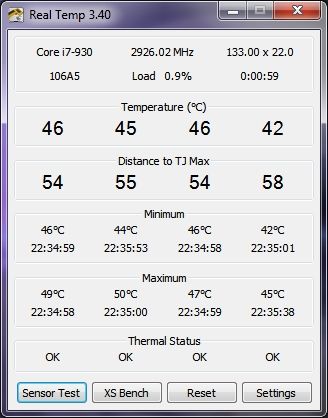
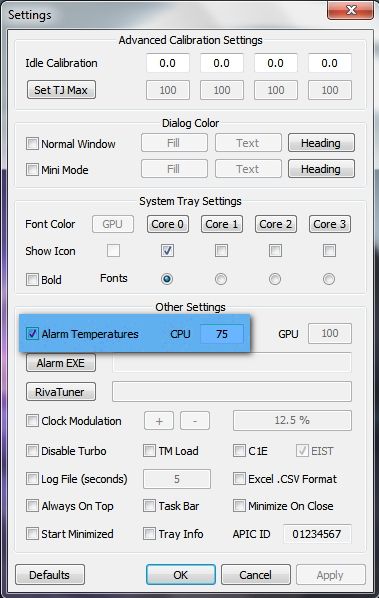
Your TJ max temps of 38 34 38 35 look very very low. Did you possibly mean distance to TJ max? Have you set the alarm temperature in settings yet?

18417e47.jpg


~Maxx~
.
da59fa57.png
 

My Computer

Computer Manufacturer/Model Number
HP HPE 270f
OS
Windows 7 x64 Home Premium
CPU
Intel Core i7 930 @ 2.8 Ghz Socket 1366 LGA
Motherboard
Pegatron Truckee v1.04E41
Memory
8 GB 1366 Mhz DDR3 (PC3-10700) RAM
Graphics Card(s)
ATI Radeon 5770 1 GB DDR5 RAM
Sound Card
Realtech High Definition
Monitor(s) Displays
32" Sony Bravia
Screen Resolution
1366 X 768
Hard Drives
Intel 25nm 120 GB Series 320 SSD HD Tune- 265 MBps Read/ 130 MBps Write

LaCie 1TB + 1TB RAID 0 eSATA Drive HD Tune- 160 MBps Read/ 90 MBps Write
Keyboard
Logitech Illuminated
Mouse
Logitech MX Revolution
Internet Speed
36.4 Mbps Maximum on a 37 Mbps Motorola SB501 Modem
Yea, sorry, it was distance to TJ Max. I'm not to clear on what that is, so I would wager unless it is automatically set, I doubt that I have.
Wow, I was looking at your temps and mine are usually a full 20 degrees over that, should I be concerned?
 

My Computer

OS
windows 7 Home Premium x64
CPU
Intel i7 980x
Motherboard
Asus Rampage III Extreme
Memory
Corsair 8 GB Dominators
Graphics Card(s)
ASUS ATI 5970
Monitor(s) Displays
HP LP3065 Model EZ320A 30" LCD Monitor
Screen Resolution
2560x1600
Hard Drives
1tb Western digital Black
Solid State drive 28 GB
PSU
1000 Watts Antec Tru power
Case
Obsidian 800D
Cooling
Liquid
Keyboard
RAZER LYCOSA
Mouse
Razer Imperator
Internet Speed
12mb/s
Wow, I was looking at your temps and mine are usually a full 20 degrees over that, should I be concerned?

That would depend on the ambient temperature of the room that your computer is running in, what tasks your computer is performing is and how much hotter your i7 965 runs than my i7 930 does.

3b4a061c.jpg


If you are concerned you can set an Alarm Temperature in the Real Temp GUI under 'settings'. The TJ Max for my processor is 100 degrees C so I have conservatively set it for 75 degrees C since I live in the Pacific Northwest and its only about 70 degrees Fahrenheit in the computer room.

~Maxx~
.
da59fa57.png
 

My Computer

Computer Manufacturer/Model Number
HP HPE 270f
OS
Windows 7 x64 Home Premium
CPU
Intel Core i7 930 @ 2.8 Ghz Socket 1366 LGA
Motherboard
Pegatron Truckee v1.04E41
Memory
8 GB 1366 Mhz DDR3 (PC3-10700) RAM
Graphics Card(s)
ATI Radeon 5770 1 GB DDR5 RAM
Sound Card
Realtech High Definition
Monitor(s) Displays
32" Sony Bravia
Screen Resolution
1366 X 768
Hard Drives
Intel 25nm 120 GB Series 320 SSD HD Tune- 265 MBps Read/ 130 MBps Write

LaCie 1TB + 1TB RAID 0 eSATA Drive HD Tune- 160 MBps Read/ 90 MBps Write
Keyboard
Logitech Illuminated
Mouse
Logitech MX Revolution
Internet Speed
36.4 Mbps Maximum on a 37 Mbps Motorola SB501 Modem
Just for trial purposes,
Take the case off of the computer.
Put a floor/desk fan blowing directly in the direction of the CPU.

Watch your temperatures drop!

Also choose "balanced" in place of "High performance" for a power plan and watch the temps drop.
 

My Computer

Computer Manufacturer/Model Number
Toshiba Satellite S875D-S7239 laptop
OS
MS Windows 7 Ultimate SP1 64-bit
CPU
AMD A10-4600M
Motherboard
AMD Pumori (Socket FT1)
Memory
6.00 GB Dual-Channel DDR3 @ 798MHz (11-11-12-28)
Graphics Card(s)
AMD Radeon HD 7660G
Sound Card
High Definition Audio Device
Monitor(s) Displays
Generic PnP Monitor (1600x900@60Hz)
Screen Resolution
1600x900@60Hz
Hard Drives
SSD 119GB Corsair CSSD-V128GB2 ATA Device
Keyboard
Standard PS/2 Keyboard
Mouse
HP Wireless Optical Mobile Mouse Model FHA-3410
Internet Speed
What the local pub, local coffee shop offers.
Other Info
Optical Drive:MATSHITA BD-CMB UJ160B ATA Device


Also have an Asus ha1002xp netbook with Win 7 Ultimate installed.
Wiredsoul- From what I've heard you don't need to be too concerned until the processor temperature gets to 90 degrees C and that's when karlsnooks' suggestions for cooling your computer down will really save the day.

BTW- How hot is it indoors where you are anyway?

~Maxx~
.
da59fa57.png
 

My Computer

Computer Manufacturer/Model Number
HP HPE 270f
OS
Windows 7 x64 Home Premium
CPU
Intel Core i7 930 @ 2.8 Ghz Socket 1366 LGA
Motherboard
Pegatron Truckee v1.04E41
Memory
8 GB 1366 Mhz DDR3 (PC3-10700) RAM
Graphics Card(s)
ATI Radeon 5770 1 GB DDR5 RAM
Sound Card
Realtech High Definition
Monitor(s) Displays
32" Sony Bravia
Screen Resolution
1366 X 768
Hard Drives
Intel 25nm 120 GB Series 320 SSD HD Tune- 265 MBps Read/ 130 MBps Write

LaCie 1TB + 1TB RAID 0 eSATA Drive HD Tune- 160 MBps Read/ 90 MBps Write
Keyboard
Logitech Illuminated
Mouse
Logitech MX Revolution
Internet Speed
36.4 Mbps Maximum on a 37 Mbps Motorola SB501 Modem
Heat will influence performance and life-time of electronic components.

Remember-100 degrees C is the temperature of boiling water.

Visit the site of your CPU manufacturer and see what they have for a recommended operating temperature range.
 

My Computer

Computer Manufacturer/Model Number
Toshiba Satellite S875D-S7239 laptop
OS
MS Windows 7 Ultimate SP1 64-bit
CPU
AMD A10-4600M
Motherboard
AMD Pumori (Socket FT1)
Memory
6.00 GB Dual-Channel DDR3 @ 798MHz (11-11-12-28)
Graphics Card(s)
AMD Radeon HD 7660G
Sound Card
High Definition Audio Device
Monitor(s) Displays
Generic PnP Monitor (1600x900@60Hz)
Screen Resolution
1600x900@60Hz
Hard Drives
SSD 119GB Corsair CSSD-V128GB2 ATA Device
Keyboard
Standard PS/2 Keyboard
Mouse
HP Wireless Optical Mobile Mouse Model FHA-3410
Internet Speed
What the local pub, local coffee shop offers.
Other Info
Optical Drive:MATSHITA BD-CMB UJ160B ATA Device


Also have an Asus ha1002xp netbook with Win 7 Ultimate installed.
Visit the site of your CPU manufacturer and see what they have for a recommended operating temperature range.

Yes, and set the alarm temperature in the Real Temp program accordingly.

~Maxx~
.
da59fa57.png
 

My Computer

Computer Manufacturer/Model Number
HP HPE 270f
OS
Windows 7 x64 Home Premium
CPU
Intel Core i7 930 @ 2.8 Ghz Socket 1366 LGA
Motherboard
Pegatron Truckee v1.04E41
Memory
8 GB 1366 Mhz DDR3 (PC3-10700) RAM
Graphics Card(s)
ATI Radeon 5770 1 GB DDR5 RAM
Sound Card
Realtech High Definition
Monitor(s) Displays
32" Sony Bravia
Screen Resolution
1366 X 768
Hard Drives
Intel 25nm 120 GB Series 320 SSD HD Tune- 265 MBps Read/ 130 MBps Write

LaCie 1TB + 1TB RAID 0 eSATA Drive HD Tune- 160 MBps Read/ 90 MBps Write
Keyboard
Logitech Illuminated
Mouse
Logitech MX Revolution
Internet Speed
36.4 Mbps Maximum on a 37 Mbps Motorola SB501 Modem
Well, my room is usually pretty mild 60-80 degrees varies, I live in southern California, and it does get pretty hot sometimes , put, yea I decided remove the stock fan and water cool the cpu, and that going to be in about two weeks, for now I have a huge external fan blow into the top of the corsair 800D. Thanks for the assist all.
P.S. Yes, I did take the advice, I have set up the alarm of the temps.
 

My Computer

OS
windows 7 Home Premium x64
CPU
Intel i7 980x
Motherboard
Asus Rampage III Extreme
Memory
Corsair 8 GB Dominators
Graphics Card(s)
ASUS ATI 5970
Monitor(s) Displays
HP LP3065 Model EZ320A 30" LCD Monitor
Screen Resolution
2560x1600
Hard Drives
1tb Western digital Black
Solid State drive 28 GB
PSU
1000 Watts Antec Tru power
Case
Obsidian 800D
Cooling
Liquid
Keyboard
RAZER LYCOSA
Mouse
Razer Imperator
Internet Speed
12mb/s
Yes, I did take the advice, I have set up the alarm of the temps.

That should do for now, but as karlsnooks pointed out "heat will influence performance and life-time of electronic components" so its good to know that you have made some long term provisions to keep your computer running at low to moderate temperatures.

~Maxx~
.
da59fa57.png
 

My Computer

Computer Manufacturer/Model Number
HP HPE 270f
OS
Windows 7 x64 Home Premium
CPU
Intel Core i7 930 @ 2.8 Ghz Socket 1366 LGA
Motherboard
Pegatron Truckee v1.04E41
Memory
8 GB 1366 Mhz DDR3 (PC3-10700) RAM
Graphics Card(s)
ATI Radeon 5770 1 GB DDR5 RAM
Sound Card
Realtech High Definition
Monitor(s) Displays
32" Sony Bravia
Screen Resolution
1366 X 768
Hard Drives
Intel 25nm 120 GB Series 320 SSD HD Tune- 265 MBps Read/ 130 MBps Write

LaCie 1TB + 1TB RAID 0 eSATA Drive HD Tune- 160 MBps Read/ 90 MBps Write
Keyboard
Logitech Illuminated
Mouse
Logitech MX Revolution
Internet Speed
36.4 Mbps Maximum on a 37 Mbps Motorola SB501 Modem
wiredsoul,

I'm glad that we could be of assistance and you have made some wise choices.
 

My Computer

Computer Manufacturer/Model Number
Toshiba Satellite S875D-S7239 laptop
OS
MS Windows 7 Ultimate SP1 64-bit
CPU
AMD A10-4600M
Motherboard
AMD Pumori (Socket FT1)
Memory
6.00 GB Dual-Channel DDR3 @ 798MHz (11-11-12-28)
Graphics Card(s)
AMD Radeon HD 7660G
Sound Card
High Definition Audio Device
Monitor(s) Displays
Generic PnP Monitor (1600x900@60Hz)
Screen Resolution
1600x900@60Hz
Hard Drives
SSD 119GB Corsair CSSD-V128GB2 ATA Device
Keyboard
Standard PS/2 Keyboard
Mouse
HP Wireless Optical Mobile Mouse Model FHA-3410
Internet Speed
What the local pub, local coffee shop offers.
Other Info
Optical Drive:MATSHITA BD-CMB UJ160B ATA Device


Also have an Asus ha1002xp netbook with Win 7 Ultimate installed.
Just for trial purposes,
Take the case off of the computer.
Put a floor/desk fan blowing directly in the direction of the CPU.

Watch your temperatures drop!

.

Thanks again for sharing such practical advise. It deserves to be on this page too...

~Maxx~
.
da59fa57.png
 

My Computer

Computer Manufacturer/Model Number
HP HPE 270f
OS
Windows 7 x64 Home Premium
CPU
Intel Core i7 930 @ 2.8 Ghz Socket 1366 LGA
Motherboard
Pegatron Truckee v1.04E41
Memory
8 GB 1366 Mhz DDR3 (PC3-10700) RAM
Graphics Card(s)
ATI Radeon 5770 1 GB DDR5 RAM
Sound Card
Realtech High Definition
Monitor(s) Displays
32" Sony Bravia
Screen Resolution
1366 X 768
Hard Drives
Intel 25nm 120 GB Series 320 SSD HD Tune- 265 MBps Read/ 130 MBps Write

LaCie 1TB + 1TB RAID 0 eSATA Drive HD Tune- 160 MBps Read/ 90 MBps Write
Keyboard
Logitech Illuminated
Mouse
Logitech MX Revolution
Internet Speed
36.4 Mbps Maximum on a 37 Mbps Motorola SB501 Modem
this will not work on my Phenom II x2 555 BE unlocked??????? Just like other App's
Not sure why this is
 
Last edited:

My Computer

Computer Manufacturer/Model Number
Self Build
OS
Windows 7 Ultimate 64bit
CPU
AMD Phenom II x 2 555 3.2 Ghz Unlocked to Phenom II x 4 B55
Motherboard
Gigabyte GA-MA78LM-S2H 1.0 DDR2 Version Bios F11
Memory
4 Gigs - GSkill PK Series (F2-8500CL5D) @ 533 5,5,5,15
Graphics Card(s)
Asus EAH5770 CUCORE
Sound Card
Onboard
Monitor(s) Displays
HP w19b
Hard Drives
Main SSD 32g OCZ Vertex
Hatachi Deskstar 7K1000.C 1TB SATA2 32mb Cache
PSU
thermaltake TR2 430W
Case
Atx mid size
Cooling
OCZ Vendetta CPU Cooler
Keyboard
Basic
Mouse
Logitech LX6
Internet Speed
17 mb/s
Vulgarity is an indication of an inadequate command of the English language.

This is a civilized forum. Please express yourself accordingly.
 

My Computer

Computer Manufacturer/Model Number
Toshiba Satellite S875D-S7239 laptop
OS
MS Windows 7 Ultimate SP1 64-bit
CPU
AMD A10-4600M
Motherboard
AMD Pumori (Socket FT1)
Memory
6.00 GB Dual-Channel DDR3 @ 798MHz (11-11-12-28)
Graphics Card(s)
AMD Radeon HD 7660G
Sound Card
High Definition Audio Device
Monitor(s) Displays
Generic PnP Monitor (1600x900@60Hz)
Screen Resolution
1600x900@60Hz
Hard Drives
SSD 119GB Corsair CSSD-V128GB2 ATA Device
Keyboard
Standard PS/2 Keyboard
Mouse
HP Wireless Optical Mobile Mouse Model FHA-3410
Internet Speed
What the local pub, local coffee shop offers.
Other Info
Optical Drive:MATSHITA BD-CMB UJ160B ATA Device


Also have an Asus ha1002xp netbook with Win 7 Ultimate installed.
Reset the Thermal Paste on your CPU
 

My Computer

OS
Windows 7 Pro x64
CPU
Intel E6300 2.8Ghz
Motherboard
ASUS P5QPL-AM Intel G41
Memory
Corsair TWIN2X 2x2GB 5-5-5-18
Graphics Card(s)
ATI HD5770 GDDR5 1GB
Sound Card
5.1 Internal
Monitor(s) Displays
Samsung Series 5 32" Full HD
Hard Drives
Seagate Barracuda 500GB 7200 16MB SATAII
WD Elements 500GB 2.5" External
PSU
CoolerMaster 550W eXtreme Power Plust Silent 12CM
Case
Lian-Li Lancool PC-K56B
Cooling
Stock Fan, Water Cooling for HDD, GPU, CPU on the Way :D
Keyboard
Logitech G15
Mouse
CoolerMaster Sentinal (set at 5600dpi)
Internet Speed
Slingshot. 5Mbps, Currently getting 2Mbps
That's what I thought at first (Cases right out of the box I unlocked) but when I lock it back to normal Phenom II X2 555 I can read My temps in any App like CPUID HWMonitor, Everrest, PC Wizard 2010 at very good temps too :) Idle 23c full load folding@home 40C
When I Unlock the other two cores (B55) the sensors do not read on the CPU just in the bios so that's the only way I can read the temps
If am not miss taken some App's will read the Bios CPU temp like CPUID HWMonitor, and Pc Wizard (TMPin1 in my case) just can't read as Per Core temp reading
 

My Computer

Computer Manufacturer/Model Number
Self Build
OS
Windows 7 Ultimate 64bit
CPU
AMD Phenom II x 2 555 3.2 Ghz Unlocked to Phenom II x 4 B55
Motherboard
Gigabyte GA-MA78LM-S2H 1.0 DDR2 Version Bios F11
Memory
4 Gigs - GSkill PK Series (F2-8500CL5D) @ 533 5,5,5,15
Graphics Card(s)
Asus EAH5770 CUCORE
Sound Card
Onboard
Monitor(s) Displays
HP w19b
Hard Drives
Main SSD 32g OCZ Vertex
Hatachi Deskstar 7K1000.C 1TB SATA2 32mb Cache
PSU
thermaltake TR2 430W
Case
Atx mid size
Cooling
OCZ Vendetta CPU Cooler
Keyboard
Basic
Mouse
Logitech LX6
Internet Speed
17 mb/s
Back
Top