CPU overclocking & heat

Hey, service manuals saved my butt more than once, no lie.
There IS a difference between taking apart a Dell Inspiron 1501 and a Dell Inspiron 1525, believe it or not. A big difference.
 

My Computer

Computer Manufacturer/Model Number
HP Pavilion dv4i-2100
OS
Windows 7 Ultimate x86
CPU
Intel Core i3 M350 @ 2.27 GHz
Motherboard
Stock
Memory
3.00 GB
Graphics Card(s)
Intel 1GB HDMI Graphics Card
Sound Card
Stock
Monitor(s) Displays
14.6" HD
Screen Resolution
1200x800 current setting.
Hard Drives
320GB samsung internal
500GB ADATA portable
PSU
Stock
Case
Stock
Cooling
Targus twin-fan chill mat.
Internet Speed
At home, 300kb/sec downloads. At work, 1028kb/sec downloads.
Other Info
Purchased through HP direct, custom build. I highly recommend HP to anyone.
Hey, service manuals saved my butt more than once, no lie.
There IS a difference between taking apart a Dell Inspiron 1501 and a Dell Inspiron 1525, believe it or not. A big difference.

Such as a 20oz hammer, and a 45oz hammer.
Ball pein or claw pein... :p

I should probably post something more productive...
Service manuals are good for swatting flies. And only used as per their intended use as a last resort.
Or if the machine is too good to screw up first time.
I'd never take a socket or spanner set to a 2008 BMW or Audi without knowing what to do.
But with my 1991 Honda, I wont feel so guilty if I have left over parts.

My garage is still approaching maximum capacity... :huh:
 

My Computer

OS
Windows 7 Enterprise
CPU
Intel Pentium Dual E2200 @2.2GHz
Motherboard
Gigabyte II-G31
Memory
4GB
Graphics Card(s)
Palit GForce 9500GT 1GB
Sound Card
onBoard
Hard Drives
WesternDigital: 250GB + 1TB + 1TB + 2TB
PSU
450W
Case
CoolerMaster CM690
Cooling
Corsair H50
Mouse
Logitech MX518
Hey, service manuals saved my butt more than once, no lie.
There IS a difference between taking apart a Dell Inspiron 1501 and a Dell Inspiron 1525, believe it or not. A big difference.
They have their uses.

I am more of the mindset of "If I can't figure it out myself, THEN I will check the manual."

~Lordbob
 

My Computer

Computer Manufacturer/Model Number
Hera
OS
Windows 7 Ultimate x64, Mint 9
CPU
Intel i5-2500k
Motherboard
ASUS P8P67 Pro
Memory
2x 4Gb Corsair VENGEANCE DDR3-1600
Graphics Card(s)
NVidia GeForce N260GTX Twin Frozr
Sound Card
Realtek HD OnBoard Audio
Monitor(s) Displays
ASUS 24" Monitor
Screen Resolution
1920x1080
Hard Drives
G.SKILL Phoenix Series 60GB SATA II MLC Internal Solid State Drive (SSD)
SAMSUNG Spinpoint F3R 1TB 7200 RPM 32MB Cache SATA II
PSU
Cooler Master Real Power Pro 750W
Case
Cooler Master Haf 932
Cooling
Fans
Keyboard
Razer Tarantula
Mouse
Razer Lachesis
Internet Speed
not fast enough
Hey, service manuals saved my butt more than once, no lie.
There IS a difference between taking apart a Dell Inspiron 1501 and a Dell Inspiron 1525, believe it or not. A big difference.

Such as a 20oz hammer, and a 45oz hammer.
Ball pein or claw pein... :p
A signatures I've used here was, "when all else fails use the impact solution.. a 5 pound sledgehammer works best"
I know what you mean.. I stopped working on cars because it's too damn frustrating. At least you don't have to worry about knuckbusters or bolt patterns and torque specs when reassembling a laptop.
 
I have a 1991 Honda. I dont worry about those things either. If it goes, it goes. If it doesnt, do it again.
I'l worked on several of these particular cars, so I've already figured it out from experience.
But with an Audi, no idea. Consult the manual.

As for PC's and Laptops... PC's are all the same. Laptops are all similar.
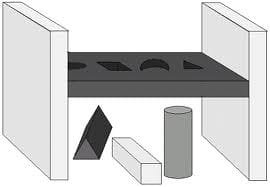
Its like that toy you used to play with as a kid.
imagesCA1HBN96.jpg
If the component doesnt fit into the slot, then it doesnt go there.
 

My Computer

OS
Windows 7 Enterprise
CPU
Intel Pentium Dual E2200 @2.2GHz
Motherboard
Gigabyte II-G31
Memory
4GB
Graphics Card(s)
Palit GForce 9500GT 1GB
Sound Card
onBoard
Hard Drives
WesternDigital: 250GB + 1TB + 1TB + 2TB
PSU
450W
Case
CoolerMaster CM690
Cooling
Corsair H50
Mouse
Logitech MX518
Yea.

I never finished playing with that toy... :o
 

My Computer

OS
Windows 7 Enterprise
CPU
Intel Pentium Dual E2200 @2.2GHz
Motherboard
Gigabyte II-G31
Memory
4GB
Graphics Card(s)
Palit GForce 9500GT 1GB
Sound Card
onBoard
Hard Drives
WesternDigital: 250GB + 1TB + 1TB + 2TB
PSU
450W
Case
CoolerMaster CM690
Cooling
Corsair H50
Mouse
Logitech MX518
Hey, service manuals saved my butt more than once, no lie.
There IS a difference between taking apart a Dell Inspiron 1501 and a Dell Inspiron 1525, believe it or not. A big difference.
They have their uses.

I am more of the mindset of "If I can't figure it out myself, THEN I will check the manual."

~Lordbob

I can generally figure it out, but I stick to the manual since it's good practice :)
 

My Computer

Computer Manufacturer/Model Number
HP Pavilion dv4i-2100
OS
Windows 7 Ultimate x86
CPU
Intel Core i3 M350 @ 2.27 GHz
Motherboard
Stock
Memory
3.00 GB
Graphics Card(s)
Intel 1GB HDMI Graphics Card
Sound Card
Stock
Monitor(s) Displays
14.6" HD
Screen Resolution
1200x800 current setting.
Hard Drives
320GB samsung internal
500GB ADATA portable
PSU
Stock
Case
Stock
Cooling
Targus twin-fan chill mat.
Internet Speed
At home, 300kb/sec downloads. At work, 1028kb/sec downloads.
Other Info
Purchased through HP direct, custom build. I highly recommend HP to anyone.
If something is broken beyond repair, I love to take it apart and put it back together, to see if I can get it all back with no missing parts :D. Having a sheet of clean fabric/paper next to you to lay out screws and stuff is very handy.
 

My Computer

Computer Manufacturer/Model Number
Pugh Technologies
OS
W7 Professional x64
CPU
AMD Athlon II X3 445 Rana 3.10 GHz
Motherboard
MSI 870A-G54
Memory
PNY XLR DDR3 1600 4x2GB
Graphics Card(s)
NVIDIA GeForce GTS 450 (fermi) 1GB GDDR5
Sound Card
Realtek ALC892 onboard
Monitor(s) Displays
ASUS VE205t, Viewsonic VX2035WM
Screen Resolution
1600x900, 1600x1050
Hard Drives
977GB Hitachi Hitachi HDS721010CLA332
244GB Western Digital WDC WD2500AAJS-65B4A0
488GB Western Digital WDC WD5000AAJS-00A8B0
488GB Western Digital WDC WD5000AAKS-00UU3A0
PSU
Antec EarthWatts EA650 650W
Case
ThermalTake Armor A90 Mid Tower
Cooling
3x 120mm in, 1x 120mm & 200mm out, self built hydro-cooler
Keyboard
Logitec 55
Mouse
Razer Deathadder
Internet Speed
20 Mbps D/L, 9 Mbps U/L
I check the manual whenever I take apart any laptop I havent worked on before.. if I can get one.. not all manufacturers make them easy to find. Sometimes the chassis will look identical to one of a previous model#, but everything inside has been redesigned. At least HP and Dell freely provide service manuals.. which is strangely convenient because most of the laptops I work on are HPs and Dells, with Toshiba coming in as a distant 3rd.. Most of the other brands either rarely get sold, rarely have problems or don't last long enough for the warranty to expire
 
For a while, I've noticed my laptop wouldnt quite sit right when the lid was closed. It was only at work today when I found what the culprit was: a loose screw holding the hinge to the lid.

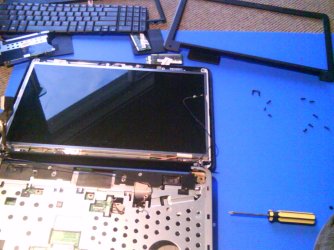
So sure enough, out with the tweezers and a one-size-fits-all screwdriver...
Never pulled this one apart and I didnt have a manual. But its all straight forward... remove the screws, and see what happens...
10 minutes later, DSC00375.JPG
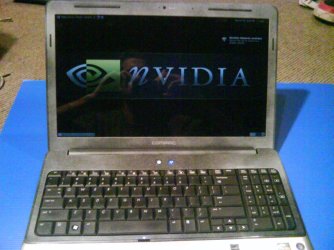
Found the loose screw... so tightened it up.
10 minutes later, DSC00381.JPG
Oh, and while the cover was off, I gave it a quick dusting with etch primer. Because the plain black looked too...plain...

Just goes to show, 9/10 times you dont need a manual. You only need a bit of common sense, intuition, and patience.
 

My Computer

OS
Windows 7 Enterprise
CPU
Intel Pentium Dual E2200 @2.2GHz
Motherboard
Gigabyte II-G31
Memory
4GB
Graphics Card(s)
Palit GForce 9500GT 1GB
Sound Card
onBoard
Hard Drives
WesternDigital: 250GB + 1TB + 1TB + 2TB
PSU
450W
Case
CoolerMaster CM690
Cooling
Corsair H50
Mouse
Logitech MX518
xarden,
Plus the added satisfaction of "can do" is invaluable but these qualities are individual and your interest like your mileage may vary as they say! Great job on the opening customization and closing looks very successful !
the Cheese
 

My Computer

Computer type
PC/Desktop
Computer Manufacturer/Model Number
A blend of brains, brawn and dumb luck.
OS
Windows 7 Ultimate 64
CPU
i7 3770k OC'd 4.6 @ 1.17v, also FX 8120 & i5 miniITX
Motherboard
MSI P67A-GD80 b3
Memory
32 gb G.Skill Sniper DDR3 10-12-12-31 @ 2133
Graphics Card(s)
XFX Radeon 7870 2GB DDR5
Sound Card
Sound Blaster Z Series Card
Monitor(s) Displays
(2) LG LED 23" 1920 x 1080 2ms Monitors via mini d-port
Screen Resolution
1680 X 1050 p
Hard Drives
Samsung 256 gb 830 SSD sata III
(1) 1 tb WD Black
(2) 1 tb Hitachi deskmates/sata II
(2) 1 tb WD green/sata II
(2) 3 tb Seagate Barracuda
(1) 120 gb OCZ Vertex SS
(1) Drobo 5N w/5 Seagate 3tb
PSU
EVGA modular 1000G2 80% gold rating & APC 1200 RS
Case
CoolerMaster Storm Styker
Cooling
7 case fans 140mm & 120mm, NZXT Kraken X60
Keyboard
(2) Logitech Illuminated Keyboards (1) usb (1) wireless
Mouse
Logitech G700 & T-BC21 - nano nx for the laptop
Internet Speed
Basic 120mbps down
Antivirus
Trend Micro Titanium Max Security & Malwarebytes Premium
Browser
Chrome and IE 10
Other Info
5 Noctua case fans + 3 Noctua in p/p on NZXT cooler
Integrated hot swap drive bays for 2.5" Drives
(2) Lite-on dvd/cd/Blu Ray optical 22X
Integrated fan controller and led on/off
HP Officejet Pro 8630 all-n-one
Hot-swappable 3.5" hard drive bay
Netgear Nighthawk router
Asus USB 3 & sata 6 PCIe card
Vantec IDE to sata adptr./Ultra sata adptr
Lenovo L420 i5 lappy with m sata
Drobo 5N advanced NAS
For a while, I've noticed my laptop wouldnt quite sit right when the lid was closed. It was only at work today when I found what the culprit was: a loose screw holding the hinge to the lid.

So sure enough, out with the tweezers and a one-size-fits-all screwdriver...
Never pulled this one apart and I didnt have a manual. But its all straight forward... remove the screws, and see what happens...
10 minutes later, View attachment 105822
Found the loose screw... so tightened it up.
10 minutes later, View attachment 105827
Oh, and while the cover was off, I gave it a quick dusting with etch primer. Because the plain black looked too...plain...

Just goes to show, 9/10 times you dont need a manual. You only need a bit of common sense, intuition, and patience.
Nice.

~Lordbob
 

My Computer

Computer Manufacturer/Model Number
Hera
OS
Windows 7 Ultimate x64, Mint 9
CPU
Intel i5-2500k
Motherboard
ASUS P8P67 Pro
Memory
2x 4Gb Corsair VENGEANCE DDR3-1600
Graphics Card(s)
NVidia GeForce N260GTX Twin Frozr
Sound Card
Realtek HD OnBoard Audio
Monitor(s) Displays
ASUS 24" Monitor
Screen Resolution
1920x1080
Hard Drives
G.SKILL Phoenix Series 60GB SATA II MLC Internal Solid State Drive (SSD)
SAMSUNG Spinpoint F3R 1TB 7200 RPM 32MB Cache SATA II
PSU
Cooler Master Real Power Pro 750W
Case
Cooler Master Haf 932
Cooling
Fans
Keyboard
Razer Tarantula
Mouse
Razer Lachesis
Internet Speed
not fast enough
Not bad, lol. Took my friends laptop apart once to reset the CMOS, which required taking EVERYTHING out to get at the CMOS battery (Dell Inspiron 1525) and upon putting it back together, I forgot to attach one wire... Well, I thought everything was kosher until I realized that the wire I forgot to attach was the wire going from the power button to the system board, the one with the CMOS and CPU on it...
 

My Computer

Computer Manufacturer/Model Number
HP Pavilion dv4i-2100
OS
Windows 7 Ultimate x86
CPU
Intel Core i3 M350 @ 2.27 GHz
Motherboard
Stock
Memory
3.00 GB
Graphics Card(s)
Intel 1GB HDMI Graphics Card
Sound Card
Stock
Monitor(s) Displays
14.6" HD
Screen Resolution
1200x800 current setting.
Hard Drives
320GB samsung internal
500GB ADATA portable
PSU
Stock
Case
Stock
Cooling
Targus twin-fan chill mat.
Internet Speed
At home, 300kb/sec downloads. At work, 1028kb/sec downloads.
Other Info
Purchased through HP direct, custom build. I highly recommend HP to anyone.
Thanks Cheese,
Thats right. Nothing beats the satisfaction of going in with no, or limited, knowledge and getting to it to work.
Maybe getting it to work 2nd time is better, then you know you've troubleshooted well.
 

My Computer

OS
Windows 7 Enterprise
CPU
Intel Pentium Dual E2200 @2.2GHz
Motherboard
Gigabyte II-G31
Memory
4GB
Graphics Card(s)
Palit GForce 9500GT 1GB
Sound Card
onBoard
Hard Drives
WesternDigital: 250GB + 1TB + 1TB + 2TB
PSU
450W
Case
CoolerMaster CM690
Cooling
Corsair H50
Mouse
Logitech MX518
Don't know of any other programs to suggest, but have you tried blowing out the ports with canned compresed air? Laptops especially older ones tend to have a great deal of build up of fibers and dust due to user using them on their laps or other cloth or fiber surfaces.
I'm pretty sure if you were to take it apart you would be amazed at how much dust ect is built up inside of it.
Fabe

I agree with Fabe, my uncle suggested I should get some form of a dust cover for my netbook, and occasionally take the netbook apart to remove any build-up of dust within the computer etc. More Dust = Over Heating
 

My Computer

Computer type
Laptop
Back
Top