CPU stays at 100%

Que

New member
Local time
1:07 AM
Messages
5
why is my CPU staying at 100%? how can i fix these issue? it cant be a virus causing this because i scan it an everything was good an im not running all kinds of programs either i closed my browser(google chrome)an disconnected from the net an my CPU is still at 100%...please can someone help me? im not to computer savvy.
 

My Computer

OS
windows 7 ultimate 32bit
Plese give more information. What model of computer is it? How much memory is in it? Give as much detail about your computer as possible. Thanks
 

My Computer

OS
XP
model:Hewlett-Packard Compaq Windows7 PC...Processor:AMD Sempron(tm) SI-42 2.10 GHz...Installed memory(RAM):2.00GB (1.75 GB usable)...System type:32-bit Operating System
 

My Computer

OS
windows 7 ultimate 32bit
Hit Ctrl+Alt+Del & open the task manager. Look in the "processes" tab & check under the CPU column to see what process is maxing your CPU usage. Then do a search online about the process you found - Or post here with your findings.
 

My Computer

Computer type
PC/Desktop
Computer Manufacturer/Model Number
Custom Build
OS
Windows 7 Professional 64 Bit SP1
CPU
Intel i7-3770K. Mild Overclock to 4.2 Ghz
Motherboard
ASUS Sabertooth Z77
Memory
Crucial Ballistix Sport 32GB DDR3-1600 (PC3-12800)
Graphics Card(s)
Intel 4000 - On CPU
Sound Card
On Board
Monitor(s) Displays
HP w2408h
Screen Resolution
1920 x 1200
Hard Drives
Samsung 840 Pro 256Gb SSD, --
Two - WDC WD1001FALS-00J7B0 SATA
PSU
Antec EarthWatts Green Series 650 Watt ATX
Case
Fractal Design Core 3000 ATX
Cooling
Corsair H80i Water Cooled
Keyboard
Logitech Illuminated
Mouse
Logitech Wireless Trackball M570 + Touchpad T650
Internet Speed
9.5 Mbps down - 25.4 Mbps upload
Antivirus
MSE
Browser
IE 10, Chrome
ok i restarted my pc an now the cpu isnt stuck at 100% anymore,but sometimes when i start up the pc it gets stuck at 100%....i dont know why it does that
 

My Computer

OS
windows 7 ultimate 32bit
Did you read my previous post? What is the process that is running when your CPU is at 100%?
 

My Computer

Computer type
PC/Desktop
Computer Manufacturer/Model Number
Custom Build
OS
Windows 7 Professional 64 Bit SP1
CPU
Intel i7-3770K. Mild Overclock to 4.2 Ghz
Motherboard
ASUS Sabertooth Z77
Memory
Crucial Ballistix Sport 32GB DDR3-1600 (PC3-12800)
Graphics Card(s)
Intel 4000 - On CPU
Sound Card
On Board
Monitor(s) Displays
HP w2408h
Screen Resolution
1920 x 1200
Hard Drives
Samsung 840 Pro 256Gb SSD, --
Two - WDC WD1001FALS-00J7B0 SATA
PSU
Antec EarthWatts Green Series 650 Watt ATX
Case
Fractal Design Core 3000 ATX
Cooling
Corsair H80i Water Cooled
Keyboard
Logitech Illuminated
Mouse
Logitech Wireless Trackball M570 + Touchpad T650
Internet Speed
9.5 Mbps down - 25.4 Mbps upload
Antivirus
MSE
Browser
IE 10, Chrome
how do i post the screen shot on here?
 

My Computer

OS
windows 7 ultimate 32bit

My Computer

Computer Manufacturer/Model Number
Toshiba Satellite S875D-S7239 laptop
OS
MS Windows 7 Ultimate SP1 64-bit
CPU
AMD A10-4600M
Motherboard
AMD Pumori (Socket FT1)
Memory
6.00 GB Dual-Channel DDR3 @ 798MHz (11-11-12-28)
Graphics Card(s)
AMD Radeon HD 7660G
Sound Card
High Definition Audio Device
Monitor(s) Displays
Generic PnP Monitor (1600x900@60Hz)
Screen Resolution
1600x900@60Hz
Hard Drives
SSD 119GB Corsair CSSD-V128GB2 ATA Device
Keyboard
Standard PS/2 Keyboard
Mouse
HP Wireless Optical Mobile Mouse Model FHA-3410
Internet Speed
What the local pub, local coffee shop offers.
Other Info
Optical Drive:MATSHITA BD-CMB UJ160B ATA Device


Also have an Asus ha1002xp netbook with Win 7 Ultimate installed.
model:Hewlett-Packard Compaq Windows7 PC...Processor:AMD Sempron(tm) SI-42 2.10 GHz...Installed memory(RAM):2.00GB (1.75 GB usable)...System type:32-bit Operating System

UPDATE YOUR SEVENFORUMS SYSTEM SPECS


User CP (3rd item in the top menu bar) |
in left-hand column, under Your Profile, Edit System Spec |


Use Speccy - System Information - Free Download
and/or SIW to gather info for filling in the blanks.

Do me a favor and add the word laptop or desktop to the “system manufacturer” block.

Use the “Other Info” block for Optical Reader, Mouse, touchpad, wifi adapter, speakers, monitor

Scroll down and click on the SAVE CHANGES button.
 

My Computer

Computer Manufacturer/Model Number
Toshiba Satellite S875D-S7239 laptop
OS
MS Windows 7 Ultimate SP1 64-bit
CPU
AMD A10-4600M
Motherboard
AMD Pumori (Socket FT1)
Memory
6.00 GB Dual-Channel DDR3 @ 798MHz (11-11-12-28)
Graphics Card(s)
AMD Radeon HD 7660G
Sound Card
High Definition Audio Device
Monitor(s) Displays
Generic PnP Monitor (1600x900@60Hz)
Screen Resolution
1600x900@60Hz
Hard Drives
SSD 119GB Corsair CSSD-V128GB2 ATA Device
Keyboard
Standard PS/2 Keyboard
Mouse
HP Wireless Optical Mobile Mouse Model FHA-3410
Internet Speed
What the local pub, local coffee shop offers.
Other Info
Optical Drive:MATSHITA BD-CMB UJ160B ATA Device


Also have an Asus ha1002xp netbook with Win 7 Ultimate installed.
Hit Ctrl+Alt+Del & open the task manager. Look in the "processes" tab & check under the CPU column to see what process is maxing your CPU usage. Then do a search online about the process you found - Or post here with your findings.

I believe you meant to say:

CTRL + SHIFT + ESC key combo
 

My Computer

Computer Manufacturer/Model Number
Toshiba Satellite S875D-S7239 laptop
OS
MS Windows 7 Ultimate SP1 64-bit
CPU
AMD A10-4600M
Motherboard
AMD Pumori (Socket FT1)
Memory
6.00 GB Dual-Channel DDR3 @ 798MHz (11-11-12-28)
Graphics Card(s)
AMD Radeon HD 7660G
Sound Card
High Definition Audio Device
Monitor(s) Displays
Generic PnP Monitor (1600x900@60Hz)
Screen Resolution
1600x900@60Hz
Hard Drives
SSD 119GB Corsair CSSD-V128GB2 ATA Device
Keyboard
Standard PS/2 Keyboard
Mouse
HP Wireless Optical Mobile Mouse Model FHA-3410
Internet Speed
What the local pub, local coffee shop offers.
Other Info
Optical Drive:MATSHITA BD-CMB UJ160B ATA Device


Also have an Asus ha1002xp netbook with Win 7 Ultimate installed.
why is my CPU staying at 100%? how can i fix these issue? it cant be a virus causing this because i scan it an everything was good an im not running all kinds of programs either i closed my browser(google chrome)an disconnected from the net an my CPU is still at 100%...please can someone help me? im not to computer savvy.

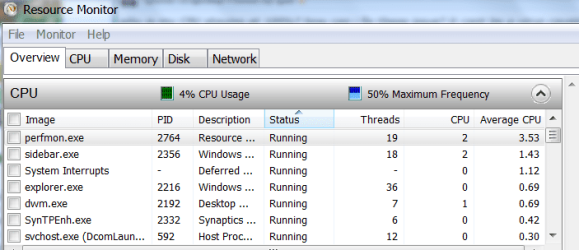
WIN | type RESMON | ENTER | OVERVIEW tab | CPU column

WIN is the key with the Microsoft flag on top.

This will show you what is so resource hungry.
 

My Computer

Computer Manufacturer/Model Number
Toshiba Satellite S875D-S7239 laptop
OS
MS Windows 7 Ultimate SP1 64-bit
CPU
AMD A10-4600M
Motherboard
AMD Pumori (Socket FT1)
Memory
6.00 GB Dual-Channel DDR3 @ 798MHz (11-11-12-28)
Graphics Card(s)
AMD Radeon HD 7660G
Sound Card
High Definition Audio Device
Monitor(s) Displays
Generic PnP Monitor (1600x900@60Hz)
Screen Resolution
1600x900@60Hz
Hard Drives
SSD 119GB Corsair CSSD-V128GB2 ATA Device
Keyboard
Standard PS/2 Keyboard
Mouse
HP Wireless Optical Mobile Mouse Model FHA-3410
Internet Speed
What the local pub, local coffee shop offers.
Other Info
Optical Drive:MATSHITA BD-CMB UJ160B ATA Device


Also have an Asus ha1002xp netbook with Win 7 Ultimate installed.
This snnapshot was made with the snipping tool.
This snapshot was posted as follows:
1. Click on the paperclip icon in that row of icons at the top of the message box.
2. Click on a BROWSE button. There are 5 of them.
3. Navigage to the folder containing the snapshot.
4. Click on the snapshot.
5. Click on the OPEN button.
6. Click on the UPLOAD button adjacent to the 5th BROWSE button.
7. Close the MANAGE ATTACHMENTS window.
8. Position the cursor at the spot in the message where you want to snapshot to appear.
9, Click on the PaperClip again.
10. Click on the file which you want to insert
11. Attach code will be inserted,

I hope that this helps.

ATTACH]162183[/ATTACH]
 

Attachments

  • resmon display.PNG
    resmon display.PNG
    19.2 KB · Views: 27

My Computer

Computer Manufacturer/Model Number
Toshiba Satellite S875D-S7239 laptop
OS
MS Windows 7 Ultimate SP1 64-bit
CPU
AMD A10-4600M
Motherboard
AMD Pumori (Socket FT1)
Memory
6.00 GB Dual-Channel DDR3 @ 798MHz (11-11-12-28)
Graphics Card(s)
AMD Radeon HD 7660G
Sound Card
High Definition Audio Device
Monitor(s) Displays
Generic PnP Monitor (1600x900@60Hz)
Screen Resolution
1600x900@60Hz
Hard Drives
SSD 119GB Corsair CSSD-V128GB2 ATA Device
Keyboard
Standard PS/2 Keyboard
Mouse
HP Wireless Optical Mobile Mouse Model FHA-3410
Internet Speed
What the local pub, local coffee shop offers.
Other Info
Optical Drive:MATSHITA BD-CMB UJ160B ATA Device


Also have an Asus ha1002xp netbook with Win 7 Ultimate installed.
ok i found the problem thanks
 

My Computer

OS
windows 7 ultimate 32bit
What was the problem? If you post the details, it might help others who have the same problem.
 

My Computer

Computer Manufacturer/Model Number
Custom
OS
Windows 7 Ultimate x64 SP1
CPU
Intel Core i7-3960X
Motherboard
Intel DX79SI
Memory
16 GB GSkill DDR3-2133 CL9
Graphics Card(s)
EVGA SC GTX 680
Sound Card
Onboard Realtek
Monitor(s) Displays
Dell 2005FPW
Screen Resolution
1680x1050
Hard Drives
Intel 520 SSD 240 GB,
2x Seagate 7200.12 1 TB
PSU
Corsair 850W HX
Case
Corsair 500R
Cooling
Corsair H100
Keyboard
Microsoft Natural 4000
Back
Top