CPU temperatures problems

Hi guys !

Woah all u posted seems pretty complex and hard..

Haha..

I noticed the problems after installing both the GPU and PSU
With how little room there is, good possibility. I assume this is the PSU you got,

Newegg.com - COOLER MASTER eXtreme Power RS600-PCARE3-US 600W ATX12V V2.3 SLI Ready CrossFire Ready Power Supply

If not it doesn't matter much as they will all be basically the same with regards to the fan in them. When you put it in the case did you put it in with the fan facing down, or facing up into the top of the case? Ideally it should be facing down to help with pulling warm air out. Looking at the service manual for it it should be facing down as ATX power supplies normal only mount one way (the 4 mounting holes are the same on all ATX cases and power supplies).

If it is facing down there is also the small problem of where it is in relation to the video card, which due to the case has its fan facing up where in a normal case it is facing the down. This will case the two fans (PSU and video card) to fight each other, as the fan on the video card is pulling air in from the same small space that the PSU fan is. Unfortunately unless someone else has a better idea, if that is what is happening the only way I can really see to fix it is another case.

It seems what you said is true !! my PSU is pulling out hot air to the GPU and the GPU is pulling in that hot air ! :zip:

Also.. looks like i can put a case cooler next to the CPU so it can pull in some cool air ! (the case have those small holes where u can put in coolers :P ), i will also change the thermal paste and clean the heatsink when i contact any technician :)

Maybe this screenie can show you what im talking about:

6s70wl.png


The arrows show where is the air being pulled to, also look where my CPU is located, there is the case holes im talking about, where i can put the Fan cooler that can pull in some cool air directly to the CPU.

Well, about the PSU and GPU air cooling problems.. Is there any way to fix this ? or to stop the conflict between them ?

BTW yeah, a blue LED cooler would look awesome..

Thanks for your replies people !

Juan.
 

My Computer

Computer Manufacturer/Model Number
HP Pavilion a6532f
OS
Windows 7 Home Premium SP1 32 bit
CPU
AMD Athlon 64 X2 Dual Core 5200+ @ 2.71 GHz
Motherboard
MCP61PM-HM (Nettle3)
Memory
2GB DDR2 RAM @ 3** MHz (2 Sticks of 1 GB each, SAMSUNG)
Graphics Card(s)
ECS Nvidia GeForce 9800 GT Green Edition 1GB DDR3
Sound Card
Integrated Realtek ALC888S Audio
Monitor(s) Displays
HP w2007
Screen Resolution
1680*1050
Hard Drives
SAMSUNG 500 GB SATA 7200 rpm
PSU
CoolerMaster eXtreme Power Plus 600W
Case
Mid Size ATX
Cooling
Default rear(back) fan pulling air out.
Keyboard
Genius random(cheap) USB keyboard
Mouse
Microsoft random(cheap) USB Mouse
Internet Speed
2 MBPS / ASDL
It also looks like a btx form factor- and prior case suggestions wont fit.

It may look like BTX, but it isn't. It is just a regular micro ATX board mounted upside, and yes it will fit in a normal ATX case. HP just has this thing for using reverse cases.

As for cutting a hole in the front, this is the best I can find for what it looks like behind the front panel (from the service manual),

front.PNG

As for cutting a hole in the front you would need,

1. A Dremel or some other cutting tool to cut the hole

2. A drill for drilling mounting holes for the fan

3. Remove the floppy drive or figure out some other place to put the hard drive after cutting a hole

4. Take everything out of the case as motherboards and what not don't react well to metal filings in them

Putting a fan over the CPU won't help much. A better heatsink would be more beneficial than a fan over top of what is there.
 
Last edited:

My Computer

Computer type
PC/Desktop
Computer Manufacturer/Model Number
Me
OS
Win 7 Ultimate x64
CPU
FX-8350 @ 4.6 GHz so far
Motherboard
Asus M5A97 EVO
Memory
ADATA XPG V1 Series Black 8GB DDR3 1600
Graphics Card(s)
Sapphire R9 270x Dual-X
Sound Card
Xonar DGX w/ Corsair Vengence 1300
Monitor(s) Displays
Acer S232HL Abid
Screen Resolution
1920x1080
Hard Drives
120 GB OCZ Vertex 3
500 GB Seagate 7200.12
PSU
Antec Earthwatts 650W Green
Case
Antec Three Hundred
Cooling
Cooler Master 212 EVO
Keyboard
Logitech G510
Mouse
Logitech G500s
Internet Speed
35000/3000
Hi people !

First of all im sorry if this is posted in a wrong section...

Well right now im gettin problems with my CPU temperatures..

They rise to 70-75 Celsius when playing games, and 50-60 while in Stand-By.

Here are my system Specs:

AMD Athlon 64 X2 5200+
MCP61PM-HM (Nettle3)
3GB DDR2 RAM
ECS Nvidia GeForce 9800 GT Green Edition 1GB DDR3
Integrated Realtek ALC888S Audio
500 GB SATA 7200 rpm
CoolerMaster eXtreme Power Plus 600W

This is my PC before i bought the GPU and PSU :P
HP Pavilion a6532f Desktop PC Product Specifications HP Pavilion a6532f Desktop PC - HP Customer Care (United States - English)

My pc is about 3 years old now and i need to know if i should go to the technician :P

Thx for your help !

I think its your gpu is causing the overheating, as well as only 1 fan - you can download MSI afterburner or Rivatuner, and manually adjust the fan speed, and even make profiles ie. a new idle profile and a gaming profile with different fan speeds, also you can make profiles for individual games if your fussy. Easist way is to adjust the fan speed manually by turning it up too high to start and then monitor the games temps and then back it off - and then save the profile or remember the speeds per game. Be careful as its better to be safe than sorry.

Another point to consider - does the gpu blow the hot air out the rear of your case as with a dual slot gpu, or a single slot gpu with a fan that blows the heat into the case . Once you install the say MSI afterburner you will be able to see how hot it is at idle etc - note if your gpu is filling the case with hot air you may need a fan controller for the rear fan, also if that isnt enough a new fan on the side or even a new case.

You can find the programs at this site and if you need extra help join the forums there as they will only be too glad to help you out.

Guru of 3D: PC Hardware Reviews and tests

I didnt get time to read all the posts so if this is a repeat just disregard - cheers and good luck.
 

My Computer

OS
XP, Vista, W7 64bit Home Premium
CPU
Intel Core Duo 6850 3.0 ghz @ 3.7 ghz
Motherboard
Asus P5E
Memory
4GB Corsair DDR 2 PC-6400
Graphics Card(s)
Ati 4870 1ghz
Sound Card
Supreme FX 11
Monitor(s) Displays
View Sonic VX1962wm
Screen Resolution
1680 X1050
Hard Drives
3 Seagate Sata Drives 160gb 250gb 500gb
PSU
Thermaltake 600 watt
Case
NZXT Alpha
Cooling
3X120cm Fans
Keyboard
Microsoft Digital Media Pro Keyboard
Mouse
Microsoft Wheel Mouse Optical
Internet Speed
1.5Mb to 8Mb/384k
Some of the well known named brands are simply packing too much into too small a case with inadequate cooling. An Acer PC I own simply has no room for an additional fan.
If you need to buy a new case or cut holes in the existing case to keep the temperature down, then new buyers beware.
 

My Computer

Computer type
PC/Desktop
Computer Manufacturer/Model Number
Own build
OS
Windows 7x64 Home Premium SP1
CPU
Intel i7 2600k
Motherboard
ASUS P8Z68 Deluxe
Memory
G.Skill Ripjaws (DDR3-1600) 2x4GB
Graphics Card(s)
Nvidia GeForce GTS 450; Intel HD Graphics 3000(GT2+)
Monitor(s) Displays
Dell Ultrasharp IPS panel U2311H, Samsung SyncMaster P2350
Screen Resolution
1920x1080
Hard Drives
Samsung 850 Pro SSD 256GB, Samsung SSD 840 120GB, Seagates 1TB Barracuda ST31000528AS x2
PSU
Seasonic M12II 520W
Case
Lian Li Lancool PC-K60
Cooling
Case: 1x120mm, 3x140mm CPU: Hyper 212+
Keyboard
Logitech MK520 (wireless)
Mouse
Logitech MK520
Internet Speed
6-7 Mbps
Antivirus
Norton Security Premium, Malwarebytes on 2 (MSE on 3rd PC)
Browser
FireFox
Other Info
Audio: Logitech Z523 2.1
That case is horrible. You have no room for more fans. Installing a program to run that one fan is a waste of time. The temps you are running that that one little fan is probably already at 100%
 

My Computer

Computer type
PC/Desktop
Computer Manufacturer/Model Number
Home made Desktop
OS
Windows 10 Pro. 64/ version 1709 Windows 7 Pro/64
CPU
Intel i7-6800K @ 4.3
Motherboard
ASUS X-99 Deluxe II
Memory
Corsair Platinum 16 gig @2400
Graphics Card(s)
EVGA GTX 1070 OC
Monitor(s) Displays
Asus 27" LED LCD/VE278Q
Screen Resolution
1920-1080 or 1280-720 HDMI
Hard Drives
INTEL SSD 730-240 Gb Sata 3.0/
PSU
EVGA Platium 1200W
Case
Phanteks Luxe Tempered Glass 8 fans/ one radiator
Cooling
XSPC/ Water Cooled CPU
Keyboard
Das 4 Professional
Mouse
Logitech M705/MX Anywhere 2-S
Internet Speed
100 mbits
Antivirus
Microsoft Security Essentials/ Malwarebytes Premium 3.0/ SAS
Browser
I.E. 11 default/Firefox/ ISP Time Warner Cable/Spectrum
Other Info
LG BluRay Burner/
Sound system-KLipsch-THX/
Icy Dock ssd Hot Swap bays.
Indeed, its always 100% cant set it to lower Rpm, i think i will change the thermal paste and try to buy a new pc next year or something, or at least change the case :(

@stormy13

>.< looks very difficult, and i dont think i have the tools for doing that, maybe i turn on my air conditioner while gaming, since it lowers CPU temperature like -5 celcius. :(

Thx for all your replies people

Juan.
 

My Computer

Computer Manufacturer/Model Number
HP Pavilion a6532f
OS
Windows 7 Home Premium SP1 32 bit
CPU
AMD Athlon 64 X2 Dual Core 5200+ @ 2.71 GHz
Motherboard
MCP61PM-HM (Nettle3)
Memory
2GB DDR2 RAM @ 3** MHz (2 Sticks of 1 GB each, SAMSUNG)
Graphics Card(s)
ECS Nvidia GeForce 9800 GT Green Edition 1GB DDR3
Sound Card
Integrated Realtek ALC888S Audio
Monitor(s) Displays
HP w2007
Screen Resolution
1680*1050
Hard Drives
SAMSUNG 500 GB SATA 7200 rpm
PSU
CoolerMaster eXtreme Power Plus 600W
Case
Mid Size ATX
Cooling
Default rear(back) fan pulling air out.
Keyboard
Genius random(cheap) USB keyboard
Mouse
Microsoft random(cheap) USB Mouse
Internet Speed
2 MBPS / ASDL
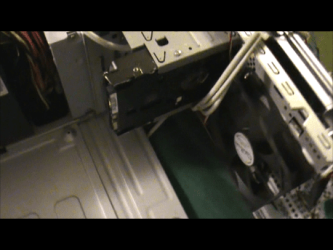
Best pic of the mounted hard drive and front fan I could get at this time i have video but is to big and not allowed for attachment.
 

Attachments

  • Snapshot 1 (4-25-2011 12-45 PM)Harddrive fan.png
    Snapshot 1 (4-25-2011 12-45 PM)Harddrive fan.png
    60.7 KB · Views: 8

My Computer

Computer Manufacturer/Model Number
Custom Build
OS
Window's 7 Ultimate 64bit
CPU
E8400 Lapped
Motherboard
P5Q Pro Turbo Asus
Memory
Kingston 4 gig
Graphics Card(s)
2=ATI 5670Video Crossfire / HVR2250 TV Tuner Card
Sound Card
HDMI sound
Monitor(s) Displays
Sony 46"
Screen Resolution
1280x720
Hard Drives
1 WD 160gig YS, 1 Black Edition 320gig and one 250gig WD YS Model plus external Caviar Black 640gig Drives
PSU
Antec 550 Modular
Case
Antec Custom 180B
Cooling
X-1283 Lapped Artic Silver 5
Keyboard
Wave Combo Logitech
Mouse
Logitech LX-8
Internet Speed
5mb down 768 up
Other Info
Custom side fan in case, plus moved middle lower fan to the front of hard drives , also installed a second intake fan in lower two optical drive slots. Rear fans are controlled by Fan mate controllers. temps inside case are monitored by probe and temps coming out the top exhaust are also monitored, temps as of right now 20c inside and 22.7 out the exhaust. Front intake fans are controlled by Asu
Wow looks good, how does it look from outside with everything on its place ?

My mom just saw this and doesnt want the PC to look ugly lol

Anyway next week im gettin paid so i might go to a technician and do some maintenance, it has been 3 years lol..

Thx for your pic !

Juan
 

My Computer

Computer Manufacturer/Model Number
HP Pavilion a6532f
OS
Windows 7 Home Premium SP1 32 bit
CPU
AMD Athlon 64 X2 Dual Core 5200+ @ 2.71 GHz
Motherboard
MCP61PM-HM (Nettle3)
Memory
2GB DDR2 RAM @ 3** MHz (2 Sticks of 1 GB each, SAMSUNG)
Graphics Card(s)
ECS Nvidia GeForce 9800 GT Green Edition 1GB DDR3
Sound Card
Integrated Realtek ALC888S Audio
Monitor(s) Displays
HP w2007
Screen Resolution
1680*1050
Hard Drives
SAMSUNG 500 GB SATA 7200 rpm
PSU
CoolerMaster eXtreme Power Plus 600W
Case
Mid Size ATX
Cooling
Default rear(back) fan pulling air out.
Keyboard
Genius random(cheap) USB keyboard
Mouse
Microsoft random(cheap) USB Mouse
Internet Speed
2 MBPS / ASDL
given the cost of a tech it may be better to get a new case, it is after all the only thing causing you problems.

case modding is your next solution but a new case would pretty much fix your problem, a new cpu heatsink and fan wouldn't hurt either:)

new case and cpu fan and heatsink > cost of techy...dunno but find out which is cheaper before doing anything.
 

My Computer

Computer Manufacturer/Model Number
.
OS
.
CPU
.
Motherboard
.
Memory
.
Graphics Card(s)
.
Monitor(s) Displays
.
Screen Resolution
.
Hard Drives
.
PSU
.
Case
.
Cooling
.
Keyboard
.
Mouse
.
Internet Speed
.
Other Info
.
I agree with the new case idea they re cheap and you will have better cooling, when I did that case and the other case that is in the family, I had to rewire the switch in the front because I upgraded there motherboard and put a reset switch in the front along with mounting extra fans, but it did bring the case temp down quite a lot. The one case had an Gforce 8800 xt video card in it that made thing inside the case even hotter ran at 70+c at idle, and finally blew a cap.
 

My Computer

Computer Manufacturer/Model Number
Custom Build
OS
Window's 7 Ultimate 64bit
CPU
E8400 Lapped
Motherboard
P5Q Pro Turbo Asus
Memory
Kingston 4 gig
Graphics Card(s)
2=ATI 5670Video Crossfire / HVR2250 TV Tuner Card
Sound Card
HDMI sound
Monitor(s) Displays
Sony 46"
Screen Resolution
1280x720
Hard Drives
1 WD 160gig YS, 1 Black Edition 320gig and one 250gig WD YS Model plus external Caviar Black 640gig Drives
PSU
Antec 550 Modular
Case
Antec Custom 180B
Cooling
X-1283 Lapped Artic Silver 5
Keyboard
Wave Combo Logitech
Mouse
Logitech LX-8
Internet Speed
5mb down 768 up
Other Info
Custom side fan in case, plus moved middle lower fan to the front of hard drives , also installed a second intake fan in lower two optical drive slots. Rear fans are controlled by Fan mate controllers. temps inside case are monitored by probe and temps coming out the top exhaust are also monitored, temps as of right now 20c inside and 22.7 out the exhaust. Front intake fans are controlled by Asu
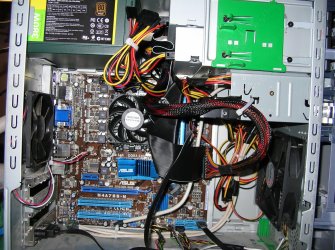
More pic of another build same mounting with a picture of the front of the case with the reset button clearly labeled for the not so savvy computer family. Triple core unlocked into a Quad core with the new motherboard and Hyper-X ram which is hide in the wiring which after first startup I arranged a little better.
 

Attachments

  • DSCN2541.jpg
    DSCN2541.jpg
    594.7 KB · Views: 4
  • DSCN2540.jpg
    DSCN2540.jpg
    446.6 KB · Views: 3

My Computer

Computer Manufacturer/Model Number
Custom Build
OS
Window's 7 Ultimate 64bit
CPU
E8400 Lapped
Motherboard
P5Q Pro Turbo Asus
Memory
Kingston 4 gig
Graphics Card(s)
2=ATI 5670Video Crossfire / HVR2250 TV Tuner Card
Sound Card
HDMI sound
Monitor(s) Displays
Sony 46"
Screen Resolution
1280x720
Hard Drives
1 WD 160gig YS, 1 Black Edition 320gig and one 250gig WD YS Model plus external Caviar Black 640gig Drives
PSU
Antec 550 Modular
Case
Antec Custom 180B
Cooling
X-1283 Lapped Artic Silver 5
Keyboard
Wave Combo Logitech
Mouse
Logitech LX-8
Internet Speed
5mb down 768 up
Other Info
Custom side fan in case, plus moved middle lower fan to the front of hard drives , also installed a second intake fan in lower two optical drive slots. Rear fans are controlled by Fan mate controllers. temps inside case are monitored by probe and temps coming out the top exhaust are also monitored, temps as of right now 20c inside and 22.7 out the exhaust. Front intake fans are controlled by Asu
Back
Top