Hi guys !
Woah all u posted seems pretty complex and hard..
Haha..
It seems what you said is true !! my PSU is pulling out hot air to the GPU and the GPU is pulling in that hot air !
Also.. looks like i can put a case cooler next to the CPU so it can pull in some cool air ! (the case have those small holes where u can put in coolers ), i will also change the thermal paste and clean the heatsink when i contact any technician
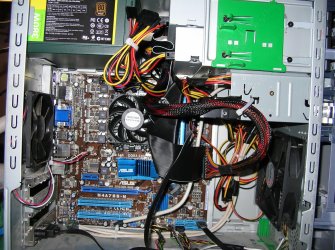
Maybe this screenie can show you what im talking about:

The arrows show where is the air being pulled to, also look where my CPU is located, there is the case holes im talking about, where i can put the Fan cooler that can pull in some cool air directly to the CPU.
Well, about the PSU and GPU air cooling problems.. Is there any way to fix this ? or to stop the conflict between them ?
BTW yeah, a blue LED cooler would look awesome..
Thanks for your replies people !
Juan.
Woah all u posted seems pretty complex and hard..
Haha..
With how little room there is, good possibility. I assume this is the PSU you got,I noticed the problems after installing both the GPU and PSU
Newegg.com - COOLER MASTER eXtreme Power RS600-PCARE3-US 600W ATX12V V2.3 SLI Ready CrossFire Ready Power Supply
If not it doesn't matter much as they will all be basically the same with regards to the fan in them. When you put it in the case did you put it in with the fan facing down, or facing up into the top of the case? Ideally it should be facing down to help with pulling warm air out. Looking at the service manual for it it should be facing down as ATX power supplies normal only mount one way (the 4 mounting holes are the same on all ATX cases and power supplies).
If it is facing down there is also the small problem of where it is in relation to the video card, which due to the case has its fan facing up where in a normal case it is facing the down. This will case the two fans (PSU and video card) to fight each other, as the fan on the video card is pulling air in from the same small space that the PSU fan is. Unfortunately unless someone else has a better idea, if that is what is happening the only way I can really see to fix it is another case.
It seems what you said is true !! my PSU is pulling out hot air to the GPU and the GPU is pulling in that hot air !
Also.. looks like i can put a case cooler next to the CPU so it can pull in some cool air ! (the case have those small holes where u can put in coolers
), i will also change the thermal paste and clean the heatsink when i contact any technician Maybe this screenie can show you what im talking about:
The arrows show where is the air being pulled to, also look where my CPU is located, there is the case holes im talking about, where i can put the Fan cooler that can pull in some cool air directly to the CPU.
Well, about the PSU and GPU air cooling problems.. Is there any way to fix this ? or to stop the conflict between them ?
BTW yeah, a blue LED cooler would look awesome..
Thanks for your replies people !
Juan.
My Computer
- Computer Manufacturer/Model Number
- HP Pavilion a6532f
- OS
- Windows 7 Home Premium SP1 32 bit
- CPU
- AMD Athlon 64 X2 Dual Core 5200+ @ 2.71 GHz
- Motherboard
- MCP61PM-HM (Nettle3)
- Memory
- 2GB DDR2 RAM @ 3** MHz (2 Sticks of 1 GB each, SAMSUNG)
- Graphics Card(s)
- ECS Nvidia GeForce 9800 GT Green Edition 1GB DDR3
- Sound Card
- Integrated Realtek ALC888S Audio
- Monitor(s) Displays
- HP w2007
- Screen Resolution
- 1680*1050
- Hard Drives
- SAMSUNG 500 GB SATA 7200 rpm
- PSU
- CoolerMaster eXtreme Power Plus 600W
- Case
- Mid Size ATX
- Cooling
- Default rear(back) fan pulling air out.
- Keyboard
- Genius random(cheap) USB keyboard
- Mouse
- Microsoft random(cheap) USB Mouse
- Internet Speed
- 2 MBPS / ASDL