CPU temps?

paulstung

New member
Member
VIP
Local time
12:17 AM
Messages
119
I'm a bit curious about my temps,as I've just noticed that on startup my temps are at 30deg is this normal?idle temps are about 34 and under load(borderlands 2)are 41deg.My air flow is 1 140mm lian li front air in.1 120mm Xclio bottom air in,1 Xclio 120mm top back air out.And a promaltech samurai low profile cooler with a lepai 120mm pulling air through.Air comes in from bottom/front and out ov the back.I wish I could add more But I'm at max for my case I am thinking of modding the top for a 240mm rad when I'm brave enough to go down the water cooling route.
 

My Computer

OS
7 home premium 64bit
CPU
Intel IvyBridge i5 3570
Motherboard
Asus p8z77-lx
Memory
Corsair venegence jet black
Graphics Card(s)
Ati saphire Hd 7850
Sound Card
on board
Monitor(s) Displays
asus 22" led/Samsung 50" plasma
Screen Resolution
1920x1280
Hard Drives
1tb western digital caviar mass storage
60g ocz ssd boot
256g samsung ssd game data
PSU
Corsair 550w
Case
Lian Li pc7w
Cooling
1x140mmfront 2x120mmbottom,back.1x120mm,promaltec samuria
Internet Speed
7 ish (god awful)
Other Info
Xclio fan controller.Matrix orbital Gx typhone.Bheringerr Ms20
Your temps being at 34c are very normal for idle and under load 41c,don't worry about it unless it starts going in the 50s or higher
 

My Computer

Computer type
PC/Desktop
Computer Manufacturer/Model Number
custom build
OS
Windows 10 64bit
CPU
AMD Phenom II X4 925 (Deneb)(2.8GHz) OC 3.4GHz
Motherboard
M5A78L-MLX Plus
Memory
Corsair Vengeance DDR3 4GBX2 (8192MB)
Graphics Card(s)
XFX HD 6870 1GB (OC)- 940MHz core, mem 1150MHz
Monitor(s) Displays
Vizio 26' 1920x1080 / Acer 1336x768
Screen Resolution
1920x1080 60Hz /1336x768
Hard Drives
Kingston Digital 60GB SSDNow V300/500gb HDD Western Digital 7200rpm (/WD 160GB HDD 7200rpm
PSU
CORSAIR CX600 600w
Case
AZZA Orion 202 EVO
Cooling
cooler master hyper TX3 cpu cooler
Keyboard
Razer DeathStalker
Mouse
Logitech Optical Gaming Mouse G400
Antivirus
Defualt on win 10
Browser
Firefox
Other Info
cpu is overclocked in bios
Thanks mate,:D
 

My Computer

OS
7 home premium 64bit
CPU
Intel IvyBridge i5 3570
Motherboard
Asus p8z77-lx
Memory
Corsair venegence jet black
Graphics Card(s)
Ati saphire Hd 7850
Sound Card
on board
Monitor(s) Displays
asus 22" led/Samsung 50" plasma
Screen Resolution
1920x1280
Hard Drives
1tb western digital caviar mass storage
60g ocz ssd boot
256g samsung ssd game data
PSU
Corsair 550w
Case
Lian Li pc7w
Cooling
1x140mmfront 2x120mmbottom,back.1x120mm,promaltec samuria
Internet Speed
7 ish (god awful)
Other Info
Xclio fan controller.Matrix orbital Gx typhone.Bheringerr Ms20
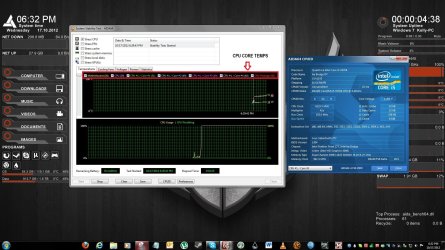
You could download the trial version of AIDA64 and run the CPU stress test and see what your temps are under FULL load(100% on all 4 cores). Idling at 34* is fine. Most Ivy Bridge owners who overclock see full load temps of up to 70 and 80* and don't worry about them!(Extreme cases of course) Mine under full load gets to about 50-52*C and most consider that cool. You have quite a ways to go before you start getting in trouble. I'll open up AIDA64 and grab a screenshot to show you what it looks like and what a good idea of temps are.

AIDA64 Snippet.JPG
 
Last edited:

My Computer

Computer type
PC/Desktop
Computer Manufacturer/Model Number
Custom Built
OS
Windows 7 Professional 64bit SP1
CPU
Intel Core i5-3570K @ 4.5GHz
Motherboard
Asus Sabertooth Z77
Memory
Corsair Vengeance 16GB (4x4) @1866MHz CL 9-9-9-24 1T
Graphics Card(s)
EVGA GTX 750 Ti FTW
Sound Card
Onboard Audio
Monitor(s) Displays
Dell S2309W
Screen Resolution
1920x1080
Hard Drives
Samsung 830 128GB SSD - OS
(4) Seagate 5TB HDD
(1) Seagate 2TB HDD
PSU
Seasonic X750 80+ Gold Full Modular
Case
Antec Eleven Hundred Super Mid Tower
Cooling
Intel Liquid Cooler
Keyboard
Max Nighthawk X8 Mechanical keyboard
Mouse
Mionix Naos 7000
Internet Speed
50 Mbps Down / 10 Mbps Up
Antivirus
Microsoft Security Essentials/Malwarebytes Anti-Malware
Browser
Chrome/Firefox
Other Info
Klipsch ProMedia 2.1's
Asus RT-N66R Wireless Router
You could download the trial version of AIDA64 and run the CPU stress test and see what your temps are under FULL load(100% on all 4 cores). Idling at 34* is fine. Most Ivy Bridge owners who overclock see full load temps of up to 70 and 80* and don't worry about them!(Extreme cases of course) Mine under full load gets to about 50-52*C and most consider that cool. You have quite a ways to go before you start getting in trouble. I'll open up AIDA64 and grab a screenshot to show you what it looks like and what a good idea of temps are.

View attachment 237153


how do i make my desktop looks like yours kbrady1979? is there a program involved or something?
 

My Computer

OS
7 pro x86
You could download the trial version of AIDA64 and run the CPU stress test and see what your temps are under FULL load(100% on all 4 cores). Idling at 34* is fine. Most Ivy Bridge owners who overclock see full load temps of up to 70 and 80* and don't worry about them!(Extreme cases of course) Mine under full load gets to about 50-52*C and most consider that cool. You have quite a ways to go before you start getting in trouble. I'll open up AIDA64 and grab a screenshot to show you what it looks like and what a good idea of temps are.

View attachment 237153


how do i make my desktop looks like yours kbrady1979? is there a program involved or something?

Program is called Rainmeter, skin is Dark Orange 2.0
 

My Computer

Computer type
PC/Desktop
Computer Manufacturer/Model Number
Custom Built
OS
Windows 7 Professional 64bit SP1
CPU
Intel Core i5-3570K @ 4.5GHz
Motherboard
Asus Sabertooth Z77
Memory
Corsair Vengeance 16GB (4x4) @1866MHz CL 9-9-9-24 1T
Graphics Card(s)
EVGA GTX 750 Ti FTW
Sound Card
Onboard Audio
Monitor(s) Displays
Dell S2309W
Screen Resolution
1920x1080
Hard Drives
Samsung 830 128GB SSD - OS
(4) Seagate 5TB HDD
(1) Seagate 2TB HDD
PSU
Seasonic X750 80+ Gold Full Modular
Case
Antec Eleven Hundred Super Mid Tower
Cooling
Intel Liquid Cooler
Keyboard
Max Nighthawk X8 Mechanical keyboard
Mouse
Mionix Naos 7000
Internet Speed
50 Mbps Down / 10 Mbps Up
Antivirus
Microsoft Security Essentials/Malwarebytes Anti-Malware
Browser
Chrome/Firefox
Other Info
Klipsch ProMedia 2.1's
Asus RT-N66R Wireless Router
Back
Top