Solved CPU Usage and Physical Memory ~90%

Geminiii

New member
Local time
9:34 PM
Messages
2
I clearly don't have a good PC, but I also think W7 doesn't need over 2 Cores 2.66 GHz and 2 ram.
My problem is that my CPU usage and and Physical Memory usage is staying around 90% each with Chrome and nothing opened.

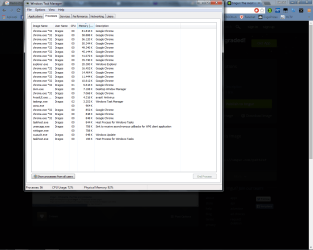
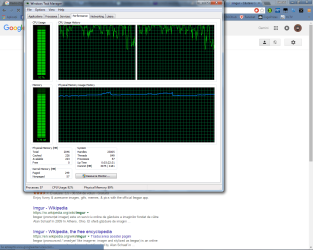
There are two screenshots of processes opened and cpu and memory usage at a difference of ~1 min.
The CPU usage is increasing on a simple loading web page.
 

Attachments
  • pzP8JiF.png
    pzP8JiF.png
    191.6 KB · Views: 5
  • sR9a9LN.png
    sR9a9LN.png
    212.9 KB · Views: 5

My Computer

Computer type
PC/Desktop
Computer Manufacturer/Model Number
All-In
OS
Windows 7 Ultimate x64
CPU
Intel Dual 2.66 GHz
Memory
2
Graphics Card(s)
HD 2400 Series
Browser
Chrome
2GB RAM and dual-core CPU is about the bare minimum for a decent experience in Windows 7. Chrome is also known for wasting system resources like crazy (just look how many processes and how much memory consumes each one). I don't think it's a rare thing what you're seeing.
CPU usage should peak while loading sites, but otherwise be low when idle. Memory usage would remain high as long as it's opened. But given the limited system resources and the heavyweight programs running, such high percentages seem normal.
 

My Computer

Computer type
Laptop
Computer Manufacturer/Model Number
Toshiba Sattelite A665-S6092
OS
Windows 7 Ultimate x64
CPU
Intel Core i7-740QM
Memory
8 GB DDR3
Graphics Card(s)
NVIDIA GeForce 330GT
Screen Resolution
1366x768
Hard Drives
Samsung 840 SSD 500GB
1TB USB3 external HD
Cooling
Coolermaster Notepal U3 notebook cooling pad
Internet Speed
3mbps ASDL
Antivirus
ClamWin 0.98.7
Browser
Opera 12.17 x86 (main), Firefox 38 (sec), IE11 (last resort)
Welcome to our forum Geminiii.

Will Windows 7/64 run on 2 gigs of ram. Well yes as your system is running.

Windows 7/64 will of course run a lot less than it's capability.

From you post.
I clearly don't have a good PC, but I also think W7 doesn't need over 2 Cores 2.66 GHz and 2 ram.
Windows 7/64 doesn't really care what anybody thinks about how much ram is need for Windows 7/64 or on what cpu to work properly. Windows 7 knows what it can and can not do with the hardware it is installed on.

Your system is at the lower level of hardware that Windows 7/64 needs and wants just to run.

Just with basic security and Foxfire running 2 open 7 Forum pages I'm using 1.9 gb of ram. So your ram usage is in my opinion is normal.
Plain and simple you could use more ram if your system is capable of more ram.

Check you motherboard manual for information on how much ram you can install and what ram to install.

What little system specs you have given us, makes it very hard to recommend anything other than start looking for a new computer if you want to run Windows 7/64 as it was designed to be run.
 

My Computer

Computer type
PC/Desktop
Computer Manufacturer/Model Number
Home made Desktop
OS
Windows 10 Pro. 64/ version 1709 Windows 7 Pro/64
CPU
Intel i7-6800K @ 4.3
Motherboard
ASUS X-99 Deluxe II
Memory
Corsair Platinum 16 gig @2400
Graphics Card(s)
EVGA GTX 1070 OC
Monitor(s) Displays
Asus 27" LED LCD/VE278Q
Screen Resolution
1920-1080 or 1280-720 HDMI
Hard Drives
INTEL SSD 730-240 Gb Sata 3.0/
PSU
EVGA Platium 1200W
Case
Phanteks Luxe Tempered Glass 8 fans/ one radiator
Cooling
XSPC/ Water Cooled CPU
Keyboard
Das 4 Professional
Mouse
Logitech M705/MX Anywhere 2-S
Internet Speed
100 mbits
Antivirus
Microsoft Security Essentials/ Malwarebytes Premium 3.0/ SAS
Browser
I.E. 11 default/Firefox/ ISP Time Warner Cable/Spectrum
Other Info
LG BluRay Burner/
Sound system-KLipsch-THX/
Icy Dock ssd Hot Swap bays.
Hi,
Yep Chrome soaks it up fast and 2gb's is barely enough ram for 7 32 bit which 3 is ideal for 32 bit and 4 is a minimum for 64 bit
AddRam ;)
 

My Computer

Computer type
PC/Desktop
Computer Manufacturer/Model Number
Custom assembled by me :}
OS
Win-7-Pro64bit 7-H-Prem-64bit
CPU
i7-5930K 2nd i9-9940x both water blocked VRM's too
Motherboard
ASUS SABERTOOTH X99 2nd ASUS x299 Apex
Memory
Trident-z 3200C14 2nd Trident-z 3600C16
Graphics Card(s)
EVGA 1080ti ftw3 2nd Titan Xp both water blocked
Sound Card
Built-in Realtek
Monitor(s) Displays
1-AOC G2460PG 24"G-Sync 144Hz/ 2nd 1-ASUS VG248QE 24" 144Hz
Screen Resolution
1920 x 1080 144Hz
Hard Drives
2-Samsung M.2 Evo & Evo Plus
2-Samsung 850 EVO 500GB SSD's/ 3-2.5 W.D. Black 1tb-&3-1tb/3-3.5 WD Black 1tb hdd's
PSU
EVGA SuperNOVA 1000-P2 2nd 1200-P2
Case
2-Corsair Obsidian Series 450D Black ATX Mid Tower
Cooling
Custom water loops
Keyboard
Logitech G710+/ 2nd Logitech G910
Mouse
2-RedDragon M901 Perdition 16400 dpi Gaming mouse = wired
Internet Speed
Comcast Ping 19ms 89.31mbps download speed 6.12mbps upload
Antivirus
Malwarebytes Pro/ Superantispyware Pro
Browser
FireFox & Pale moon
Other Info
2nd ASUS X299 Apex/Intel i9-9940x with Custom water loop/7H-Prem-x64/Corsair 450D case/Ram Trident-z 3600C16 4x8gb / Samsung970Evo plus 500gb SSD/Dual ssd EZ swap evo/PSU EVGA SuperNova 1200w-P2 80+Platinum/GPU Titan Xp /8-ML-140 on push-pull on 2-280GTX rads
...Chrome is also known for wasting system resources like crazy (just look how many processes and how much memory consumes each one).
Chrome does launch several instances at start up. Most instances soon go away.

Here is Chrome and Opera 12.16 displaying this website: A continuous stream of stellar images made by the community

chrome.PNG

One instance of Chrome is handling crash recovery; the other is rendering the website.

The OP's hardware would likely perform better with a more appropriate version of Windows 7.
 

My Computer

Computer type
Laptop
Computer Manufacturer/Model Number
Employer provided Dell Latitude
OS
W7 Pro SP1 64bit
CPU
i7
Memory
8GB
Graphics Card(s)
Intel HD Graphics
Hard Drives
crappy SSD
Antivirus
Employer mandated Symantec Endpoint Protection
Browser
Pale Moon 64bit, IE11 64bit & Chrome 64bit
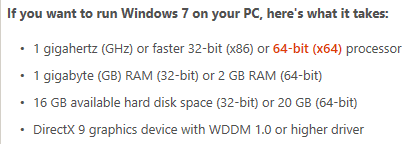
How you can say "your 2.66 GHz and 2 rams" is barely MINIMUM ??? I see it needs 1GHz and 1Ram.
I disabled Windows Update from startup and stopped it, and now it uses under 50% each.
Doesn't seems you guys know many things ;/

"AddRam" kk
 

My Computer

Computer type
PC/Desktop
Computer Manufacturer/Model Number
All-In
OS
Windows 7 Ultimate x64
CPU
Intel Dual 2.66 GHz
Memory
2
Graphics Card(s)
HD 2400 Series
Browser
Chrome

My Computer

Computer type
PC/Desktop
Computer Manufacturer/Model Number
Custom assembled by me :}
OS
Win-7-Pro64bit 7-H-Prem-64bit
CPU
i7-5930K 2nd i9-9940x both water blocked VRM's too
Motherboard
ASUS SABERTOOTH X99 2nd ASUS x299 Apex
Memory
Trident-z 3200C14 2nd Trident-z 3600C16
Graphics Card(s)
EVGA 1080ti ftw3 2nd Titan Xp both water blocked
Sound Card
Built-in Realtek
Monitor(s) Displays
1-AOC G2460PG 24"G-Sync 144Hz/ 2nd 1-ASUS VG248QE 24" 144Hz
Screen Resolution
1920 x 1080 144Hz
Hard Drives
2-Samsung M.2 Evo & Evo Plus
2-Samsung 850 EVO 500GB SSD's/ 3-2.5 W.D. Black 1tb-&3-1tb/3-3.5 WD Black 1tb hdd's
PSU
EVGA SuperNOVA 1000-P2 2nd 1200-P2
Case
2-Corsair Obsidian Series 450D Black ATX Mid Tower
Cooling
Custom water loops
Keyboard
Logitech G710+/ 2nd Logitech G910
Mouse
2-RedDragon M901 Perdition 16400 dpi Gaming mouse = wired
Internet Speed
Comcast Ping 19ms 89.31mbps download speed 6.12mbps upload
Antivirus
Malwarebytes Pro/ Superantispyware Pro
Browser
FireFox & Pale moon
Other Info
2nd ASUS X299 Apex/Intel i9-9940x with Custom water loop/7H-Prem-x64/Corsair 450D case/Ram Trident-z 3600C16 4x8gb / Samsung970Evo plus 500gb SSD/Dual ssd EZ swap evo/PSU EVGA SuperNova 1200w-P2 80+Platinum/GPU Titan Xp /8-ML-140 on push-pull on 2-280GTX rads
How you can say "your 2.66 GHz and 2 rams" is barely MINIMUM ??? I see it needs 1GHz and 1Ram.
I disabled Windows Update from startup and stopped it, and now it uses under 50% each.
Doesn't seems you guys know many things ;/

"AddRam" kk
It appears that you read the requirements incorrectly.
You have claim to have a 64bit OS, so 2GB is the minimum.
Windows 7 system requirements - Windows Help

ram.PNG

Ultimate 64bit is a waste on your hardware. A 32bit OS would use less RAM, thus leaving more RAM for apps.


You might try resetting Windows Update:
http://www.sevenforums.com/tutorials/91738-windows-update-reset.html
We have seen that reduce RAM usage. You could let us know if it helped with your CPU usage too.
 

My Computer

Computer type
Laptop
Computer Manufacturer/Model Number
Employer provided Dell Latitude
OS
W7 Pro SP1 64bit
CPU
i7
Memory
8GB
Graphics Card(s)
Intel HD Graphics
Hard Drives
crappy SSD
Antivirus
Employer mandated Symantec Endpoint Protection
Browser
Pale Moon 64bit, IE11 64bit & Chrome 64bit
How you can say "your 2.66 GHz and 2 rams" is barely MINIMUM ??? I see it needs 1GHz and 1Ram.
I disabled Windows Update from startup and stopped it, and now it uses under 50% each.
Doesn't seems you guys know many things ;/

"AddRam" kk

Ok, Ok, you got us all. Yeah, we all know that Windows 7 successfully runs on 133 MHz CPU with 96 MB RAM. But that doesn't means that it's something I can suggest to do. The specs on the MS site are certainly possible, but for many purpose those fall short, many programs and the system in general behaves just slow in normal usage, hence the 2GB suggestion (or 4 for x64) to have a decent experience, mostly because more and more programs become memory hungry. In practice it's difficult to see a smooth system on the bare minimum MS recommends.
Doesn't seems that you have seen so many Windows systems in real use :p
 

My Computer

Computer type
Laptop
Computer Manufacturer/Model Number
Toshiba Sattelite A665-S6092
OS
Windows 7 Ultimate x64
CPU
Intel Core i7-740QM
Memory
8 GB DDR3
Graphics Card(s)
NVIDIA GeForce 330GT
Screen Resolution
1366x768
Hard Drives
Samsung 840 SSD 500GB
1TB USB3 external HD
Cooling
Coolermaster Notepal U3 notebook cooling pad
Internet Speed
3mbps ASDL
Antivirus
ClamWin 0.98.7
Browser
Opera 12.17 x86 (main), Firefox 38 (sec), IE11 (last resort)
From post #6
Doesn't seems you guys know many things ;/
Thanks Geminiii for the kind words.

I'm thinking what we know and post you don't want to hear.
 

My Computer

Computer type
PC/Desktop
Computer Manufacturer/Model Number
Home made Desktop
OS
Windows 10 Pro. 64/ version 1709 Windows 7 Pro/64
CPU
Intel i7-6800K @ 4.3
Motherboard
ASUS X-99 Deluxe II
Memory
Corsair Platinum 16 gig @2400
Graphics Card(s)
EVGA GTX 1070 OC
Monitor(s) Displays
Asus 27" LED LCD/VE278Q
Screen Resolution
1920-1080 or 1280-720 HDMI
Hard Drives
INTEL SSD 730-240 Gb Sata 3.0/
PSU
EVGA Platium 1200W
Case
Phanteks Luxe Tempered Glass 8 fans/ one radiator
Cooling
XSPC/ Water Cooled CPU
Keyboard
Das 4 Professional
Mouse
Logitech M705/MX Anywhere 2-S
Internet Speed
100 mbits
Antivirus
Microsoft Security Essentials/ Malwarebytes Premium 3.0/ SAS
Browser
I.E. 11 default/Firefox/ ISP Time Warner Cable/Spectrum
Other Info
LG BluRay Burner/
Sound system-KLipsch-THX/
Icy Dock ssd Hot Swap bays.
The minimum system specifications should provide acceptable performance (if your expectations aren't too high) with a relatively light workload. It is often possible to run with much less than the specified minimums but this is just a stunt and not suitable for actual usage. Windows update is resource intensive and you can't really do much else while it is happening on a minimum RAM system. Chrome has quite high memory usage when many tabs are open. Tabs on the same website will share a process but separate websites will have their own. This was a design decision to improve stability. The downside is that processes have a relatively high overhead raising the memory requirements. It is probably a poor choice on a low spec system if many tabs will be open.

To get decent performance with a typical workload you need to double the minimum RAM, 2 GB with 32 bits and 4 GB with 64 bits. To get good performance you need to double that again. With 4 GB on 64 bit Windows there will be times of degraded performance due to memory shortages. 8 GB will provide optimum performance in most situations.
 

My Computer

Computer type
PC/Desktop
Computer Manufacturer/Model Number
HP
OS
Windows 7 Pro 64 bit
CPU
Xeon W3520
Memory
8 GB
Graphics Card(s)
Nvidia Geforce 210
Back
Top