
CPU Usage and RAM increases when I use the internet/web browser.

ContiWolnaes

New member
Local time
5:31 PM
Messages
6
As the title said.

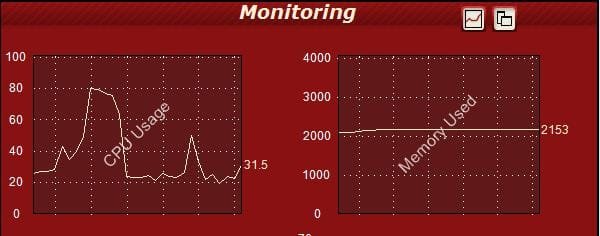
But from what I see on OCCT, it's unusual (I've attached the photo) -

Normally, the CPU usage will be showing 0 - 30. But in the image, OCCT showed that my CPU usage was about 20 - 80 !

Don't forget the RAM.

OCCT will normally show that my computer is using it's RAM from about 1000 -2000 but in the image, the RAM is starting off at 2200 +.

It's unusual because this is a first. OCCT has never showed me this and I would like to ask if there is a problem with my PC and if there is, how do I fix it?

I hope to receive some help soon. This is freaking me out.
 

Attachments
  • Unusual help troubleshoot.JPG
    Unusual help troubleshoot.JPG
    28.5 KB · Views: 15

My Computer My Computer

OS
Windows 7 Home Premium 64 bit
You are way too into monitoring your system.
My guess for the browser using more cpu is likely a plugin gone bad. Or it could even just be a specific element on a page you visited.
Spikes in cpu useage happen all the time.

...and what is the point in even having ram if it's not getting used?
The more commonly you use apps the more of them windows will keep on hold in memory for you.
Over the course of time this could lead to slightly higher memory numbers as the system gets used to how you are using it and precaches more dll's and system files.

Windows 7 is different in this respect than it's predecessors.

That being said 2gigs when idle seems a bit on the high side. I only run around 1.33 gigs out of my 16 when in a idle state. I also keep this system pretty trim as it's primarily expected to play games and hd video.
 

My Computer My Computer

Computer Manufacturer/Model Number
Insane hobo technologies. ;-)
OS
Windows 7 x64
CPU
Intel i7 2600k
Motherboard
Asrock z68 extreme 4 gen 3
Memory
G.skill Ripjaw 16gigs @ 1866
Graphics Card(s)
Nvidia gtx580 (evga)
Sound Card
Integrated HD audio + hdmi
Monitor(s) Displays
24" ASUS widescreen + 42" insignia
Screen Resolution
1080p (1920x1080)
Hard Drives
128 Samsung 830
256 Samsung 840
3 x 1tb storage drive (various)
1 western digital 1tb (eSATA)
1 Seagate 1tb (eSATA)
PSU
1 kilowatt SLI/Crossfire rated Silverstone modular
Case
NZXT Phantom + additional 220 fan
Cooling
Zalmann
Keyboard
Microsoft wireless 3000 (v2)
Mouse
MS - wireless 5000 (bluetrack)
Internet Speed
depends on if you ask me or my provider.
Other Info
The above information is provided as is, and the author assumes no responsibility for issues it may cause with your sanity or fanboyism.
Really come on. A CPU is designed to work at 100%, if it is not working at 100% you are wasting your investment. If all you are getting is spikes there is nothing to fix. NOTHING. And there is nothing wrong with your memory being used. Using CPU or memory does not slow your computer down, it makes it FASTER.

ZOMG! This program is using 100% CPU!1! Think of the puppies!!11!!1!1!eleven
 

My Computer My Computer

Computer type
PC/Desktop
Computer Manufacturer/Model Number
Alienware Aurora ALX R4
OS
Windows 10 Pro (x64)
CPU
Intel Core i7-3930K (3.2GHz - 4.5GHz)
Motherboard
Alienware Aurora-R4 x79
Memory
4x Samsung 4GB PC3-12800 DDR3 (16GB 1600MHz)
Graphics Card(s)
Nvidia Geforce GTX 690
Sound Card
SteelSeries Siberia Elite
Monitor(s) Displays
Dell UltraSharp U3011
Screen Resolution
2560x1600
Hard Drives
Samsung 850 Pro 256 GB, Seagate 1TB Desktop Hybrid HDD, 2x Western Digital 4TB Green HDD
PSU
875W Some Dell PSU <.<
Case
Alienware Aurora ALX
Cooling
Custom Liquid Cooling (EK CPU & GPU blocks) dual EK 480RAD
Keyboard
Logitech G710+ Mechanical
Mouse
Logitech G700s
Internet Speed
Verizon Fios (50 mbps average)
Other Info
Server: Intel NUC D54250WYK: i5-4250U, 16GB, 256 GB mSATA, Windows Server 2012 R2
How long do these spike last? Usually at the start of a program your cpu will spike in usage. As far ass RAM although a huge amount gets used about 50% of it is cached. Cache memory is really good! If this spike is running really high, for long time while only running a simple task then we worry
 

My Computer My Computer

Computer type
PC/Desktop
Computer Manufacturer/Model Number
Gateway / Slight Modifications
OS
Windows 8 64 bit PRO
CPU
AMD Phenom X4 9100e
Motherboard
Gateway RS780
Memory
2GB X2 DDR2
Graphics Card(s)
Sapphire HD 6850
Sound Card
Integrated
Monitor(s) Displays
Gateway 19" + Dell 19"
Screen Resolution
1440X900 sometimes 2880 by 900
Hard Drives
WD 80GB
WD 640GB
WD 1,000GB
PSU
Antec BP 550watts
Case
Antec 300
Cooling
Stock Cooling
Keyboard
Saitek Eclipse II
Mouse
Gigabyte GM-M6800
Internet Speed
D: 30Mbps U:4Mbps
Antivirus
Avast version 8
Browser
Internet Explorer ver 10 64 bit
Other Info
This is my work computer.
I have another laptop running Windows 7 64 bit.
Another PC running Windows 8 64 bit pro.
Total of 3
Back
Top