CPU Usage at max after driver updates.

Plates

New member
Local time
2:26 AM
Messages
11
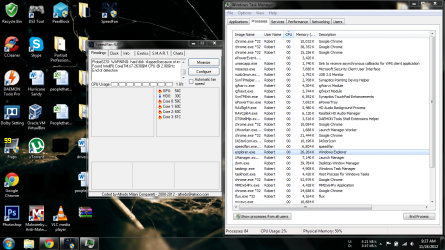
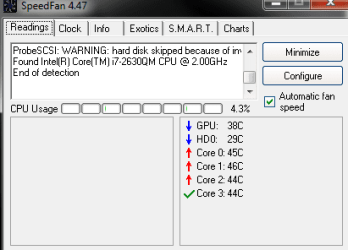
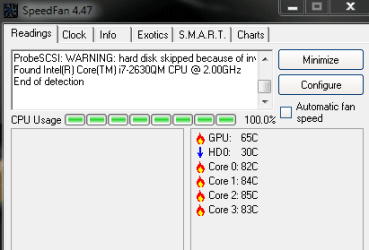
I have an Acer Aspire 5750G and last night I decided to run some driver updates. I downloaded updates for the wireless card, chipset, synaptics track pad, and the camera. They installed fine but after I restarted I noticed that the nvidia GPU monitor is saying that igfxupdate.exe is running and now the fans are on max. Right now Speedfan is telling me that the CPU Usage is at max and the temps for the CPU are above 80C.(http://i.imgur.com/91ZHd.png) See that image for what Speedfan is saying. But when I open task manager, everything stops. I've left Task Manager open for now and the fans have become very silent.(http://i.imgur.com/vWRod.png) See that image for what it looks like with task manager open. So far I only tried system restore to before I started updating, but that did not fix it. Does anyone know what to do here?
 

Attachments
  • Capture.PNG
    Capture.PNG
    6.1 KB · Views: 7
  • Untitled.png
    Untitled.png
    146.2 KB · Views: 66

My Computer

Computer Manufacturer/Model Number
Acer Aspire 5750G-9639
OS
Windows 7 Home Premium 64 bit
CPU
Intel Core i7-2630QM
Memory
4GB DDR3 Kingston 10666
Graphics Card(s)
Nvidia Geforce GT 540M
Sound Card
Realtek
Monitor(s) Displays
15.6"
Screen Resolution
1366 x 768
Hard Drives
500GB HDD, 3TB Seagate USB 3.0 External Drive.
Internet Speed
7MB/s FIOS 50/25 package
I just googled igfxupdate.exe and came up with what might be your problem. I shouldn't post links to other forums but this might help you.
This is not my post submission but somebody elses.

Hi, after several hours of attemps I think I finally found the offender:
much probably a Trojan Generic KDV 792778, it pretends to be the windows service "Search Indexer" and it creates the fake executable: "igfxupdate.exe" which tries to connect in internet and rises the cpu load all the time till you open the task manager to hide itself..
So I solved the problem like this:
in the windows services management console I disabled the above fake windows service (it was in automatic start mode) and after I deleted the igfxupdate.exe file that was in the windows system32 folder..
I rebooted the pc and I deleted the same service with the command: "sc delete SearchIndexer"..
problem solved! cpu back to normal level, not more unwanted connections and not more igfxupdate files around ..
anyway for more safety it's better to do also a complete scan with a good antivirus/malware software.

PS...Google is a valuable asset for looking up problems I just wish more would use it to its fullest potential.
 

My Computer

Computer Manufacturer/Model Number
Custom Build
OS
Microsoft Windows 7 Ultimate 64-bit
CPU
Intel(R) Pentium(R) CPU G2030 @ 3.00GHz
Motherboard
ASUSTeK COMPUTER INC. P8H77-V LE
Memory
12.00 GB Kingston DIMM 3x4 gig sticks
Graphics Card(s)
AMD Radeon HD 5450
Sound Card
AMD High Definition Audio Device
Monitor(s) Displays
Dual displays
Screen Resolution
1280 x 1024 x 4294967296 colors
Hard Drives
ST3500320AS 465.76 GB
WDC WD10EZEX-00BN5A0 931.51 GB
WDC WD10 EARS-00MVWB0 USB Device 931.51 GB
PSU
XION SuperNova 600 watt
Keyboard
Razer Tarantula Gaming Keyboard
Mouse
Razer Imperator Gaming Mouse
Internet Speed
DSL 6 down & 1 up with Netgear R6300 Wireless router
I just googled igfxupdate.exe and came up with what might be your problem. I shouldn't post links to other forums but this might help you.
This is not my post submission but somebody elses.

Hi, after several hours of attemps I think I finally found the offender:
much probably a Trojan Generic KDV 792778, it pretends to be the windows service "Search Indexer" and it creates the fake executable: "igfxupdate.exe" which tries to connect in internet and rises the cpu load all the time till you open the task manager to hide itself..
So I solved the problem like this:
in the windows services management console I disabled the above fake windows service (it was in automatic start mode) and after I deleted the igfxupdate.exe file that was in the windows system32 folder..
I rebooted the pc and I deleted the same service with the command: "sc delete SearchIndexer"..
problem solved! cpu back to normal level, not more unwanted connections and not more igfxupdate files around ..
anyway for more safety it's better to do also a complete scan with a good antivirus/malware software.

PS...Google is a valuable asset for looking up problems I just wish more would use it to its fullest potential.
Ahhh I found that post last night but the solution was not posted when I checked. Thank you very much because now it is fixed. Do you think the driver updates were the issue or was it from something else because the igfxupdate.exe says it was created on November 21, 2012 and not yesterday.
 

Attachments

  • Capture.PNG
    Capture.PNG
    5.9 KB · Views: 7

My Computer

Computer Manufacturer/Model Number
Acer Aspire 5750G-9639
OS
Windows 7 Home Premium 64 bit
CPU
Intel Core i7-2630QM
Memory
4GB DDR3 Kingston 10666
Graphics Card(s)
Nvidia Geforce GT 540M
Sound Card
Realtek
Monitor(s) Displays
15.6"
Screen Resolution
1366 x 768
Hard Drives
500GB HDD, 3TB Seagate USB 3.0 External Drive.
Internet Speed
7MB/s FIOS 50/25 package
Back
Top