CPU Voltage & CPU VDDA Voltage

IoNGeNeRaL

New member
Power User
Local time
12:30 AM
Messages
375
Location
Cambridge, UK
Hey guys.

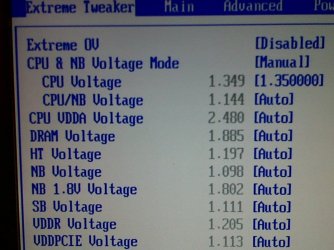
I am sort of confused as to why my BIOS has "CPU VDDA Voltage" and not "CPU Voltage". My BIOS version is 1102 (latest).

Any help?
 

My Computer My Computer

Computer type
PC/Desktop
Computer Manufacturer/Model Number
Custom Built
OS
Windows 10 Pro x64 (UPGRADED - 10/20/2016)
CPU
AMD FX 8350 (OC: 4.48GHz)
Motherboard
ASUS Crosshair V Formula-Z AM3+
Memory
14GB DDR3 Corsair Vengeance
Graphics Card(s)
Asus AMD Radeon R9 280X 3GB
Sound Card
N/A
Monitor(s) Displays
BenQ G2420HD
Screen Resolution
1920x1080
Hard Drives
Internal: 1x 500GB WD Blue SSD | 1TB WD Caviar Black | 3x 500GB WD Caviar Green
External: 500GB Seagate
PSU
Corsair AX1200i
Case
CoolerMaster HAF X
Cooling
Corsair Hydro H90 Water Cooling
Keyboard
Microsoft SideWinder X6 Keyboard
Mouse
Microsoft SideWinder X8 Mouse
Antivirus
MSE / Malwarebytes Anti-Malware
Browser
Mozilla Firefox + Google Chrome
The CPU VDDA Voltage seems to be unique to Asus and may have nothing to worry about. This artical from Overclockers have more info about this but is to do with your North bridge for nForce it seems.
 

My Computer My Computer

Computer Manufacturer/Model Number
Packard Bell MH36-U300
OS
Windows 7 Ultimate 64-Bit
CPU
Intel(R) Pentium(R) Dual CPU T3400 @ 2.16GHz
Memory
2GB DDR2
Graphics Card(s)
Mobile Intel(R) 4 Series Express Chipset
Sound Card
Realtek High Definition Audio
Monitor(s) Displays
15" LCD
Screen Resolution
1280 x 800
Hard Drives
320GB Western Digital
Case
Notebook
Internet Speed
10Mbps
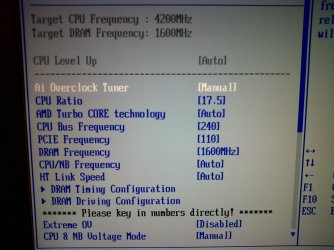
Yeah, I have a problem with the Northbridge temp. It's at like 50'C at an Auto voltage. (2.4v I think) I found CPU Voltage. It was hiding under the setting "CPU & NB Voltage Mode", which was set to "Offset".

Screenshots taken from my BlackBerry in attachments.
 

Attachments

  • IMG00047-20101117-1600.jpg
    IMG00047-20101117-1600.jpg
    183 KB · Views: 25
  • IMG00049-20101117-1601.jpg
    IMG00049-20101117-1601.jpg
    101.3 KB · Views: 27

My Computer My Computer

Computer type
PC/Desktop
Computer Manufacturer/Model Number
Custom Built
OS
Windows 10 Pro x64 (UPGRADED - 10/20/2016)
CPU
AMD FX 8350 (OC: 4.48GHz)
Motherboard
ASUS Crosshair V Formula-Z AM3+
Memory
14GB DDR3 Corsair Vengeance
Graphics Card(s)
Asus AMD Radeon R9 280X 3GB
Sound Card
N/A
Monitor(s) Displays
BenQ G2420HD
Screen Resolution
1920x1080
Hard Drives
Internal: 1x 500GB WD Blue SSD | 1TB WD Caviar Black | 3x 500GB WD Caviar Green
External: 500GB Seagate
PSU
Corsair AX1200i
Case
CoolerMaster HAF X
Cooling
Corsair Hydro H90 Water Cooling
Keyboard
Microsoft SideWinder X6 Keyboard
Mouse
Microsoft SideWinder X8 Mouse
Antivirus
MSE / Malwarebytes Anti-Malware
Browser
Mozilla Firefox + Google Chrome
I was wondering this also.
 

My Computer My Computer

Computer Manufacturer/Model Number
Myself
OS
Windows 7 Ultimate x64
CPU
Intel i7 980 EE
Motherboard
Asus Rampage III Extreme
Memory
Corsair Dominator 6GB
Graphics Card(s)
Nvidia GeForce 480
Monitor(s) Displays
Samsung 23 inch
Hard Drives
Western Digital 1TB 6gb/s
PSU
Corsair 1200W
Case
Antec Twelve Hundred
Cooling
Intel Stock
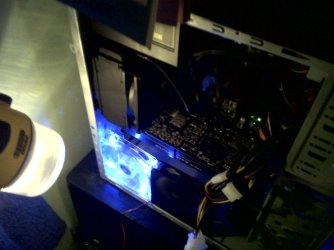
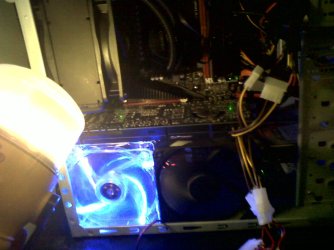
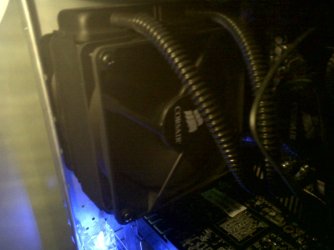
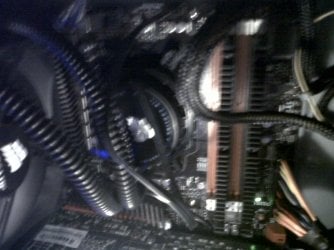
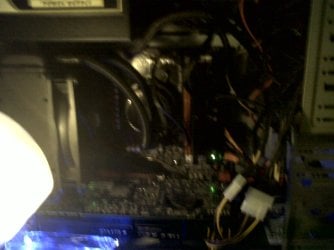
OK, since I've been increasing the CPU VDDA Voltage (NB Voltage) could that be the reason why it's so hot? I mean, I've completely reset my CMOS settings, everything is running at stock speeds and stock voltage, but the NB is still too hot. The NB voltage is running at 2.4v, and CPU at 1.3v. I can't install fans on my sidepanel, since my CPUs Water Cooling radiator is attached to the back of the case as an exhaust fan. The Radiator is an Air In-Take.

I'd rarther not uninstall the Water Cooler since it took me 4 hours to install the Water pump onto the CPU itself. Instead of doing as the manual instructed, I manually removed the entire CPU socket from the motherboard (the brackets) and then put the pump into its own bracket then screwed it on since it wouldn't work the way it's intructed to.

Picture:
 

Attachments

  • IMG00061-20101118-2236.jpg
    IMG00061-20101118-2236.jpg
    135.5 KB · Views: 12
  • IMG00062-20101118-2236.jpg
    IMG00062-20101118-2236.jpg
    186.6 KB · Views: 13
  • IMG00063-20101118-2236.jpg
    IMG00063-20101118-2236.jpg
    124.9 KB · Views: 8
  • IMG00064-20101118-2236.jpg
    IMG00064-20101118-2236.jpg
    156.8 KB · Views: 12
  • IMG00065-20101118-2237.jpg
    IMG00065-20101118-2237.jpg
    124.3 KB · Views: 14

My Computer My Computer

Computer type
PC/Desktop
Computer Manufacturer/Model Number
Custom Built
OS
Windows 10 Pro x64 (UPGRADED - 10/20/2016)
CPU
AMD FX 8350 (OC: 4.48GHz)
Motherboard
ASUS Crosshair V Formula-Z AM3+
Memory
14GB DDR3 Corsair Vengeance
Graphics Card(s)
Asus AMD Radeon R9 280X 3GB
Sound Card
N/A
Monitor(s) Displays
BenQ G2420HD
Screen Resolution
1920x1080
Hard Drives
Internal: 1x 500GB WD Blue SSD | 1TB WD Caviar Black | 3x 500GB WD Caviar Green
External: 500GB Seagate
PSU
Corsair AX1200i
Case
CoolerMaster HAF X
Cooling
Corsair Hydro H90 Water Cooling
Keyboard
Microsoft SideWinder X6 Keyboard
Mouse
Microsoft SideWinder X8 Mouse
Antivirus
MSE / Malwarebytes Anti-Malware
Browser
Mozilla Firefox + Google Chrome
Back
Top