Create a auto installer

callumm

New member
Local time
9:44 PM
Messages
42
Hi,

How would I go about created a script or so that would install a set list of software? I have tried this before and managed to create one that would install Adobe Flash etc. But some of the software requires some input for example setting a file path etc. How would I go about doing this? Is there any software that does this?
I have seen Ninite and that looks cool but it doesn't support other software.
Also are there any drawbacks of installing like this?

Thanks! :)
 

My Computer

OS
Windows 7 64bit
AutoIt or AutoHotKey (AHK)
Autohotkey vs AutoIt v3 - WikiVS

There are other scripting languages, but those are the two that I would suggest looking into.

The drawback to automation is dealing with the unexpected. If your script is going to click on a window or send keystrokes to a window, then you need to be prepared for windows from other apps popping up unexpectedly. AutoIt (and AHK) can send keystrokes to windows that are not in focus (not in front of all other windows).
[ControlSend]
https://www.autoitscript.com/autoit3/docs/functions/ControlSend.htm
ControlSend / ControlSendRaw

edit: it would help us to know if you plan on visiting each computer to make these installations or if you want to push them out from one central computer. Silent installations work well when pushed. But for those stubborn installs that require attention, you can try and automate that attention via scripting tools.
 
Last edited:

My Computer

Computer type
Laptop
Computer Manufacturer/Model Number
Employer provided Dell Latitude
OS
W7 Pro SP1 64bit
CPU
i7
Memory
8GB
Graphics Card(s)
Intel HD Graphics
Hard Drives
crappy SSD
Antivirus
Employer mandated Symantec Endpoint Protection
Browser
Pale Moon 64bit, IE11 64bit & Chrome 64bit
Possible solution

You could consider GEGeek Toolkit although it's a huge download. Once downloaded you can extract to USB and run it from there. It's possible to add your own apps and then install them from the USB.

It's not at all straightforward though. I'm familiar with the basics.

The link to the website is in my signature - Geeks Toolbox

Run GEGeek.exe and right click on the system tray icon. Run Ketarin to update everything or to add your own apps.

Adding apps and configuring existing apps to be installed requires command line knowledge and that's something that I'm not fully up to speed on.

However here's an example:

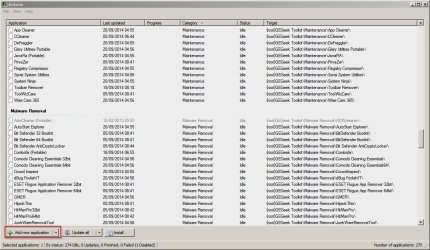
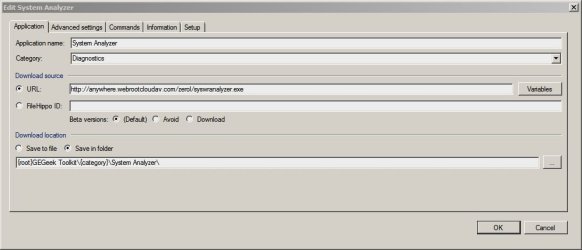
With Ketarin running choose "add new application" then add download URL and file save location.

Ketarin.jpg

Edit System Analyzer.jpg

Add the required setup information.

Edit System Analyzer 2.jpg

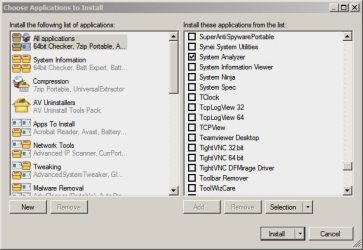
When done - close the window and choose "install" then choose the required apps.

Choose Applications to Install.jpg
 

My Computer

Computer type
Laptop
Computer Manufacturer/Model Number
ASUS
OS
Microsoft Windows 7 Home Premium 64-bit 7601 Multiprocessor Free Service Pack 1
CPU
AMD C-60 APU with Radeon(tm) HD Graphics
Motherboard
ASUSTeK COMPUTER INC. X501U
Memory
4.00 GB
Graphics Card(s)
AMD Radeon HD 6290 Graphics
Sound Card
(1) AMD High Definition Audio Device (2) Realtek High Defi
Screen Resolution
1366 x 768 x 32 bits (4294967296 colors) @ 60 Hz
Hard Drives
Hitachi HTS545050A7E380 SATA Disk Device
Antivirus
Comodo CIS & FW, SecureAplus App Whitelisting, Threatfire
Browser
Cyberfox 64bit, Opera 64bit, Airfox
Other Info
Spy-The-Spy, HitmanPro.Alert, Norton Connect Safe, MJRegWatcher, BitDefender TrafficLight, Voodoo Shield, Zemana AntiMalware
AutoIt or AutoHotKey (AHK)
Autohotkey vs AutoIt v3 - WikiVS

There are other scripting languages, but those are the two that I would suggest looking into.

The drawback to automation is dealing with the unexpected. If your script is going to click on a window or send keystrokes to a window, then you need to be prepared for windows from other apps popping up unexpectedly. AutoIt (and AHK) can send keystrokes to windows that are not in focus (not in front of all other windows).
[ControlSend]
https://www.autoitscript.com/autoit3/docs/functions/ControlSend.htm
ControlSend / ControlSendRaw

edit: it would help us to know if you plan on visiting each computer to make these installations or if you want to push them out from one central computer. Silent installations work well when pushed. But for those stubborn installs that require attention, you can try and automate that attention via scripting tools.

Thanks your reply! I am only going to run it from the computer itself. I will give AutoHotKey a try :)
 

My Computer

OS
Windows 7 64bit
You might have heard about it already but Windows 10 will ship with OneGet, a Linux-like package manager : Windows 10 Includes a Linux-Style Package Manager Named ?OneGet?

If you're not familiar with Linux, then just know that with this system you can with one command line, upload and install a software and all its associated dependencies (DLLs, .NET framework, Redistributables, etc..). This might be what you're looking for.

And since OneGet is actually based on technology already existing, you can have its equivalent for Windows 7/8 too !
More info :
Chocolatey brings Linux-style package management to Windows - TechRepublic
How to use Chocolatey: A delicious Windows package manager
 

My Computer

Computer type
PC/Desktop
OS
Windows 8
I reloaded the XP OS onto a laptop once. I noticed that Toshiba used AutoIt v2 to script the installation of 3rd party apps that did not have a silent installer. It was odd seeing that old scripting language being used in a commercial setting.

oneeyed,
That sound good, but MS has barfed so many patch Tuesdays lately, they will have to earn some trust back.
 

My Computer

Computer type
Laptop
Computer Manufacturer/Model Number
Employer provided Dell Latitude
OS
W7 Pro SP1 64bit
CPU
i7
Memory
8GB
Graphics Card(s)
Intel HD Graphics
Hard Drives
crappy SSD
Antivirus
Employer mandated Symantec Endpoint Protection
Browser
Pale Moon 64bit, IE11 64bit & Chrome 64bit
I reloaded the XP OS onto a laptop once. I noticed that Toshiba used AutoIt v2 to script the installation of 3rd party apps that did not have a silent installer. It was odd seeing that old scripting language being used in a commercial setting.

oneeyed,
That sound good, but MS has barfed so many patch Tuesdays lately, they will have to earn some trust back.

Thanks for the input! The PCs I do are usually Dell :)
 

My Computer

OS
Windows 7 64bit
Back
Top