Create a task to run exe if it is not running.

JustWatching

New member
Member
Local time
2:06 PM
Messages
71
I am trying to figure out how to use task scheduler to open an exe if it is not already running, also trying to get the task to check this every hour or so but all I get is Daily, weekly, etc options.
 

My Computer My Computer

Computer type
PC/Desktop
Computer Manufacturer/Model Number
Custom
OS
Windows 7 Ultimate x64
CPU
Intel Core i5-3350P Ivy Bridge Quad-Core 3.1GHzz
Motherboard
Asus P8H77-v
Memory
HyperX XMP 10th Anniversary Series 16GB
Graphics Card(s)
EVGA GeForce GTX 970 4GB
Sound Card
Onboard
Monitor(s) Displays
Acer S241HL 24", ASUS V238h 23"
Screen Resolution
1920x1080
Hard Drives
Kingston SSD 240GB
Samsung 2TB
PSU
XION AXP-700K14XE 700W ATX
Case
HEC 6C28BBX585 Black Steel ATX Mid Tower
Cooling
ZALMAN CNPS9500 AT 2 Ball CPU Cooling Fan/Heatsink
Keyboard
Logitech G710+
Mouse
Anker Wireless Vertical Mouse
Internet Speed
220/20
Antivirus
Webroot
Browser
Chrome
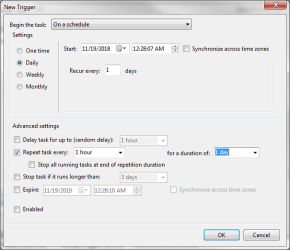
I have the option for every hour.

new task.PNG
 

My Computers My Computers

System One System Two

You will need to run the .exe as a service. To do this grab NSSM here: NSSM - the Non-Sucking Service Manager


Place the nssm-2.24 folder in the directory folder of the .exe you want to run as a service. (Keep in mind there are two nssm-2.24 folders. You want to copy/paste the nssm-2.24 folder containing the program.

So say you have server.exe as an .exe you want to run as a service, and server.exe is located in
Code:
C:\program files\server
So place the nssm-2.24 folder in
Code:
C:\program files\server\
This is where server.exe is located.

Now go to the start orb and in the search box enter cmd. Right click command prompt and open as administrator.

Once cmd is open enter cd and your path to the exe you want to run as a service. In this case,
Code:
cd C:\program files\server\
this is also the path that has the nssm-2.24 folder.


Now once you cd into that path (cd means change directory by the way) enter
Code:
nssm.exe install [servicename]
.

A service install GUI will pop up. Pick the path to your exe that you want to run as a service. In this case the path is
Code:
C:\program files\server\server.exe
Under the Details tab enter a name for your new service that isn't the same name of a service you have running already and give it a quick description. Under the Exit actions tab you may want to delay the restart by so many milliseconds. Maybe 500 ms for half a second. You can leave all the other options alone.

If done correctly your .exe should start with Windows boot. If it fails it should automatically restart.


I have not tried this program before, so YMMV.

What .exe are you wanting to start with Windows anyway?
 

My Computer My Computer

Computer type
PC/Desktop
OS
Windows 7 Ultimate x64
Double post. vBulletin crap as usual.
 

My Computer My Computer

Computer type
PC/Desktop
OS
Windows 7 Ultimate x64
I do not want it to start when windows starts.

I want my computer to constantly check if the program is running and if it is not, then run the program. I cannot seem to be able to do this with task scheduler
 

My Computer My Computer

Computer type
PC/Desktop
Computer Manufacturer/Model Number
Custom
OS
Windows 7 Ultimate x64
CPU
Intel Core i5-3350P Ivy Bridge Quad-Core 3.1GHzz
Motherboard
Asus P8H77-v
Memory
HyperX XMP 10th Anniversary Series 16GB
Graphics Card(s)
EVGA GeForce GTX 970 4GB
Sound Card
Onboard
Monitor(s) Displays
Acer S241HL 24", ASUS V238h 23"
Screen Resolution
1920x1080
Hard Drives
Kingston SSD 240GB
Samsung 2TB
PSU
XION AXP-700K14XE 700W ATX
Case
HEC 6C28BBX585 Black Steel ATX Mid Tower
Cooling
ZALMAN CNPS9500 AT 2 Ball CPU Cooling Fan/Heatsink
Keyboard
Logitech G710+
Mouse
Anker Wireless Vertical Mouse
Internet Speed
220/20
Antivirus
Webroot
Browser
Chrome
I suspect you can do this from the CMD prompt, which means you can probably run a batch file to perform the test and run the program conditionally.

Hint: Use TASKLIST with either /svc or /v switch. For example,
Code:
TASKLIST /FI "imagename eq program.exe" /svc
or
Code:
TASKLIST /v /fi "STATUS eq running"

Here is someone with a similar question to yours: Batch - check If program is running , if not , run it - Stack Overflow
 

My Computer My Computer

Computer type
PC/Desktop
OS
Windows 7 x64, Vista x64, 8.1 smartphone
CPU
Intel E8400 65W 64-bit
Motherboard
Gigabyte EP45-UD3LR
Memory
DDR2 2 x 2GB, 1GB x 2
Graphics Card(s)
XFX Radeon HD5750
Sound Card
AMD High Definition Audio; Realtek High Definition Audio
Monitor(s) Displays
iiyama prolite X2377HDS
Screen Resolution
1920 x 1080
Hard Drives
500GB 7200 rpm Seagate ST3500413AS 16MB, 500GB 5400 rpm Toshiba MQ02ABF050H 32MB, 200GB 7200 rpm Seagate ST3200820AS 8MB, 2TB 7200 rpm Western Digital WD20EZRX 64MB
PSU
Enermax Liberty Modular
Case
Antec P193 Midi Tower
Keyboard
Mionix ZIBAL 60
Mouse
Razer USB 2.0 Diamondback Mouse or Huion Graphics Tablet
Browser
Internet Explorer, Lunascape, Firefox, Opera, Avast Safezone
I suspect you can do this from the CMD prompt, which means you can probably run a batch file to perform the test and run the program conditionally.

Hint: Use TASKLIST with either /svc or /v switch. For example,
Code:
TASKLIST /FI "imagename eq program.exe" /svc
or
Code:
TASKLIST /v /fi "STATUS eq running"
Here is someone with a similar question to yours: Batch - check If program is running , if not , run it - Stack Overflow


Ok that batch file should work, but how do I get windows to run it every hour?
 

My Computer My Computer

Computer type
PC/Desktop
Computer Manufacturer/Model Number
Custom
OS
Windows 7 Ultimate x64
CPU
Intel Core i5-3350P Ivy Bridge Quad-Core 3.1GHzz
Motherboard
Asus P8H77-v
Memory
HyperX XMP 10th Anniversary Series 16GB
Graphics Card(s)
EVGA GeForce GTX 970 4GB
Sound Card
Onboard
Monitor(s) Displays
Acer S241HL 24", ASUS V238h 23"
Screen Resolution
1920x1080
Hard Drives
Kingston SSD 240GB
Samsung 2TB
PSU
XION AXP-700K14XE 700W ATX
Case
HEC 6C28BBX585 Black Steel ATX Mid Tower
Cooling
ZALMAN CNPS9500 AT 2 Ball CPU Cooling Fan/Heatsink
Keyboard
Logitech G710+
Mouse
Anker Wireless Vertical Mouse
Internet Speed
220/20
Antivirus
Webroot
Browser
Chrome
To get a batch file to run every hour, you would need to add either TIMEOUT or PING to the batch file, and then put the batch file into a loop. One hour is 60 minutes * 60 seconds = 3600 seconds.

TIMEOUT waits so many seconds, and then continues executing the batch file. Problem is that a keypress can interrupt the timeout. So, best use PING. For example PING -n 3600 127.0.0.1>nul gives a timeout of 3600 echo requests.
 

My Computer My Computer

Computer type
PC/Desktop
OS
Windows 7 x64, Vista x64, 8.1 smartphone
CPU
Intel E8400 65W 64-bit
Motherboard
Gigabyte EP45-UD3LR
Memory
DDR2 2 x 2GB, 1GB x 2
Graphics Card(s)
XFX Radeon HD5750
Sound Card
AMD High Definition Audio; Realtek High Definition Audio
Monitor(s) Displays
iiyama prolite X2377HDS
Screen Resolution
1920 x 1080
Hard Drives
500GB 7200 rpm Seagate ST3500413AS 16MB, 500GB 5400 rpm Toshiba MQ02ABF050H 32MB, 200GB 7200 rpm Seagate ST3200820AS 8MB, 2TB 7200 rpm Western Digital WD20EZRX 64MB
PSU
Enermax Liberty Modular
Case
Antec P193 Midi Tower
Keyboard
Mionix ZIBAL 60
Mouse
Razer USB 2.0 Diamondback Mouse or Huion Graphics Tablet
Browser
Internet Explorer, Lunascape, Firefox, Opera, Avast Safezone
To get a batch file to run every hour, you would need to add either TIMEOUT or PING to the batch file, and then put the batch file into a loop. One hour is 60 minutes * 60 seconds = 3600 seconds.

TIMEOUT waits so many seconds, and then continues executing the batch file. Problem is that a keypress can interrupt the timeout. So, best use PING. For example PING -n 3600 127.0.0.1>nul gives a timeout of 3600 echo requests.


I thought for sure I could set task scheduler to run it every hour but all I get is day, month, etc
 

My Computer My Computer

Computer type
PC/Desktop
Computer Manufacturer/Model Number
Custom
OS
Windows 7 Ultimate x64
CPU
Intel Core i5-3350P Ivy Bridge Quad-Core 3.1GHzz
Motherboard
Asus P8H77-v
Memory
HyperX XMP 10th Anniversary Series 16GB
Graphics Card(s)
EVGA GeForce GTX 970 4GB
Sound Card
Onboard
Monitor(s) Displays
Acer S241HL 24", ASUS V238h 23"
Screen Resolution
1920x1080
Hard Drives
Kingston SSD 240GB
Samsung 2TB
PSU
XION AXP-700K14XE 700W ATX
Case
HEC 6C28BBX585 Black Steel ATX Mid Tower
Cooling
ZALMAN CNPS9500 AT 2 Ball CPU Cooling Fan/Heatsink
Keyboard
Logitech G710+
Mouse
Anker Wireless Vertical Mouse
Internet Speed
220/20
Antivirus
Webroot
Browser
Chrome
Yes you can do it that way, if you'd prefer.

Open Task Scheduler; Select Create Basic Task; Select Trigger (Daily); then Follow townsbg example in post #2 of this thread. In townsbg screenshot, where it says "Repeat Task every", all you need do is tick the box, and then select "hourly" from the list.

If you are still having problems, make a screenshot of your Task Scheduler where you are stuck, and upload the screenshot image with your next post. And we will have a look at it.
 

My Computer My Computer

Computer type
PC/Desktop
OS
Windows 7 x64, Vista x64, 8.1 smartphone
CPU
Intel E8400 65W 64-bit
Motherboard
Gigabyte EP45-UD3LR
Memory
DDR2 2 x 2GB, 1GB x 2
Graphics Card(s)
XFX Radeon HD5750
Sound Card
AMD High Definition Audio; Realtek High Definition Audio
Monitor(s) Displays
iiyama prolite X2377HDS
Screen Resolution
1920 x 1080
Hard Drives
500GB 7200 rpm Seagate ST3500413AS 16MB, 500GB 5400 rpm Toshiba MQ02ABF050H 32MB, 200GB 7200 rpm Seagate ST3200820AS 8MB, 2TB 7200 rpm Western Digital WD20EZRX 64MB
PSU
Enermax Liberty Modular
Case
Antec P193 Midi Tower
Keyboard
Mionix ZIBAL 60
Mouse
Razer USB 2.0 Diamondback Mouse or Huion Graphics Tablet
Browser
Internet Explorer, Lunascape, Firefox, Opera, Avast Safezone
You don't have to set it so that it runs on boot up.
 

My Computers My Computers

System One System Two

Back
Top