creating bootable dvd from original windows 7 dvd

mayankakshay

New member
Local time
2:05 PM
Messages
2
i bought a dell laptop with windows 7 home basic as my os.But the installation dvd I got didn't work when i tried to format my lappy using it.So I brought my friend's legitimate home premium dvd .

I want to create a bootable dvd using my friend's dvd.So I copied the entire contents from my friend's dvd into my laptop and using
ultra iso burned them into the blank dvd.But it was not able to boot .

On internet i learnt that we have to include a file bootse7en.bif which makes the dvd bootable.I also learnt that this file is not there in legitimate windows 7 dvd.

I don't understand that if this file is not present in the legitimate windows 7 dvd then how does it boots .and why I have to include it in the new dvd I want to make.Plz help me with this doubt.
 

My Computer My Computer

Computer Manufacturer/Model Number
dell
OS
windows 7 home basic 64 bit
First of all, are you sure you received a Windows install DVD with your laptop? That's actually unusual...

Second, the correct way to copy your friend's install DVD would be to simply extract it to an .iso file with software such as ImgBurn or ISOBuster. Then you can write that .iso straight back to a blank disc and it'll be bootable.

The full data session on the install disc (what ends up inside the .iso file) contains two parts, a small boot image and the entire filesystem with the Windows install files. Your mistake was to copy all those files to a folder and create a new .iso from the folder, but by doing this you didn't account for the boot image on the DVD (which is invisible to Windows).
 

My Computer My Computer

Computer type
PC/Desktop
Computer Manufacturer/Model Number
Custom-built
OS
Windows 7 Professional SP1 32-bit
CPU
Intel Core 2 Duo E6600 2.4GHz
Motherboard
Asus PL5D2
Memory
4GB DDR2-667 (4x1GB in dual-channel config)
Graphics Card(s)
nVidia GeForce 9800 GT
Sound Card
Creative X-Fi XtremeMusic
Monitor(s) Displays
Acer P236H
Screen Resolution
1920x1200 (DVI)
Hard Drives
OCZ SSD Vertex Plus 60GB SATA (Firmware 3.55), 64MB cache
Hitachi HD321KJ SATA, 320GB, 7200rpm, 16MB cache
PSU
Antec TruePower 2.0
Case
Cooler Master Centurion
Cooling
Too many fans
Keyboard
Standard
Mouse
Microsoft wireless optical mouse
Internet Speed
AT&T U-verse (18mbit/sec)
Antivirus
Microsoft Security Essentials
Browser
Firefox
Other Info
Other devices:
Compaq CQ-60 laptop
Google Nexus 7 (2012) tablet
Nvidia SHIELD tablet (US/LTE)
Hardkernel ODROID-XU single-board computer (Samsung Exynos 5420)
I think Corazon meant ISO Recorder and not ISObuster- typing error.:)

Download ISO Recorder 3.1 from ISO Recorder .

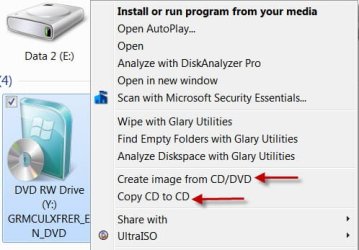
Once installed use the right click menu to create an ISO (Create image from CD/DVD) and then write the ISO to DVD. (Copy CD to CD)

DVD2DVD.jpg
 

My Computer My Computer

OS
Windows 7 Home Premium 32 bit
How to use Dell Recovery Partition,make Recovery Disks & how to order Recovery Disks.
Dell - Support
 

My Computer My Computer

OS
ME/XP/Vista/Win7
Thanks jumanji. :) I did mean ISObuster, though...since it offers a very straightforward way of copying entire discs (or single tracks) as .iso images. :) It can't burn them back of course, so that's a point I should have made clearer.
 

My Computer My Computer

Computer type
PC/Desktop
Computer Manufacturer/Model Number
Custom-built
OS
Windows 7 Professional SP1 32-bit
CPU
Intel Core 2 Duo E6600 2.4GHz
Motherboard
Asus PL5D2
Memory
4GB DDR2-667 (4x1GB in dual-channel config)
Graphics Card(s)
nVidia GeForce 9800 GT
Sound Card
Creative X-Fi XtremeMusic
Monitor(s) Displays
Acer P236H
Screen Resolution
1920x1200 (DVI)
Hard Drives
OCZ SSD Vertex Plus 60GB SATA (Firmware 3.55), 64MB cache
Hitachi HD321KJ SATA, 320GB, 7200rpm, 16MB cache
PSU
Antec TruePower 2.0
Case
Cooler Master Centurion
Cooling
Too many fans
Keyboard
Standard
Mouse
Microsoft wireless optical mouse
Internet Speed
AT&T U-verse (18mbit/sec)
Antivirus
Microsoft Security Essentials
Browser
Firefox
Other Info
Other devices:
Compaq CQ-60 laptop
Google Nexus 7 (2012) tablet
Nvidia SHIELD tablet (US/LTE)
Hardkernel ODROID-XU single-board computer (Samsung Exynos 5420)
to corazon,
actually dell provides us with windows reinstallation dvd which can be used in a dell laptop only.
so u mean to say that boot se7en.bif file is not important .
 

My Computer My Computer

Computer Manufacturer/Model Number
dell
OS
windows 7 home basic 64 bit
Hello mayankakshay

The file your looking for should be in the BOOT folder of the copied files and folders.
ETFSBOOT.COM

TJG :)

Edit: If you are using Ultra ISO, you will need to rename tthe file to ETFSBOOT.BIF
 
Last edited:

My Computer My Computer

Computer Manufacturer/Model Number
Dell Dimension E510
OS
Windows 7 Home Premium 32bits
CPU
Intel Pentium 4 521
Motherboard
Dell Inc. ORD203
Memory
DDR2 4096MBytes
Graphics Card(s)
ATI Radeon HD 2400 Series
Sound Card
On-Board Sigma Tel High Definition Audio
Monitor(s) Displays
Dell ST2210 1920x1080x60 hertz
Hard Drives
320 SATA
500 SATA
PSU
Antec 430 Watts
Case
Dell
Cooling
Standard Fans
Try booting the Dell Win7 reinstallation DVD as it should work:
How to Boot your Computer from a Bootable CD or DVD

If not, extract the ISO from the borrowed DVD using ImgBurn, unlock all versions using the ei.cfg removal tool on the ISO, then burn to DVD using ImgBurn at 4x speed:
ImgBurn - Free software downloads and software reviews - CNET Download.com
Unlock any version eicfg removal tool

Boot the DVD correctly, choose your licensed version to install with Product Key on COA sticker, follow these steps to get a Perfect Reinstall
 
.... I did mean ISObuster, though...since it offers a very straightforward way of copying entire discs (or single tracks) as .iso images. ....

OK. I have always thought of IsoBuster as a CD/DVD/BD (Optical Media) Data Recovery Tool. :mad:

Here we go with IsoBuster as an IsoMaker.

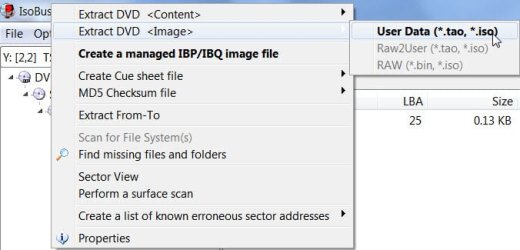
Run IsoBuster, right click on the DVD, Extract DVD <Image>, User Data (*.tao, *.iso) and show it the folder to save the ISO to. That is it.

IBISO.jpg

Note:

1. If RAW (*.bin, *.iso) option is available, use that option. This makes a
one to one copy of the optical media.

2. For Folders/files, use RAW2User (*.tao, *.iso) (RAW includes data not
necessary and the ISO may appear corrupted with that unnecessary data)

3. For DVDs, use the User Data (*.tao, *iso), the only option that may be available.
(There is no RAW for DVDs)

Not an elaborate guide, but do go through the Help in IsoBuster.

It is always good to know the various options available to create an ISO image of the optical media.

Thanks, Corazon for bringing in IsoBuster.
 

My Computer My Computer

OS
Windows 7 Home Premium 32 bit
Back
Top