Creation of new hard disk partition in windows 7

arunlal86

New member
Local time
5:25 AM
Messages
3
Hi,

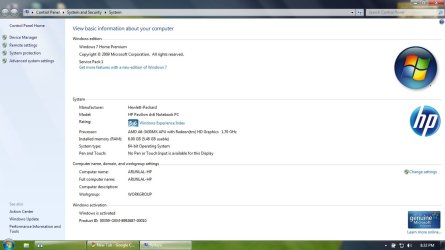
I have bought a new HP Pavilion dv6 series laptop recently.
OS: Windows 7 Home Premium 64bit
Hard disk: 700 GB
RAM: 6 GB

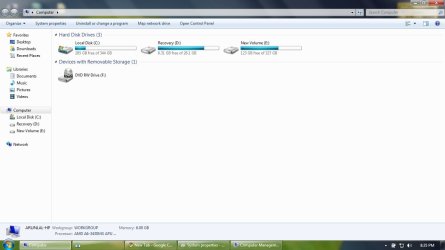
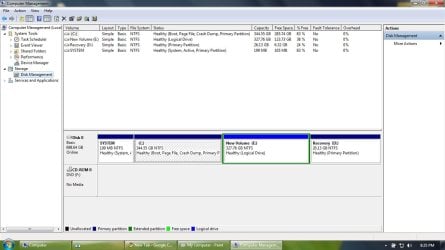
I want to create a new partition in my hard disk. Now there are 3 partitions: Primary disk (C:) 344 GB (windows is installed in this partition), Recovery (D:) 26 GB and New volume (E:) 327 GB. I want to take some 260 GB from C: & create a new volume.

But when i shrink volume C:, "Enter the amount of space to shrink in MB" is not exceeding 1413 MB even if "Total size before shrink in MB" is 352819 MB. :confused:

You can find more details from the screen shots attached.

Also let me know whether i can do this creation of new partition without affecting the data in C:

Please help..... :)

Arunlal
 

Attachments

  • 01 System properties.jpg
    01 System properties.jpg
    75.2 KB · Views: 9
  • 02 My computer.jpg
    02 My computer.jpg
    54.2 KB · Views: 9
  • 03 Computer management.jpg
    03 Computer management.jpg
    92.6 KB · Views: 10
  • 04 Shrink details.jpg
    04 Shrink details.jpg
    103.5 KB · Views: 9
Last edited by a moderator:

My Computer My Computer

At a glance

Windows 7 Home Premium 64bit
OS
Windows 7 Home Premium 64bit
Yes you can...but there are some factors to consider. There is a limit to how many logical drives one drive can have, which I think is 4. The volume size of the main drive needs to be considered for performance issues and storage.
 

My Computer My Computer

At a glance

Windows 7 Ultimate 64 bitAMD Phenom II X4 965 Black EditionGSkill 4 X 2 GB PC 8500XFX Radeon HD 6790 D
Computer Manufacturer/Model Number
Custom built
OS
Windows 7 Ultimate 64 bit
CPU
AMD Phenom II X4 965 Black Edition
Motherboard
Gigabyte GA-MA790X-DS4
Memory
GSkill 4 X 2 GB PC 8500
Graphics Card(s)
XFX Radeon HD 6790 D
Sound Card
On board RealTek HD
Monitor(s) Displays
Dual monitors:Samsung SyncMaster S20B300
Screen Resolution
1600 X 900
Hard Drives
Seagate Barracuda 1TB (primary)
Seagate Barracuda 2 X 320 GB
PSU
Ultra X4 750 watt fully modular
Case
Thermaltake Overseer RX 1 full tower
Cooling
Core-Contact 92 mm CPU Cooler
Keyboard
Logitech G510
Mouse
Razor DeathAdder
Internet Speed
50/5 Mbps UL/DL
Other Info
Optical: Super Muliti DVD burner w/lightscribe, Hauppauge WinTV HVR-1800
I would think twice about taking that much from C
Although it will leave a bit of space you should leave plenty of spare for recycle bin/page file/hiber file etc etc + any programs you want to install in future
 

My Computer My Computer

At a glance

Win7 Ultimate X64Intel i5 3570K8GB DDR3 1600Onboard
Computer type
PC/Desktop
Computer Manufacturer/Model Number
Pauly Special
OS
Win7 Ultimate X64
CPU
Intel i5 3570K
Motherboard
Gigabyte Z77X-DS3H
Memory
8GB DDR3 1600
Graphics Card(s)
Onboard
Sound Card
Onboard
Screen Resolution
1280x1024
Hard Drives
Samsung 840 Evo SSD (OS)
1TB Spinner (Data)
PSU
800W Arctic
Case
Cooler Master
Cooling
3x120mm Fans
Keyboard
MS Wireless
Mouse
MS Wireless
Internet Speed
20M
Thank u for ur reply.... can u be more specific. Im not a computer geek. Also this is my first laptop. I can limit the volume taken from C: to 200 GB only. My concern is: if i store any documents in C: or desktop and something happens to windows i will lose my data....
 

My Computer My Computer

At a glance

Windows 7 Home Premium 64bit
OS
Windows 7 Home Premium 64bit
The best way to protect your data files is to save them to an external HDD, flash drive, or even CD/DVD if you don't have either of the first two. That way if your C drive fails, you won't lose your data. As for shrinking your C partition, if Windows won't shrink it down far enough, then you can use a free third party Partitioning Software, like Partition Wizard, Easeus Partition Master, Aomei Partition Master, which will do the job for you.
 

My Computer My Computer

At a glance

Windows 7 Home Premium 64bit SP 1Intel i5 2500k8 gigabytes Corsair PC3-12800 DDR3EVGA GeForce GTX 460 superclocked
Computer Manufacturer/Model Number
Customized build from CyberPower
OS
Windows 7 Home Premium 64bit SP 1
CPU
Intel i5 2500k
Motherboard
Asus P8P67 Deluxe
Memory
8 gigabytes Corsair PC3-12800 DDR3
Graphics Card(s)
EVGA GeForce GTX 460 superclocked
Sound Card
Integrated
Monitor(s) Displays
ViewSonic 23" LCD
Screen Resolution
1980 x 1080
Hard Drives
120 Gb Samsung 840 Pro SSD
120 Gb Kingston Hyper X SSD
1 Tb WD Caviar Black HDD
PSU
Coolermaster 1000 watt modular
Case
Coolermaster HAF X full tower
Cooling
Coolermaster Hyper 212 plus
Keyboard
Logitech USB
Mouse
Microsoft 3 button
Internet Speed
download 1.5 Mb/sec upload 300Kb/sec
Thank u bassfisher6522, Pauly & LittleJay.... Partition was successful with "Partition Wizard"... Actually it was pretty easy.... Thanks again....:party:
 

My Computer My Computer

At a glance

Windows 7 Home Premium 64bit
OS
Windows 7 Home Premium 64bit
Glad you got it set up.

Now, my advice for storage would be to use an external hard drive (usb) and store all you want there.

I'm not a big fan of partitions, except when testing another OS or dual booting OS's. Other than that I use separate hard drives but that just me and just one opinion. There are pro's and con's to everything.
 

My Computer My Computer

At a glance

Windows 7 Ultimate 64 bitAMD Phenom II X4 965 Black EditionGSkill 4 X 2 GB PC 8500XFX Radeon HD 6790 D
Computer Manufacturer/Model Number
Custom built
OS
Windows 7 Ultimate 64 bit
CPU
AMD Phenom II X4 965 Black Edition
Motherboard
Gigabyte GA-MA790X-DS4
Memory
GSkill 4 X 2 GB PC 8500
Graphics Card(s)
XFX Radeon HD 6790 D
Sound Card
On board RealTek HD
Monitor(s) Displays
Dual monitors:Samsung SyncMaster S20B300
Screen Resolution
1600 X 900
Hard Drives
Seagate Barracuda 1TB (primary)
Seagate Barracuda 2 X 320 GB
PSU
Ultra X4 750 watt fully modular
Case
Thermaltake Overseer RX 1 full tower
Cooling
Core-Contact 92 mm CPU Cooler
Keyboard
Logitech G510
Mouse
Razor DeathAdder
Internet Speed
50/5 Mbps UL/DL
Other Info
Optical: Super Muliti DVD burner w/lightscribe, Hauppauge WinTV HVR-1800
Thank u bassfisher6522, Pauly & LittleJay.... Partition was successful with "Partition Wizard"... Actually it was pretty easy.... Thanks again....:party:

Glad to hear you got things sorted. Thanks for letting us know.
 

My Computer My Computer

At a glance

Windows 7 Home Premium 64bit SP 1Intel i5 2500k8 gigabytes Corsair PC3-12800 DDR3EVGA GeForce GTX 460 superclocked
Computer Manufacturer/Model Number
Customized build from CyberPower
OS
Windows 7 Home Premium 64bit SP 1
CPU
Intel i5 2500k
Motherboard
Asus P8P67 Deluxe
Memory
8 gigabytes Corsair PC3-12800 DDR3
Graphics Card(s)
EVGA GeForce GTX 460 superclocked
Sound Card
Integrated
Monitor(s) Displays
ViewSonic 23" LCD
Screen Resolution
1980 x 1080
Hard Drives
120 Gb Samsung 840 Pro SSD
120 Gb Kingston Hyper X SSD
1 Tb WD Caviar Black HDD
PSU
Coolermaster 1000 watt modular
Case
Coolermaster HAF X full tower
Cooling
Coolermaster Hyper 212 plus
Keyboard
Logitech USB
Mouse
Microsoft 3 button
Internet Speed
download 1.5 Mb/sec upload 300Kb/sec
Back
Top