Unable to do new partition in Windows 7 Ultimate

mbchowdari

New member
Local time
5:58 PM
Messages
2
Dear Windows 7 experts,

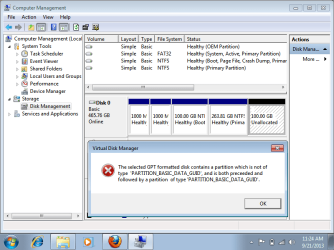
I am unable to do new partition in windows 7 ultimate (64 bit) operating system.

Please find error message in attachment.

Thanks,
 

Attachments

  • win7error.png
    win7error.png
    27.8 KB · Views: 3
Last edited:

My Computer My Computer

At a glance

Windows 7 Ultimate
Computer type
Laptop
Computer Manufacturer/Model Number
Lenovo
OS
Windows 7 Ultimate
I found this elsewhere:

"You can only have four partitions on the same hard drive.

dividing the Unallocated space would give you 5.
which you can not have.

i know you are going to say,
that only makes four.
well during the install of windows 7 it creates a small partition for start up system files.
which will make it 5."

I didn't know this either!! But it might answer your question.
 

My Computer My Computer

At a glance

Windows 7 Ultimate X64
OS
Windows 7 Ultimate X64
I found this elsewhere:

"You can only have four partitions on the same hard drive.

dividing the Unallocated space would give you 5.
which you can not have.

i know you are going to say,
that only makes four.
well during the install of windows 7 it creates a small partition for start up system files.
which will make it 5."

I didn't know this either!! But it might answer your question.

I think that is true for a MBR partitioned drive but GPT drives can have a lot more partitions than that.

Edit: I still don't understand that message though, sorry.
 

My Computer My Computer

At a glance

Windows 10 Education 64 bitAMD Phenom II X4 980 Black Edition Deneb 3.7GHz8GB 4GBx2 Kingston PC10600 DDR3 1333 MemoryZotac NVIDIA Geforce GT640 2 Gig DDR3 PCIe
Computer type
PC/Desktop
Computer Manufacturer/Model Number
Home Built
OS
Windows 10 Education 64 bit
CPU
AMD Phenom II X4 980 Black Edition Deneb 3.7GHz
Motherboard
Asus M4N68T-M V2 µATX Motherboard
Memory
8GB 4GBx2 Kingston PC10600 DDR3 1333 Memory
Graphics Card(s)
Zotac NVIDIA Geforce GT640 2 Gig DDR3 PCIe
Sound Card
VIA VT1708s High Definition Audio 8-channel Onboard
Monitor(s) Displays
22" LG E2242 1080p and 2 19" I-INC AG191D
Screen Resolution
1280x1024 - 1920x1080 - 1280x1024
Hard Drives
Crucial M100 256 GB SSD and 500 GB WD Blue SATA
PSU
Thermaltake TR 620
Case
Power Up Black ATX Mid-Tower Case
Cooling
Stock heatsink and fan
Keyboard
Logitech Wireless K350 Wave
Mouse
Logitech Wireless M570 Trackman Wheel
Internet Speed
80 Mbps Down 30 Mbps Up
Antivirus
Windows Defender
Browser
Internet Explorer 11
Other Info
HP DVD1040e Lightscribe - External USB2
Thanks for your quick reply john.

well during the install of windows 7 it creates a small partition for start up system files.
which will make it 5. -- I have seen my friends windows 7 laptop, he's able to created 5 partitions including those start up system files.

When I create new sample volume, it shows an error message like "The Operation you selected will convert the selected basic disks to dynamic disks. If you convert the disks to dynamic, you will not be able to start installed operating systems from any volume on the disks,, are you sure you want to continue? " If I continue I got PARTITION_BASIC_DATA_GUID error.

Please suggest me how do I proceed now.

Thanks,
 

My Computer My Computer

At a glance

Windows 7 Ultimate
Computer type
Laptop
Computer Manufacturer/Model Number
Lenovo
OS
Windows 7 Ultimate
I suspect it has something to do with those first two 1000 MB partitions. Custom OEM partitions from the looks of it. Other than that though, that error message is over my head.

Q. How many partitions can a GPT disk have? A. The specification allows an almost unlimited number of partitions. However, the Windows implementation restricts this to 128 partitions. The number of partitions is limited by the amount of space reserved for partition entries in the GPT.

Windows and GPT FAQ
 

My Computer My Computer

At a glance

Windows 10 Education 64 bitAMD Phenom II X4 980 Black Edition Deneb 3.7GHz8GB 4GBx2 Kingston PC10600 DDR3 1333 MemoryZotac NVIDIA Geforce GT640 2 Gig DDR3 PCIe
Computer type
PC/Desktop
Computer Manufacturer/Model Number
Home Built
OS
Windows 10 Education 64 bit
CPU
AMD Phenom II X4 980 Black Edition Deneb 3.7GHz
Motherboard
Asus M4N68T-M V2 µATX Motherboard
Memory
8GB 4GBx2 Kingston PC10600 DDR3 1333 Memory
Graphics Card(s)
Zotac NVIDIA Geforce GT640 2 Gig DDR3 PCIe
Sound Card
VIA VT1708s High Definition Audio 8-channel Onboard
Monitor(s) Displays
22" LG E2242 1080p and 2 19" I-INC AG191D
Screen Resolution
1280x1024 - 1920x1080 - 1280x1024
Hard Drives
Crucial M100 256 GB SSD and 500 GB WD Blue SATA
PSU
Thermaltake TR 620
Case
Power Up Black ATX Mid-Tower Case
Cooling
Stock heatsink and fan
Keyboard
Logitech Wireless K350 Wave
Mouse
Logitech Wireless M570 Trackman Wheel
Internet Speed
80 Mbps Down 30 Mbps Up
Antivirus
Windows Defender
Browser
Internet Explorer 11
Other Info
HP DVD1040e Lightscribe - External USB2
I recommend downloading "Mini Tool Partition Wizard" free version which might succeed when the Windows version fails good luck.
 

My Computer My Computer

At a glance

w7 ult 64 and w7 hp 64 X 2 mint 64 8.1 64 10w...
Computer type
PC/Desktop
OS
w7 ult 64 and w7 hp 64 X 2 mint 64 8.1 64 10wtp 64
If you haven't already, I would burn a set of recovery disks. Messing around with the partition structure may break the factory utility that you run from the hard drive.
 

My Computer My Computer

At a glance

Windows 10 Education 64 bitAMD Phenom II X4 980 Black Edition Deneb 3.7GHz8GB 4GBx2 Kingston PC10600 DDR3 1333 MemoryZotac NVIDIA Geforce GT640 2 Gig DDR3 PCIe
Computer type
PC/Desktop
Computer Manufacturer/Model Number
Home Built
OS
Windows 10 Education 64 bit
CPU
AMD Phenom II X4 980 Black Edition Deneb 3.7GHz
Motherboard
Asus M4N68T-M V2 µATX Motherboard
Memory
8GB 4GBx2 Kingston PC10600 DDR3 1333 Memory
Graphics Card(s)
Zotac NVIDIA Geforce GT640 2 Gig DDR3 PCIe
Sound Card
VIA VT1708s High Definition Audio 8-channel Onboard
Monitor(s) Displays
22" LG E2242 1080p and 2 19" I-INC AG191D
Screen Resolution
1280x1024 - 1920x1080 - 1280x1024
Hard Drives
Crucial M100 256 GB SSD and 500 GB WD Blue SATA
PSU
Thermaltake TR 620
Case
Power Up Black ATX Mid-Tower Case
Cooling
Stock heatsink and fan
Keyboard
Logitech Wireless K350 Wave
Mouse
Logitech Wireless M570 Trackman Wheel
Internet Speed
80 Mbps Down 30 Mbps Up
Antivirus
Windows Defender
Browser
Internet Explorer 11
Other Info
HP DVD1040e Lightscribe - External USB2
Looking again there rather a lot of "primary partitions" could this be a factor?
 

My Computer My Computer

At a glance

w7 ult 64 and w7 hp 64 X 2 mint 64 8.1 64 10w...
Computer type
PC/Desktop
OS
w7 ult 64 and w7 hp 64 X 2 mint 64 8.1 64 10wtp 64
Where is the C drive letter for the large Win7 partition? Have you made other changes which you didn't mention because I've never seen C drive not be lettered in Disk Mgmt?

Compounding this an error is flagging implying you have a GPT disk but you also have an Active partition and the conversion warning error which would only be for an MBR disk. So we have to assume you have an MBR disk.

This can be confirmed with certainty by rightclicking the area of the Disk Mgmt Drive Map labeled Disk 0 to see what it offers to convert to. Does it say Convert to GPT? Then it's MBR disk.


Do not attempt to Convert to GPT or Dynamic disk!
You didn't try such a thing before, did you?

In this case the Best Practice for adding another partition where four Primary already exist - while keeping the System and Recovery/OEM partitions bootable as necessary - is to use free Partition Wizard to convert C to Logical, then create the adjacent new partition as Logical, too.

This procedure to convert C to Logical is illustrated in this video: How to set partition as Primary or Logical.

The to create an adjacent new Logical sub-partition: Partition Wizard Create Partition Video Help

Once you've converted the only suitable partition C to Logical you can add as many adjacent Logical partitions as you wish.

But there is either a read anomaly or serious problem when the C drive letter is not showing in Disk Mgmt. Let us see a drive map and listings from Partition Wizard.

 
Back
Top