
Creation of Win 7 System Image to External Drive Fails

Durango

New member
Member
Local time
1:00 PM
Messages
83
Location
North Central Arkansas
I have two Seagate 2TB external drives that I want to use for backup purposes (system image only). The older drive is USB 2.0 and it works fine, whether it's plugged into a 2.0 or 3.0 port.

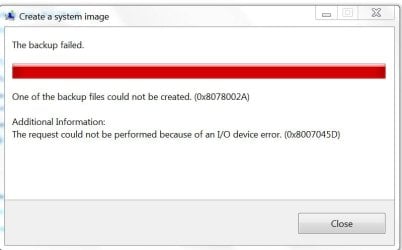
My new drive is USB 3.0, and it is causing me problems. It will store data files, but not a system image. When I try to create a system image of my Win 7 Pro C: drive (and by default the EFI System Partition), it goes through the following steps:
- Windows is saving the backup
- Preparing to create the backup
- Preparing media
- Backing up EFI System Partition
At that point I get the Backup Failed screen shown in the attachment.

I am totally perplexed as to why one drive is successful and the other is not. Any help/advice would be appreciated. Thanks in advance.
 

Attachments
  • BackupFailed.JPG
    BackupFailed.JPG
    34.2 KB · Views: 0

My Computer My Computer

At a glance

win 7 proIntel Core i5-6600, 4 core @ 3.3GHz16 GB Crucial Ballistix2GB EVGA NVIDIA GeForce GTX950 GDDR5
Computer type
PC/Desktop
Computer Manufacturer/Model Number
Custom Build by Velocity Micro/Raptor Z55 SKYLAKE
OS
win 7 pro
CPU
Intel Core i5-6600, 4 core @ 3.3GHz
Motherboard
Asus Z170-P Intel Z170 base chipset
Memory
16 GB Crucial Ballistix
Graphics Card(s)
2GB EVGA NVIDIA GeForce GTX950 GDDR5
Sound Card
On-Board Integrated Realtek ALC887 7.1 Channel Audio
Monitor(s) Displays
Viewsonic 28"
Hard Drives
512GB Samsung 950 Pros PCIe 3.0 SSD
Two - 2TB 7200 SATA 600 with 64MB Cache
PSU
750 Watt EVGA SuperNOVA
Case
Full Sized ATX
Cooling
Intel High Performance Heatsink
Keyboard
Logitech Illuminated k740
Mouse
Logitech Wireless M310
Internet Speed
2.5 (slow DSL)
Antivirus
Microsoft Security Essentials, Malwarebytes
Browser
Internet Explorer 11
Other Info
TeamViewer installed
Acronis True Image installed
Try to make the image with this command where "S" is the address of the disk to where the image is written. You may need to change that to reflect your setup.:

wbadmin start backup -backupTarget:S: -include:C: -AllCritical -quiet
 

My Computer My Computer

At a glance

Vista, Windows7, Mint Mate, Zorin, Windows 8from 1.6GHz Duo to i7
Computer Manufacturer/Model Number
HP, Dell, Gateway, Toshiba - 4 laptops and 2 desktops
OS
Vista, Windows7, Mint Mate, Zorin, Windows 8
CPU
from 1.6GHz Duo to i7
Monitor(s) Displays
2x HP w2207
Hard Drives
5x HDD, 7x SSD, 12x Externals
Keyboard
with trackball - no mices
Mouse
Trackball mice
Internet Speed
DSL 6000
Try to make the image with this command where "S" is the address of the disk to where the image is written. You may need to change that to reflect your setup.:

wbadmin start backup -backupTarget:S: -include:C: -AllCritical -quiet
Well that is certainly worth trying.........thanks much for the advice.

Since C is the drive I'm trying to backup to external drive N, then I assume my command would be
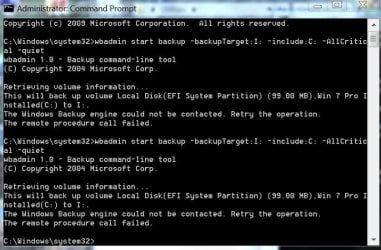
wbadmin start backup -backupTarget:N: -include:C: -AllCritical -quiet
 

My Computer My Computer

At a glance

win 7 proIntel Core i5-6600, 4 core @ 3.3GHz16 GB Crucial Ballistix2GB EVGA NVIDIA GeForce GTX950 GDDR5
Computer type
PC/Desktop
Computer Manufacturer/Model Number
Custom Build by Velocity Micro/Raptor Z55 SKYLAKE
OS
win 7 pro
CPU
Intel Core i5-6600, 4 core @ 3.3GHz
Motherboard
Asus Z170-P Intel Z170 base chipset
Memory
16 GB Crucial Ballistix
Graphics Card(s)
2GB EVGA NVIDIA GeForce GTX950 GDDR5
Sound Card
On-Board Integrated Realtek ALC887 7.1 Channel Audio
Monitor(s) Displays
Viewsonic 28"
Hard Drives
512GB Samsung 950 Pros PCIe 3.0 SSD
Two - 2TB 7200 SATA 600 with 64MB Cache
PSU
750 Watt EVGA SuperNOVA
Case
Full Sized ATX
Cooling
Intel High Performance Heatsink
Keyboard
Logitech Illuminated k740
Mouse
Logitech Wireless M310
Internet Speed
2.5 (slow DSL)
Antivirus
Microsoft Security Essentials, Malwarebytes
Browser
Internet Explorer 11
Other Info
TeamViewer installed
Acronis True Image installed
Correct !! And run command prompt as admin.
 

My Computer My Computer

At a glance

Vista, Windows7, Mint Mate, Zorin, Windows 8from 1.6GHz Duo to i7
Computer Manufacturer/Model Number
HP, Dell, Gateway, Toshiba - 4 laptops and 2 desktops
OS
Vista, Windows7, Mint Mate, Zorin, Windows 8
CPU
from 1.6GHz Duo to i7
Monitor(s) Displays
2x HP w2207
Hard Drives
5x HDD, 7x SSD, 12x Externals
Keyboard
with trackball - no mices
Mouse
Trackball mice
Internet Speed
DSL 6000
Try to make the image with this command where "S" is the address of the disk to where the image is written. You may need to change that to reflect your setup.:

wbadmin start backup -backupTarget:S: -include:C: -AllCritical -quiet
OK, I tried (twice) backing up to drive I and got the attached error message. What should I do next? Thanks.
 

Attachments

  • CommandPrompt.JPG
    CommandPrompt.JPG
    75.5 KB · Views: 0

My Computer My Computer

At a glance

win 7 proIntel Core i5-6600, 4 core @ 3.3GHz16 GB Crucial Ballistix2GB EVGA NVIDIA GeForce GTX950 GDDR5
Computer type
PC/Desktop
Computer Manufacturer/Model Number
Custom Build by Velocity Micro/Raptor Z55 SKYLAKE
OS
win 7 pro
CPU
Intel Core i5-6600, 4 core @ 3.3GHz
Motherboard
Asus Z170-P Intel Z170 base chipset
Memory
16 GB Crucial Ballistix
Graphics Card(s)
2GB EVGA NVIDIA GeForce GTX950 GDDR5
Sound Card
On-Board Integrated Realtek ALC887 7.1 Channel Audio
Monitor(s) Displays
Viewsonic 28"
Hard Drives
512GB Samsung 950 Pros PCIe 3.0 SSD
Two - 2TB 7200 SATA 600 with 64MB Cache
PSU
750 Watt EVGA SuperNOVA
Case
Full Sized ATX
Cooling
Intel High Performance Heatsink
Keyboard
Logitech Illuminated k740
Mouse
Logitech Wireless M310
Internet Speed
2.5 (slow DSL)
Antivirus
Microsoft Security Essentials, Malwarebytes
Browser
Internet Explorer 11
Other Info
TeamViewer installed
Acronis True Image installed
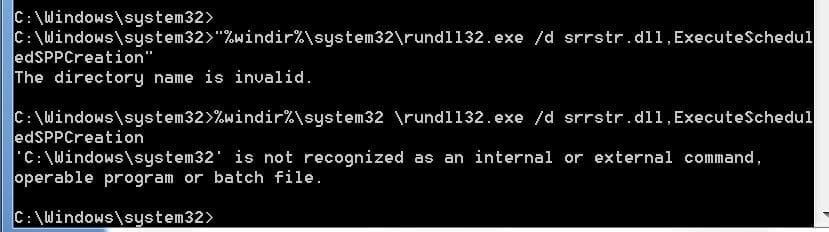
Hmm, looks like your VSS is kaputt. Try this command first:

"%windir%\system32\rundll32.exe /d srrstr.dll,ExecuteScheduledSPPCreation"
 

My Computer My Computer

At a glance

Vista, Windows7, Mint Mate, Zorin, Windows 8from 1.6GHz Duo to i7
Computer Manufacturer/Model Number
HP, Dell, Gateway, Toshiba - 4 laptops and 2 desktops
OS
Vista, Windows7, Mint Mate, Zorin, Windows 8
CPU
from 1.6GHz Duo to i7
Monitor(s) Displays
2x HP w2207
Hard Drives
5x HDD, 7x SSD, 12x Externals
Keyboard
with trackball - no mices
Mouse
Trackball mice
Internet Speed
DSL 6000
Hmm, looks like your VSS is kaputt. Try this command first:

"%windir%\system32\rundll32.exe /d srrstr.dll,ExecuteScheduledSPPCreation"
OK, I will. But I have a quick question. Where does VSS reside in my system? The reason I ask is because I can successfully create a system image of C: on another older Seagate drive (USB 2.0), as well as on an internal drive. It's only on my new Seagate drive (USB 3.0) that is causing me problems. Actually I have two new USB 3.0 external drives.........both have the same problem.
 

My Computer My Computer

At a glance

win 7 proIntel Core i5-6600, 4 core @ 3.3GHz16 GB Crucial Ballistix2GB EVGA NVIDIA GeForce GTX950 GDDR5
Computer type
PC/Desktop
Computer Manufacturer/Model Number
Custom Build by Velocity Micro/Raptor Z55 SKYLAKE
OS
win 7 pro
CPU
Intel Core i5-6600, 4 core @ 3.3GHz
Motherboard
Asus Z170-P Intel Z170 base chipset
Memory
16 GB Crucial Ballistix
Graphics Card(s)
2GB EVGA NVIDIA GeForce GTX950 GDDR5
Sound Card
On-Board Integrated Realtek ALC887 7.1 Channel Audio
Monitor(s) Displays
Viewsonic 28"
Hard Drives
512GB Samsung 950 Pros PCIe 3.0 SSD
Two - 2TB 7200 SATA 600 with 64MB Cache
PSU
750 Watt EVGA SuperNOVA
Case
Full Sized ATX
Cooling
Intel High Performance Heatsink
Keyboard
Logitech Illuminated k740
Mouse
Logitech Wireless M310
Internet Speed
2.5 (slow DSL)
Antivirus
Microsoft Security Essentials, Malwarebytes
Browser
Internet Explorer 11
Other Info
TeamViewer installed
Acronis True Image installed
Hmm, looks like your VSS is kaputt. Try this command first:

"%windir%\system32\rundll32.exe /d srrstr.dll,ExecuteScheduledSPPCreation"
Me again. I guess I don't know exactly how to enter this command.....I always get confused on the %'s.

If I am at the Administrator: Command Prompt screen, this is what I see:
C:\Windows\system32>
What exactly do I enter at this prompt?
 

My Computer My Computer

At a glance

win 7 proIntel Core i5-6600, 4 core @ 3.3GHz16 GB Crucial Ballistix2GB EVGA NVIDIA GeForce GTX950 GDDR5
Computer type
PC/Desktop
Computer Manufacturer/Model Number
Custom Build by Velocity Micro/Raptor Z55 SKYLAKE
OS
win 7 pro
CPU
Intel Core i5-6600, 4 core @ 3.3GHz
Motherboard
Asus Z170-P Intel Z170 base chipset
Memory
16 GB Crucial Ballistix
Graphics Card(s)
2GB EVGA NVIDIA GeForce GTX950 GDDR5
Sound Card
On-Board Integrated Realtek ALC887 7.1 Channel Audio
Monitor(s) Displays
Viewsonic 28"
Hard Drives
512GB Samsung 950 Pros PCIe 3.0 SSD
Two - 2TB 7200 SATA 600 with 64MB Cache
PSU
750 Watt EVGA SuperNOVA
Case
Full Sized ATX
Cooling
Intel High Performance Heatsink
Keyboard
Logitech Illuminated k740
Mouse
Logitech Wireless M310
Internet Speed
2.5 (slow DSL)
Antivirus
Microsoft Security Essentials, Malwarebytes
Browser
Internet Explorer 11
Other Info
TeamViewer installed
Acronis True Image installed
Just copy and paste it the way I posted it.
 

My Computer My Computer

At a glance

Vista, Windows7, Mint Mate, Zorin, Windows 8from 1.6GHz Duo to i7
Computer Manufacturer/Model Number
HP, Dell, Gateway, Toshiba - 4 laptops and 2 desktops
OS
Vista, Windows7, Mint Mate, Zorin, Windows 8
CPU
from 1.6GHz Duo to i7
Monitor(s) Displays
2x HP w2207
Hard Drives
5x HDD, 7x SSD, 12x Externals
Keyboard
with trackball - no mices
Mouse
Trackball mice
Internet Speed
DSL 6000
Just copy and paste it the way I posted it.
That's what I did, both with and then without the "" marks. Attached are the error notices I got. So I am doing something wrong.
 

Attachments

  • Capture1.JPG
    Capture1.JPG
    35.5 KB · Views: 0

My Computer My Computer

At a glance

win 7 proIntel Core i5-6600, 4 core @ 3.3GHz16 GB Crucial Ballistix2GB EVGA NVIDIA GeForce GTX950 GDDR5
Computer type
PC/Desktop
Computer Manufacturer/Model Number
Custom Build by Velocity Micro/Raptor Z55 SKYLAKE
OS
win 7 pro
CPU
Intel Core i5-6600, 4 core @ 3.3GHz
Motherboard
Asus Z170-P Intel Z170 base chipset
Memory
16 GB Crucial Ballistix
Graphics Card(s)
2GB EVGA NVIDIA GeForce GTX950 GDDR5
Sound Card
On-Board Integrated Realtek ALC887 7.1 Channel Audio
Monitor(s) Displays
Viewsonic 28"
Hard Drives
512GB Samsung 950 Pros PCIe 3.0 SSD
Two - 2TB 7200 SATA 600 with 64MB Cache
PSU
750 Watt EVGA SuperNOVA
Case
Full Sized ATX
Cooling
Intel High Performance Heatsink
Keyboard
Logitech Illuminated k740
Mouse
Logitech Wireless M310
Internet Speed
2.5 (slow DSL)
Antivirus
Microsoft Security Essentials, Malwarebytes
Browser
Internet Explorer 11
Other Info
TeamViewer installed
Acronis True Image installed
Hmm, I don't know what the problem could be. But the "" marks are part of the command.
 

My Computer My Computer

At a glance

Vista, Windows7, Mint Mate, Zorin, Windows 8from 1.6GHz Duo to i7
Computer Manufacturer/Model Number
HP, Dell, Gateway, Toshiba - 4 laptops and 2 desktops
OS
Vista, Windows7, Mint Mate, Zorin, Windows 8
CPU
from 1.6GHz Duo to i7
Monitor(s) Displays
2x HP w2207
Hard Drives
5x HDD, 7x SSD, 12x Externals
Keyboard
with trackball - no mices
Mouse
Trackball mice
Internet Speed
DSL 6000
Back
Top