Currency Format - Change

How to Change Currency Format in Windows 7 and Windows 8

   Information
This tutorial will show you how to change the regional currency format to how you want it to display in Windows 7 and Windows 8.


Here's How: 1. Open the Control Panel (icons view) in Windows 7 or Windows 8, and click on the Region and Language (Windows 7) or Region (Windows 8) icon.


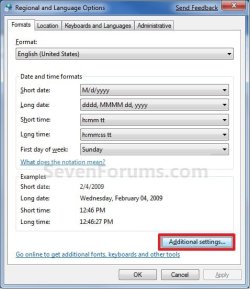
2. Under the Formats tab, select the format regional language that you want to use. (See screenshot below step 3)

3. Click/tap on the Additional Settings button. (See screenshot below) Formats-1.jpg
4. Click on the Currency tab, and change the currency formats to how you want them displayed. (See screenshot below) Currency_Format-2.jpg
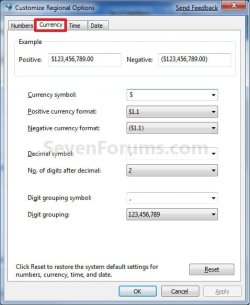
5. When finished, click/tap on OK. (See screenshot above)

6. Click/tap on OK. (See screenshot below step 3)
That's it,
Shawn


Last edited:
What if the country you want to change it to (Philippines) is not listed. Can it be added?? I also want to change the currency to the Philippine peso. If this can not be done here then how about the desk top gadgets?? There is a currency converter available but again the Philippines is not listed as an option?? Can the countries currency (Philippine Peso) be added here?? This is real important to my wife who sends money home a lot over the internet.

Thanks,
Timewarpone
 

My Computer

Computer Manufacturer/Model Number
Custom Built
OS
Windows 7 Ultimate x64
CPU
Intel E8400
Motherboard
ASUS P5Q SE PLUS
Memory
4GB Kingston HyperX (4x1gb) 1066Mhz Model# KHX8500D2K2/2GN
Graphics Card(s)
Galaxy GTS 450
Sound Card
Stock
Monitor(s) Displays
Dell 1908FP, SONY TV KDS-60A3000 via HDMI Cable
Screen Resolution
1280x1024 (Native), TV (1080p) 1920x1080 (Recommended)
Hard Drives
WD3000HLFS 300GB SATA VelociRaptor,
WD3200AAKS SATA HDD
PSU
Antec TP-650 (650 watts)
Case
Antec 300
Cooling
7-120mm case fans
Keyboard
Logitech Wired Slim Keyboard
Mouse
Gigabyte Wired Advanced Wheel Mouse
Internet Speed
DSL
Other Info
Installed 120mm heatsink over CPU with a 120mm case fan using Artic Silver 5 thermal paste. I downloaded and installed the Win 7 Graphics Driver From The Nvidia web site.
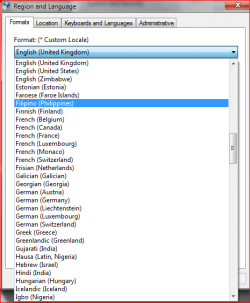
Maybe you looked from the wrong place? Choose Filipino, not Philippines.

Kari

filipino.PNG
 

My Computer

Computer type
Laptop
Computer Manufacturer/Model Number
HP ENVY 17-1150eg
OS
Windows 10 Pro x64 EN-GB
CPU
1.6 GHz Intel Core i7-720QM Processor
Memory
6 GB
Graphics Card(s)
ATI Mobility Radeon HD 5850 Graphics
Sound Card
Beats sound system with integrated subwoofer
Monitor(s) Displays
17" laptop display, 22" LED and 32" Full HD TV through HDMI
Screen Resolution
1600*900 (1), 1920*1080 (2&3)
Hard Drives
Internal: 2 x 500 GB SATA Hard Disk Drive 7200 rpm
External: 2TB for backups, 3TB USB3 network drive for media
Cooling
As Envy runs a bit warm, I have it on a Cooler Master pad
Keyboard
Logitech diNovo Media Desktop Laser (bluetooth)
Mouse
Logitech Performance Mouse MX
Internet Speed
50/10 Mbps VDSL
Antivirus
Windows Defender 4.3.9431.0
Browser
Maxthon 3.5.2., IE11
Thank You for the info. I don't know how I missed it the first time. How about the desk top gadgets?? I would like the currency converter there also to display Philippine Peso's. (If Possible) I went back and looked for Filipino and it was not listed.

Regards,
Vince
 

My Computer

Computer Manufacturer/Model Number
Custom Built
OS
Windows 7 Ultimate x64
CPU
Intel E8400
Motherboard
ASUS P5Q SE PLUS
Memory
4GB Kingston HyperX (4x1gb) 1066Mhz Model# KHX8500D2K2/2GN
Graphics Card(s)
Galaxy GTS 450
Sound Card
Stock
Monitor(s) Displays
Dell 1908FP, SONY TV KDS-60A3000 via HDMI Cable
Screen Resolution
1280x1024 (Native), TV (1080p) 1920x1080 (Recommended)
Hard Drives
WD3000HLFS 300GB SATA VelociRaptor,
WD3200AAKS SATA HDD
PSU
Antec TP-650 (650 watts)
Case
Antec 300
Cooling
7-120mm case fans
Keyboard
Logitech Wired Slim Keyboard
Mouse
Gigabyte Wired Advanced Wheel Mouse
Internet Speed
DSL
Other Info
Installed 120mm heatsink over CPU with a 120mm case fan using Artic Silver 5 thermal paste. I downloaded and installed the Win 7 Graphics Driver From The Nvidia web site.
Thank You for the info. I don't know how I missed it the first time. How about the desk top gadgets?? I would like the currency converter there also to display Philippine Peso's. (If Possible) I went back and looked for Filipino and it was not listed.

Regards,
Vince

I use this one on my browser,

Forex Tools

If you don't like this one there are many to choose from, try More Gadgets in (right click on your desktop, click Gadgets) or a search for 'currency exchange gadgets'.

Most I've seen over the years have the Filipino Peso.
 

My Computer

Computer type
PC/Desktop
Computer Manufacturer/Model Number
76~2.0
OS
Windows 7 Ult x64 - SP1/ Windows 8 Pro x64
CPU
Intel Core i5-3570K 4.6GHz
Motherboard
Gigabyte GA-Z77X UD3H, f18
Memory
8GB (2X4GB) DDR3 1600 Corsair Vengeance CL8 1.5v
Graphics Card(s)
Sapphire HD 7770 Vapor-X OC 1GB DDR5
Sound Card
Onboard VIA VT2021
Monitor(s) Displays
22" LCD Dell
Screen Resolution
1680x1050
Hard Drives
Samsung 840Pro 128GB SSD,
Seagate Barracuda 500GB SATA2 7200rpm 32MB cache, Seagate Barracuda 1TB SATA2 7200rpm 32MB cache,
PSU
Corsair HX650W
Case
Cooler Master Storm Scout
Cooling
Corsair H80 2x12cm Noctua NF P12 , 2x14cm case fans
Keyboard
Logitech Wave
Mouse
CM Sentinel
Internet Speed
Dismal
Antivirus
Avast
Browser
Opera Next
Other Info
Haswell laptop: HP Envy 17t-j, i7-4700MQ, GeForce 740M 2GB DDR3, 17.3" Full HD 1920x1080, 16GB RAM, Samsung 840 Pro 128GB, 1TB Hitachi 7200 HDD,
Desktop: eSATA ports,
External eSATA Seagate 500GB SATA2 7200rpm,
External WD USB 500GB
This was a real big help. Many, many to choose from.

Thanks,
Vince
 

My Computer

Computer Manufacturer/Model Number
Custom Built
OS
Windows 7 Ultimate x64
CPU
Intel E8400
Motherboard
ASUS P5Q SE PLUS
Memory
4GB Kingston HyperX (4x1gb) 1066Mhz Model# KHX8500D2K2/2GN
Graphics Card(s)
Galaxy GTS 450
Sound Card
Stock
Monitor(s) Displays
Dell 1908FP, SONY TV KDS-60A3000 via HDMI Cable
Screen Resolution
1280x1024 (Native), TV (1080p) 1920x1080 (Recommended)
Hard Drives
WD3000HLFS 300GB SATA VelociRaptor,
WD3200AAKS SATA HDD
PSU
Antec TP-650 (650 watts)
Case
Antec 300
Cooling
7-120mm case fans
Keyboard
Logitech Wired Slim Keyboard
Mouse
Gigabyte Wired Advanced Wheel Mouse
Internet Speed
DSL
Other Info
Installed 120mm heatsink over CPU with a 120mm case fan using Artic Silver 5 thermal paste. I downloaded and installed the Win 7 Graphics Driver From The Nvidia web site.
Back
Top