
CaptainKen
New member
- Local time
- 5:36 AM
- Messages
- 2
I created a custom taskbar toolbar (right click taskbar, Toolbars, New Toolbar...).
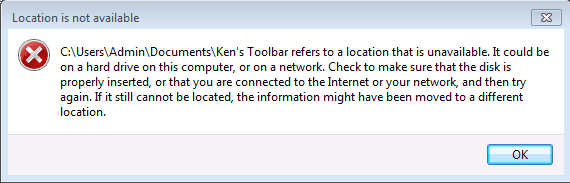
All was well until I rename or delete it. Once it is renamed or deleted and I go back in and click "New toolbar..." I get the "Location Is Not Available" error window.
I've searched the registry for the original name of the toolbar, but found nothing. Also looked in the following area, but struck out again.
C:\Users\Admin\AppData\Roaming\Microsoft\Internet Explorer\Quick Launch
The only work around I have found is to create a new toolbar and then it stops looking for the old one. Therefore, Windows must be remembering the last custom toolbar and trying to use that as the default location to open to.
I've created a screencast of the whole process here:
TechSmith | Screencast.com, online video sharing, ToolbarLocationIsNotAvailable
All was well until I rename or delete it. Once it is renamed or deleted and I go back in and click "New toolbar..." I get the "Location Is Not Available" error window.
I've searched the registry for the original name of the toolbar, but found nothing. Also looked in the following area, but struck out again.
C:\Users\Admin\AppData\Roaming\Microsoft\Internet Explorer\Quick Launch
The only work around I have found is to create a new toolbar and then it stops looking for the old one. Therefore, Windows must be remembering the last custom toolbar and trying to use that as the default location to open to.
I've created a screencast of the whole process here:
TechSmith | Screencast.com, online video sharing, ToolbarLocationIsNotAvailable
Attachments
Last edited:
My Computer
- OS
- Windows &


