
Custom Windows components (as in XP)

bawldiggle

GrayGhost2 ret.
Pro User
VIP
Local time
7:47 PM
Messages
895
Location
Australia
In Win-XP I can modify colors and fonts of Windows Components. eg, caption bar, component colors, etc
Start > Settings > Control Panel > Display
Display (Dialog) > Appearance (tab) > Advanced (button)
- then different Windows components can be tweaked
In Win 7/8 ~Display" does not have "Appearance" feature

In Win-7 x32 I fluked it at one stage but I don't remember how? :confused:

So many Win components are white.
With multiple windows/dialogs open sometimes it is very difficult to decipher buttons/controls windows/dialogs.
eg, WinExp in Win8 x64 is very white and hardly contrasts with a Word document etc.
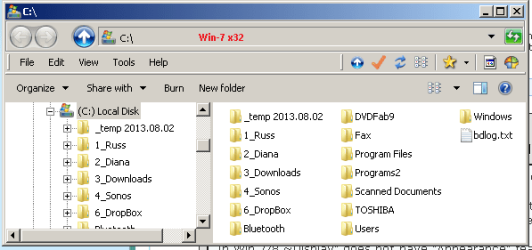
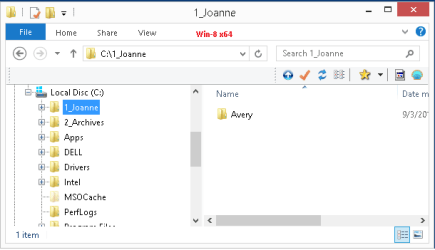
Win7 x32 WinExp.png Win8 x64 WinExp.png

How do I get the XP like (my fluked Win7) in Win7 + Win8 ?

Thank you :)
-------------------
Dell laptop
Win8 x64
Classic Shell Start + WinExplorer

Toshiba laptop
Win7 x32
Classic Shell Start + WinExplorer
 

My Computer

Computer type
PC/Desktop
Computer Manufacturer/Model Number
Toshiba, Lenovo (laptops) + 4 rigs
OS
XP Pro (x86) | 7 HP (x86) & (x64) | 7 Pro (x64)
In Win-XP I can modify colors and fonts of Windows Components. eg, caption bar, component colors, etc
Start > Settings > Control Panel > Display
Display (Dialog) > Appearance (tab) > Advanced (button)
- then different Windows components can be tweaked
In Win 7/8 ~Display" does not have "Appearance" feature

In Win-7 x32 I fluked it at one stage but I don't remember how? :confused:

So many Win components are white.
With multiple windows/dialogs open sometimes it is very difficult to decipher buttons/controls windows/dialogs.
eg, WinExp in Win8 x64 is very white and hardly contrasts with a Word document etc.

View attachment 284489 View attachment 284490

How do I get the XP like (my fluked Win7) in Win7 + Win8 ?

Thank you :)
-------------------
Dell laptop
Win8 x64
Classic Shell Start + WinExplorer

Toshiba laptop
Win7 x32
Classic Shell Start + WinExplorer

Hi GrayGhost2,

Maybe someone more proficient in tweaking the apperance of windows would be able to offer better assistance.

However, you can check these tutorials for changing various appearances of windows:

http://www.sevenforums.com/tutorials/3716-window-color-appearance-enable-disable-change.html?filter[2]=Appearance%20Personalize

http://www.sevenforums.com/tutorials/28377-theme-how-apply-custom-themes.html?filter[2]=Appearance%20Personalize

http://www.sevenforums.com/tutorials/23252-control-panel-change-default-icons.html?filter[2]=Appearance%20Personalize

http://www.sevenforums.com/tutorials/34579-enabling-custom-themes-windows-7-a.html?filter[2]=Appearance%20Personalize

Hope it helps.
 

My Computer

Computer type
PC/Desktop
OS
Winndows 7 32 bit

My Computer

Computer type
PC/Desktop
Computer Manufacturer/Model Number
Custom assembled by me :}
OS
Win-7-Pro64bit 7-H-Prem-64bit
CPU
i7-5930K 2nd i9-9940x both water blocked VRM's too
Motherboard
ASUS SABERTOOTH X99 2nd ASUS x299 Apex
Memory
Trident-z 3200C14 2nd Trident-z 3600C16
Graphics Card(s)
EVGA 1080ti ftw3 2nd Titan Xp both water blocked
Sound Card
Built-in Realtek
Monitor(s) Displays
1-AOC G2460PG 24"G-Sync 144Hz/ 2nd 1-ASUS VG248QE 24" 144Hz
Screen Resolution
1920 x 1080 144Hz
Hard Drives
2-Samsung M.2 Evo & Evo Plus
2-Samsung 850 EVO 500GB SSD's/ 3-2.5 W.D. Black 1tb-&3-1tb/3-3.5 WD Black 1tb hdd's
PSU
EVGA SuperNOVA 1000-P2 2nd 1200-P2
Case
2-Corsair Obsidian Series 450D Black ATX Mid Tower
Cooling
Custom water loops
Keyboard
Logitech G710+/ 2nd Logitech G910
Mouse
2-RedDragon M901 Perdition 16400 dpi Gaming mouse = wired
Internet Speed
Comcast Ping 19ms 89.31mbps download speed 6.12mbps upload
Antivirus
Malwarebytes Pro/ Superantispyware Pro
Browser
FireFox & Pale moon
Other Info
2nd ASUS X299 Apex/Intel i9-9940x with Custom water loop/7H-Prem-x64/Corsair 450D case/Ram Trident-z 3600C16 4x8gb / Samsung970Evo plus 500gb SSD/Dual ssd EZ swap evo/PSU EVGA SuperNova 1200w-P2 80+Platinum/GPU Titan Xp /8-ML-140 on push-pull on 2-280GTX rads
Back
Top