Custom Windows Installations - Windows 7

How to Use vLite to Trim Down Windows 7 for a Custom Installation

   Information
For anyone who has ever used Windows, there is one fact that can never be denied...it is bloated. Even with Windows 7 having a lower footprint and more customization than Windows Vista, it is still bloated. This tutorial aims to help the user with using vLite: a program designed by a developer named nuhi. To summarize the program's ability, it takes in the source files of a Windows Vista/7 installation, you choose an edition to modify, and then components can be added, modified, or deleted.

   Warning
Attempting to make a custom installation of Windows is not a daunting task but many things can go wrong...as always follow my optional testing environment below to make sure that any issues won't be encountered when a clean install is performed on your native hardware. Please note that it is highly inadvisable to do an upgrade with a lite build...always do a clean install


PREREQUISITES
Windows Vista/7 (RC or above recommended)
A CPU that supports Virtualization (optional)
2GB or more of RAM (optional, for Virtual PC/VMWare/etc.)
6GB or more of free Hard Disk Space
   Tip
Install either Virtual PC 2007, VMware Workstation or another virtualization solution to test your builds in a virtual environment before testing on native hardware.


Heres How:
1. To start off download vLite and the Windows Vista SP1 WAIK.
   Warning
To guarantee no compatibility issues between vLite and Windows 7, set the vLite installer for Windows Vista compatibility and run as a administrator. Do the same for the WAIK setup.exe on the ISO. When running vLite always run as an administrator.

   Tip
Download MagicDisc or another ISO mount program and just mount the WAIK instead of burning it to a DVD


2. Browse to the location of the installation files.
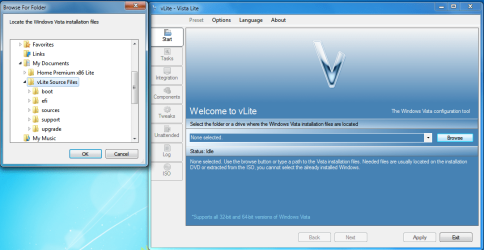
vLite Interface.png
   Tip
If you choose a DVD or a mounted ISO than you will be required to copy all files off the media to a location on the computer.


3. Choose your edition of Windows to modify.
NOTE: I will be using Ultimate edition in this tutorial and in all my INIs.
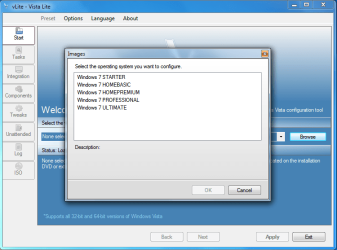
OS Choice.png
4. Choose your options.

  • Integration
  • Components
  • Tweaks
  • Unattended setup (Do not select this one if modifying Windows 7)
  • Bootable ISO
    • Enable before apply.(Click this to make an ISO at any time during this process)
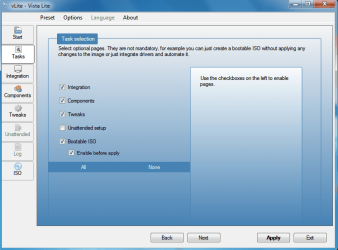
Task Selection.png
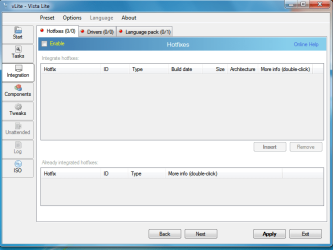
5. Integration Tab: Hotfixes, Drivers, and Language Packs.
Integration Tab.png
·For Hotfixes you will need either the .cab or .msu of the update (these can normally be found on Microsoft's website...Windows Vista only right now)
·For Drivers you will need the *.ini(s) of the driver...these can be found in the folders of driver installers (use Google)
·For Language Packs you will need to find the .cab of the language you want to install (use Google)
   Tip
Can't select anything in these windows? Don't forget to hit the enable button in the top left hand corner.

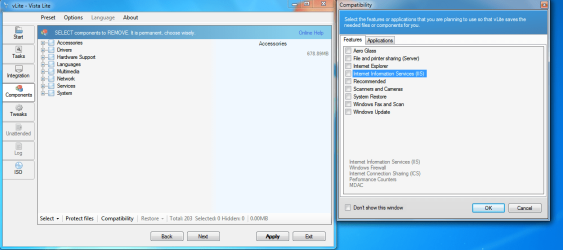
6. Components Tab: Select from the categories listed. Their explanations will be available when you highlight an entry including any possible warnings.
Components Tab.png
   Tip
When you click on the tab you will notice that a windows comes up with presets (ex. Aero Glass). Check beside one of these to hide the services/files needed for that feature so you don't accidentally delete/corrupt it.

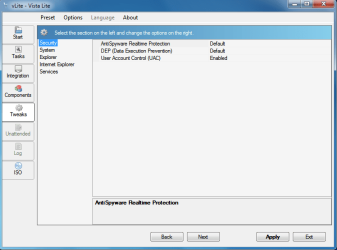
7. Tweak Tab: Choose various tweaks to enable by default.
Tweaks Tab.png
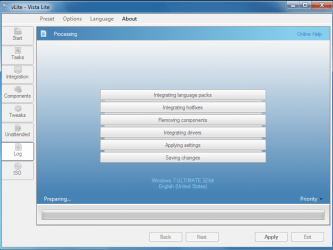
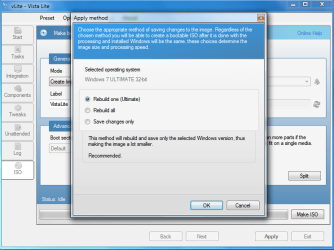
8.Hit apply and watch vLite strip 7 down to your specifications. You can choose to either rebuild one edition (your chosen one), all of them, or just save changes.
Edition Rebuild.png

Applying.PNG
   Tip
It is generally not recommended to rebuild all editions when you hit apply…this just wastes space considering you are going for the edition you chose


9. Deployment: Choose a method below
·The USB Key Method – Follow the link above to use your modified source files on a USB Key for installation
·The Burn Disc Method – Proceed to the ISO tab and choose “Direct Burn”. Give it a label and if necessary you can split the image up on multiple media. Hit “Make ISO” and your done
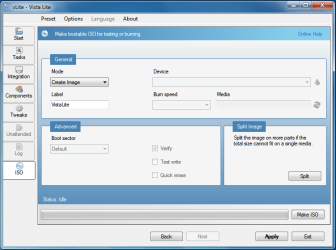
ISO Tab.png
Hope it helps
Chris


Last edited by a moderator:
Great tutorial, :thumbsup:

Will test it soon, when I find the time.

Greetz
 

My Computer

OS
Win7 Build 7600 x86
CPU
Pentium II 300MHz
Motherboard
Asus
Memory
32mb EDO RAM
Graphics Card(s)
Diamond Viper
Sound Card
Soundblaster 16
Monitor(s) Displays
14" AOC CRT 16K color
Screen Resolution
800x600
Hard Drives
300mb Quantum fireball
PSU
110 Watts
Cooling
Passive
Keyboard
Trust Ergonomic
Mouse
Generic
Internet Speed
256K u 128K d
Nice work!
Can i add wallpapers and some programs to it? I mean portable programs that is enough to copy to the right place.
How can I save all my currently used driver to use it in the installer? (sorry it is OFF)
Is it legal to modify the original installer?
 

My Computer

Computer Manufacturer/Model Number
home made
OS
Windows 7 RTM x64
CPU
AMD X2 5000+
Motherboard
Asrock
Memory
4GB
Graphics Card(s)
Nvidia 9400GT
Sound Card
onboard 6Ch
Monitor(s) Displays
Medion 22" + HannSpree 22"
Screen Resolution
1680X1050 + 1920X1080
Hard Drives
Intel SSD 80GB
WD 1.5 TB
WD 1 TB
Samsung 1TB X 3
PSU
noname
Case
noname
Cooling
Zalman
Keyboard
DeLUX multimedia keyboard
Mouse
Microsoft
Internet Speed
25MB/s
Nice work!
Can i add wallpapers and some programs to it? I mean portable programs that is enough to copy to the right place.
How can I save all my currently used driver to use it in the installer? (sorry it is OFF)
Is it legal to modify the original installer?
Im checking on the wallpaper/programs thing right now. When you run the installer of the driver...most of the time it dumps a folder pertaining to the driver and any apps that come with it in the program files folder. If you check its folder in there more than likely you will find the ini of the driver. You can also user DriverMax...it scans your current computer and outputs all the iNis...just as easy as that
 

My Computer

Computer Manufacturer/Model Number
Compal JFT02 (Custom Build Laptop)
OS
Windows 7 Home Premium x64 - Mac OS X 10.6.4 x64
CPU
Intel Core 2 Duo T9300 2.5 GHz
Motherboard
JFT02
Memory
4GB Kingston DDR2-800
Graphics Card(s)
NVIDIA Geforce 8600M GT (512MB Model)
Sound Card
Realtek HD Audio
Monitor(s) Displays
WUXGA Standard Laptop Display
Screen Resolution
1680*1050
Hard Drives
Toshiba 320GB 5400RPM Laptop HD
PSU
Standard Laptop Power Supply
Case
Standard Laptop Case
Cooling
Standard Laptop Cooling
Keyboard
Standard Laptop 105 Key-Keyboard
Mouse
Synaptics Touchpad
Internet Speed
Verizion Online DSL 3360/864 kbs (dl/up)
Amazing.
Congrats Zid!
 

My Computer

OS
Windows 7 PRO x64
CPU
Phenom II 1090T @ 4.00GHz
Motherboard
Crosshair IV Formula
Memory
8gb DDR3
Graphics Card(s)
1x ATI Diamond 5850
Monitor(s) Displays
50in HDTV (HDMI)
Screen Resolution
1080P
Hard Drives
2x 1TB barracuda
1x 1TB WD Black
1x 2TB WD
1x OCZ Vertex 2 40GB
PSU
1000w Xion
Case
Armor+ VH6000BWS
Cooling
W/C
Internet Speed
60Mbps down, 7 up

My Computer

Computer Manufacturer/Model Number
Compal JFT02 (Custom Build Laptop)
OS
Windows 7 Home Premium x64 - Mac OS X 10.6.4 x64
CPU
Intel Core 2 Duo T9300 2.5 GHz
Motherboard
JFT02
Memory
4GB Kingston DDR2-800
Graphics Card(s)
NVIDIA Geforce 8600M GT (512MB Model)
Sound Card
Realtek HD Audio
Monitor(s) Displays
WUXGA Standard Laptop Display
Screen Resolution
1680*1050
Hard Drives
Toshiba 320GB 5400RPM Laptop HD
PSU
Standard Laptop Power Supply
Case
Standard Laptop Case
Cooling
Standard Laptop Cooling
Keyboard
Standard Laptop 105 Key-Keyboard
Mouse
Synaptics Touchpad
Internet Speed
Verizion Online DSL 3360/864 kbs (dl/up)
I am glad you liked it...would have had it early if I hadn't literally fell asleep on my keyboard...
Get some sleep!
Or, buy a faster CPU instead of waiting for loading screens..(been there back in the day).lol, JK as i havnt even looked at your specs :P
 

My Computer

OS
Windows 7 PRO x64
CPU
Phenom II 1090T @ 4.00GHz
Motherboard
Crosshair IV Formula
Memory
8gb DDR3
Graphics Card(s)
1x ATI Diamond 5850
Monitor(s) Displays
50in HDTV (HDMI)
Screen Resolution
1080P
Hard Drives
2x 1TB barracuda
1x 1TB WD Black
1x 2TB WD
1x OCZ Vertex 2 40GB
PSU
1000w Xion
Case
Armor+ VH6000BWS
Cooling
W/C
Internet Speed
60Mbps down, 7 up
Nice work mate, well done :D
 

My Computer

Computer Manufacturer/Model Number
Compaq Desktop
OS
Windows 7 Ultimate x64
CPU
AMD Sempron Dual Core
Memory
3GB
Graphics Card(s)
NVIDIA GeForce 6150SE nForce 430
Screen Resolution
1024x768
Hard Drives
150GB Sata
Wow great tutorial!! Ill be tryng this one for sure its tempting to build own custom W7 installer lol! Is it possible to also put some apps/software that will be install together with W7
 

My Computer

Computer Manufacturer/Model Number
BXD-X1A
OS
Windows 7 X64
CPU
Intel C2D E8400 @ 3Ghz
Motherboard
Gigabyte GA-EP43-US3L
Memory
Patriot Viper II Series PC2-8500 4GB kit @ 1000 (5-5-5-15) 2
Graphics Card(s)
Galaxy GTX 260+ 896MB 216SP
Sound Card
Creative SoundBlaster Audigy Value
Monitor(s) Displays
LG W2043T 20" LCD wide
Screen Resolution
1600x900 @60Hz
Hard Drives
Samsung SATA 250GB
WD Caviar SATA 160GB
PSU
OCZ ModXStream Pro 600w PSU
Case
Cooler Master 690 pure (RC-690K) chasis
Cooling
Cooler Master V8
Keyboard
Logitech G110 gaming keyboard
Mouse
NZXT Avatar mouse
Internet Speed
DSL @ 1280kbps
Other Info
3x2.1 subwoofer
[Logitech S200]
[Edifier M1350]
[Eacan E-099]
Belkin N150 Enhanced Wireless Router
LG GH22 SuperMulti DVDRewriter 22x
Xbox 360 wired controller
BigBen Xbox 360 wired controller
BigBen Racing seat 4in1
Steelseries QcK limited edition WOTLK gaming mousepad
Deep Cool Rockman (PWM)
1 Cooler Master blue led silent fan 120mm (front)
2 Deep Cool Wind Blade 120mm fan (top)
1 G
hi nice tut i dont know if you realize this or not but when you make your own install like this you will not be able to install sevice packs when there released as i got caught out doing the same thing with vista disk and there was a problem using the disk to try and repair any problems as well

cheers brad
 

My Computer

Computer type
PC/Desktop
Computer Manufacturer/Model Number
my own build
OS
xp/vista/win7/win8/10 tech preview
CPU
PHENOM II X4 Quad Core 965 Black Edition CPU, 3.40 GHz
Motherboard
GA-MA790FXT-UD5P
Memory
G.Skill 8GB (4x XMS3 2GB) PC-12800 (1600MHz
Graphics Card(s)
nvidia 9500 gt
Sound Card
on board
Monitor(s) Displays
T231H / X243H ACER
Screen Resolution
1980/1080
Hard Drives
Hitachi 500 samsung1terabyte wd 750
PSU
550 watt
Case
cooler master
Cooling
stock
Keyboard
microsoft
Mouse
logitech
Internet Speed
20000 dl 1020 ul exetel
Other Info
booting xp32 2x dual pci-e digital tv tuners
xp pro v 1xusb2 digital tv tuner
vista ultimate 64
win7 64 win8 64
hi nice tut i dont know if you realize this or not but when you make your own install like this you will not be able to install sevice packs when there released as i got caught out doing the same thing with vista disk and there was a problem using the disk to try and repair any problems as well

cheers brad
Yeah that is an issue...but that is something you pay for with something like this...at least you can slipstream a service pack with vLite into another installation....but a clean install will be necessary
 

My Computer

Computer Manufacturer/Model Number
Compal JFT02 (Custom Build Laptop)
OS
Windows 7 Home Premium x64 - Mac OS X 10.6.4 x64
CPU
Intel Core 2 Duo T9300 2.5 GHz
Motherboard
JFT02
Memory
4GB Kingston DDR2-800
Graphics Card(s)
NVIDIA Geforce 8600M GT (512MB Model)
Sound Card
Realtek HD Audio
Monitor(s) Displays
WUXGA Standard Laptop Display
Screen Resolution
1680*1050
Hard Drives
Toshiba 320GB 5400RPM Laptop HD
PSU
Standard Laptop Power Supply
Case
Standard Laptop Case
Cooling
Standard Laptop Cooling
Keyboard
Standard Laptop 105 Key-Keyboard
Mouse
Synaptics Touchpad
Internet Speed
Verizion Online DSL 3360/864 kbs (dl/up)
Thanks, new and nice info here. These things get forgotten very often, at least now there is a place to find one.
:D
(Only read the first bit though, im very sleepy now. bookmarked for tomorrows very first post to be read.)
 

My Computer

Computer Manufacturer/Model Number
Intel
OS
Windows 7 Professional, Windows XP
CPU
Intel Dual Core
Motherboard
Intel D945GCNL
Memory
2GB
Graphics Card(s)
Intel 82945G Express
Monitor(s) Displays
HP Pavilion 1859m
Screen Resolution
1366x768
Hard Drives
Samsung 250GB SATA
Maxtor 80GB SATA
Case
High Tower
Cooling
Air
Keyboard
Delux
Mouse
A4Tech
Internet Speed
512kbps downlink and 128kbps uplink :(
Thanks, new and nice info here. These things get forgotten very often, at least now there is a place to find one.
:D
your welcome!
 

My Computer

Computer Manufacturer/Model Number
Compal JFT02 (Custom Build Laptop)
OS
Windows 7 Home Premium x64 - Mac OS X 10.6.4 x64
CPU
Intel Core 2 Duo T9300 2.5 GHz
Motherboard
JFT02
Memory
4GB Kingston DDR2-800
Graphics Card(s)
NVIDIA Geforce 8600M GT (512MB Model)
Sound Card
Realtek HD Audio
Monitor(s) Displays
WUXGA Standard Laptop Display
Screen Resolution
1680*1050
Hard Drives
Toshiba 320GB 5400RPM Laptop HD
PSU
Standard Laptop Power Supply
Case
Standard Laptop Case
Cooling
Standard Laptop Cooling
Keyboard
Standard Laptop 105 Key-Keyboard
Mouse
Synaptics Touchpad
Internet Speed
Verizion Online DSL 3360/864 kbs (dl/up)
last time i used vlite to modify my 7, it made it uninstallable..would not finish..and did not show errors when I was tweaking either..gave up. Can just do what I need after install.
 
last time i used vlite to modify my 7, it made it uninstallable..would not finish..and did not show errors when I was tweaking either..gave up. Can just do what I need after install.
If you check out the components list I have posted, that is the only "safe" stuff to remove right now...vLite just wasn't designed for 7 (despite all the similarities between it and 7) and removing somethings will kill an installation (like WLan 0_o)...Its a game of trial and error; Just continue to test and when you find one that works to your specs...than you will run a 7 Installation like no other
 

My Computer

Computer Manufacturer/Model Number
Compal JFT02 (Custom Build Laptop)
OS
Windows 7 Home Premium x64 - Mac OS X 10.6.4 x64
CPU
Intel Core 2 Duo T9300 2.5 GHz
Motherboard
JFT02
Memory
4GB Kingston DDR2-800
Graphics Card(s)
NVIDIA Geforce 8600M GT (512MB Model)
Sound Card
Realtek HD Audio
Monitor(s) Displays
WUXGA Standard Laptop Display
Screen Resolution
1680*1050
Hard Drives
Toshiba 320GB 5400RPM Laptop HD
PSU
Standard Laptop Power Supply
Case
Standard Laptop Case
Cooling
Standard Laptop Cooling
Keyboard
Standard Laptop 105 Key-Keyboard
Mouse
Synaptics Touchpad
Internet Speed
Verizion Online DSL 3360/864 kbs (dl/up)
Great Tutorial Zidane...:thumbsup:

This is very helpful for me and a lot of people :)
 

My Computer

OS
Windows7 Enterprise SP1 x64 (Technet)
Thanks Zidane, nice tutorial. :)
 

My Computer

Computer Manufacturer/Model Number
MasterB/Custom
OS
Windows 7 Professional x64
CPU
QuadCore AMD Phenom II X4 Black Edition 955 3.2 GHz
Motherboard
Asus M4A785TD-V Evo
Memory
8 GB Crucial DDR3
Graphics Card(s)
SAPPHIRE Radeon HD 4890 1GB HDMI New Edition
Sound Card
VIA VT1708S HD Audio 7.1 onboard/ ATI HDMI video card
Monitor(s) Displays
Acer H233H 23'' LCD HDMI
Screen Resolution
1920x1080
Hard Drives
1x 500GB and 1x 1TB 7200RPM 32MB Cache WD Caviar Black
PSU
CORSAIR CMPSU-620HX 620W
Case
COOLER MASTER Storm Scout SGC-2000
Cooling
2x 140mm and 1x 120mm case fans, Stock CPU fan
Keyboard
Logitech MX 3200
Mouse
Logitech MX 3200
Internet Speed
15 Mbps
Other Info
My first build!
problem

problem with V-Lite on Windows 7 RTM

after DL V-Lite 1.2 i tried to install and got the message that V-Lite requires a WIM filter as a dependency. after clicking on OK to goto MS to download it i find that its a Windows Vista Service pack - see quote below.

"The Windows Automated Installation Kit (Windows AIK) is designed to help corporate IT professionals customize and deploy the Windows Vista and Windows Server 2008 family of operation systems" and its 1.3gb in Size!!

have you tested this tutorial on a system running JUST windows 7 RTM?

Surely there must be a way around this --- or am i missing something? :rolleyes:
 

My Computer

Computer Manufacturer/Model Number
Toshiba Satelite
OS
windows 7 RTM
CPU
AMD Athlon x 2 64
Memory
4gb
Back
Top