Custom Windows Installations - Windows 7

How to Use vLite to Trim Down Windows 7 for a Custom Installation

   Information
For anyone who has ever used Windows, there is one fact that can never be denied...it is bloated. Even with Windows 7 having a lower footprint and more customization than Windows Vista, it is still bloated. This tutorial aims to help the user with using vLite: a program designed by a developer named nuhi. To summarize the program's ability, it takes in the source files of a Windows Vista/7 installation, you choose an edition to modify, and then components can be added, modified, or deleted.

   Warning
Attempting to make a custom installation of Windows is not a daunting task but many things can go wrong...as always follow my optional testing environment below to make sure that any issues won't be encountered when a clean install is performed on your native hardware. Please note that it is highly inadvisable to do an upgrade with a lite build...always do a clean install


PREREQUISITES
Windows Vista/7 (RC or above recommended)
A CPU that supports Virtualization (optional)
2GB or more of RAM (optional, for Virtual PC/VMWare/etc.)
6GB or more of free Hard Disk Space
   Tip
Install either Virtual PC 2007, VMware Workstation or another virtualization solution to test your builds in a virtual environment before testing on native hardware.


Heres How:
1. To start off download vLite and the Windows Vista SP1 WAIK.
   Warning
To guarantee no compatibility issues between vLite and Windows 7, set the vLite installer for Windows Vista compatibility and run as a administrator. Do the same for the WAIK setup.exe on the ISO. When running vLite always run as an administrator.

   Tip
Download MagicDisc or another ISO mount program and just mount the WAIK instead of burning it to a DVD


2. Browse to the location of the installation files.
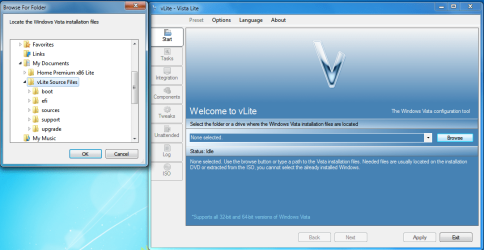
vLite Interface.png
   Tip
If you choose a DVD or a mounted ISO than you will be required to copy all files off the media to a location on the computer.


3. Choose your edition of Windows to modify.
NOTE: I will be using Ultimate edition in this tutorial and in all my INIs.
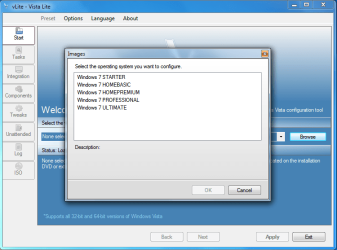
OS Choice.png
4. Choose your options.

  • Integration
  • Components
  • Tweaks
  • Unattended setup (Do not select this one if modifying Windows 7)
  • Bootable ISO
    • Enable before apply.(Click this to make an ISO at any time during this process)
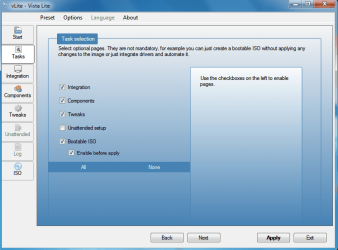
Task Selection.png
5. Integration Tab: Hotfixes, Drivers, and Language Packs.
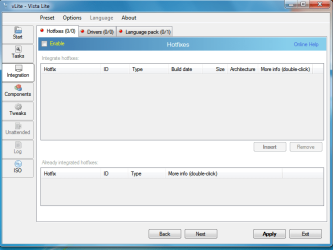
Integration Tab.png
·For Hotfixes you will need either the .cab or .msu of the update (these can normally be found on Microsoft's website...Windows Vista only right now)
·For Drivers you will need the *.ini(s) of the driver...these can be found in the folders of driver installers (use Google)
·For Language Packs you will need to find the .cab of the language you want to install (use Google)
   Tip
Can't select anything in these windows? Don't forget to hit the enable button in the top left hand corner.

6. Components Tab: Select from the categories listed. Their explanations will be available when you highlight an entry including any possible warnings.
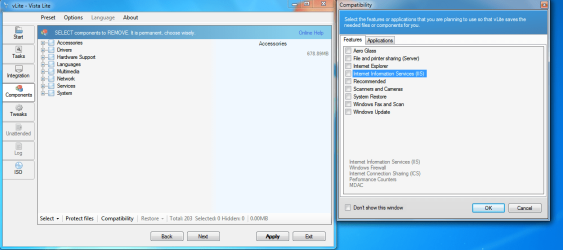
Components Tab.png
   Tip
When you click on the tab you will notice that a windows comes up with presets (ex. Aero Glass). Check beside one of these to hide the services/files needed for that feature so you don't accidentally delete/corrupt it.

7. Tweak Tab: Choose various tweaks to enable by default.
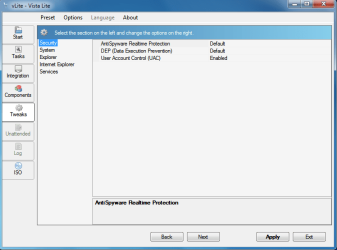
Tweaks Tab.png
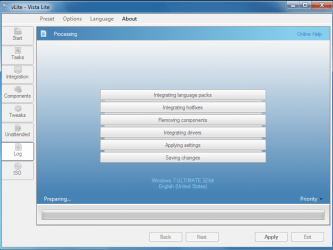
8.Hit apply and watch vLite strip 7 down to your specifications. You can choose to either rebuild one edition (your chosen one), all of them, or just save changes.
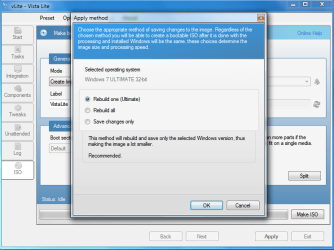
Edition Rebuild.png

Applying.PNG
   Tip
It is generally not recommended to rebuild all editions when you hit apply…this just wastes space considering you are going for the edition you chose


9. Deployment: Choose a method below
·The USB Key Method – Follow the link above to use your modified source files on a USB Key for installation
·The Burn Disc Method – Proceed to the ISO tab and choose “Direct Burn”. Give it a label and if necessary you can split the image up on multiple media. Hit “Make ISO” and your done
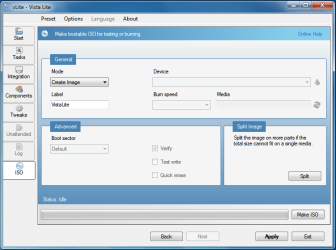
ISO Tab.png
Hope it helps
Chris


Last edited by a moderator:
answered my own question. Managed to get a copy of the Waik Drivers which some kind soul had upped. so copied them to my system32 directory and used a copy of Portable v-lite (rather than the full install program) and it worked like a dream. saved me downloading 1.3gb of rubbish!
 

My Computer

Computer Manufacturer/Model Number
Toshiba Satelite
OS
windows 7 RTM
CPU
AMD Athlon x 2 64
Memory
4gb
answered my own question. Managed to get a copy of the Waik Drivers which some kind soul had upped. so copied them to my system32 directory and used a copy of Portable v-lite (rather than the full install program) and it worked like a dream. saved me downloading 1.3gb of rubbish!


Damn, I'm downloading that 1.3GB of rubbish just now :( can't find the drivers and last night i also downloaded another 978MB of rubbish too with the Vista 6000 LRMAIK lol
 

My Computer

Computer Manufacturer/Model Number
Dell Inspiron 1545
OS
Windows 7 Ultimate
CPU
Mobile Intel Celeron 900, 2200 MHz (11 x 200)
Motherboard
Dell Inc. 0G848F
Memory
3GB
Graphics Card(s)
No idea
Sound Card
No idea
Monitor(s) Displays
1377x768
Hard Drives
160GB
PSU
Stock
Case
Stock (with blue lid)
Cooling
Stock
Damn, I'm downloading that 1.3GB of rubbish just now :( can't find the drivers and last night i also downloaded another 978MB of rubbish too with the Vista 6000 LRMAIK lol


well if u like here is the Portable version which has the drivers in a folder inside the rar file - link

i just copied the 2 drivers to my system32 folder and it runs just fine.
 

My Computer

Computer Manufacturer/Model Number
Toshiba Satelite
OS
windows 7 RTM
CPU
AMD Athlon x 2 64
Memory
4gb
íå ðàáîòàåò ñ ðóññêèìè âåðñèÿìè ôèíàëüíîé ñáîðêè
----
don't work whit final windows 7 edition rus
 

My Computer

Computer Manufacturer/Model Number
ASUSTeK Computer INC. P5KC
OS
Windows Seven Professional
CPU
Intel(R) Core(TM)2 Duo CPU E8400 @ 3.0
Motherboard
ASUSTeK Computer INC.
Memory
2048 Мб
Graphics Card(s)
NVIDIA GeForce 8600 GT
Sound Card
Realtek High Definition Audio
Monitor(s) Displays
SyncMaster 2043NW/2043NWX
Screen Resolution
1680x1050
Internet Speed
2.2 Mbitp/s
and!!!! check windows components in setup or uninstall!
is clear! =(
 

My Computer

Computer Manufacturer/Model Number
ASUSTeK Computer INC. P5KC
OS
Windows Seven Professional
CPU
Intel(R) Core(TM)2 Duo CPU E8400 @ 3.0
Motherboard
ASUSTeK Computer INC.
Memory
2048 Мб
Graphics Card(s)
NVIDIA GeForce 8600 GT
Sound Card
Realtek High Definition Audio
Monitor(s) Displays
SyncMaster 2043NW/2043NWX
Screen Resolution
1680x1050
Internet Speed
2.2 Mbitp/s
great write up Zidane24 finally i needed to use vlite for this purpose only.
Thanx bro:)

i would also like to mention that when the Dependencies window opens up and you click on the WIM filter, it re-directs you to the AIK download page for Windows Vista, but if you scroll down there's an AIK for Windows 7 which is the proper download to install for this program.

The Windows® Automated Installation Kit (AIK) for Windows® 7
 
Last edited:

My Computer

Computer Manufacturer/Model Number
custom of course...built by grimreaper
OS
Windows 7 Ultimate X64
CPU
Intel Core 2 Quad Q9650 3.0GHz (3.6GHz 24/7) maxed 4.05GHz
Motherboard
EVGA 790i Ultra SLi Model#132-CK-NF79-A1 BIOS P10
Memory
8GB OCZ DDR3 PC3-14400 @ 1800MHz NVIDIA SLi-Ready
Graphics Card(s)
2XBFG GeForce GTX 280 OC Edition SLi'd
Sound Card
SoundBlaster X-Fi Titanium Fatal1ty Pro Series
Monitor(s) Displays
Samsung 52" 1080P LCD HDTV (LN52B550)
Screen Resolution
1920X1080 @ 60Hz
Hard Drives
3xWestern Digital WD1001FALS Caviar Black 1TB Hard Drive(s) RAID 0 x2 encased in 3xMasscool KuFormula SHF1 HDD Cooler(s)
PSU
ThermalTake ToughPower 1200W P/N:W0133RU Modularized
Case
ThermalTake P/N: VH6000BWS Armor Full-Tower
Cooling
ThermalTake SpinQ P/N: P0466 CPU Cooler
Keyboard
Logitech cordless Y-RAJ56A piece of ****
Mouse
Logitech G7 Laser Cordless mouse black
Internet Speed
10 Mbps DL-1Mbps UL wirelessly DWA-552 extreme N
Other Info
1XSamsung DVD burner SH-S223Q/BEBN SATA
1XSamsung DVD burner SH-S223L/BEBN SATA
1XLG GGW-H20L Blu-Ray burner
4XCooler Master 120mm Blue LED SickleFlow 2000 RPM
1XBelkin UPS F6C1500TWRK) backup power supply
Hi
i have a problem
i'm using 64 bit windows 7 Home premium.
And i have a 64 bit windows 7 installation dvd but only english
i download a turkish language pack from here
bu it's in .exe format
therefore vlite don't accept it
when i run this exe file appear a .cab file but after 2-3 secs. it disappear
so where can i find a turkish language pack as cab format or how i can make a .cab file from this exe file which i have?
 

My Computer

Computer Manufacturer/Model Number
asus f3sv240dr
OS
vista
CPU
t7700
Memory
2 gb
Graphics Card(s)
8600M
Hard Drives
250 GB
The version of Windows that you are using does not support the use of language packs...
 

My Computer

Computer type
PC/Desktop
Computer Manufacturer/Model Number
LENOVO K450 @3.0GHZ
OS
64-bit Windows 8.1 Pro
CPU
Core(TM) i5 CPU 4330 Haswell @ 3.20GHz
Motherboard
LENOVO
Memory
12.00 GB
Graphics Card(s)
Intel(R) HD Graphics
Sound Card
Intel HD integtrated
Monitor(s) Displays
HP 25' ISP Monitor
Screen Resolution
1900/1020
Hard Drives
(1) ST1000DM003-1CH162 (2) Generic STORAGE DEVICE USB Device (3) Generic STORAGE DEVICE USB Device
Internet Speed
100mb down/10mb up
The version of Windows that you are using does not support the use of language packs...
i know it
it's true if windows allready installed
but it posible to make slipstream windows 7 dvd
my problem is i can't find language pack in .cab format
 

My Computer

Computer Manufacturer/Model Number
asus f3sv240dr
OS
vista
CPU
t7700
Memory
2 gb
Graphics Card(s)
8600M
Hard Drives
250 GB
Nice tutorial but its not working for me.RT7 and vLite are not applying changes exept for Unattended.Im trying to trim down Windows 7 Starter to bare minimum so any help would be apreciated
:)
 

My Computer

Computer type
Laptop
Computer Manufacturer/Model Number
Lenovo
OS
Windows 7 Starter
CPU
Intel Atom N270 @ 1.6GHz DualCore
Motherboard
Mariana2
Memory
DDR2 1GB
Graphics Card(s)
GMA 945
Hard Drives
Hitachi 160GB 5400RPM
Back
Top