Customising folder views

davidn37

New member
Local time
6:38 PM
Messages
2
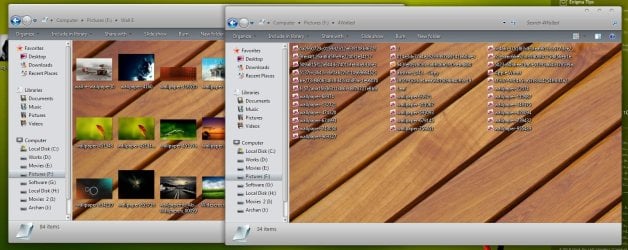
In my old Windows XP I could set the folder view for each folder individually but in Windows 7 it seems that if I change the view in one folder it changes all the folders. I have found that if I access a file by avoiding the libraries (which is a long way round) then I can do it but if I use libraries it all goes wrong again. If I go the long way round when I right click I get a folder customisation tab where I can set the view type but if I use the libraries the customisation tab doesn't show and I lose any folder customisation I've already set up. David
 

My Computer

OS
Windows 7 64 bit
Hi David ! Welcome to the forums .

Do you mean this ?
Capture.JPG

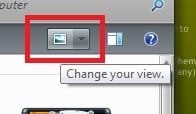
If so Clicking the button below can do it .
Untitled.jpg
 

My Computer

Computer type
PC/Desktop
Computer Manufacturer/Model Number
Self Assembled
OS
Microsoft Windows 10 Pro Insider Preview 64-bit
CPU
Intel(R) Core(TM) i3-4130 CPU @ 3.40GHz
Motherboard
Gigabyte Technology Co., Ltd. B85M-D3H
Memory
Corsair Vengence 4GB x2 (8.00GB Dual-Channel DDR3 @ 798MHz)
Graphics Card(s)
2047MB GeForce GTS 450 (ZOTAC International)
Sound Card
Onboard (Realtek High Definition Audio)
Monitor(s) Displays
LG Flatron E2040T
Screen Resolution
1600x900
Hard Drives
Western Digital 1 TB
Seagate 500 GB
PSU
Corsair VS550
Case
Cooler Master K380
Cooling
Cooler Master Seidon 120V Plus
Keyboard
Logitech MK260r
Mouse
Logitech MK260r
Internet Speed
PMPL Broadband
Antivirus
Windows Defender + MBAM
Browser
Firefox
Other Info
Dell Studio 15" Laptop
Hello David, and welcome to Seven Forums.

If you mean while in a library, then the folder view settings will be applied to all folders in that library. The Arrange by setting is available to set library folders though. The arrange by options will vary depending on the folder template of the library folder. All Included Folders and subfolders in a library will always share the same folder view. You can have separate "Arrange by" view settings in each added right click -> New -> Folder created in the library itself though.


Only non library folders have their own folder view settings. Here are some links that may help. Be sure to also look at the related links at the bottom in them to for more.
Hope this helps,
Shawn
 

My Computer

Computer type
PC/Desktop
Computer Manufacturer/Model Number
Self built custom
OS
64-bit Windows 11 Pro for Workstations
CPU
Intel i7-8700K OC'd to 5 GHz
Motherboard
ASUS ROG Maximus XI Formula Z390
Memory
64 GB (4x16GB) G.SKILL TridentZ RGB DDR4 3600 MHz
Graphics Card(s)
ASUS ROG-STRIX-GTX1080TI-O11G-GAMING
Sound Card
Integrated
Monitor(s) Displays
2 x Samsung Odyssey G7 27"
Screen Resolution
2560x1440
Hard Drives
1TB Samsung 990 PRO M.2,
4TB Samsung 990 PRO PRO M.2,
TerraMaster F8 SSD Plus NAS
PSU
Seasonic Prime Titanium 850W
Case
Thermaltake Core P3
Cooling
Corsair Hydro H115i
Keyboard
Logitech wireless K800
Mouse
Logitech MX Master 4
Internet Speed
2 Gb/s Download and 100 Mb/s Upload
Antivirus
Malwarebyte Anti-Malware Premium
Browser
Google Chrome
Other Info
Logitech Z625 speaker system,
Logitech BRIO 4K Pro webcam,
HP Color LaserJet Pro MFP M477fdn,
APC SMART-UPS RT 1000 XL - SURT1000XLI,
Galaxy S23 Plus phone
Thanks for the responses.

Yes the problem is with folders accessed through the Libraries. I suppose I shall have access files through the start menu or desktop shortcuts but that does seem to be a long way round and to negate any benefits of the library system, whatever they may be.

Looking at another thread I have changed the start menu so that the personal folder opens as a menu and that makes it easier.
 

My Computer

OS
Windows 7 64 bit
Back
Top