JavaScript is disabled. For a better experience, please enable JavaScript in your browser before proceeding.
You are using an out of date browser. It may not display this or other websites correctly.
You should upgrade or use an
alternative browser .
Solved Customizing Google Chrome Icon
Hello.
I'm trying to customize my Google Chrome Icon.
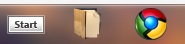
I downloaded a custom icon off the internet, then I changed the icon of the shortcut and pinned it to my task bar. All well and good as can be seen in the picture below:
But when I open Google Chrome it reverts back to the old icon, as can be seen in the picture below:
Does anyone know how to fix this?
Thanks in advance.
Computer type PC/Desktop Computer Manufacturer/Model Number Myself OS Windows 7 Professional x64 CPU AMD FX 8320 Motherboard ASUS M5A97 Memory 8GB Graphics Card(s) Nvidia Geforce GTX 770 Monitor(s) Displays Acer P223w Screen Resolution 1680x1050 Hard Drives Samsung SpinPoint 1TB @ 7200rpm PSU Corsair 620HX - 620W Case Lian-Li Scandinavian Edition Keyboard Razer Lycosa Mouse Razer DeathAdder
New member
Guru
Gold Member
VIP
Chrome Icon
Well I'm sorry to say that I don't have Chrome installed but I do have
SRWareIron portable version installed.
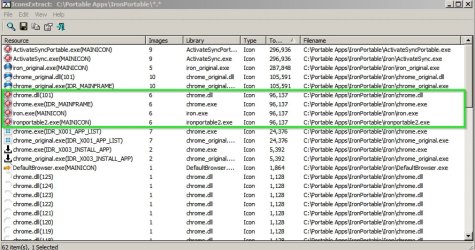
So using that Chromium browser I tried changing icons and got the same problem. The old icon still shows up in the taskbar when it's run.
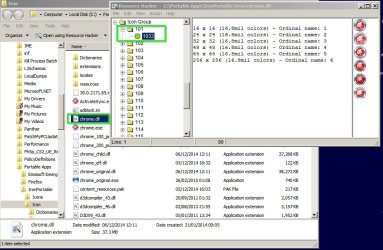
The solution was to not only change the icons in the .exe files using Resource Hacker
but also to modify chrome.dll
Hopefully that should give you a clue as to where to start looking.
Computer type Laptop Computer Manufacturer/Model Number ASUS OS Microsoft Windows 7 Home Premium 64-bit 7601 Multiprocessor Free Service Pack 1 CPU AMD C-60 APU with Radeon(tm) HD Graphics Motherboard ASUSTeK COMPUTER INC. X501U Memory 4.00 GB Graphics Card(s) AMD Radeon HD 6290 Graphics Sound Card (1) AMD High Definition Audio Device (2) Realtek High Defi Screen Resolution 1366 x 768 x 32 bits (4294967296 colors) @ 60 Hz Hard Drives Hitachi HTS545050A7E380 SATA Disk Device Antivirus Comodo CIS & FW, SecureAplus App Whitelisting, Threatfire Browser Cyberfox 64bit, Opera 64bit, Airfox Other Info Spy-The-Spy, HitmanPro.Alert, Norton Connect Safe, MJRegWatcher, BitDefender TrafficLight, Voodoo Shield, Zemana AntiMalware
New member
Member
Thread Starter
I needed to modify two chrome.dll files and one chrome.exe, but now it works.
Thank you very much for the help. =)
Result:
Computer type PC/Desktop Computer Manufacturer/Model Number Myself OS Windows 7 Professional x64 CPU AMD FX 8320 Motherboard ASUS M5A97 Memory 8GB Graphics Card(s) Nvidia Geforce GTX 770 Monitor(s) Displays Acer P223w Screen Resolution 1680x1050 Hard Drives Samsung SpinPoint 1TB @ 7200rpm PSU Corsair 620HX - 620W Case Lian-Li Scandinavian Edition Keyboard Razer Lycosa Mouse Razer DeathAdder