
data drive help and understanding

rockybee

New member
Local time
7:14 PM
Messages
8
Ok, so i resolved a few issues with that easy tranfser blasted thing.

I backed up all my data from the old computer to the external hard drive.

Now that it is there, how do i save data to the d drive. Things like music and pics and documents.

My c drive is labeled OS and that is where i am putting the programs into. I assume the data goes into the data drive. How do i get it from the external drive to the d drive?

I attached an image of my drive configerations...hope it helps
Please keep it simple, I am a newbie at windows 7 and was an xp user up until yesterday
 

Attachments
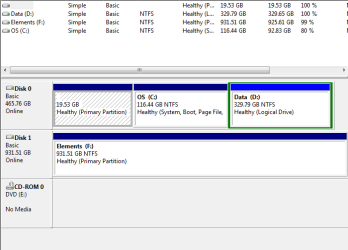
  • Capture.PNG
    Capture.PNG
    9.8 KB · Views: 9

My Computer

Computer Manufacturer/Model Number
Asus K72f
OS
windows 7 premium
CPU
Intel i3-370,2.4ghz
Memory
4gb
Graphics Card(s)
intel graphicsmedia accelerator hd
Hard Drives
500gb
To simply transfer it over, on your new computer go to easy transfer and follow the instructions. the first window will be external hard drive, next tell it this is your new computer, then show it the file you transfered from the old computer it will transfer it back over. Hope this answers your question.
 

My Computers

System One System Two

  • Computer type
    PC/Desktop
    Computer Manufacturer/Model Number
    ALWAYS UNDER CONSTRUCTION
    OS
    Windows 11 Pro
    CPU
    Ryzen 9 5900X
    Motherboard
    Asus X570 Crosshair Viii Hero
    Memory
    32GB G Skill DDR4-3600
    Graphics Card(s)
    EVGA RTX 3080 FTW 3 Ultra
    Sound Card
    On Board/Sennheiser PC37X Headset
    Monitor(s) Displays
    3 X Asus 27"
    Screen Resolution
    2560x1440
    Hard Drives
    2 X 1 TB NVME drives
    PSU
    EVGA 850
    Case
    Phanteks Eclipse P400A
    Cooling
    EVGA 280 AIO
    Keyboard
    Logitech G510s/ Logitech G13
    Mouse
    Logitech G502
    Internet Speed
    24/1
    Antivirus
    ESET/MBAM Pro/SAS Pro
    Browser
    Chrome/ Firefox/ Edge
  • Computer type
    Laptop
    System Manufacturer/Model Number
    Dell 16 Plus
    OS
    Windows 11 Pro
    CPU
    Intel Ultra 9 288V
    Memory
    32 GB LPDDR5X 8533
    Monitor(s) Displays
    16" Mini-LED HDR600 Touch 90 Hz
    Screen Resolution
    2560X1600
    Hard Drives
    1 TB NVME
Did you use the easy transfer on your old computer. If not disregard my last post.
 

My Computers

System One System Two

  • Computer type
    PC/Desktop
    Computer Manufacturer/Model Number
    ALWAYS UNDER CONSTRUCTION
    OS
    Windows 11 Pro
    CPU
    Ryzen 9 5900X
    Motherboard
    Asus X570 Crosshair Viii Hero
    Memory
    32GB G Skill DDR4-3600
    Graphics Card(s)
    EVGA RTX 3080 FTW 3 Ultra
    Sound Card
    On Board/Sennheiser PC37X Headset
    Monitor(s) Displays
    3 X Asus 27"
    Screen Resolution
    2560x1440
    Hard Drives
    2 X 1 TB NVME drives
    PSU
    EVGA 850
    Case
    Phanteks Eclipse P400A
    Cooling
    EVGA 280 AIO
    Keyboard
    Logitech G510s/ Logitech G13
    Mouse
    Logitech G502
    Internet Speed
    24/1
    Antivirus
    ESET/MBAM Pro/SAS Pro
    Browser
    Chrome/ Firefox/ Edge
  • Computer type
    Laptop
    System Manufacturer/Model Number
    Dell 16 Plus
    OS
    Windows 11 Pro
    CPU
    Intel Ultra 9 288V
    Memory
    32 GB LPDDR5X 8533
    Monitor(s) Displays
    16" Mini-LED HDR600 Touch 90 Hz
    Screen Resolution
    2560X1600
    Hard Drives
    1 TB NVME

My Computer

Computer Manufacturer/Model Number
mickey megabyte 1234
OS
ultimate 64 sp1
CPU
i5 2500K [email protected]
Motherboard
MSI P67A-GD53
Memory
8 gigs GSkill Ripjaws 1600
Graphics Card(s)
amd hd6950
Sound Card
creative x-fi gamer
Monitor(s) Displays
samsung 24"
Screen Resolution
1920x1080
Hard Drives
ocz vertex 2e 60 gig, samsung f3 1tb, buffalo 2tb ext
PSU
antec 550
Case
antec three hundred
Cooling
i'm a cooling fan
Keyboard
saitek eclipse ii
Mouse
logitech g3
Internet Speed
about 4 Mbps
Other Info
i love win7
ok, I tried this option 2. However, it will not give me the option to move the file. Those options do not exist on the location tab.
when i typed shell:userfilesfolders, nothing happened either.

in my library I have two picture folders
 

Attachments

  • Capture 1.PNG
    Capture 1.PNG
    48.5 KB · Views: 3

My Computer

Computer Manufacturer/Model Number
Asus K72f
OS
windows 7 premium
CPU
Intel i3-370,2.4ghz
Memory
4gb
Graphics Card(s)
intel graphicsmedia accelerator hd
Hard Drives
500gb

My Computer

Computer Manufacturer/Model Number
HP, Dell, Gateway, Toshiba - 4 laptops and 2 desktops
OS
Vista, Windows7, Mint Mate, Zorin, Windows 8
CPU
from 1.6GHz Duo to i7
Monitor(s) Displays
2x HP w2207
Hard Drives
5x HDD, 7x SSD, 12x Externals
Keyboard
with trackball - no mices
Mouse
Trackball mice
Internet Speed
DSL 6000
ok, I tried this option 2. However, it will not give me the option to move the file. Those options do not exist on the location tab.
when i typed shell:userfilesfolders, nothing happened either.

in my library I have two picture folders

you have to type shell:userfilesfolders into the start-menu searchbox, then hit enter.

you should then see a bunch of folders, including my pictures, my documents etc.

right-click on these, and use the location tab to change the location of current and future stored documents.
 

My Computer

Computer Manufacturer/Model Number
mickey megabyte 1234
OS
ultimate 64 sp1
CPU
i5 2500K [email protected]
Motherboard
MSI P67A-GD53
Memory
8 gigs GSkill Ripjaws 1600
Graphics Card(s)
amd hd6950
Sound Card
creative x-fi gamer
Monitor(s) Displays
samsung 24"
Screen Resolution
1920x1080
Hard Drives
ocz vertex 2e 60 gig, samsung f3 1tb, buffalo 2tb ext
PSU
antec 550
Case
antec three hundred
Cooling
i'm a cooling fan
Keyboard
saitek eclipse ii
Mouse
logitech g3
Internet Speed
about 4 Mbps
Other Info
i love win7
ok, I tried this option 2. However, it will not give me the option to move the file. Those options do not exist on the location tab.
when i typed shell:userfilesfolders, nothing happened either.

in my library I have two picture folders

you have to type shell:userfilesfolders into the start-menu searchbox, then hit enter.

you should then see a bunch of folders, including my pictures, my documents etc.

right-click on these, and use the location tab to change the location of current and future stored documents.

I did that again and nothing happend. I get search not found
 

My Computer

Computer Manufacturer/Model Number
Asus K72f
OS
windows 7 premium
CPU
Intel i3-370,2.4ghz
Memory
4gb
Graphics Card(s)
intel graphicsmedia accelerator hd
Hard Drives
500gb
ah very sorry - spelling mistake :o

it should be shell:usersfilesfolder

's' on the end of 'user' and not 'folder'.

please try again - it should work now.

oops
 

My Computer

Computer Manufacturer/Model Number
mickey megabyte 1234
OS
ultimate 64 sp1
CPU
i5 2500K [email protected]
Motherboard
MSI P67A-GD53
Memory
8 gigs GSkill Ripjaws 1600
Graphics Card(s)
amd hd6950
Sound Card
creative x-fi gamer
Monitor(s) Displays
samsung 24"
Screen Resolution
1920x1080
Hard Drives
ocz vertex 2e 60 gig, samsung f3 1tb, buffalo 2tb ext
PSU
antec 550
Case
antec three hundred
Cooling
i'm a cooling fan
Keyboard
saitek eclipse ii
Mouse
logitech g3
Internet Speed
about 4 Mbps
Other Info
i love win7
Thank you!
 

My Computer

Computer Manufacturer/Model Number
Asus K72f
OS
windows 7 premium
CPU
Intel i3-370,2.4ghz
Memory
4gb
Graphics Card(s)
intel graphicsmedia accelerator hd
Hard Drives
500gb
Back
Top