Solved Data error cyclic redundancy check ssd

Franky

New member
Member
VIP
Local time
8:07 AM
Messages
472
Location
Kurdistan
Hi,

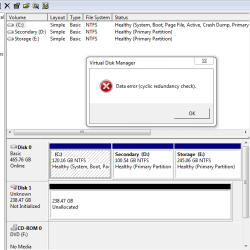
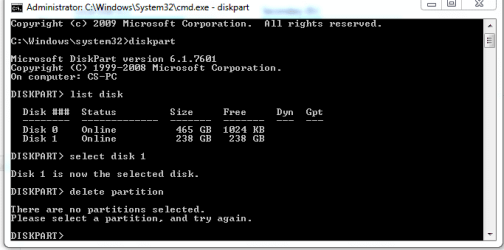
Windows 7 doesn't recognize my SSD drive. When I go to disk management, it shows a message to initialize it (image no.1) but when I press OK to do that, one another message appears and says: Data error cyclic redundancy check (image no.2). My computer windows doesn't show that drive and also when I went to cmd->diskpart, again it didn't show that disk to use of chkdsk /f command. How to solve the problem please?
 

Attachments

  • 1.PNG
    1.PNG
    67.9 KB · Views: 1
  • 2.PNG
    2.PNG
    33.2 KB · Views: 20

My Computer

Computer type
PC/Desktop
OS
windows 7 32-bit
CPU
Intel(R) Core(TM) i3-2120 CPU @ 3.30GHz
Motherboard
Gigabyte Technology Co., Ltd. P61A-D3
Memory
4.00 GB
Graphics Card(s)
NVIDIA GeForce GTS 450
Sound Card
(1) NVIDIA High Definition Audio (2) NVIDIA Virtual Audio
Monitor(s) Displays
Samsung
Hard Drives
ST500DM002-1BC142 ATA Device
Internet Speed
1 Mbps
Antivirus
KIS 2013
Browser
chrome
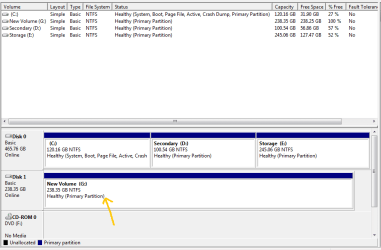
I could to revive that disk in diskpart using PartedMagic in boot. I've uploaded a new image from that. The remained problem here is that I can't delete it there.
 

Attachments

  • 3.PNG
    3.PNG
    23.2 KB · Views: 18

My Computer

Computer type
PC/Desktop
OS
windows 7 32-bit
CPU
Intel(R) Core(TM) i3-2120 CPU @ 3.30GHz
Motherboard
Gigabyte Technology Co., Ltd. P61A-D3
Memory
4.00 GB
Graphics Card(s)
NVIDIA GeForce GTS 450
Sound Card
(1) NVIDIA High Definition Audio (2) NVIDIA Virtual Audio
Monitor(s) Displays
Samsung
Hard Drives
ST500DM002-1BC142 ATA Device
Internet Speed
1 Mbps
Antivirus
KIS 2013
Browser
chrome
Hey guys,
Fortunately I could to revive it completely!!!!
I've also uploaded a new snapshot of disk management. Now there is only one problem. Its format is in NTFS, I need to someway convert/reformat it to exFAT to be usable on its device. But there isn't such a way to format it in that file system in disk management or by right-clicking on it in My computer window! Do you have any idea?
 

Attachments

  • 4.PNG
    4.PNG
    37.5 KB · Views: 1

My Computer

Computer type
PC/Desktop
OS
windows 7 32-bit
CPU
Intel(R) Core(TM) i3-2120 CPU @ 3.30GHz
Motherboard
Gigabyte Technology Co., Ltd. P61A-D3
Memory
4.00 GB
Graphics Card(s)
NVIDIA GeForce GTS 450
Sound Card
(1) NVIDIA High Definition Audio (2) NVIDIA Virtual Audio
Monitor(s) Displays
Samsung
Hard Drives
ST500DM002-1BC142 ATA Device
Internet Speed
1 Mbps
Antivirus
KIS 2013
Browser
chrome
After checking the disk using chkdsk /f /r command every thing became okay, that is, that command said there isn't any error with this drive.
Then I was alone with it. The reason that the Windows wouldn't format it in exFat was that the OS would consider the drive as a Local Drive not as a removable device. If I could change that consideration some way from the Windows' mind, I could easily format it as exfat by normal method of Windows. I tried other OSes (I have some as virtual machines). I used Windows 8.1 for formatting that SSD. I put it into USB port of PC running win 8.1. It showed a message in bottom right corner that would say it couldn't recognize the SSD. I tried other USB ports but same result!
I returned to win 7 and was thinking to find other ways, but this time win 7 said this ssd should be formatted! I formatted it again but win said "unable to format the drive"!!! It was like a disaster.
I immediately went to Disk Management. The only work I can do there is just deleting the volume but can't format it :(:(:(
Now again I should search for solutions.
I'm going to once again use of Parted Magic tool. But this time its new version. Use it to both format it and in exfat too.
Agree?
I thank any idea for solving the problem.
thank again.
 

My Computer

Computer type
PC/Desktop
OS
windows 7 32-bit
CPU
Intel(R) Core(TM) i3-2120 CPU @ 3.30GHz
Motherboard
Gigabyte Technology Co., Ltd. P61A-D3
Memory
4.00 GB
Graphics Card(s)
NVIDIA GeForce GTS 450
Sound Card
(1) NVIDIA High Definition Audio (2) NVIDIA Virtual Audio
Monitor(s) Displays
Samsung
Hard Drives
ST500DM002-1BC142 ATA Device
Internet Speed
1 Mbps
Antivirus
KIS 2013
Browser
chrome
Thank you all for those many help responses! Those helped me much.
The problem is solved.
 

My Computer

Computer type
PC/Desktop
OS
windows 7 32-bit
CPU
Intel(R) Core(TM) i3-2120 CPU @ 3.30GHz
Motherboard
Gigabyte Technology Co., Ltd. P61A-D3
Memory
4.00 GB
Graphics Card(s)
NVIDIA GeForce GTS 450
Sound Card
(1) NVIDIA High Definition Audio (2) NVIDIA Virtual Audio
Monitor(s) Displays
Samsung
Hard Drives
ST500DM002-1BC142 ATA Device
Internet Speed
1 Mbps
Antivirus
KIS 2013
Browser
chrome
Back
Top