Data or Folders that should be backed up but missing ?

Mike99

New member
Member
VIP
Local time
8:12 PM
Messages
258
I was looking at my C: drive & was curious what data should be backed up other than the "Users" folder.

The OS C: uses up 373GB according the properties in Windows 7.
All the folders under OS C: such as Users, Program Files, etc, plus the Recycle bin add up to 348GB.
That means there is 25GB of HDD space that is used but not accounted for.

Everything under C: should add up to the 373GB total but it doesn't. Any idea what I might be missing?
 

My Computer My Computer

At a glance

Windows 7 Ultimate x64AMD Athlon x48.00 GBGTX 750Ti SC
Computer type
PC/Desktop
Computer Manufacturer/Model Number
HP
OS
Windows 7 Ultimate x64
CPU
AMD Athlon x4
Motherboard
HP / Foxconn
Memory
8.00 GB
Graphics Card(s)
GTX 750Ti SC
Monitor(s) Displays
ACER
Hard Drives
1TB Seagate
PSU
380W
Cooling
Stock
Internet Speed
3 Mbps
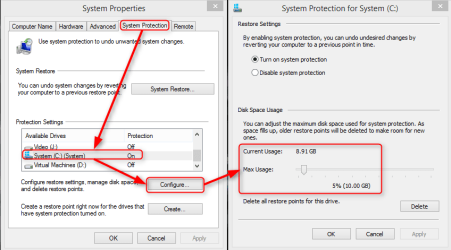
Did you check the hidden system folder ProgramData, too? It easily explains a few gigs. Also the shadow copies (restore points) can take some space:

2014-03-03_14h23_07.png

Kari
 

My Computer My Computer

At a glance

Windows 10 Pro x64 EN-GB1.6 GHz Intel Core i7-720QM Processor6 GBATI Mobility Radeon HD 5850 Graphics
Computer type
Laptop
Computer Manufacturer/Model Number
HP ENVY 17-1150eg
OS
Windows 10 Pro x64 EN-GB
CPU
1.6 GHz Intel Core i7-720QM Processor
Memory
6 GB
Graphics Card(s)
ATI Mobility Radeon HD 5850 Graphics
Sound Card
Beats sound system with integrated subwoofer
Monitor(s) Displays
17" laptop display, 22" LED and 32" Full HD TV through HDMI
Screen Resolution
1600*900 (1), 1920*1080 (2&3)
Hard Drives
Internal: 2 x 500 GB SATA Hard Disk Drive 7200 rpm
External: 2TB for backups, 3TB USB3 network drive for media
Cooling
As Envy runs a bit warm, I have it on a Cooler Master pad
Keyboard
Logitech diNovo Media Desktop Laser (bluetooth)
Mouse
Logitech Performance Mouse MX
Internet Speed
50/10 Mbps VDSL
Antivirus
Windows Defender 4.3.9431.0
Browser
Maxthon 3.5.2., IE11
Thanks for the information.

My ProgramData folder is 6.84GB & was included in the original figures.

The restore data accounts for about 21GB. If it’s set for 2% (18.36 GB) why would the Current usage be higher than that? Is this data saved in a hidden folder somewhere or just completely hidden on the C: drive?

Now I’m only off by 4GB which is small relative to a 1TB HDD. But I am curious what's taking up the space.
 

Attachments

  • System Properties.png
    System Properties.png
    16 KB · Views: 10

My Computer My Computer

At a glance

Windows 7 Ultimate x64AMD Athlon x48.00 GBGTX 750Ti SC
Computer type
PC/Desktop
Computer Manufacturer/Model Number
HP
OS
Windows 7 Ultimate x64
CPU
AMD Athlon x4
Motherboard
HP / Foxconn
Memory
8.00 GB
Graphics Card(s)
GTX 750Ti SC
Monitor(s) Displays
ACER
Hard Drives
1TB Seagate
PSU
380W
Cooling
Stock
Internet Speed
3 Mbps
It is quite common that when there's a lot of space available on the hard disk, system protection uses a bit more than the amount assigned by the user. When the space is needed for other uses system protection releases the extra amount it is using.

Sometimes it happens that user sets the amount too small needed for one restore point in which case system protection only saves one restore point even if it exceeds the assigned amount of storage space.

Notice that pagefile takes some space, too.

Kari
 

My Computer My Computer

At a glance

Windows 10 Pro x64 EN-GB1.6 GHz Intel Core i7-720QM Processor6 GBATI Mobility Radeon HD 5850 Graphics
Computer type
Laptop
Computer Manufacturer/Model Number
HP ENVY 17-1150eg
OS
Windows 10 Pro x64 EN-GB
CPU
1.6 GHz Intel Core i7-720QM Processor
Memory
6 GB
Graphics Card(s)
ATI Mobility Radeon HD 5850 Graphics
Sound Card
Beats sound system with integrated subwoofer
Monitor(s) Displays
17" laptop display, 22" LED and 32" Full HD TV through HDMI
Screen Resolution
1600*900 (1), 1920*1080 (2&3)
Hard Drives
Internal: 2 x 500 GB SATA Hard Disk Drive 7200 rpm
External: 2TB for backups, 3TB USB3 network drive for media
Cooling
As Envy runs a bit warm, I have it on a Cooler Master pad
Keyboard
Logitech diNovo Media Desktop Laser (bluetooth)
Mouse
Logitech Performance Mouse MX
Internet Speed
50/10 Mbps VDSL
Antivirus
Windows Defender 4.3.9431.0
Browser
Maxthon 3.5.2., IE11
Thanks.
I'll look at the pagefile information.
 

My Computer My Computer

At a glance

Windows 7 Ultimate x64AMD Athlon x48.00 GBGTX 750Ti SC
Computer type
PC/Desktop
Computer Manufacturer/Model Number
HP
OS
Windows 7 Ultimate x64
CPU
AMD Athlon x4
Motherboard
HP / Foxconn
Memory
8.00 GB
Graphics Card(s)
GTX 750Ti SC
Monitor(s) Displays
ACER
Hard Drives
1TB Seagate
PSU
380W
Cooling
Stock
Internet Speed
3 Mbps
Back
Top