
You are using an out of date browser. It may not display this or other websites correctly.
You should upgrade or use an alternative browser.
You should upgrade or use an alternative browser.
Data Recovery after using diskpart clean command
- Thread starter Shadezzz
- Start date

- Local time
- 3:50 AM
- Messages
- 5,915
You had downloaded TestDisk. You had extracted the testdisk-7.0.win.zip.
Where did you extract it? I have extracted it to the root of the C: drive
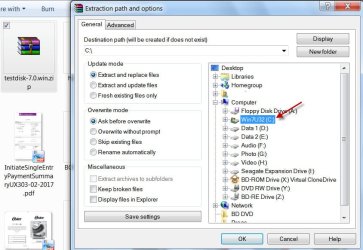
Where is your testdisk-7.0 folder?
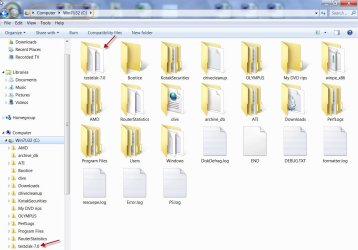
Where did you extract it? I have extracted it to the root of the C: drive
Where is your testdisk-7.0 folder?
My Computer
- OS
- Windows 7 Home Premium 32 bit
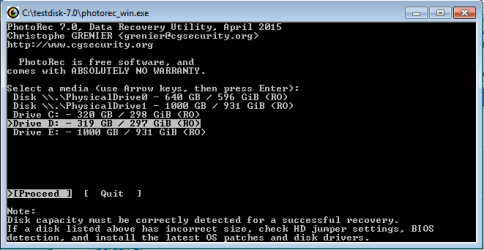
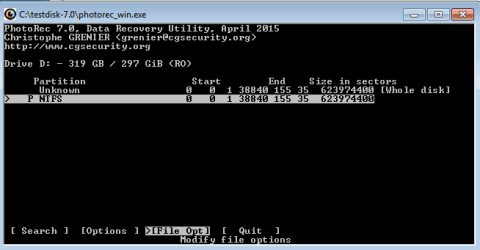

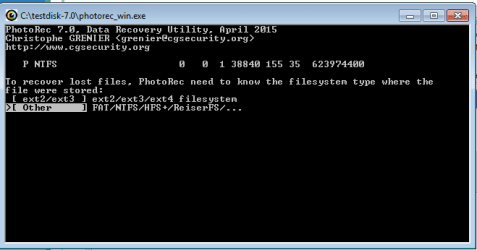
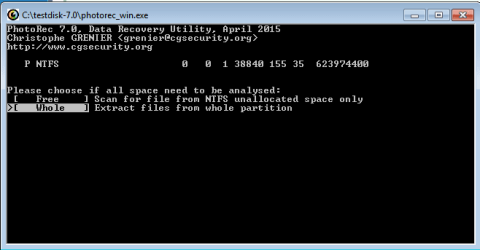
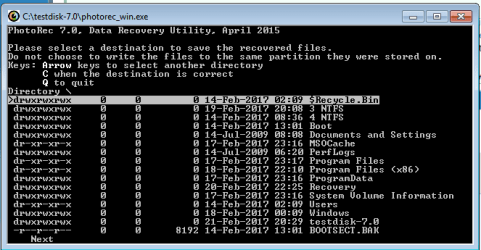
jumanji, Sir keep in mind that i was able to recover some files and i was able to view some more using EaseUS Partition Recovery Program..Even i found some Microsoft Word & Excel files with their original names and i found some documents regarding games previously installed and a HD movie with full size as before formatting ...That's what gives me hope that at least some files are there and with the right procedure i can recover most of my important files...
My Computer
- Computer type
- PC/Desktop
- OS
- Windows 7 Ultimate 64bit.
- Local time
- 3:50 AM
- Messages
- 5,915
If you are able to recover more files using EaseUs, do it. In data recovery you should always grab the files if shown at the first instance.
As far as PhotoRec is concerned, when you highlight [Whole] and press enter it should take you to the default location Directory C: \testdisk-7.0 From there you should be able to navigate to the Destination directory by using the arrow keys.( you can try all the arrow keys for whether it is the left key or right key or the UP /down key may depend on the Keyboard configuration) Why is it showing just Directory \ issomething which I cannot decipher.
Please do a clean up and then run PhotoRec from a fresh install of TestDisk.
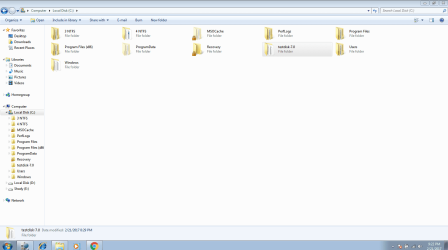
Check your current TestDisk folder and all the sub-folders in it to see whether it has any recovered file/s. If there is any, copy those elsewhere ( but not to your D: drive). Then delete the testdisk-7.0 folder. Extract the testdisk-7.0.win.zip again to the root directory of your C: drive. You now have a clean copy of TestDisk. Run PhotoRec from this fresh install and check whether everything goes fine. It should show the default Destination Directory C: \testdisk-7.0 when you reach that screen.
( I see three or four folders named NTFS in your C: drive. What are those? Those are not normally seen in a fresh install of Windows )
Last edited:
My Computer
- OS
- Windows 7 Home Premium 32 bit
jumanji Sir i deleted testdisk, did a cleanup, installed it again to the root of C: Drive and the problem is still there..I can't select my external HDD Recovery Folder, it only shows the contents of C: Drive..Any suggestions sir?
I began to lose hope
I began to lose hope
My Computer
- Computer type
- PC/Desktop
- OS
- Windows 7 Ultimate 64bit.

- Local time
- 5:20 PM
- Messages
- 2,774
Can you select the external HD? Did you give that HD a unique name so that you are sure you are selecting the correct device?
My Computer
- Computer type
- PC/Desktop
- Computer Manufacturer/Model Number
- Antec desktop; Acer Aspire laptops
- OS
- Windows 7 Professional 64-bit
- CPU
- Desktop i5; Acers i5 & i7
- Memory
- desktop 16GB; 1 Acer 8GB & 1 Acer 16GB
- Hard Drives
- 1TB split into 2 equal partitions [OS and data] usable by RJS
- Internet Speed
- AT&T DSL
- Browser
- FF, GChrome, msIE
- Other Info
- Windows 7 Firewall, Emsisoft AM/AV, MSE [scan-only], SpywareBlaster, Ruiware/BillP combine
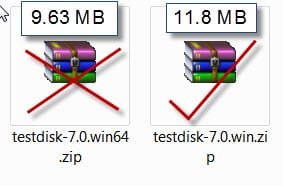
jumanji You're correct sir. I had the 9.63 MB version of testdisk.I deleted it and downloaded the 11 MB version and i was able to select my External HDD Recovery Folder and the recovery is ongoing...I will post the results once it's finished..
My Computer
- Computer type
- PC/Desktop
- OS
- Windows 7 Ultimate 64bit.
 .
.
- Local time
- 3:50 AM
- Messages
- 5,915
If you have any new data as you aver , those new data would have overwritten all your old data and you wouldn't be getting those old data.. So what it means now is there was no new data. You only have that old data in there which PhotoRec has fetched rather reconstructed.Nothing more can be done.
.
.
My Computer
- OS
- Windows 7 Home Premium 32 bit
jumanji I totally trust you sir, what really confuses me is that some of the new data were shown while using EaseUS Recovery but that was a very small portion like only 5% percent of the whole data..I don't care about the movies, the games or any media files..I just care about office documents, images and other personal files which i think they are at most 20 GB. So, is there no other way?!!
My Computer
- Computer type
- PC/Desktop
- OS
- Windows 7 Ultimate 64bit.
- Local time
- 3:50 AM
- Messages
- 5,915
Not any I can think of.
Anyway you can try running Getdataback Simple free demo version, scan your D drive and check whether it shows any files. If it shows you can open and preview the files. Data Recovery Software Products - Runtime Software Products v3.12 8.80MB
Anyway you can try running Getdataback Simple free demo version, scan your D drive and check whether it shows any files. If it shows you can open and preview the files. Data Recovery Software Products - Runtime Software Products v3.12 8.80MB
My Computer
- OS
- Windows 7 Home Premium 32 bit
- Local time
- 3:50 AM
- Messages
- 5,915
We have in many cases - where Diskpart Clean was accidentally run on a wrong drive - recovered the whole drive back but in all those cases they did nothing further to the disk. In such a condition we can easily restore the drive by running the Partition Recovery Wizard, for a "diskpart clean" only zeroes sector 0 to 2047. The partition boot records at 2048 ( the first partition start point) and other partition boot records with all data will still be intact.
You made a monumental mistake by formatting and reinstalling Windows and creating a new volume D:
The new data which you are referring may perhaps be in the 150GB of your old D: drive which has now been gobbled up and merged into your C drive. Most of that data would have already been overwritten by Windows.
You made a monumental mistake by formatting and reinstalling Windows and creating a new volume D:
The new data which you are referring may perhaps be in the 150GB of your old D: drive which has now been gobbled up and merged into your C drive. Most of that data would have already been overwritten by Windows.
My Computer
- OS
- Windows 7 Home Premium 32 bit
We have in many cases - where Diskpart Clean was accidentally run on a wrong drive - recovered the whole drive back but in all those cases they did nothing further to the disk. In such a condition we can easily restore the drive by running the Partition Recovery Wizard, for a "diskpart clean" only zeroes sector 0 to 2047. The partition boot records at 2048 ( the first partition start point) and other partition boot records with all data will still be intact.
You made a monumental mistake by formatting and reinstalling Windows and creating a new volume D:
The new data which you are referring may perhaps be in the 150GB of your old D: drive which has now been gobbled up and merged into your C drive. Most of that data would have already been overwritten by Windows.
Yes i know i made a terrible mistake but at least it was undeliberately. I'll make sure this will never happen again and as for the lost data i shall create them again except for the images which is not a big issue. Again thanks a lot for your time and knowledge sir.
My Computer
- Computer type
- PC/Desktop
- OS
- Windows 7 Ultimate 64bit.
Similar threads
- Replies
- 9
- Views
- 3K

- Replies
- 2
- Views
- 3K
- Replies
- 2
- Views
- 3K

- Replies
- 3
- Views
- 3K