Solved DBAN won't auto start, please help!

Dj79794

New member
Local time
10:56 PM
Messages
13
Hi,

Apologies if I've posted in the wrong catagory. I've downloaded DBAN to a disc as I want to wipe the HD of my dell Inspiron mini 1012. I've checked the disc and it's got the 7 or 8 files it's supposed to have on it and I've pressed F12 on the start up of the computer and changed the BIOS, no matter what preference I put the bios onto, the dban won't fire up in the USB connected cd. Any ideas?

Thanks in advance

DJ
 

My Computer

Computer type
PC/Desktop
OS
Windows 7 starter 32bit
Can you tell whether or not it is actually reading the disc?
 

My Computer

Computer type
PC/Desktop
Computer Manufacturer/Model Number
custom built
OS
Windows 7 ultimate 64-bit
CPU
Intel I7 2600K 3.4ghz
Motherboard
Asus Evo P8P67
Memory
Corsair 16gb ddr3 1600mhz
Graphics Card(s)
Nvidia Geforce gt 430
Sound Card
Sound Blaster Titanium x-fi pci express
Monitor(s) Displays
Dell E198WFP
Hard Drives
1 western digital 2TB drive.
PSU
Antec 1200 watt
Case
Inwin Dragon Rider
Cooling
6 case supplied cooling fans
Keyboard
logitech mk700
Mouse
logitech m705
Internet Speed
25-50mbps download; 10mbps upload(i think)
Antivirus
avg free 2014
Browser
mozilla firefox
Other Info
Also have a pretty bad speaker setup which is a klipsch promedia 5.1 surround speaker setup with huge subwoofer and lg blu ray player/writer. Also a hp officejet pro 8600 plus wireless all in one and a logitech s7500 webcam.
Bios settings

Hi,

I had the same problem but a long time ago. From what I remember the solution involved changing IDE to AHCI in Bios then changing it back after Dban finished.

I'll try checking my bios settings and post back in a while.

Change SATA Configuration from AHCI to IDE. Reboot. Then boot again from Dban.

If that doesn't work - do the reverse.

Best not to say "Thanks in advance" as any other forum where I've seen that posted mostly indicates that the question was posted by spammers and time wasters 99% of the time. I'm just saying!
 
Last edited:

My Computer

Computer type
Laptop
Computer Manufacturer/Model Number
ASUS
OS
Microsoft Windows 7 Home Premium 64-bit 7601 Multiprocessor Free Service Pack 1
CPU
AMD C-60 APU with Radeon(tm) HD Graphics
Motherboard
ASUSTeK COMPUTER INC. X501U
Memory
4.00 GB
Graphics Card(s)
AMD Radeon HD 6290 Graphics
Sound Card
(1) AMD High Definition Audio Device (2) Realtek High Defi
Screen Resolution
1366 x 768 x 32 bits (4294967296 colors) @ 60 Hz
Hard Drives
Hitachi HTS545050A7E380 SATA Disk Device
Antivirus
Comodo CIS & FW, SecureAplus App Whitelisting, Threatfire
Browser
Cyberfox 64bit, Opera 64bit, Airfox
Other Info
Spy-The-Spy, HitmanPro.Alert, Norton Connect Safe, MJRegWatcher, BitDefender TrafficLight, Voodoo Shield, Zemana AntiMalware
I can't tell if its reading the disc or not, as soon as the computer fires up the disc "whirs" for a short period and then stops and the normal start up resumes. I'll look in the bios settings again... It's probably something really simple but very frustrating as I'm not a computer whizz by any means!
 

My Computer

Computer type
PC/Desktop
OS
Windows 7 starter 32bit
I've changed the SATA configuration from AHCI to the only option it gave me which was ATA, the computer then wouldn't start and kept going into repair mode. It's doing my head in!!!
 

My Computer

Computer type
PC/Desktop
OS
Windows 7 starter 32bit
Dban usage

I suppose you know that you burn Dban to USB then once you've got the Bios settings sorted you plug in the USB - boot to Bios and use whatever settings that exist to boot from the USB next boot. In other words there will be settings to change device boot order and the USB should come first. Otherwise there might be an option to over-ride boot settings and boot to the USB for the next boot only. When you switch the computer on you should be seeing the Dban splash screen. If you don't see that - it's not working!

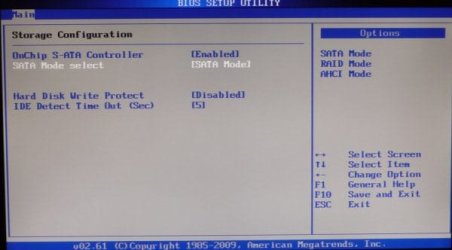
You should see something like this for Sata configuration:

bios.jpg

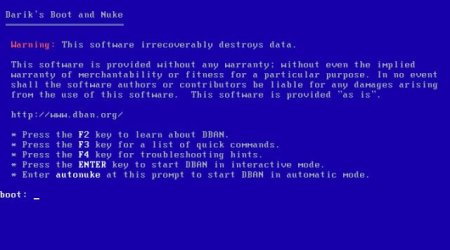
Something like this for Dban when it boots.

EDIT: Just read your post properly and you're using a cd. Suggest burning yo USB and use that instead.

dban-splash.jpg
 
Last edited:

My Computer

Computer type
Laptop
Computer Manufacturer/Model Number
ASUS
OS
Microsoft Windows 7 Home Premium 64-bit 7601 Multiprocessor Free Service Pack 1
CPU
AMD C-60 APU with Radeon(tm) HD Graphics
Motherboard
ASUSTeK COMPUTER INC. X501U
Memory
4.00 GB
Graphics Card(s)
AMD Radeon HD 6290 Graphics
Sound Card
(1) AMD High Definition Audio Device (2) Realtek High Defi
Screen Resolution
1366 x 768 x 32 bits (4294967296 colors) @ 60 Hz
Hard Drives
Hitachi HTS545050A7E380 SATA Disk Device
Antivirus
Comodo CIS & FW, SecureAplus App Whitelisting, Threatfire
Browser
Cyberfox 64bit, Opera 64bit, Airfox
Other Info
Spy-The-Spy, HitmanPro.Alert, Norton Connect Safe, MJRegWatcher, BitDefender TrafficLight, Voodoo Shield, Zemana AntiMalware
I get similar to the first screen, at the top I go into the "boot" screen, I've selected the following in the order;
USB Storage
!CD/DVD/BD-ROM
+Hard drive
network boot

The icons, i.e the exclamation mark and the "plus" sign are as they are displayed exactly too.
In the advanced menu I can see "SATA Operation" which only gives me the option of default AHCI or ATA.
 

My Computer

Computer type
PC/Desktop
OS
Windows 7 starter 32bit
Try this

I take it that you created a bootable Dban USB? It's the best way.

Install DBAN to a USB Flash Drive using Windows | USB Pen Drive Linux

Make sure that the USB is plugged in before changing bios settings.

Anyway try the AHCI option first. Save the settings before exiting Bios. Then reboot. It should boot to USB and if Dban can't run you should see a message about this.

In that case try only other existing option in your Bios settings - ATA
 

My Computer

Computer type
Laptop
Computer Manufacturer/Model Number
ASUS
OS
Microsoft Windows 7 Home Premium 64-bit 7601 Multiprocessor Free Service Pack 1
CPU
AMD C-60 APU with Radeon(tm) HD Graphics
Motherboard
ASUSTeK COMPUTER INC. X501U
Memory
4.00 GB
Graphics Card(s)
AMD Radeon HD 6290 Graphics
Sound Card
(1) AMD High Definition Audio Device (2) Realtek High Defi
Screen Resolution
1366 x 768 x 32 bits (4294967296 colors) @ 60 Hz
Hard Drives
Hitachi HTS545050A7E380 SATA Disk Device
Antivirus
Comodo CIS & FW, SecureAplus App Whitelisting, Threatfire
Browser
Cyberfox 64bit, Opera 64bit, Airfox
Other Info
Spy-The-Spy, HitmanPro.Alert, Norton Connect Safe, MJRegWatcher, BitDefender TrafficLight, Voodoo Shield, Zemana AntiMalware
Ah.... I've created a DBAN disc which is in an external CD rewritable drive which connects via the USB port. Could that possibly be the reason then, that it's not actually on a Usb stick?
 
Last edited:

My Computer

Computer type
PC/Desktop
OS
Windows 7 starter 32bit
Probably

In my experience booting from cd's in external drives is problematic in that the correct drivers might not load and so on. If you use a bootable USB instead it gets around the problem.

I think that you could safely run Dban on a CD from a built in drive but even so USB is a better way.
 

My Computer

Computer type
Laptop
Computer Manufacturer/Model Number
ASUS
OS
Microsoft Windows 7 Home Premium 64-bit 7601 Multiprocessor Free Service Pack 1
CPU
AMD C-60 APU with Radeon(tm) HD Graphics
Motherboard
ASUSTeK COMPUTER INC. X501U
Memory
4.00 GB
Graphics Card(s)
AMD Radeon HD 6290 Graphics
Sound Card
(1) AMD High Definition Audio Device (2) Realtek High Defi
Screen Resolution
1366 x 768 x 32 bits (4294967296 colors) @ 60 Hz
Hard Drives
Hitachi HTS545050A7E380 SATA Disk Device
Antivirus
Comodo CIS & FW, SecureAplus App Whitelisting, Threatfire
Browser
Cyberfox 64bit, Opera 64bit, Airfox
Other Info
Spy-The-Spy, HitmanPro.Alert, Norton Connect Safe, MJRegWatcher, BitDefender TrafficLight, Voodoo Shield, Zemana AntiMalware
Thank you, I'll try that first thing in the morning��
 

My Computer

Computer type
PC/Desktop
OS
Windows 7 starter 32bit
I bow to your superior knowledge, Dban fired up immediately from the USB stick!
I've selected the type of wipe and rounds I require but when I press F10 to start it, nothing happens!
Nothing's ever easy!!!!
 

My Computer

Computer type
PC/Desktop
OS
Windows 7 starter 32bit

My Computer

Computer type
PC/Desktop
Computer Manufacturer/Model Number
Golden Mk. I.4
OS
Windows 10 Pro x64 ; Xubuntu x64
CPU
Intel i7 860 @ 2.80 GHz O/C'ed to 4.0GHz
Motherboard
Gigabyte P55A-UD3R Rev.1. Award BIOS F13
Memory
16GB Corsair Vengance DDR3 @ 661 MHz Dual Channel (9-9-9-24)
Graphics Card(s)
EVGA NVidia GTX 560 1024MB
Sound Card
Realtek Integrated
Monitor(s) Displays
Dual Samsung SyncMaster 2494HS
Screen Resolution
1920*1080 and 1920*1080
Hard Drives
1*Samsung 840 EVO 120GB SSD;
1*OCZ Vertex 2 60GB SSD;
2*Samsung F3 SpinPoint 1TB in RAID0;
1*Samsung F1 SpinPoint 1TB;
2*Western Digital 1TB External USB 3.0
1*Western Digital 500GB External USB 3.0
1*Seagate 500GB External USB 2.0
PSU
Thermaltake ToughPower QFan 750W
Case
Thermaltake Element S VK60001W2Z
Cooling
Corsair H60 Water Cooling, 2*230mm and 2*80mm case fans
Keyboard
Logitech G110
Mouse
Logitech MX518
I've done auto nuke and after about 30 seconds it stops and says it's crashed. That's the only program I can get to start. I'll try to reload it to the USB stick to see if it makes a difference.
 

My Computer

Computer type
PC/Desktop
OS
Windows 7 starter 32bit
Keyboard Navigation

You can try navigating the Dban menu using the arrow keys, TAB key, Enter key and ESC key.

If all else fails use the autonuke feature. (Type autonuke - press ENTER).

Be warned that it will wipe your hard drive entirely and will take many hours to complete.

You'll need to clean install windows afterwards and will most likely need to use a Linux tool run from USB again to create a system partition for windows to install onto.
 

My Computer

Computer type
Laptop
Computer Manufacturer/Model Number
ASUS
OS
Microsoft Windows 7 Home Premium 64-bit 7601 Multiprocessor Free Service Pack 1
CPU
AMD C-60 APU with Radeon(tm) HD Graphics
Motherboard
ASUSTeK COMPUTER INC. X501U
Memory
4.00 GB
Graphics Card(s)
AMD Radeon HD 6290 Graphics
Sound Card
(1) AMD High Definition Audio Device (2) Realtek High Defi
Screen Resolution
1366 x 768 x 32 bits (4294967296 colors) @ 60 Hz
Hard Drives
Hitachi HTS545050A7E380 SATA Disk Device
Antivirus
Comodo CIS & FW, SecureAplus App Whitelisting, Threatfire
Browser
Cyberfox 64bit, Opera 64bit, Airfox
Other Info
Spy-The-Spy, HitmanPro.Alert, Norton Connect Safe, MJRegWatcher, BitDefender TrafficLight, Voodoo Shield, Zemana AntiMalware
Thank you for the advice, I've tried everything so far to no avail. I think I'll bite the bullet and take it to a pro to do or at least set up dban to run properly.
 

My Computer

Computer type
PC/Desktop
OS
Windows 7 starter 32bit
Dban

you cannot down load DBAN to a cd and have it work. DBAN down load only gives you a file to create an iso image.. win 7 comes with an .iso program. your mini pc does not have a dvd rom installed, but you do have a usb port. You need to down load DBAN to a folder on your desk top. you need to download a "USB Installer" to create an ISO image on the usb flash drive. try this link. Install DBAN to a USB Flash Drive using Windows | USB Pen Drive Linux. FOR instructionson how to create a usb flash drive for DBAN. Callender is correct in that you may need to go into your BIOS and set the Boot order to usb as first boot option. Sometimes DBAN will auto start when the HDD is set as first boot. I have used it a lot. Just be aware that the DOD short option takes less time to wipe the drive rather than the DOD .22. An example is a 2TB hdd on DOD .22 takes 36 hours because it makes 7 passes and 7 verifications. DOD Short just does one pass and one verify disk. Your Hdd looks to be a 120 gb capacity according to the base specs for you mini pc. DBAN will probably be done in less than 2 hours.. Press the enter key in DBAN to start in interactive mode to see the list of wipe options available. also you can go to YouTube and search for tutorials on how to use DBAN. DBAN is 37.3 mb in iso format so don't buy a large flash drive. You need to have a flash drive that has no other files on it.
 

My Computer

Computer type
PC/Desktop
Computer Manufacturer/Model Number
custom build
OS
Windows 7 Pro x64 bit
CPU
intel Q6700 quad 2.6 ghz
Motherboard
MSI P6N diamond
Memory
super talent pc6400 800mhz 8gb
Graphics Card(s)
nvidia GEforce 650ti
Hard Drives
Seagate Barracuda 2 TB
Antivirus
Msse, Ccleaner, Hitman pro,
Browser
Sandboxie, IE 11, Google Chrome, Srware Iron
Maybe I missed something so I will ask some questions.
1. How many hard drives are there in the system?
2. Which hard drive is the wipe intended for?
3. Does the intended drive to wipe have the operating system installed?
4. What are the intended use of the wiped drive when the wipe is completed?

This tutorial could be helpful.

By Brink:
http://www.sevenforums.com/tutorials/52129-disk-clean-clean-all-diskpart-command.html
 

My Computer

Computer type
PC/Desktop
Computer Manufacturer/Model Number
Home made Desktop
OS
Windows 10 Pro. 64/ version 1709 Windows 7 Pro/64
CPU
Intel i7-6800K @ 4.3
Motherboard
ASUS X-99 Deluxe II
Memory
Corsair Platinum 16 gig @2400
Graphics Card(s)
EVGA GTX 1070 OC
Monitor(s) Displays
Asus 27" LED LCD/VE278Q
Screen Resolution
1920-1080 or 1280-720 HDMI
Hard Drives
INTEL SSD 730-240 Gb Sata 3.0/
PSU
EVGA Platium 1200W
Case
Phanteks Luxe Tempered Glass 8 fans/ one radiator
Cooling
XSPC/ Water Cooled CPU
Keyboard
Das 4 Professional
Mouse
Logitech M705/MX Anywhere 2-S
Internet Speed
100 mbits
Antivirus
Microsoft Security Essentials/ Malwarebytes Premium 3.0/ SAS
Browser
I.E. 11 default/Firefox/ ISP Time Warner Cable/Spectrum
Other Info
LG BluRay Burner/
Sound system-KLipsch-THX/
Icy Dock ssd Hot Swap bays.
Back
Top