Default Gateway Not Available

Kerrybiantulip

New member
Member
Local time
3:52 PM
Messages
31
Hi there,
I just did a clean install of Win7 from WinXP 4-5 days ago. In 2+ years of owning this computer I've never had internet problems, but now I've been having this disconnecting issue that's the same as other people's with different setups. I have a Realtek PCIe GBE NIC. I saw a few posts about this default gateway issue, but the majority of people I saw having this same issue were using an Nvidia Nforce driver or something of the like.

I was having this issue with the default windows 7 driver, and 'updated' it to the realtek drivers, and am still having the same issues. XP used to tell me the exact model of my NIC, Win7 doesn't, but it seems that the drivers from realtek are fairly generic anyway: Realtek
That one, obviously for windows 7, is the one I installed before trying anything else.


Here's a post I tried troubleshooting from. default gateway not available in windows 7
I'm having the exact same problem as those people, but nothing there really seemed to address my issue.

Here's another one that was closer to mine http://www.sevenforums.com/network-sharing/26005-default-gateway-not-available.html

I tried assigning a static IP to the IPv4 as someone suggested, and I didn't disconnect for a long while, but when I loaded ventrilo to talk to a friend while playing a game I disconnected and had an entirely different issue that's hard to explain... Network wasn't recognized at all, and each time I tried to make a new one it'd say it was unavailable. I'm not even sure what I eventually did to get back online :( I went back to automatic assignment. It seems that my disconnections happen when I'm using lots of bandwidth. Downloading SCII / WoW at the same time, or playing AoC, logging on ventrilo, loading many browser pages.

I tried changing the speed/duplex as well to half/full as someone else suggested, that didn't seem to change anything.

The last thing I wanted to try but honestly have *no* idea about how to do is to update my chipset drivers. I'm not sure if the person posting resolved it by doing so, but they stopped replying, and that's usually a good sign...no? :sarc:
My motherboard is an Asus M3A78-CM.

Aside from my disconnecting issue, I believe my network is somehow hindered and causing choppiness in ventrilo as well.

I did a speed test...
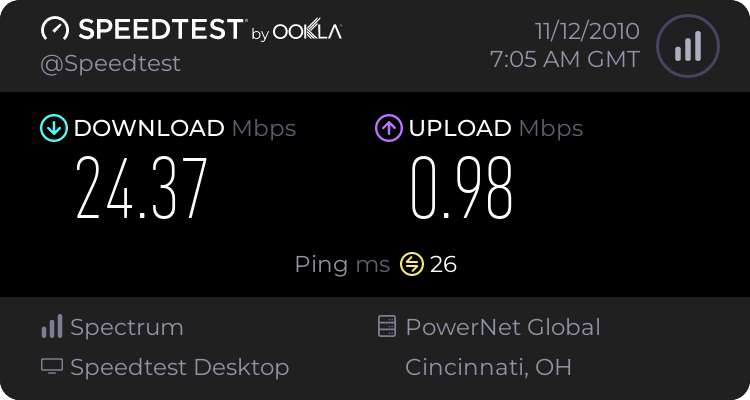
It's probably not even useful, but there it is! :D

Any suggestions you folks have would be valued enormously.
 

My Computer

OS
Windows 7 Professional 32bit
CPU
AMD Athlon 64 x2 Dual Core Processor 2.6Ghz
Motherboard
Asus M3A78-CM
Memory
4G
Graphics Card(s)
ATI Radeon x1950 Pro
Sound Card
VIA HD Audio
PSU
Fatality 550Watt
Hi there,
I just did a clean install of Win7 from WinXP 4-5 days ago. In 2+ years of owning this computer I've never had internet problems, but now I've been having this disconnecting issue that's the same as other people's with different setups. I have a Realtek PCIe GBE NIC. I saw a few posts about this default gateway issue, but the majority of people I saw having this same issue were using an Nvidia Nforce driver or something of the like.

I was having this issue with the default windows 7 driver, and 'updated' it to the realtek drivers, and am still having the same issues. XP used to tell me the exact model of my NIC, Win7 doesn't, but it seems that the drivers from realtek are fairly generic anyway: Realtek
That one, obviously for windows 7, is the one I installed before trying anything else.


Here's a post I tried troubleshooting from. default gateway not available in windows 7
I'm having the exact same problem as those people, but nothing there really seemed to address my issue.

Here's another one that was closer to mine http://www.sevenforums.com/network-sharing/26005-default-gateway-not-available.html

I tried assigning a static IP to the IPv4 as someone suggested, and I didn't disconnect for a long while, but when I loaded ventrilo to talk to a friend while playing a game I disconnected and had an entirely different issue that's hard to explain... Network wasn't recognized at all, and each time I tried to make a new one it'd say it was unavailable. I'm not even sure what I eventually did to get back online :( I went back to automatic assignment. It seems that my disconnections happen when I'm using lots of bandwidth. Downloading SCII / WoW at the same time, or playing AoC, logging on ventrilo, loading many browser pages.

I tried changing the speed/duplex as well to half/full as someone else suggested, that didn't seem to change anything.

The last thing I wanted to try but honestly have *no* idea about how to do is to update my chipset drivers. I'm not sure if the person posting resolved it by doing so, but they stopped replying, and that's usually a good sign...no? :sarc:
My motherboard is an Asus M3A78-CM.

Aside from my disconnecting issue, I believe my network is somehow hindered and causing choppiness in ventrilo as well.

I did a speed test...
It's probably not even useful, but there it is! :D

Any suggestions you folks have would be valued enormously.


It is probably not bandwidth but latency. download and run this and let us know the results. DPC Latency Checker


Ken J
 

My Computer

Computer Manufacturer/Model Number
HP Pavillion dv-7 1005 Tx
OS
Win 8 Release candidate 8400
CPU
[email protected]
Memory
4 gigs
Graphics Card(s)
Nvidia 9600M
Sound Card
HD built-in
Monitor(s) Displays
17" Wxga
Screen Resolution
1440x900
Cooling
none
Internet Speed
45Mb down 5Mb up
Morning,

Are you looking for when it disconnects? It's running smoothly right now except for one spike I saw within the past 10-20mins. Here is a capture of its one spike.

Uploaded with ImageShack.us
 

My Computer

OS
Windows 7 Professional 32bit
CPU
AMD Athlon 64 x2 Dual Core Processor 2.6Ghz
Motherboard
Asus M3A78-CM
Memory
4G
Graphics Card(s)
ATI Radeon x1950 Pro
Sound Card
VIA HD Audio
PSU
Fatality 550Watt
Newest Pic!

I went afk for a while and left the program you asked me to run ...erm..running..

Here's what it says now.


Uploaded with ImageShack.us


I always just assumed that it might be the NiC driver, but after uninstalling/reinstalling the standard windows driver and Realtek one, maybe it's something else?

I did disconnect once today to the default gateway not being available, but I wasn't running DPC Lat at the time, unforunately. It happened during DLing of WoW.

I have been having issues finding the proper driver for my video card. It's not in the list of ATI drivers, and there's something about having to use vista drivers in windows 7 ..bleh. My friend and I knocking our heads together couldn't dig up the right windows 7 driver for my ati radeon x1950 pro card. It also installs the regular 'display adapter' in device manager, then installs two strangely named 'other devices' whos properties tell me it's my gfx card. Could that be causing the issue? Should I post on the driver forum instead maybe?
 

My Computer

OS
Windows 7 Professional 32bit
CPU
AMD Athlon 64 x2 Dual Core Processor 2.6Ghz
Motherboard
Asus M3A78-CM
Memory
4G
Graphics Card(s)
ATI Radeon x1950 Pro
Sound Card
VIA HD Audio
PSU
Fatality 550Watt
Because you seem to be having a problem getting the default gateway, it could easily be a problem with your router or the routers firmware. Have you tried to update the firmware on your router yet?

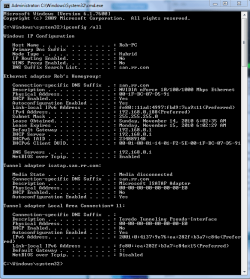
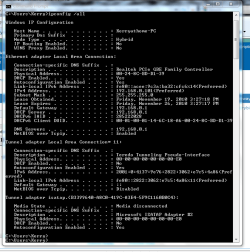
Can you please post a screen shot of your ipconfig /all here like the picture below shows.
 

Attachments

  • ipconfig all.PNG
    ipconfig all.PNG
    88 KB · Views: 53
Last edited:

My Computer

Computer type
PC/Desktop
Computer Manufacturer/Model Number
Home built
OS
Windows 7 Ult, Windows 8.1 Pro,
CPU
Q9650-4.275GHz, E8600 4.5GHz, E6750-3.8GHz
Motherboard
Evga 780i FTW
Memory
G.Skill PC2 9600 1200Mhz 5 5 5 15 2T
Graphics Card(s)
GTX480
Sound Card
Asus Xonar D2
Monitor(s) Displays
HannsG
Screen Resolution
1680X1050
Hard Drives
GSkill Phoenix Pro 120GB SSD
PSU
ThermalTake Toughpower 1000Watt modular
Case
ThermalTake XaserV
Cooling
Xigmatek S1283
Keyboard
Logitech G15
Mouse
Logitech G9
Internet Speed
T1
I did actually try upgrading my router firmware yesterday. It already had the most recent firmware but I tried installing the same one anyway.

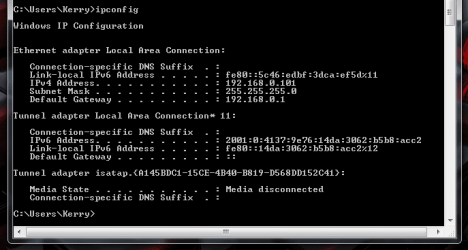
Here's my ipconfig snip.
 

Attachments

  • ipconfig.PNG
    ipconfig.PNG
    60.5 KB · Views: 40

My Computer

OS
Windows 7 Professional 32bit
CPU
AMD Athlon 64 x2 Dual Core Processor 2.6Ghz
Motherboard
Asus M3A78-CM
Memory
4G
Graphics Card(s)
ATI Radeon x1950 Pro
Sound Card
VIA HD Audio
PSU
Fatality 550Watt
I did actually try upgrading my router firmware yesterday. It already had the most recent firmware but I tried installing the same one anyway.

Here's my ipconfig snip.

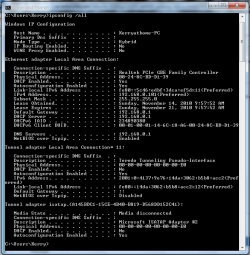
I'm sorry, I meant to post my ipconfig /all which shows more information. That last one is just ipconfig. I updated the screen shot to show what I need it to be.

Do you have iTunes or Adobe photo suite installed on this machine?
 

My Computer

Computer type
PC/Desktop
Computer Manufacturer/Model Number
Home built
OS
Windows 7 Ult, Windows 8.1 Pro,
CPU
Q9650-4.275GHz, E8600 4.5GHz, E6750-3.8GHz
Motherboard
Evga 780i FTW
Memory
G.Skill PC2 9600 1200Mhz 5 5 5 15 2T
Graphics Card(s)
GTX480
Sound Card
Asus Xonar D2
Monitor(s) Displays
HannsG
Screen Resolution
1680X1050
Hard Drives
GSkill Phoenix Pro 120GB SSD
PSU
ThermalTake Toughpower 1000Watt modular
Case
ThermalTake XaserV
Cooling
Xigmatek S1283
Keyboard
Logitech G15
Mouse
Logitech G9
Internet Speed
T1
Sorry, my misunderstanding. I don't have either Itunes or Adobe photo shop suite installed.

Here's the requested shot

Also, to add to the DCP program which is still running, the only change is that the absolute maximum is now 1191633576. Which...I think....is bad...no? ;) (This tidbit is for Zigzag)
 

Attachments

  • ipconfigall.PNG
    ipconfigall.PNG
    108 KB · Views: 39
Last edited:

My Computer

OS
Windows 7 Professional 32bit
CPU
AMD Athlon 64 x2 Dual Core Processor 2.6Ghz
Motherboard
Asus M3A78-CM
Memory
4G
Graphics Card(s)
ATI Radeon x1950 Pro
Sound Card
VIA HD Audio
PSU
Fatality 550Watt
Check in device manager if the network drivers are installed. Generally, default gateway wont show up when the network drivers are not installed.
 

My Computer

Computer Manufacturer/Model Number
Samsung NP530U4B-S02IN
OS
Windows® 8 Pro (64-bit)
CPU
Intel® Core™ i5 Processor 2467M (1.60GHz, 3MB L3 Cache)
Motherboard
Samsung Electronics
Memory
6GB DDR3 System Memory at 1,333MHz (on BD 4GB + 2GB x 1)
Graphics Card(s)
AMD Radeon™ HD7550M 1GB DDR3 (Ext. Graphic)
Sound Card
Realtek High Definition Audio
Monitor(s) Displays
35.56cm (14.0) SuperBright 300nit HD LED Display
Screen Resolution
1366x768
Hard Drives
1TB S-ATA II Hard Drive (5400RPM) with ExpressCache 16GB SSD
Internet Speed
sucks
Antivirus
Microsoft Security Essentials
Browser
Google Chrome (Sync enabled)
You mean the Network adapter drivers? I installed the default windows one when I installed windows 7. Having the gateway issue, I installed Realtek ones for my NIC. Then I went back to the windows 7 driver after having the same issues.

Tried uninstalling the windows 7 one and installing Realtek again, both drivers are giving me the same problems. The only device I seem to have driver issues with is my video card.

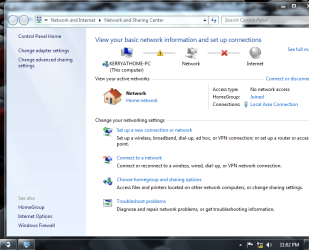
The gateway issue pops up a caution symbol on my network. When I open the network and sharing center, the caution symbol is on the line between my PC and my network. I click on it, it cycles through methods of 'fixing it' and fixes it. My next step is to just try for 3-4 days without the router to see if it still occurs. I can't imagine why it'd be broken, considering I didn't touch it at all when installing Windows 7.

Thanks for all your attempted assistance so far, people.
 

My Computer

OS
Windows 7 Professional 32bit
CPU
AMD Athlon 64 x2 Dual Core Processor 2.6Ghz
Motherboard
Asus M3A78-CM
Memory
4G
Graphics Card(s)
ATI Radeon x1950 Pro
Sound Card
VIA HD Audio
PSU
Fatality 550Watt
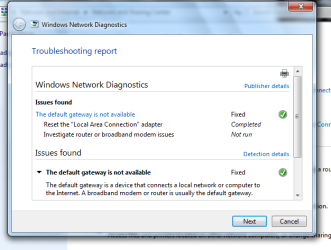
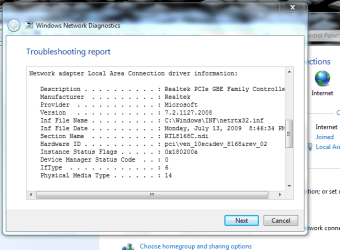
It just happened about 5 minutes ago, and I took pictures this time so you know what happens, exactly.

The first image is when the gateway goes down. I click on the caution icon to bring up a 'troubleshooter' that scans and fixes the issue. #2 is the window that comes up after the repair. The last image is just my device info from that previous window.
 

Attachments

  • gatewaydown.PNG
    gatewaydown.PNG
    213.4 KB · Views: 24
  • fixed.PNG
    fixed.PNG
    105.5 KB · Views: 36
  • versioninfo.PNG
    versioninfo.PNG
    132 KB · Views: 37

My Computer

OS
Windows 7 Professional 32bit
CPU
AMD Athlon 64 x2 Dual Core Processor 2.6Ghz
Motherboard
Asus M3A78-CM
Memory
4G
Graphics Card(s)
ATI Radeon x1950 Pro
Sound Card
VIA HD Audio
PSU
Fatality 550Watt
The ipconfig /all looks completely normal. Which router are we talking about here? It would be useful to know the brand make and model number of this router.

You can sometimes get around default gateway problems by typing in the default gateway into your IPv4 properties manually. This would only make up for a router problem of some sort but it might be worth a try. There may be other options we can pursue once I know what router this is.
 

My Computer

Computer type
PC/Desktop
Computer Manufacturer/Model Number
Home built
OS
Windows 7 Ult, Windows 8.1 Pro,
CPU
Q9650-4.275GHz, E8600 4.5GHz, E6750-3.8GHz
Motherboard
Evga 780i FTW
Memory
G.Skill PC2 9600 1200Mhz 5 5 5 15 2T
Graphics Card(s)
GTX480
Sound Card
Asus Xonar D2
Monitor(s) Displays
HannsG
Screen Resolution
1680X1050
Hard Drives
GSkill Phoenix Pro 120GB SSD
PSU
ThermalTake Toughpower 1000Watt modular
Case
ThermalTake XaserV
Cooling
Xigmatek S1283
Keyboard
Logitech G15
Mouse
Logitech G9
Internet Speed
T1
The router I have is a Trendnet TW100-S4W1CA.

For the IPv4 properties, do I add the default gateway into both the IP address and DNS server address?


I like to think I have a shred of a clue about computers until I have problems with them. ;) Then I feel a bit clueless. Or a lot.

Right now I have my router removed from my network, and I'm downloading large files to see what issues may arise.
 

My Computer

OS
Windows 7 Professional 32bit
CPU
AMD Athlon 64 x2 Dual Core Processor 2.6Ghz
Motherboard
Asus M3A78-CM
Memory
4G
Graphics Card(s)
ATI Radeon x1950 Pro
Sound Card
VIA HD Audio
PSU
Fatality 550Watt
It just happened with my router completely removed from the network. Just when I thought I couldn't become any more confused...

Same steps as above to repair.
 

My Computer

OS
Windows 7 Professional 32bit
CPU
AMD Athlon 64 x2 Dual Core Processor 2.6Ghz
Motherboard
Asus M3A78-CM
Memory
4G
Graphics Card(s)
ATI Radeon x1950 Pro
Sound Card
VIA HD Audio
PSU
Fatality 550Watt
Didn't happen yesterday, not sure if it's fixed, the day is still young!

Things I tried: Disabling flow control and disabling the 1 service I had running other than MS services.

Hope it's fixed, will post back if it's still causing issues.
 

My Computer

OS
Windows 7 Professional 32bit
CPU
AMD Athlon 64 x2 Dual Core Processor 2.6Ghz
Motherboard
Asus M3A78-CM
Memory
4G
Graphics Card(s)
ATI Radeon x1950 Pro
Sound Card
VIA HD Audio
PSU
Fatality 550Watt
Nope! Disconnected again just now. Default gateway is not available. Again.


Any more suggestions?
 

My Computer

OS
Windows 7 Professional 32bit
CPU
AMD Athlon 64 x2 Dual Core Processor 2.6Ghz
Motherboard
Asus M3A78-CM
Memory
4G
Graphics Card(s)
ATI Radeon x1950 Pro
Sound Card
VIA HD Audio
PSU
Fatality 550Watt
Nope! Disconnected again just now. Default gateway is not available. Again.


Any more suggestions?

Do you have anything from Apple installed like itunes or do you have Adobe photo suite installed on this system?
 

My Computer

Computer type
PC/Desktop
Computer Manufacturer/Model Number
Home built
OS
Windows 7 Ult, Windows 8.1 Pro,
CPU
Q9650-4.275GHz, E8600 4.5GHz, E6750-3.8GHz
Motherboard
Evga 780i FTW
Memory
G.Skill PC2 9600 1200Mhz 5 5 5 15 2T
Graphics Card(s)
GTX480
Sound Card
Asus Xonar D2
Monitor(s) Displays
HannsG
Screen Resolution
1680X1050
Hard Drives
GSkill Phoenix Pro 120GB SSD
PSU
ThermalTake Toughpower 1000Watt modular
Case
ThermalTake XaserV
Cooling
Xigmatek S1283
Keyboard
Logitech G15
Mouse
Logitech G9
Internet Speed
T1
No, I have neither of those programs installed.


I do have Adobe AIR, Acrobat Reader, and Flash Player installed.

I don't even have Quicktime installed on this computer for Apple programs, as I had in XP.
 
Last edited:

My Computer

OS
Windows 7 Professional 32bit
CPU
AMD Athlon 64 x2 Dual Core Processor 2.6Ghz
Motherboard
Asus M3A78-CM
Memory
4G
Graphics Card(s)
ATI Radeon x1950 Pro
Sound Card
VIA HD Audio
PSU
Fatality 550Watt
It seems like your TCP/ip stack is messed up or maybe winsock is having a problem.
Try running this batch file which will reset winsock, reset the TCP/IP stack and release renew your IP. Reboot after you run the batch file then repost your ipconfig /all here please. :)


My Computer

Computer type
PC/Desktop
Computer Manufacturer/Model Number
Home built
OS
Windows 7 Ult, Windows 8.1 Pro,
CPU
Q9650-4.275GHz, E8600 4.5GHz, E6750-3.8GHz
Motherboard
Evga 780i FTW
Memory
G.Skill PC2 9600 1200Mhz 5 5 5 15 2T
Graphics Card(s)
GTX480
Sound Card
Asus Xonar D2
Monitor(s) Displays
HannsG
Screen Resolution
1680X1050
Hard Drives
GSkill Phoenix Pro 120GB SSD
PSU
ThermalTake Toughpower 1000Watt modular
Case
ThermalTake XaserV
Cooling
Xigmatek S1283
Keyboard
Logitech G15
Mouse
Logitech G9
Internet Speed
T1
Hi,
Just got home, ran the batch file and rebooted. Here's the info you asked for.
 

Attachments

  • ipconfigafterbatch.PNG
    ipconfigafterbatch.PNG
    116.8 KB · Views: 25

My Computer

OS
Windows 7 Professional 32bit
CPU
AMD Athlon 64 x2 Dual Core Processor 2.6Ghz
Motherboard
Asus M3A78-CM
Memory
4G
Graphics Card(s)
ATI Radeon x1950 Pro
Sound Card
VIA HD Audio
PSU
Fatality 550Watt
Back
Top