Default Operating System - Change Default Boot OS

How to Change the Default Operating System to Start in Windows 7 and Vista

   Information
If you dual boot with one or more operating systems installed other than Windows 7 or Vista, then this will show you how to change the default operating system to start in the Windows Boot Manager.

You must be logged in as an administrator to be able to do the steps in this tutorial.


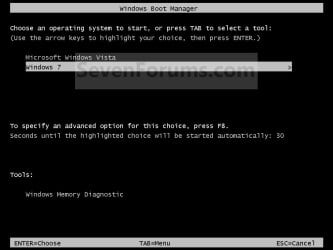
EXAMPLE: Windows Boot Manager
NOTE: This is the boot screen where you select what operating system that you would like to start. By default, you have 30 seconds to choose another operating system before the default operating system will start automatically.
Boot_Manager.jpg


OPTION ONE

Through Startup and Recovery


1. Open the Start Menu.
A) Right click on the Computer button on the dark right side and click on Properties.

B) Go to step 3.
OR

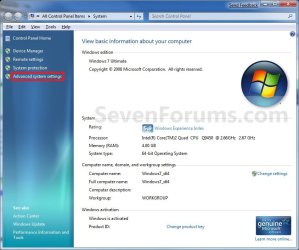
2. Open the Control Panel (icons view) and click on the System icon.

3. In the left blue pane, click on the Advanced system settings link. (See screenshot below)
System.jpg
4. Close the System window. (See screenshot above)

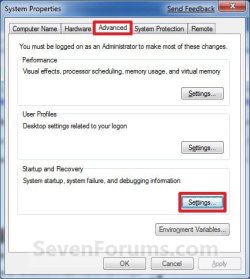
5. Under the Advanced tab, click on the Settings button under Startup and Recovery. (See screenshot below)
System_Properties.jpg
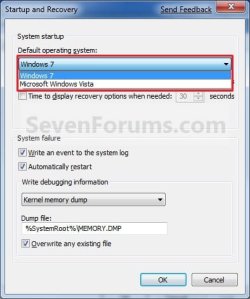
6. Under System Startup, select a operating system from the drop down menu to be the new default operating system, then click on OK. (See screenshots below)
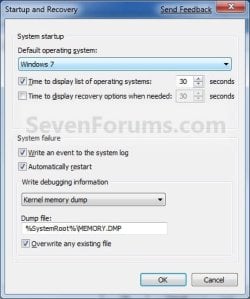
Startup.jpgStartup2.jpg
7. Click on OK. (See screenshot below step 5)


OPTION TWO

Through System Configuration


1. Open the Start Menu, type msconfig in the search line, and press Enter.

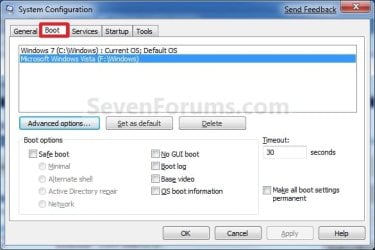
2. Click on the Boot tab. (see screenshot below)
Boot.jpg
3. Select a listed operating system that is not already set as the Default OS, and click on the Set as default button to make the selected OS the new default instead. (see screenshot above)

4. Click on OK. (see screenshot below step 2)

5. Click on the Restart button. (see screenshot below)
WARNING: This will restart the computer immediately. Make sure you save and close anything open that you do not want to lose first.
Restart.jpg


OPTION THREE

Using the bcdedit Command


1. Open a elevated command prompt or a command prompt at boot.
NOTE: If you have a RAID setup or a PCI-E SSD as your boot drive and want to open a command prompt at boot, then you may need to use the Load Drivers option in the System Recovery Options screen to load it's drivers first before Windows will see the boot drive to be able to use the bcdedit command on it.

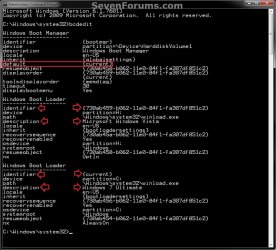
2. In the elevated command prompt, type bcdedit and press enter. (see screenshot below)
NOTE: This will let you see what OS is the default to start under the Windows Boot Manager section, and to see the description (name) and identifier of the operating system(s) listed in Windows Boot Manager under the Windows Boot Loader section(s). For example, Microsoft Windows Vista (description) as {730ab458-b062-11e0-84f1-fa307df851c2} (identifier).
CMD-1.jpg
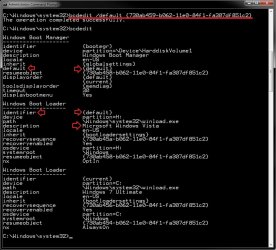
3. In the elevated command prompt, type the command below for a listed OS that you want to be the default OS to start, and press Enter. (see screenshot below)
bcdedit /default {identifier}

For example: If I wanted to change the default OS to start from Windows 7 Ultimate (description) as {current} (identifier) to Microsoft Windows Vista (description) as {730ab458-b062-11e0-84f1-fa307df851c2} (identifier), I would type this below and press Enter.

bcdedit /default {730ab459-b062-11e0-84f1-fa307df851c2}
CMD-2.jpg
4. In the elevated command prompt, type bcdedit and press enter. (see screenshot below step 3)
NOTE: This will let you see and verify the new default OS identifier to start under the Windows Boot Manager section. For example, {default} identifier for Microsoft Windows Vista (description) now.

5. When finished, close the elevated command prompt.


OPTION FOUR

Using the "EasyBCD" Program


1. If you have not already, download and install a free version of the EasyBCD program, then run it.
NOTE: The free version download is at the bottom under "Download free for limited, non-commercial use". Registration is not required to download.

2. Click on the Edit Boot Menu button, then check the box for the OS that you want to be the default OS to start in the Windows Boot Manager. (see screenshot below)
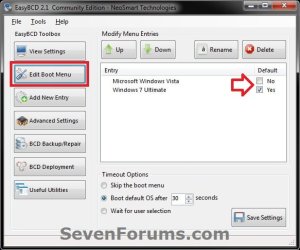
EasyBCD.jpg
3. When finished, close EasyBCD.
That's it,
Shawn


Last edited:
You're most welcome Trapper. Thank you.

Usually whatever loaded OS will show itself as C: even though it may truly not be C: .
 

My Computer

Computer type
PC/Desktop
Computer Manufacturer/Model Number
Self built custom
OS
64-bit Windows 11 Pro for Workstations
CPU
Intel i7-8700K OC'd to 5 GHz
Motherboard
ASUS ROG Maximus XI Formula Z390
Memory
64 GB (4x16GB) G.SKILL TridentZ RGB DDR4 3600 MHz
Graphics Card(s)
ASUS ROG-STRIX-GTX1080TI-O11G-GAMING
Sound Card
Integrated
Monitor(s) Displays
2 x Samsung Odyssey G7 27"
Screen Resolution
2560x1440
Hard Drives
1TB Samsung 990 PRO M.2,
4TB Samsung 990 PRO PRO M.2,
TerraMaster F8 SSD Plus NAS
PSU
Seasonic Prime Titanium 850W
Case
Thermaltake Core P3
Cooling
Corsair Hydro H115i
Keyboard
Logitech wireless K800
Mouse
Logitech MX Master 4
Internet Speed
2 Gb/s Download and 100 Mb/s Upload
Antivirus
Malwarebyte Anti-Malware Premium
Browser
Google Chrome
Other Info
Logitech Z625 speaker system,
Logitech BRIO 4K Pro webcam,
HP Color LaserJet Pro MFP M477fdn,
APC SMART-UPS RT 1000 XL - SURT1000XLI,
Galaxy S23 Plus phone
XP on 7 dual boot

G'day
Many thanks to all who have helped with answers to dual-booting XP and 7 on the one notebook and all the tutorials. I've learnt a lot.
Happy New Year.
Cheers,
Suziman.:)
 

My Computer

Computer Manufacturer/Model Number
Toshiba Satellite Pro C660
OS
Windows 7 Professional 32bit (preinstalled on notebook, no disk
G'day Seven Forums,
Should you like to send me an email address registered with PayPal, I would
like to make a donation in appreciation for your help.

During recent attempts to instal Win XP onto a new notebook computer
pre-installed with Win 7, I received considerable assistance from many
people across a number of very helpful sites including "Tom's Hardware",
"Seven Forum", PC User Magazine, MailStore Home, "Driver Packs", Tradewind
("DualBootPro") and there may be others of whom I have lost track.
Many, many thanks to all these sites and people all of whom played an
important part.
In the end, the original Win 7 setup was backed to an external hard drive,
the Toshiba Recovery "Console" was used to make a set of recovery DVDs, the
original hard drive was replaced with a new one of similar size and
specification, the appropriate drivers obtained and installed, XP Home SP2
installed, all the necessary programmes, folders and files installed, many
mistakes rectified and cleaned-up, a bootable recovery disc made and it is
almost where it is finished. The physical hard drive has been partitioned into
a number of various sized partitions including one which will be kept aside
for Win 7 when required and the original drive may be able to be used as
support for this. This was all done in quite an amateurish manner so
unfortunately I am not sure that I can be of much use to others with similar
problems although I would try.
Thanks again.
Cheers,
suziman
 

My Computer

Computer Manufacturer/Model Number
Toshiba Satellite Pro C660
OS
Windows 7 Professional 32bit (preinstalled on notebook, no disk
Hello Suziman,

I'm happy to hear that everything is still good. :)

There's no need for donations since our adverts for non logged in viewers cover our site expenses for now, but thank you very much for the offer. Just you visiting and getting and/or giving help is all the appreciation we need. :)

Thank you again,
Shawn
 

My Computer

Computer type
PC/Desktop
Computer Manufacturer/Model Number
Self built custom
OS
64-bit Windows 11 Pro for Workstations
CPU
Intel i7-8700K OC'd to 5 GHz
Motherboard
ASUS ROG Maximus XI Formula Z390
Memory
64 GB (4x16GB) G.SKILL TridentZ RGB DDR4 3600 MHz
Graphics Card(s)
ASUS ROG-STRIX-GTX1080TI-O11G-GAMING
Sound Card
Integrated
Monitor(s) Displays
2 x Samsung Odyssey G7 27"
Screen Resolution
2560x1440
Hard Drives
1TB Samsung 990 PRO M.2,
4TB Samsung 990 PRO PRO M.2,
TerraMaster F8 SSD Plus NAS
PSU
Seasonic Prime Titanium 850W
Case
Thermaltake Core P3
Cooling
Corsair Hydro H115i
Keyboard
Logitech wireless K800
Mouse
Logitech MX Master 4
Internet Speed
2 Gb/s Download and 100 Mb/s Upload
Antivirus
Malwarebyte Anti-Malware Premium
Browser
Google Chrome
Other Info
Logitech Z625 speaker system,
Logitech BRIO 4K Pro webcam,
HP Color LaserJet Pro MFP M477fdn,
APC SMART-UPS RT 1000 XL - SURT1000XLI,
Galaxy S23 Plus phone
Thank you for the post.. it helped me a lot. I have one more question.
Is there any registry key value or wmi query to get the list of Operating systems
 

My Computer

Computer type
PC/Desktop
OS
Windows 7 64 bit
Thank you for the post.. it helped me a lot. I have one more question.
Is there any registry key value or wmi query to get the list of Operating systems

Hello c0m3t, and welcome to Seven Forums. :)

Using the bcdedit command will give you list of OSs.
 

My Computer

Computer type
PC/Desktop
Computer Manufacturer/Model Number
Self built custom
OS
64-bit Windows 11 Pro for Workstations
CPU
Intel i7-8700K OC'd to 5 GHz
Motherboard
ASUS ROG Maximus XI Formula Z390
Memory
64 GB (4x16GB) G.SKILL TridentZ RGB DDR4 3600 MHz
Graphics Card(s)
ASUS ROG-STRIX-GTX1080TI-O11G-GAMING
Sound Card
Integrated
Monitor(s) Displays
2 x Samsung Odyssey G7 27"
Screen Resolution
2560x1440
Hard Drives
1TB Samsung 990 PRO M.2,
4TB Samsung 990 PRO PRO M.2,
TerraMaster F8 SSD Plus NAS
PSU
Seasonic Prime Titanium 850W
Case
Thermaltake Core P3
Cooling
Corsair Hydro H115i
Keyboard
Logitech wireless K800
Mouse
Logitech MX Master 4
Internet Speed
2 Gb/s Download and 100 Mb/s Upload
Antivirus
Malwarebyte Anti-Malware Premium
Browser
Google Chrome
Other Info
Logitech Z625 speaker system,
Logitech BRIO 4K Pro webcam,
HP Color LaserJet Pro MFP M477fdn,
APC SMART-UPS RT 1000 XL - SURT1000XLI,
Galaxy S23 Plus phone
Hello c0m3t, and welcome to Seven Forums. :)

Using the bcdedit command will give you list of OSs.

Hello Brink, Thank you..

But is it possible to get this information either through registry key or through wmi query? As these are the only 2 options I have and I can not use commands to get the output?
 

My Computer

Computer type
PC/Desktop
OS
Windows 7 64 bit
Out of curiosity, why are these the only options you have?
 

My Computer

Computer type
PC/Desktop
Computer Manufacturer/Model Number
Self built custom
OS
64-bit Windows 11 Pro for Workstations
CPU
Intel i7-8700K OC'd to 5 GHz
Motherboard
ASUS ROG Maximus XI Formula Z390
Memory
64 GB (4x16GB) G.SKILL TridentZ RGB DDR4 3600 MHz
Graphics Card(s)
ASUS ROG-STRIX-GTX1080TI-O11G-GAMING
Sound Card
Integrated
Monitor(s) Displays
2 x Samsung Odyssey G7 27"
Screen Resolution
2560x1440
Hard Drives
1TB Samsung 990 PRO M.2,
4TB Samsung 990 PRO PRO M.2,
TerraMaster F8 SSD Plus NAS
PSU
Seasonic Prime Titanium 850W
Case
Thermaltake Core P3
Cooling
Corsair Hydro H115i
Keyboard
Logitech wireless K800
Mouse
Logitech MX Master 4
Internet Speed
2 Gb/s Download and 100 Mb/s Upload
Antivirus
Malwarebyte Anti-Malware Premium
Browser
Google Chrome
Other Info
Logitech Z625 speaker system,
Logitech BRIO 4K Pro webcam,
HP Color LaserJet Pro MFP M477fdn,
APC SMART-UPS RT 1000 XL - SURT1000XLI,
Galaxy S23 Plus phone
Back
Top