Default Programs - Remove a Listed Program

How to Remove a Listed Program in Default Programs for Windows 7 and Vista

   Information
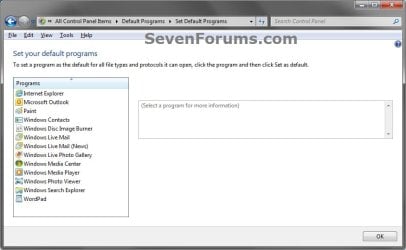
By default, you would normally uninstall a program to remove it from the list of programs in Set Default Programs. This will show you how to remove your choice of any program listed in the Windows 7 and Vista Set Default Programs window without having to uninstall the program instead.

You must be logged in as an administrator to be able to do this tutorial.

   Note
This can be handy if you uninstalled a program and it was not removed from the list in Set Default Programs, or you just did not want the program to be listed in Set Default Programs.

EXAMPLE: Set Default Programs
NOTE: Notice the program (ex: Axialis IconWorkshop) now removed in the left screenshot without having to uninstall it.
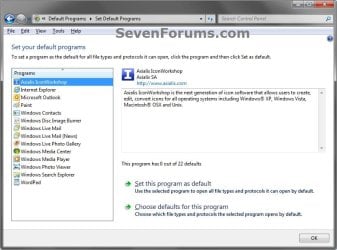
Default_Programs.jpg

Removed.jpg


OPTION ONE

To Backup and Remove a Program Listed in Default Programs


1. Open the Start Menu, then type regedit in the search box and press Enter.

2. If prompted by UAC, click on Yes (Windows 7) or Continue (Vista).

3. In regedit, navigate to the location below. (see screenshot below)
HKEY_LOCAL_MACHINE\SOFTWARE\RegisteredApplications
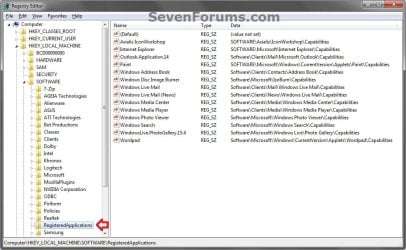
REG-1.jpg
4. To Backup the List of Programs in Default Programs
NOTE: It is highly recommended that you do this to backup your list of default programs so you will be able to restore any program(s) in OPTION TWO below that you delete.
A) In the left pane of regedit, right click on RegisteredApplications, and click on Export. (see screenshot above)

B) Type in a name (ex: Default_Programs-RegisteredApplications.reg), and save this to your Desktop. (see screenshot below)
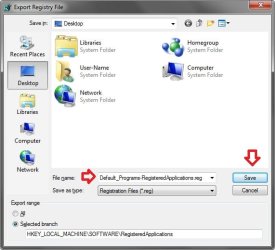
Backup.jpg
C) Move this exported REG file to where you will like to keep it saved it. This will be your only backup of the listed programs in Default Programs before you delete any of them below.
5. In the right pane of RegisteredApplications, right click on the program (ex: Axialis IconWorkshop) that you want removed from the list in Default Programs and click on Delete. (see screenshot below)
REG-2.jpg
6. Click on Yes to confirm the deletion. (see screenshot below)
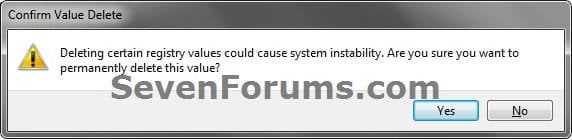
Reg-3.jpg
7. Repeat steps 5 and 6 for any other program you want to be removed from the list in Default Programs.

8. Close regedit when finished.

9. If open, close and reopen Default Programs to see the change. (see example screenshots at top of tutorial)


OPTION TWO

To Restore Backup of Listed Programs in Default Programs


NOTE: You will only be able to do this if you did step 4 in OPTION ONE above.
1. Double click on the exported REG file that you exported in step 4 of OPTION ONE above, and approve the merge when prompted.

2. If open, close and reopen Default Programs to see the change. (see example screenshots at top of tutorial)
That's it,
Shawn


Last edited:
Brink:

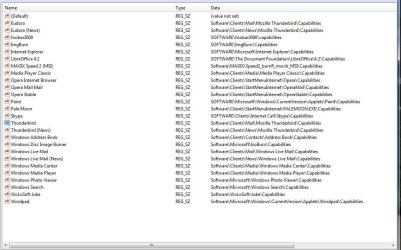
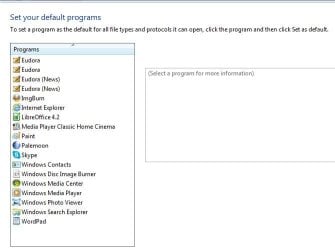
Not Quite right for my situation: I have TWO Entries for Eudora OSE Mail and News

FYI: I had been using Mozilla Thunderbird for Mail, but removed it. Now I see via REGEDIT and registeredApplications, I still have Thunderbird in use as Eudora OSE uses Thunderbird MBox type files.

Any way to fix this? DbSeven
 

Attachments

  • RegApps.JPG
    RegApps.JPG
    104.5 KB · Views: 786
  • defaultpgmlist.JPG
    defaultpgmlist.JPG
    32.9 KB · Views: 50,911

My Computer

Computer Manufacturer/Model Number
Home build
OS
Windows 7 Pro 64Bit
CPU
AMD Phenom II 965
Motherboard
Biostar 790GXE
Memory
Corsair XMS2 4GB PC6400 DDR2 800MHz Memory Upgrade - 2x2048M
Graphics Card(s)
GeForce 9500 GT Video Card, 1GB DDR2
Sound Card
Realtek Digital Audio 6.1
Monitor(s) Displays
Acer X223W
Screen Resolution
680Hx1050H
Hard Drives
WDC WD1002-FAEX-00Z3A0 1000GB SATA2 64MB CACHE
WDC WD2002-FAEX-007BA0 2000GB SATA2 64MB CACHE
PSU
Ultra X4 750-Watt Modular Power Supply - 135mm Fan, ATX
Case
CoolerMaster Elite 300 (Black)
Cooling
Enermax 120mm HiVolocity, CoolerMaster
Keyboard
Logitech Deluxe 250 (PS/2)
Mouse
Logitech Optical Mouse 852149-0000 (PS/2)
Internet Speed
AT&T (3Gb/s: so they claim)
Other Info
Logitech C600 Webcam HD, Logitech
Logitech Z-4(3-driver) 40 watts 2.1 Speakers w/subwoofer
Hello Donald,

It appears to be the Thunderbird and Thunderbird (News) string values that are showing as the second set of Eudora default programs.

Deleting those two should remove them for you. Be sure to export the RegisteredApplications key as a .reg file first to have as a backup to be able to restore the Thunderbird and Thunderbird (News) string values if needed or wanted later though. :)
 

My Computer

Computer type
PC/Desktop
Computer Manufacturer/Model Number
Self built custom
OS
64-bit Windows 11 Pro for Workstations
CPU
Intel i7-8700K OC'd to 5 GHz
Motherboard
ASUS ROG Maximus XI Formula Z390
Memory
64 GB (4x16GB) G.SKILL TridentZ RGB DDR4 3600 MHz
Graphics Card(s)
ASUS ROG-STRIX-GTX1080TI-O11G-GAMING
Sound Card
Integrated
Monitor(s) Displays
2 x Samsung Odyssey G7 27"
Screen Resolution
2560x1440
Hard Drives
1TB Samsung 990 PRO M.2,
4TB Samsung 990 PRO PRO M.2,
TerraMaster F8 SSD Plus NAS
PSU
Seasonic Prime Titanium 850W
Case
Thermaltake Core P3
Cooling
Corsair Hydro H115i
Keyboard
Logitech wireless K800
Mouse
Logitech MX Master 4
Internet Speed
2 Gb/s Download and 100 Mb/s Upload
Antivirus
Malwarebyte Anti-Malware Premium
Browser
Google Chrome
Other Info
Logitech Z625 speaker system,
Logitech BRIO 4K Pro webcam,
HP Color LaserJet Pro MFP M477fdn,
APC SMART-UPS RT 1000 XL - SURT1000XLI,
Galaxy S23 Plus phone
Thanks Brink!
had 2 similar firefox entries ( Software\Clients\StartMenuInternet\FIREFOX.EXE\Capabilities)
Now deleted 1
 

My Computer

Computer type
PC/Desktop
OS
98SE/XP/windows7 32bit/ win10

My Computer

Computer type
PC/Desktop
Computer Manufacturer/Model Number
Self built custom
OS
64-bit Windows 11 Pro for Workstations
CPU
Intel i7-8700K OC'd to 5 GHz
Motherboard
ASUS ROG Maximus XI Formula Z390
Memory
64 GB (4x16GB) G.SKILL TridentZ RGB DDR4 3600 MHz
Graphics Card(s)
ASUS ROG-STRIX-GTX1080TI-O11G-GAMING
Sound Card
Integrated
Monitor(s) Displays
2 x Samsung Odyssey G7 27"
Screen Resolution
2560x1440
Hard Drives
1TB Samsung 990 PRO M.2,
4TB Samsung 990 PRO PRO M.2,
TerraMaster F8 SSD Plus NAS
PSU
Seasonic Prime Titanium 850W
Case
Thermaltake Core P3
Cooling
Corsair Hydro H115i
Keyboard
Logitech wireless K800
Mouse
Logitech MX Master 4
Internet Speed
2 Gb/s Download and 100 Mb/s Upload
Antivirus
Malwarebyte Anti-Malware Premium
Browser
Google Chrome
Other Info
Logitech Z625 speaker system,
Logitech BRIO 4K Pro webcam,
HP Color LaserJet Pro MFP M477fdn,
APC SMART-UPS RT 1000 XL - SURT1000XLI,
Galaxy S23 Plus phone
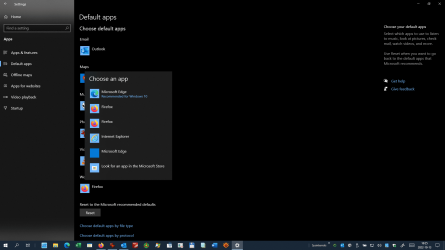
I have two Firefox entries in the menu for "Settings - Default Apps", yet there is only one Firefox entry, "Firefox-308046B0AF4A39CB" in the registry under "RegisteredApplications". I suspect that this is responsible for problems which I have had with Firefox not recognizing that it was already set as default, as well as error messages which appear when I launch Firefox from an HTML link, e.g. in Outlook, instead of from a Firefox launch shortcut. Any ideas?
FirefoxDefaultAvailable2x.png
 

My Computer

Computer type
PC/Desktop
Computer Manufacturer/Model Number
Fujitsu Siemens Scaleo E
OS
Windows 7 Pro x64 SP1
CPU
Intel i5-2500 @3.3GHz
Motherboard
Intel DH67GD
Memory
32 GB DDR3
Graphics Card(s)
Intel HD2000 onboard
Sound Card
Realtek HDA (onboard)
Monitor(s) Displays
Philips 46PFL9706
Screen Resolution
1920x1080
Hard Drives
SanDisk SSD Plus 120GB SATA III
Toshiba MQ series 2TB
PSU
OEM 250W
Case
OEM (Elonex Artisan)
Cooling
Scythe 4" low profile
Keyboard
Fujitsu Siemens RK0410
Mouse
trackball integrated in keyboard
Internet Speed
80 Mbps
Antivirus
Avast free
Browser
Firefox

My Computer

Computer type
PC/Desktop
Computer Manufacturer/Model Number
Self built custom
OS
64-bit Windows 11 Pro for Workstations
CPU
Intel i7-8700K OC'd to 5 GHz
Motherboard
ASUS ROG Maximus XI Formula Z390
Memory
64 GB (4x16GB) G.SKILL TridentZ RGB DDR4 3600 MHz
Graphics Card(s)
ASUS ROG-STRIX-GTX1080TI-O11G-GAMING
Sound Card
Integrated
Monitor(s) Displays
2 x Samsung Odyssey G7 27"
Screen Resolution
2560x1440
Hard Drives
1TB Samsung 990 PRO M.2,
4TB Samsung 990 PRO PRO M.2,
TerraMaster F8 SSD Plus NAS
PSU
Seasonic Prime Titanium 850W
Case
Thermaltake Core P3
Cooling
Corsair Hydro H115i
Keyboard
Logitech wireless K800
Mouse
Logitech MX Master 4
Internet Speed
2 Gb/s Download and 100 Mb/s Upload
Antivirus
Malwarebyte Anti-Malware Premium
Browser
Google Chrome
Other Info
Logitech Z625 speaker system,
Logitech BRIO 4K Pro webcam,
HP Color LaserJet Pro MFP M477fdn,
APC SMART-UPS RT 1000 XL - SURT1000XLI,
Galaxy S23 Plus phone
Thanks for pointing that out! I found this tutorial through a web search and failed to notice that it was from an old forum. I have posted a new thread on TenForums as you suggested.
 

My Computer

Computer type
PC/Desktop
Computer Manufacturer/Model Number
Fujitsu Siemens Scaleo E
OS
Windows 7 Pro x64 SP1
CPU
Intel i5-2500 @3.3GHz
Motherboard
Intel DH67GD
Memory
32 GB DDR3
Graphics Card(s)
Intel HD2000 onboard
Sound Card
Realtek HDA (onboard)
Monitor(s) Displays
Philips 46PFL9706
Screen Resolution
1920x1080
Hard Drives
SanDisk SSD Plus 120GB SATA III
Toshiba MQ series 2TB
PSU
OEM 250W
Case
OEM (Elonex Artisan)
Cooling
Scythe 4" low profile
Keyboard
Fujitsu Siemens RK0410
Mouse
trackball integrated in keyboard
Internet Speed
80 Mbps
Antivirus
Avast free
Browser
Firefox

My Computer

Computer type
PC/Desktop
Computer Manufacturer/Model Number
Self built custom
OS
64-bit Windows 11 Pro for Workstations
CPU
Intel i7-8700K OC'd to 5 GHz
Motherboard
ASUS ROG Maximus XI Formula Z390
Memory
64 GB (4x16GB) G.SKILL TridentZ RGB DDR4 3600 MHz
Graphics Card(s)
ASUS ROG-STRIX-GTX1080TI-O11G-GAMING
Sound Card
Integrated
Monitor(s) Displays
2 x Samsung Odyssey G7 27"
Screen Resolution
2560x1440
Hard Drives
1TB Samsung 990 PRO M.2,
4TB Samsung 990 PRO PRO M.2,
TerraMaster F8 SSD Plus NAS
PSU
Seasonic Prime Titanium 850W
Case
Thermaltake Core P3
Cooling
Corsair Hydro H115i
Keyboard
Logitech wireless K800
Mouse
Logitech MX Master 4
Internet Speed
2 Gb/s Download and 100 Mb/s Upload
Antivirus
Malwarebyte Anti-Malware Premium
Browser
Google Chrome
Other Info
Logitech Z625 speaker system,
Logitech BRIO 4K Pro webcam,
HP Color LaserJet Pro MFP M477fdn,
APC SMART-UPS RT 1000 XL - SURT1000XLI,
Galaxy S23 Plus phone
Back
Top