Defrag in windows 7

defraggler is good.
 

My Computer

Computer Manufacturer/Model Number
Samsung NP530U4B-S02IN
OS
Windows® 8 Pro (64-bit)
CPU
Intel® Core™ i5 Processor 2467M (1.60GHz, 3MB L3 Cache)
Motherboard
Samsung Electronics
Memory
6GB DDR3 System Memory at 1,333MHz (on BD 4GB + 2GB x 1)
Graphics Card(s)
AMD Radeon™ HD7550M 1GB DDR3 (Ext. Graphic)
Sound Card
Realtek High Definition Audio
Monitor(s) Displays
35.56cm (14.0) SuperBright 300nit HD LED Display
Screen Resolution
1366x768
Hard Drives
1TB S-ATA II Hard Drive (5400RPM) with ExpressCache 16GB SSD
Internet Speed
sucks
Antivirus
Microsoft Security Essentials
Browser
Google Chrome (Sync enabled)
Im gonna check out that Vopt defragger.... i used to use O&O, but i dont like it... it doesnt work right on my system for some odd reason..
 

My Computer

Computer Manufacturer/Model Number
HP dv6000t CTO Entertainment Lappy |My Desktop @ Bottom
OS
7 x64/ Back-Track 4
CPU
Intel Core 2 Duo CPU 8300@ 2.4 Ghz
Motherboard
HP's Own
Memory
4096 MB DDR2
Graphics Card(s)
Nvidia 8400M GS
Sound Card
Altec Lansing (The usual on Laptops )
Monitor(s) Displays
Laptop Screen. 17' Wide.
Screen Resolution
1280 x 800
Hard Drives
150 GB HDD.
Cooling
2 External Fans, Undervolted, Coolant
Keyboard
Norm. Cheap Random Keyboard
Mouse
Norm. Cheap Random Mouse
Other Info
This is my Homemade Desktop :)
HDD: Western Digital Caviar Blue 320GB 16MB 7200RPM SATA2
And more to come in a bit! :D
just came across this one stating it's for Win7...

MyDefrag v4.2.0.Beta

not sure if it's any good but it's free and uses screen saver...might give it a shot!
 

My Computer

Computer Manufacturer/Model Number
MyBuild
OS
Windows 7 64-bit/XP
CPU
QuadCore Intel Core i7 920, 2800 MHz (21 x 133)
Motherboard
Asus P6T
Memory
Corsair XMS3 6gb
Graphics Card(s)
eVga GeForce GTX275
Sound Card
Asus Xonar 7.1
Monitor(s) Displays
HP 2509m 25.5"
Screen Resolution
1920x1080
Hard Drives
WD Caviar Black 500GB x 2
WD Caviar Black 1TB
PSU
Corsair TX850
Case
X-Clio Windtunnel
Cooling
Intel
Keyboard
Eclipses II
Mouse
Razer DeathAdder
Internet Speed
Cable
Other Info
Old Dell Speakers and Razer Headphones
What's the best tool for defragging your HD's. Do you consider the standard Win defrag sufficient or is there a better free third party application?

Window's built-in Defragger has improved tremendously over the years..
It does a very well job.

However.. the downside is it's not automated.
It only defrags when you either manually defrag or set a scheduled time to do it..
Either way.. you have to set aside time to let your PC run.

My solutions is "Diskeeper" .
I absolutely love it.
It runs in the background with minimal resource.
It will stop running if you are running resource-intensive programs.
I can feel the performance upgrade with Diskeeper.

The best part is "Diskeeper" is completely sanctioned/certified by Microsoft.
In fact, Diskeeper utilizes Windows' own Defragger..
So it is absolutely safe.
It replaces the Built-in Defrag in Windows.
When you press Defrag in Windows.. it will launch Diskeeper :)

The "Automatic Defragger" option means you'll never have to worry about Defrag issues or spending hours upon hours Defragging your Drives.

Unlike other "after-market" Defrag Programs out there ...
That put files & folders in places that is not recognized by Windows thus causing errors and even decreases the performance.
 

My Computer

Computer type
PC/Desktop
Computer Manufacturer/Model Number
HP Pavilion TS 14
OS
Windows 8.1 (x64)
CPU
AMD Quad-Core
Memory
4GB
Graphics Card(s)
Radeon 8 Series
Screen Resolution
1330x768
Internet Speed
Broadband
Antivirus
None
Browser
IE 11 (Gecko)
Other Info
TinyWall
I am going to agree with the first reply to the query. I use Raxco's PerfectDisk 10 exclusively.

It is the absolute finest defrag program available... period. Yes, you have to pay for it, but it does the job far better and faster than any other program I've used.

I've been using this program for over 6 years and it has never failed me yet.
 

My Computer

Computer Manufacturer/Model Number
Custom Build by Nibiru2008 Computer Shop
OS
Windows 7 Professional X64 Build 7600.16385 (win7_rtm.090713-1255)
CPU
Intel Core 2 Duo E8400 Wolfdale 3.0GHz 6MB L2 Cache
Motherboard
Gigabyte GA-EP45-UD3R F12 BIOS
Memory
Mushkin Enhanced Blackline PC8500 DDR2 6 GB (2x2GB & 2x1GB)
Graphics Card(s)
XFX Radeon HD 5770 1 GB DDR5
Sound Card
Onboard Realtek Azalia HD Audio
Monitor(s) Displays
ViewSonic VX2250wm 22" Widescreen LED Backlight LCD
Screen Resolution
1920 X 1080p HD
Hard Drives
OCZ Vertex 2 60GB SSD, Samsung F3 HD502HJ 500GB, Samsung F1 HD502IJ 500GB, Samsung HD102SJ 1TB, Western Digital WD500AAKS 500GB
PSU
Bgears B-Tarantula 550 watt with Pigtail Modular Cabling
Case
Lian Li PC-7F Black Anodized All Aluminum bottom PSU mount
Cooling
Xigmatek Nepartak S983 3-Pipe HDT CPU Cooler & 92mm PWM Fan
Keyboard
KeyTronic Lifetime Series Model: LT Designer Black Full Size
Mouse
Logitech Wireless Trackman Wheel
Internet Speed
30 Mbps Down 2 Mbps Up Turbo RoadRunner
Other Info
G DATA Internet Security
how long do these apps generally take to defrag a 1tb or 1.5tb hd? I tried using Tune Up Utilities and it took forever.
 

My Computer

OS
Windows 7 x64 bit
CPU
Intel Core i7 920
Motherboard
ASUSTeK Computer INC. P6T (LGA1366)
Memory
12.0GB Triple-Channel DDR3 @ 535MHz 8-8-8-20
Graphics Card(s)
ATI Radeon HD 5700 Series
Monitor(s) Displays
DELL S2409W
Screen Resolution
1920x1080
Hard Drives
1.5tb Buffalo
1tb Lacie
1tb Cavalry
500gb WD
1tb Internal
2 x 500gb Internal
40gb Internal
PSU
Corsair TX750W 750-Watt Power Supply
Case
NZXT Tempest ATX Mid-Tower Case
Keyboard
Pro Media Keyboard
Mouse
Logitech Track Marble
Internet Speed
28.97mb/s

My Computer

Computer Manufacturer/Model Number
Samsung NP530U4B-S02IN
OS
Windows® 8 Pro (64-bit)
CPU
Intel® Core™ i5 Processor 2467M (1.60GHz, 3MB L3 Cache)
Motherboard
Samsung Electronics
Memory
6GB DDR3 System Memory at 1,333MHz (on BD 4GB + 2GB x 1)
Graphics Card(s)
AMD Radeon™ HD7550M 1GB DDR3 (Ext. Graphic)
Sound Card
Realtek High Definition Audio
Monitor(s) Displays
35.56cm (14.0) SuperBright 300nit HD LED Display
Screen Resolution
1366x768
Hard Drives
1TB S-ATA II Hard Drive (5400RPM) with ExpressCache 16GB SSD
Internet Speed
sucks
Antivirus
Microsoft Security Essentials
Browser
Google Chrome (Sync enabled)
Puran Defrag is a defragmenter that deserves more attention than it's getting. Does a wonderful job on my 7 64.
 

My Computer

OS
Windows 7 64
CPU
AMD Phenom II X4 Black Edition 940
Motherboard
Gigabyte GA-MA790X-UD3P
Memory
8 GB
Graphics Card(s)
Nvidia 8800GTS
Monitor(s) Displays
Benq G2420HDBL
Screen Resolution
1920x1080
Case
Lian-Li
Internet Speed
10/10 mb/s
I have been liking O&O. I prefer it to Perfect Disk. PD slowed my system down noticeably when it was degragging in the background. Never see that with O&O on autopilot. It is very inconspicuous but it keeps the disks nicely defragged and optimized.
 

My Computer

Computer Manufacturer/Model Number
HP DV8t quad
OS
Windows 7 Ultimate x64 (Retail)
CPU
i7-Q 720
Motherboard
Motherboard Chipset Intel Ibex Peak-M PM55, Intel Lynnfield
Memory
6 GB
Graphics Card(s)
nVidia GeForce GT 230M (1GB)
Sound Card
IDT High Definition Audio CODEC
Monitor(s) Displays
18.4 inch HP Infinity FHD (Samsung 184HT03-001)
Screen Resolution
1920 x 1080
Hard Drives
Hitachi 500GB 7200 rpm (x2)
Seagate FreeAgent 1.5 TB External USB (x2)
Thermaltake BlacX eSATA/USB 2.0 3.5/2.5 HD dock
Cooling
Zalman NC-2000 notebook cooling pad
Keyboard
laptop
Mouse
Logitech VX Revolution
Other Info
Backup Unit: Lenovo T61p
What's the best tool for defragging your HD's. Do you consider the standard Win defrag sufficient or is there a better free third party application?

Auslogics free disk defragmenter does a great job and can be scheduled.
 

My Computer

Computer Manufacturer/Model Number
Custom
OS
Windows 7 Ultimate RTM (Technet)
CPU
3.00 gigahertz Intel Core2 Duo E8400
Motherboard
ASUSTeK Computer INC. P5K/EPU Rev 1.xx
Memory
4GB
Graphics Card(s)
ATI Radeon X1950 Pro
Sound Card
Built in HD Audio
Monitor(s) Displays
22" Gateway LCD
Screen Resolution
1920 x 1200
Hard Drives
ST3160023A [Hard drive] (160.04 GB) -- drive 0, rev 8.01, ST3500630AS [Hard drive] (500.11 GB) -- drive 2, rev 3.AAK
ST3500630AS [Hard drive] (500.11 GB) -- drive 1, rev 3.AAK
Keyboard
Logitech G11
Mouse
Microsoft Wireless Laser Mouse 5000
Internet Speed
13.44 Mbps
I've used TuneUp Utilities Defrager and it's great but i'm not sure if it's working on 7

TuneUP just released a 2010 version, that is optimized for Win 7 and 64 bit. Great tool, plus a superb registry cleaner among other features. Been using it for years. You even have a couple of different choices on the type of defrag you wish.

Do NOT use TuneUP 2009 on a Win 7 environment. Per TuneUP, you could cause significant issues if you do.
 

My Computer

Computer Manufacturer/Model Number
Self Build
OS
Windows 7 Pro 64
CPU
i7 940
Motherboard
Asus P6T Delux
Memory
6 GB
Graphics Card(s)
4870
Sound Card
N/A
Monitor(s) Displays
Samsung
Hard Drives
Velociraptor + WD 1 GB data backup
PSU
700 Coolermax UPS
Case
Cooler Master Cosmos S
Cooling
Air
Keyboard
MS Wireless Ergon keyboard 7000
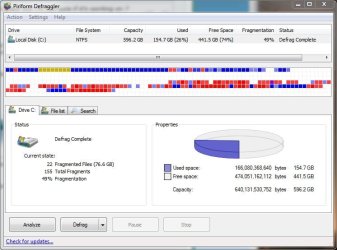
I downloaded Defraggler. But even after two rounds of defragmentation sessions, my drive is still 49% fragmented.

Why can't it get the job done in one cycle? I just want it to completely defrag my drive, no matter how long it takes.

Defraggler.JPG
 
Last edited:

My Computer

Computer Manufacturer/Model Number
Custom
OS
Windows 7 Home Premium 64
CPU
Core i7 870 2.93 GHz
Motherboard
Gigabyte P55A-UD3
Memory
16 GB G-Skills DDR3 1333
Graphics Card(s)
ASUS GTX 680 DirectCu-II Top
Sound Card
Realtek 5.1 audio
Monitor(s) Displays
Samsung 23" widescreen
Screen Resolution
2048x1152
Hard Drives
OCZ Vertex III 128 GB (primary)
OCZ Vertex II 128 GB (data)
PSU
Corsair 650W
Case
CoolerMaster HAF 920
Cooling
Arctic Cooling Freezer 7 Pro
Keyboard
DAS Model S Ultimate keyboard
Mouse
Logitech G5 gaming mouse
Internet Speed
Cable
Browser
Chrome
Other Info
Built in December 2010
I figured out the problem myself.

All those fragmented files in red are system restore points saved by Windows 7.

I deleted all the restore points, and my drive is now squeaky clean and unfragmented.
 

My Computer

Computer Manufacturer/Model Number
Custom
OS
Windows 7 Home Premium 64
CPU
Core i7 870 2.93 GHz
Motherboard
Gigabyte P55A-UD3
Memory
16 GB G-Skills DDR3 1333
Graphics Card(s)
ASUS GTX 680 DirectCu-II Top
Sound Card
Realtek 5.1 audio
Monitor(s) Displays
Samsung 23" widescreen
Screen Resolution
2048x1152
Hard Drives
OCZ Vertex III 128 GB (primary)
OCZ Vertex II 128 GB (data)
PSU
Corsair 650W
Case
CoolerMaster HAF 920
Cooling
Arctic Cooling Freezer 7 Pro
Keyboard
DAS Model S Ultimate keyboard
Mouse
Logitech G5 gaming mouse
Internet Speed
Cable
Browser
Chrome
Other Info
Built in December 2010
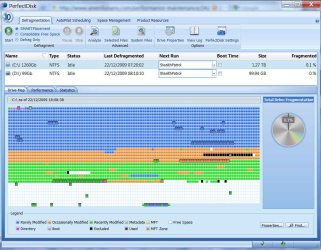
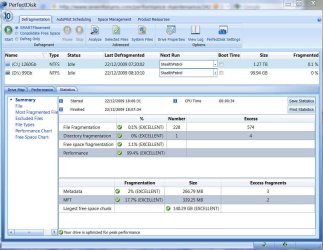
I was using diskeeper and now I got perfect disk 10 on my 1.5Tb HD

perfectdisk groups the boot files at the begining of the HD and it looks he can handle system and page files better than diskeeper. I don't know if that can make a big difference at overall performance but that's what I've checked.

full heavy defrag with diskeeper used to take 3-4 hours. with perfectdisk takes 10-12 hours. I like the performance reports b4-after at perfect disk. here is a couple of SS
 

Attachments

  • SNAG-0001.jpg
    SNAG-0001.jpg
    156.4 KB · Views: 77
  • SNAG-0002.jpg
    SNAG-0002.jpg
    106.7 KB · Views: 58

My Computer

Computer Manufacturer/Model Number
Personal Built (frankenstein) - WEI Here -> http://www.sevenforums.com/451826-post2094.html
OS
dual: windows 7 Ultimate x64 7600 and XP SP3
CPU
AMD PHENOM II 720 2800MHz
Motherboard
ASUS M4A78 sb700
Memory
2 X 2 OCZ REAPER 1066MHz
Graphics Card(s)
MSI 4850 1GB OC
Sound Card
REALTEK HD ONBOARD
Monitor(s) Displays
LCD SAMSUNG 21" T220
Screen Resolution
1680 x 1050 - 60Hz
Hard Drives
1.5 TB SEAGATE SATA II 7200 RPM
PSU
THERMALTAKE 430W PFC ACTIVE W0069
Case
SOLID FULL ATX
Cooling
COOLER MASTER TX-3 HEAT PIPES
Keyboard
logitech cordless keyboard
Mouse
microsoft wireless
Internet Speed
4Mb
Other Info
sound system: logitech x540 5.1
Zboard Fang gaming keyboard
PS2 joystick
Philips VOIP fone

My Computer

OS
Windows 7
Thanks. That's useful information.
 

My Computer

Computer Manufacturer/Model Number
Custom
OS
Windows 7 Home Premium 64
CPU
Core i7 870 2.93 GHz
Motherboard
Gigabyte P55A-UD3
Memory
16 GB G-Skills DDR3 1333
Graphics Card(s)
ASUS GTX 680 DirectCu-II Top
Sound Card
Realtek 5.1 audio
Monitor(s) Displays
Samsung 23" widescreen
Screen Resolution
2048x1152
Hard Drives
OCZ Vertex III 128 GB (primary)
OCZ Vertex II 128 GB (data)
PSU
Corsair 650W
Case
CoolerMaster HAF 920
Cooling
Arctic Cooling Freezer 7 Pro
Keyboard
DAS Model S Ultimate keyboard
Mouse
Logitech G5 gaming mouse
Internet Speed
Cable
Browser
Chrome
Other Info
Built in December 2010
guys I learned a simple rule.

dont use your c: drive for storage, keep space utilisation below 50%. That alone should make fragmentation rare. I have a 100 gig partition dedicated to windows 7 and I dont use it for storage. Various apps installed including office and is 60gig free space.

Storage and media drives are fine fragmented, I have never defragmented by non c: drives and I dont see issues.

In the past I have tried various apps such as perfectdisk and diskeeper, and the results arent convincing, I tend to fine some apps like outlook get noticebly faster but they do have a negative affect on boot time and loading time of small apps like notepad and IE. My guess is they seem to mess up the internal boot optimisation done by windows.
 

My Computer

Computer type
PC/Desktop
Computer Manufacturer/Model Number
home built
OS
windows 8.1 Pro x64
CPU
intel i5 4670k @ 4.3ghz
Motherboard
asus z87-plus
Memory
16 gig ram ddr3 @ 1600 corsair vengeance
Graphics Card(s)
evga 970 GTX 4 GIG FTW ACX 2.0
Sound Card
asus xonar D2X
Monitor(s) Displays
benq gw2765ht
Screen Resolution
2560x1440
Hard Drives
Samsung 850 pro SSD 512gig - boot device wooosh
WD black cavalier 640gig WD6401AALS
Seagate 500gig ST3500630AS
WD 2TB Green WDC20EARS
2 x WD Red 3TB WD30EFRX
Samsung 750gig HD753LG - on asmedia controller
PSU
coolermaster silent pro 600watt modular
Case
fractal define R4
Cooling
artic freezer i30, 3 case fans
Keyboard
microsoft business ps2 keyboard
Mouse
microsoft optical black mouse
Internet Speed
80/20 FTTC SkyBB
Antivirus
Nod32 AV v8, HitmanProAlert, SRP, System Hardening
Browser
Chrome x64
Other Info
Intel controller is in AHCI mode currently using IaSTOR 12.8.0.1016 drivers
I hate to say it, because it promotes that whole anti-competitive behavior, but I haven't run a third party defragger since my initial testing with Vista. At the time, there were several other websites reporting that those apps made no improvement, or enhancements to the OS. I would assume the same holds true with W7. Vista and W7 are much better at self-tuning and self-maintenance.

For all the difference that third party defrager`s make it`s not worth it, Windows 7 does a good enough job for the vast majority of users, more options for Windows defrag can be found easily at the command prompt;

defrag

/A Perform analysis on the specified volumes.
/C Perform the operation on all volumes.
/E Perform the operation on all volumes except those specified.
/H Run the operation at normal priority (default is low).
/M Run the operation on each volume in parallel in the background.
/T Track an operation already in progress on the specified volume.
/U Print the progress of the operation on the screen.
/V Print verbose output containing the fragmentation statistics.
/X Perform free space consolidation on the specified volumes.

Windows 7 still accepts these Vista switches.
/R Performs partial defragmentation (default). Attempts to consolidate only fragments smaller than 64 megabytes (MB).
/W Performs full defragmentation. Attempts to consolidate all file fragments, regardless of their size.
/F Forces defragmentation of the volume when free space is low.

example; defrag C: /V /W

Personally speaking the need for third party solutions with 7 is just a myth, they may improve some aspects of the drive performance, or worse conflict with Windows own routines, and any performance increase will be imperceptible (if any at all) to the average user on a standalone machine.

Differing algorithms just give varying results this is why you will always see more fragmentation when using third party solutions. A whole industry has grown up around this subject, and let`s face it if they all reported that Windows was now doing a good enough job it would hardly be in their best interests.

 

My Computer

OS
Windows XP, Vista & Windows 7 - Leopard & Snow Leopard
On my Windows 7 installation I just use the operating system's own program. On my XP system I use JKdefrag (aka MyDefrag).
 

My Computer

Computer Manufacturer/Model Number
Dell Studio XPS 9100
OS
Windows 7 Home Premium x64
CPU
Intel Core i7 930 2.8GHz/8MB
Motherboard
Intel X58
Memory
12GB DDR3
Graphics Card(s)
Radeon 5670 1GB
Sound Card
ESI Juli@
Monitor(s) Displays
23" LED
Screen Resolution
1920 x 1080
Hard Drives
Seagate Barracuda 7200.12 1TB x 2
WD Scorpio Black 750GB (laptop)
PSU
Base
Case
Base
Cooling
Base
Keyboard
Multimedia
Mouse
Microsoft precision optical
Internet Speed
10Mbits
Other Info
Mobile: Dell XPS 15 L502X
Intel i7 2630QM, 8 gigs DDR3 RAM, 750 gigs WD Scorpio Black (7,200 rpm SATA3), Nvidia GT525M 1 gig, 15.6" B+RGLED 1920 x1080, Win7 HP
Hey guys just a heads up that you grab O&O Defrag 10 Professional for free if you want to give it a shot
O&O Software -
 

My Computer

Computer type
PC/Desktop
Computer Manufacturer/Model Number
Elsa
OS
windows 8.1 Pro x64
CPU
intel [email protected]
Motherboard
msi mpower max ac
Memory
2x8gb ripjaws x @2133
Graphics Card(s)
asus r9-290@1100/1300
Sound Card
creative sbz
Monitor(s) Displays
dell u3011
Hard Drives
840 evo 250 & 8.5tb
PSU
evga supernova p2-1000
Case
corsair air 540
Cooling
corsair h100
Keyboard
logitech g710+
Mouse
logitech g502
Internet Speed
50/10
Antivirus
avg
Browser
firefox
Back
Top