Defraggler question?

billberry12

New member
Member
VIP
Local time
6:22 PM
Messages
292
I downloaded and ran the untility, but it is not completley defragging, and my hard drive gets about 2 gb more used space on it every time I try to defrag. Any ideas?
Thanks,
Bill
 

My Computer

Computer type
Laptop
Computer Manufacturer/Model Number
Dell Vostro 3750
OS
Windows 7 Professional
CPU
Core I5
Memory
8GB
Hard Drives
Seagate 600 240GB SSD
Antivirus
MSE
Browser
Chrome, IE, Firfox
This probably has nothing to do with the defrag but is an increase in restore points in the shadowstorage.
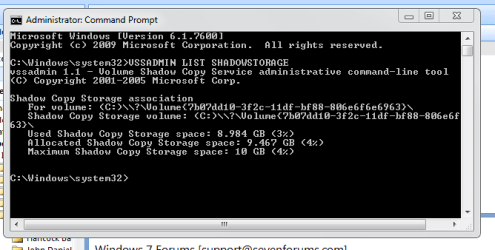
Do the following: Go to All Programs > Accessories > Command Prompt > right click on Command Prompt > Run as Administrator => into the little black window type: VSSADMIN LIST SHADOWSTORAGE > look for C:/ and see what the USED, ALLOCATED and MAXIMUM numbers are. ALLOCATED is what is currently missing from your diskspace.
 

My Computer

Computer Manufacturer/Model Number
HP, Dell, Gateway, Toshiba - 4 laptops and 2 desktops
OS
Vista, Windows7, Mint Mate, Zorin, Windows 8
CPU
from 1.6GHz Duo to i7
Monitor(s) Displays
2x HP w2207
Hard Drives
5x HDD, 7x SSD, 12x Externals
Keyboard
with trackball - no mices
Mouse
Trackball mice
Internet Speed
DSL 6000
Here is what I foound. What does this mean.

Windows defrag doesn't do this does it?
 

Attachments

  • Capture.PNG
    Capture.PNG
    10.2 KB · Views: 89

My Computer

Computer type
Laptop
Computer Manufacturer/Model Number
Dell Vostro 3750
OS
Windows 7 Professional
CPU
Core I5
Memory
8GB
Hard Drives
Seagate 600 240GB SSD
Antivirus
MSE
Browser
Chrome, IE, Firfox
Shawdowstorage?

What is it , where does it come from, do I need it, and why does it eventually go away after 4 or 5 defrags with defraggler? I don't understand what's going on here. Can someone help me understand?
Thanks.
 

My Computer

Computer type
Laptop
Computer Manufacturer/Model Number
Dell Vostro 3750
OS
Windows 7 Professional
CPU
Core I5
Memory
8GB
Hard Drives
Seagate 600 240GB SSD
Antivirus
MSE
Browser
Chrome, IE, Firfox
Here is the explanation and it has nothing to do with defrag:

Windows writes a shadow (restore point) of about 1GB - plus one is written each day in Vista and each week in Windows7. For that purpose Vista reserves 15% of your OS disk partition and allocates/uses it as needed. The allocation in Windows7 is variable from 3 to 15% depending on the size of your C-disk.
Find Command Prompt (in All Programs > Accessories > Command Prompt), right click on it and Open as Administrator. Into the little black window type VSSADMIN LIST SHADOWSTORAGE and hit ENTER. It will show 3 numbers:
Allocated - that is the amount that it has grabbed from your OS partition at this time
Used - this is the amount currently used
Maximum - this is the ultimate amount it will allocate and use
Once you reach "maximum", it will reuse the space deleting the oldest shadows for the storage of the newest shadows. With e.g. a 200GB OS partition you should expect a maximum of 30GBs that are reserved for the system and that you cannot use. If your OS partition is larger or smaller, the shadowstorage will be accordingly (always 15% max.in Vista but variable in Windows7) But the restore points (shadows) are required the day you need to do a system restore.
The easiest way to change the shadowstorage is with this cmd command: (for the case where you want to set it to the minimum which is 300GB)
Vssadmin Resize ShadowStorage /For=C: /On=C: /MaxSize=300MB
If you want to set it to e.g. 20GB, the command would look like this:
Vssadmin Resize ShadowStorage /For=C: /On=C: /MaxSize=20GB
Never forget GB or MB behind the MaxSize number because then the system will assume bytes and you will get an error.
Note: In Windows7 you can also set it in System Protection, but you have to be a good scout to find it. The cmd way is faster – just paste the command into cmd and adjust the last number to your liking. You have to, of course, also adjust the drive letter if you apply it to other than C.

 

My Computer

Computer Manufacturer/Model Number
HP, Dell, Gateway, Toshiba - 4 laptops and 2 desktops
OS
Vista, Windows7, Mint Mate, Zorin, Windows 8
CPU
from 1.6GHz Duo to i7
Monitor(s) Displays
2x HP w2207
Hard Drives
5x HDD, 7x SSD, 12x Externals
Keyboard
with trackball - no mices
Mouse
Trackball mice
Internet Speed
DSL 6000
Here is the explanation and it has nothing to do with defrag:

Actually it does. Defragmenting your HDD in certain ways (like Defraggler) causes an abundant amount of Shadow Copies to be created. In my humble opinion, third-party defragmentation is not required. The built in tool is more then smart enough and suffice to get any level or performance out of the drive.
 

My Computer

Computer type
PC/Desktop
Computer Manufacturer/Model Number
Alienware Aurora ALX R4
OS
Windows 10 Pro (x64)
CPU
Intel Core i7-3930K (3.2GHz - 4.5GHz)
Motherboard
Alienware Aurora-R4 x79
Memory
4x Samsung 4GB PC3-12800 DDR3 (16GB 1600MHz)
Graphics Card(s)
Nvidia Geforce GTX 690
Sound Card
SteelSeries Siberia Elite
Monitor(s) Displays
Dell UltraSharp U3011
Screen Resolution
2560x1600
Hard Drives
Samsung 850 Pro 256 GB, Seagate 1TB Desktop Hybrid HDD, 2x Western Digital 4TB Green HDD
PSU
875W Some Dell PSU <.<
Case
Alienware Aurora ALX
Cooling
Custom Liquid Cooling (EK CPU & GPU blocks) dual EK 480RAD
Keyboard
Logitech G710+ Mechanical
Mouse
Logitech G700s
Internet Speed
Verizon Fios (50 mbps average)
Other Info
Server: Intel NUC D54250WYK: i5-4250U, 16GB, 256 GB mSATA, Windows Server 2012 R2
If you want to use Defraggler, personally I do because it allows for mini defrags and it's just more user friendly, download CCleaner as well. It'll allow you to manage your system restore points as well as clean your system of temp files. That way you can delete all but the latest system restore point before and after a defrag.

You can also set how much space you want system restore to use via the system protection option within the sytem menu of control panel.

To set system restore max storage:
Start > Right Click Computer > Properties > System Protection > Choose HDD in question > Configure > Slide the slider to whatever you want the max size to be.

In regards to Defraggler
Make sure that you let the full defrag finish before you exit the program. During the process it will create an extra 5GB or more of files. When it finishes, it deletes those files as they've already been moved and placed in their correct location.

   Tip
Whenever you're doing a defrag, whether it be w/ the system program or a third party program, be sure to turn off any and all unnecessary programs and services.
 
Last edited:

My Computer

Computer Manufacturer/Model Number
Apple Macbook Pro (April 2009)
OS
W7 Ult. x64 | OS X
CPU
Intel Mobile Core 2 Duo 2.93Ghz [T9800 Penryn]
Motherboard
NVIDIA nForce 730i Rev. B1 [Mac-F2268EC8 (U2E1)]
Memory
4096MB Samsung DDR3 Dual Channel [PC3-8500F 1066Mhz]
Graphics Card(s)
NVIDIA GeForce 9600M GT 512MB [G96M Rev. C1]
Sound Card
SB X-Fi Surround 5.1 USB | Onboard Realtek (Disabled)
Monitor(s) Displays
Acer x223wbd 22" | Apple Anti-Glare 17" (Disabled)
Screen Resolution
{Current} 1440x900 {Acer} 1680x1050 {Apple} 1920x1200
Hard Drives
{Internal}
Seagate Momentus 320GB 2.5" 7200RPM [ST9320421AS]

{Externals}
LaCie 320GB USB 2.0 HDD [301284UR]
LaCie 750GB USB 2.0 FW400 eSATA HDD [301314U]
LaCie 1TB USB 2.0 HDD [301304UR]
PSU
Magsafe
Case
Aluminum/Unibody (MBP52)
Cooling
2 x 6000 RPM Fans
Keyboard
Logitech G-15v2 [PN 920-000379]
Mouse
Logitech G-9 [PN 910-000338]
Internet Speed
12Mbps/2.5Mbps w/ 24Mbps Speed Boost [Comcast]
Other Info
Logitech X-540 Speakers [PN 970223-0122]
Sennheiser PC-151 Headset
Here is the explanation and it has nothing to do with defrag:

Actually it does. Defragmenting your HDD in certain ways (like Defraggler) causes an abundant amount of Shadow Copies to be created. In my humble opinion, third-party defragmentation is not required. The built in tool is more then smart enough and suffice to get any level or performance out of the drive.
Thanks for pointing that out. I did not know that. Always learn new things.
 

My Computer

Computer Manufacturer/Model Number
HP, Dell, Gateway, Toshiba - 4 laptops and 2 desktops
OS
Vista, Windows7, Mint Mate, Zorin, Windows 8
CPU
from 1.6GHz Duo to i7
Monitor(s) Displays
2x HP w2207
Hard Drives
5x HDD, 7x SSD, 12x Externals
Keyboard
with trackball - no mices
Mouse
Trackball mice
Internet Speed
DSL 6000
Problem solved

I removed defraggler, cleaned up everything with ccleaner, and got my 6 gb back. Thanks, everyone.

I'll just use the Windows defragger
 

My Computer

Computer type
Laptop
Computer Manufacturer/Model Number
Dell Vostro 3750
OS
Windows 7 Professional
CPU
Core I5
Memory
8GB
Hard Drives
Seagate 600 240GB SSD
Antivirus
MSE
Browser
Chrome, IE, Firfox
The state of the art free Disk and Registry Defragger is Auslogics. Have used both for 10 years along with CCleaner with no issues.
 
Back
Top