Defragmenter programs can delete System Restore Points

I have never had a problem using Windows 7 built in defrag.
I do them manually on spinners. No scheduled.

I'm thinking that s 3rd party defrag don't always remove Restore Points.
The 3rd party defrag just puts them where Windows 7 can't find them. Windows 7 built in defrag knows where Windows 7 wants things on a disk and in which order.

Sometime I just don't get it.
For years people have requested that Microsoft put things in their system like quality defrag and as soon as they put a good one in their system many still want a 3rd party program.

For sure whether it is Windows 7 built in defrag or a 3rd party defrag program we really don't know for sure what its done.
Some will say they defrag the boot, startup, moved things to the outside of of disk ect. but we really don't know.
 

My Computer My Computer

Computer type
PC/Desktop
Computer Manufacturer/Model Number
Home made Desktop
OS
Windows 10 Pro. 64/ version 1709 Windows 7 Pro/64
CPU
Intel i7-6800K @ 4.3
Motherboard
ASUS X-99 Deluxe II
Memory
Corsair Platinum 16 gig @2400
Graphics Card(s)
EVGA GTX 1070 OC
Monitor(s) Displays
Asus 27" LED LCD/VE278Q
Screen Resolution
1920-1080 or 1280-720 HDMI
Hard Drives
INTEL SSD 730-240 Gb Sata 3.0/
PSU
EVGA Platium 1200W
Case
Phanteks Luxe Tempered Glass 8 fans/ one radiator
Cooling
XSPC/ Water Cooled CPU
Keyboard
Das 4 Professional
Mouse
Logitech M705/MX Anywhere 2-S
Internet Speed
100 mbits
Antivirus
Microsoft Security Essentials/ Malwarebytes Premium 3.0/ SAS
Browser
I.E. 11 default/Firefox/ ISP Time Warner Cable/Spectrum
Other Info
LG BluRay Burner/
Sound system-KLipsch-THX/
Icy Dock ssd Hot Swap bays.
  • Like
Reactions: scr
From what I read of Bill's research the MS defragger can have this problem too. We need to determine this with certainty to advise consumers best. I may need to change my tutorials to MS defragger perhaps with a caveat to monitor Restore Points after doing only an on-demand defrag. But I could keep advising my preferred Puran and just add the same suggestion. What do you think?

I am loyal to Puran because after Cluberti prescribed a boot time defrag on a slow HD's Startup it cut it from 2 minutes to 1 minute which is one of the most dramatic results I've ever seen from a tool. I later cut other boot times and sped up older hardware using Puran Boot Time defrag after enabling Intelligent Optimizer that moves most-used files to the outer edge of the drive for faster reads.

But if this deletes or hides the restore points it isn't a valuable enough trade-off since that is a consumer's first and often best repair and recovery option.
 
I have never had a problem using Windows 7 built in defrag.
I do them manually on spinners. No scheduled.

I'm thinking that s 3rd party defrag don't always remove Restore Points.
The 3rd party defrag just puts them where Windows 7 can't find them. Windows 7 built in defrag knows where Windows 7 wants things on a disk and in which order.

Sometime I just don't get it.
For years people have requested that Microsoft put things in their system like quality defrag and as soon as they put a good one in their system many still want a 3rd party program.

For sure whether it is Windows 7 built in defrag or a 3rd party defrag program we really don't know for sure what its done.
Some will say they defrag the boot, startup, moved things to the outside of of disk ect. but we really don't know.

I used Auslogics for about a year. After the most recent defrag I started getting a "Windows is running Slow - Click here for Details" error. Clicking for details told me nothing. This happened even at idle and showed up every 20 minutes or so. A re boot would resolve the error for about 45 minutes then it would happen every 15 to 20 minutes after the first time all at idle.

I didn't have a clue as to why this was happening. Looking in the Event Viewer I noticed a VSS error on the same day as the Auslogic defrag. I didn't know if it was related to the running slow error or not.

I decided to run the Windows 7 defrag, I figured I couldn't do any more harm at this point and if needed I could restore from my 3 day old backup. Now I'm not one to sit and watch defrag work but because it had been a long time since I used it I decided to keep an eye on it. Watching paint dry comes to mind for the level of excitement. I watched it run none-the-less and it did 8 passes, I don't know if that's normal or not.

This was 5 days ago and I haven't seen the running slow error since and I notice a definite speed improvement in both start up - Boot Duration on 5/22: 97977ms on 5/28: 60409ms. Shut down time improved as well - Shutdown Duration on 5/22: 89445ms on 5/28: 11813ms. I'm not seeing the spinning wheel as often or as long either when starting other programs. All and all a definite improvement. Through this experiment my 10 SR points remained and were unchanged. I use a self imposed delay between certain application start ups at boot using the free standard Startup Delayer Overview | r2 Studios as well as a AV Boot scan.

What you said above "Windows 7 built in defrag knows where Windows 7 wants things on a disk and in which order" makes a lot of sense to me now.
 

My Computer My Computer

Computer type
PC/Desktop
Computer Manufacturer/Model Number
1. HP p6733w Desktop 2. HP Envy 700-515xt Desktop
OS
1. Windows 7 Home Premium sp1 - 64bit 2. Windows 7 Pro sp1 - 64bit
CPU
1. AMD Phenom II x2 511 3.4GHz 2. Intel i7-4790 Quad 4.0GHz
Motherboard
1. N-Alvorix-RS880-uATX 2. Kaili2
Memory
1. 5 GB - DDR3 2. 8GB DDR3-1600MHz
Graphics Card(s)
Integrated 1. ATI Radeon 4200 2. Intel HD Graphics 4600
Sound Card
1. Realtek High Definition Audio 2. Realtek (Neutered Beats)
Monitor(s) Displays
1. Acer V193L 2. HP 2311 Series Wide LCD
Screen Resolution
1. 1280 x 1024 2. 1920 x 1080
Hard Drives
1. 750 GB - 7200 RPM SATA 2. 1TB 7200 RPM SATA
PSU
1. 250w 2. 300w
Cooling
Stock
Keyboard
Logitech USB keyboard
Mouse
Logitech USB optical mouse
Internet Speed
1.0 - 2.0 mbps
Antivirus
Eset Smart Security v9.0.349.0
Browser
Pale Moon
The error you were receiving is not generated by Windows that I've ever seen, but is most often generated some type of sneakware allowed in during a program or tool install without guarding closely enough to prevent it.

Check your Browser Add-Ons and Search services to make sure nothing is there except Flash, a reader helper and Google in the stable search box with all others precluded. Then check in Control Panel that nothing that you don't use and know is installed, or uninstall it. Finally run a full scan with SUPERAntiSpyware and Malwarebytes declining their free trial to use only the on-demand scanner as needed.

I also always run CCleaner before a defrag. Never heard of it deleting Restore points.
 
Ccleaner has the ability to delete restore points, but not by using the clean or reg clean. Its under tools.

and

The error you were receiving is not generated by Windows that I've ever seen


Agreed
 

My Computer My Computer

Computer type
PC/Desktop
Computer Manufacturer/Model Number
Custom Built
OS
Windows 10 Pro
CPU
AMD Ryzen 5 2400G Processor with Radeon RX Vega 11 Graphics
Motherboard
ASRock X470 Master SLI/AC AM4 AMD Promontory X470 SATA 6Gb/s
Memory
G.SKILL Ripjaws V Series 16GB (2 x 8GB) 288-Pin DDR4 SDRAM D
Graphics Card(s)
2047MB NVIDIA GeForce GTX 1060 6GB (EVGA)
Sound Card
Motherboard Built in
Monitor(s) Displays
Acer R240HY bidx 23.8-Inch IPS HDMI DVI VGA (1920 x 1080) Wi
Screen Resolution
1920 x 1080
Hard Drives
1TB Sandisk SSD PLUS (Main drive)
500 GB Seagate 7200 RPM (Games)
500 GB Western Digital 7200 RPM (Virtual Machines)
PSU
CORSAIR TX Series TX650M 650W 80+ Gold Modular Power Supply
Case
CORSAIR CARBIDE SPEC-02 Mid-Tower Gaming Case, Red LED Fan
Cooling
220mm, two 120mm, and four 60mm fans
Keyboard
Wired Dell keyboard
Mouse
Wireless Logitech mouse
Internet Speed
250mb down, 30mb up
Antivirus
Panda Cloud Antivirus
Browser
Chrome-ish x64
Other Info
Your awesome for reading this.
The error you were receiving is not generated by Windows that I've ever seen, but is most often generated some type of sneakware allowed in during a program or tool install without guarding closely enough to prevent it.

Check your Browser Add-Ons and Search services to make sure nothing is there except Flash, a reader helper and Google in the stable search box with all others precluded. Then check in Control Panel that nothing that you don't use and know is installed, or uninstall it. Finally run a full scan with SUPERAntiSpyware and Malwarebytes declining their free trial to use only the on-demand scanner as needed.

I also always run CCleaner before a defrag. Never heard of it deleting Restore points.

I didn't quote the error correctly it should read "Windows has detected slow performance".

Before any backup I use CCleaner, AdwCleaner, JRT, SuperAntiSpyware free, Mbam premium is installed and runs a scan every evening, a full Eset Smart Security AV scan and I did defrag with Auslogics but from now on I'll be using the Win7 defrag utility. I have uninstalled Auslogics. At boot Eset runs a boot scan. So far nothing has been found.

The Windows Running Slow error opened Windows reporting screen but I never tried to use it as previous use leads to a series of troubleshooters that have rarely been useful to the problem at hand. I have had better success in correcting a problem by first searching these forums and then if no luck Goggle the error.
To be on the safe side I ran all of the above again and everything comes up clean. I also checked the Search Services, Installed programs and
Browser add on items, all is in order.

Again, I haven't received the slow performance notification in 5 days.
 

My Computer My Computer

Computer type
PC/Desktop
Computer Manufacturer/Model Number
1. HP p6733w Desktop 2. HP Envy 700-515xt Desktop
OS
1. Windows 7 Home Premium sp1 - 64bit 2. Windows 7 Pro sp1 - 64bit
CPU
1. AMD Phenom II x2 511 3.4GHz 2. Intel i7-4790 Quad 4.0GHz
Motherboard
1. N-Alvorix-RS880-uATX 2. Kaili2
Memory
1. 5 GB - DDR3 2. 8GB DDR3-1600MHz
Graphics Card(s)
Integrated 1. ATI Radeon 4200 2. Intel HD Graphics 4600
Sound Card
1. Realtek High Definition Audio 2. Realtek (Neutered Beats)
Monitor(s) Displays
1. Acer V193L 2. HP 2311 Series Wide LCD
Screen Resolution
1. 1280 x 1024 2. 1920 x 1080
Hard Drives
1. 750 GB - 7200 RPM SATA 2. 1TB 7200 RPM SATA
PSU
1. 250w 2. 300w
Cooling
Stock
Keyboard
Logitech USB keyboard
Mouse
Logitech USB optical mouse
Internet Speed
1.0 - 2.0 mbps
Antivirus
Eset Smart Security v9.0.349.0
Browser
Pale Moon
Sounds like it might have been the Action Center, so be sure you clear all of the issues there at all times. Action Center, Problems>Solutions reporting, Win7 troubleshooters can all help resolve a problem as given in Troubleshooting Steps for Windows 7.
 
Sounds like it might have been the Action Center, so be sure you clear all of the issues there at all times. Action Center, Problems>Solutions reporting, Win7 troubleshooters can all help resolve a problem as given in Troubleshooting Steps for Windows 7.

The only issue in the Action Center is that I have Windows Updates set to download and then notify me for install. I guess I could turn that off but I use it to remind me that I have it set that way.

Since using the Windows Defrag things are running better then ever.

In my previous post I stated that Windows Defrag made 8 passes on my drive, is that normal?

Seems that it's normal. I found that answer over at http://answers.microsoft.com/en-us/...finishes/25167e16-8f32-472d-962d-f9aceee44777
 
Last edited:

My Computer My Computer

Computer type
PC/Desktop
Computer Manufacturer/Model Number
1. HP p6733w Desktop 2. HP Envy 700-515xt Desktop
OS
1. Windows 7 Home Premium sp1 - 64bit 2. Windows 7 Pro sp1 - 64bit
CPU
1. AMD Phenom II x2 511 3.4GHz 2. Intel i7-4790 Quad 4.0GHz
Motherboard
1. N-Alvorix-RS880-uATX 2. Kaili2
Memory
1. 5 GB - DDR3 2. 8GB DDR3-1600MHz
Graphics Card(s)
Integrated 1. ATI Radeon 4200 2. Intel HD Graphics 4600
Sound Card
1. Realtek High Definition Audio 2. Realtek (Neutered Beats)
Monitor(s) Displays
1. Acer V193L 2. HP 2311 Series Wide LCD
Screen Resolution
1. 1280 x 1024 2. 1920 x 1080
Hard Drives
1. 750 GB - 7200 RPM SATA 2. 1TB 7200 RPM SATA
PSU
1. 250w 2. 300w
Cooling
Stock
Keyboard
Logitech USB keyboard
Mouse
Logitech USB optical mouse
Internet Speed
1.0 - 2.0 mbps
Antivirus
Eset Smart Security v9.0.349.0
Browser
Pale Moon
Defrag deletes restore points?

Well for most users I reckon it's probably best to stick to the built in Windows 7 defrag tool.

Here's some info from Ultra Defrag (I used this software in the past)

Quotes from the handbook:

It doesn't mention anything about VSS compatible mode but other utilities that I've used in the past warn users to enable it.

UltraDefrag Handbook: Tips and Tricks - 6.0.2

After defragmentation I see my restore points disappeared, what happens?

This is a normal situation when restore points disappear after an intensive disk processing. Windows limits amount of disk space reserved for restore points. When you perform intensive disk processing, Windows tracks changes through system restore, therefore the mentioned limit may be easily exceeded which results in old restore points deletion.

We would recommend to avoid the use of restore points for serious purposes, because Windows can never guarantee that some point saved in the past will be available in the next moment. Use backup software instead.

Performance of UltraDefrag from best to worst

Running at Boot Time
this is the fastest, since there are no other processes running

Running in Safe Mode
here are only a limited number of processes running, which are essential to operate Windows

Running with Anti-virus Software disabled
read and write operations are not interrupted by the AV process

Running when the System is fully used
this is the worst and not recommended at all, since many files are locked by running applications. You should never use this to process entire disks.

Note
You must disable your virus detection software before using UltraDefrag. Any virus scanner running during the defragmentation extremely slows down the process.

Some Anti-virus programs allow to exclude processes from being monitored, if your Anti-virus program supports this, you can use it instead of disabling it completely. You may still encounter slower performance compared to running UltraDefrag at boot or in safe mode.

We recommend to exclude as much files as possible from defragmentation - this will dramatically decrease the defragmentation time. Temporary files and archives are usually rarely accessed and may be left fragmented without a noticeable system performance degradation.


So the only reason that I wanted to post this was to show an opinion from a third party defrag utility provider and not to suggest that it should be used as an alternative to Windows Defrag.

My personal thoughts: I use Puran Defrag as suggested by Greg Rocker but only ever choose the boot defrag option and even then only after disk repair (chkdsk) as I seem to remember reading somewhere that disk errors should be fixed before running third party defrag utilities but I can't find the source of that information at the moment.

I keep System Restore disabled anyway but understand that it comes in handy as a first port of call for some users who experience problems.
 

My Computer My Computer

Computer type
Laptop
Computer Manufacturer/Model Number
ASUS
OS
Microsoft Windows 7 Home Premium 64-bit 7601 Multiprocessor Free Service Pack 1
CPU
AMD C-60 APU with Radeon(tm) HD Graphics
Motherboard
ASUSTeK COMPUTER INC. X501U
Memory
4.00 GB
Graphics Card(s)
AMD Radeon HD 6290 Graphics
Sound Card
(1) AMD High Definition Audio Device (2) Realtek High Defi
Screen Resolution
1366 x 768 x 32 bits (4294967296 colors) @ 60 Hz
Hard Drives
Hitachi HTS545050A7E380 SATA Disk Device
Antivirus
Comodo CIS & FW, SecureAplus App Whitelisting, Threatfire
Browser
Cyberfox 64bit, Opera 64bit, Airfox
Other Info
Spy-The-Spy, HitmanPro.Alert, Norton Connect Safe, MJRegWatcher, BitDefender TrafficLight, Voodoo Shield, Zemana AntiMalware
We'd need someone with repeatable SR point deletion to test various products, and see if it causes same result. Just a garden variety degrag, not optimizing/moving defrag. Would Contig cause the same issue as it works differently? If VSS is tracking the changes, then any mass movement of fragments would likely cause the issue, But that obviously can't be the cause alone, perhaps coupled with some unknown variable. I have used defrag programs for years, without ever losing SR points.

A Guy
 

My Computer My Computer

Computer type
PC/Desktop
OS
Windows 10 Home x64
CPU
INTEL Core i5-750 Quad-Core 3.37GHz
Motherboard
ASUS P7P55D
Memory
HyperX Fury Black Series 8GB (2 x 4GB) 1866Mhz
Graphics Card(s)
EVGA GeForce GTX 750 Superclocked 1GB 128-Bit GDDR5
Monitor(s) Displays
LG 32MA68HY 32" IPS
Screen Resolution
1920 x 1080
Hard Drives
Samsung 840 Evo 120GB, SEAGATE 500GB Barracuda® 7200.12, SATA 3 Gb/s, 7200 RPM, 16MB cache
PSU
ANTEC TruePower New TP-550, 80 PLUS, 550W
Case
ANTEC Three Hundred Illusion
Cooling
COOLER MASTER Hyper 212 Plus, 4 x 120mm 1 x 140mm Noctua's
Internet Speed
85 + Mbps
Antivirus
Avast
Browser
Vivaldi
I've been mostly using Win 8.1 lately and see some "interesting" findings.
I prefer Win 7, but some people I help are buying Win 8 PCs, and then call me for help.
So, I've got Win 8.1 now and I'm trying to learn as much as possible.
I don't want this post to start a Win 7/Win 8 flame war.
If I'm going "off-topic" with this, let me know and I'll delete this post ...

On this Win 8.1 OS

I know there was at least one Restore Point (last I checked).
There are none now.
The space allocated for RPs was reset to 0, I know I set that to apx 10% earlier.

I NEVER installed a 3rd party defrag utility on this OS.
I NEVER manually ran a defrag, I let Windows default scheduled defrag handle this.

Just checked and SOMETHING defragged the partiton ONLY a day after the scheduled defrag. It was NOT the default Scheduled Defrag Task that ran, I have History enabled. I do use CCleaner file cleaner. I have been installing several programs and testing them, but the system is "clean" imho. If this thread is for Win 7 only, I can delete this post. If anyone is interested in Win 8 "issues", this is what I found so far. I didn't see a thread about this issue on EF, but maybe this info will help over there ...
 

My Computer My Computer

Computer type
PC/Desktop
Computer Manufacturer/Model Number
home built
OS
Multi-Boot W7_Pro_x64 W8.1_Pro_x64 W10_Pro_x64 +Linux_VMs +Chromium_VM
CPU
AMD Athlon II x4 620
Motherboard
Gigabyte GA-MA785G-UD3H
Memory
6GB GSkill DDR2 800
Graphics Card(s)
AMD 4670 GPU + AMD 4200 IGP
Sound Card
on board Realtek ALC889A
Monitor(s) Displays
RCA 40" LCD TV, Insignia 32" LCD TV, HP 15" LCD monitor
Screen Resolution
1680 x 1050
Hard Drives
OCZ Vertex 3 120GB,
Samsung F3 1TB (3),
Several others - WD, Seagate, Hitachi, ...
PSU
Corsair 500 W
Case
Rosewill mid tower
Cooling
CM 90mm rifle
Keyboard
Gyration wireless, Logitech wireless, Dell USB wired
Mouse
Gyration wireless, Logitech wireless, V7 USB wired
Internet Speed
Spectrum - 100Mbps D / 10Mbps U
Antivirus
Avast, MBAM3, EMET, WinPatrol
Browser
Pale Moon, Firefox, IE
Other Info
2 multi-boot PC's
Mainly HTPC/Office/Gen purpose (no gaming).
Trendnet USB KVM.
LG DVD burner/Blue Ray Player.
Tray system for removable SATA backup drives.

Not currently OCd, under-volted.
I use Hybrid sleep, rarely re-boot or shutdown.

Hauppauge HD-PVR, Avermedia PCIe TV Tuner, Hauppauge PCI TV Tuner.
I think this is a general Defrag thread, no need to differentiate between OS.

Does anything get reported in the event logs re: the unscheduled defrag.

It is very odd that the space got reset to 0 - I think I understand the RPs disappearing, but this is different and very bad.
 

My Computer My Computer

Computer type
Laptop
Computer Manufacturer/Model Number
HP Pavilion dv6-6c10us
OS
x64 (6.3.9600) Win8.1 Pro & soon dual boot x64 (6.1.7601) Win7_SP1 HomePrem
CPU
AMD A6-3420M APU with Radeon(tm) HD Graphics
Motherboard
Hewlett-Packard 1805
Memory
6.00 GB
Graphics Card(s)
AMD Radeon(TM) HD 6520G
Sound Card
(1) AMD High Definition Audio Device (2) IDT High Definiti
Monitor(s) Displays
HP W2072a 20" LCD (1600 x 900) @ 60 Hz
Screen Resolution
1366 x 768 x 32 bits (4294967296 colors) @ 60 Hz
Hard Drives
ST640LM0 00 HM641JI SATA Disk Device
Keyboard
Logitech k520 wireless KB
Mouse
Logitech m320 wireless mouse (bundled with KB)
Internet Speed
15/5 | 54 MB Wireless 'n'
Antivirus
Realtime: Defender or Avast | On-demand: Malwarebytes, ESET
Browser
IE 11 on Win8, IE 10 on win 7
Other Info
Media: [Gimp, Audacity, VLC] || Comm: [WEmail 2012, Skype] || Productivity: [OpenOffice,| Textpad] || Utils: [Sysinternals, cCleaner, Speccy, Defraggler]
The more I look at this the more interesting - and confusing ...
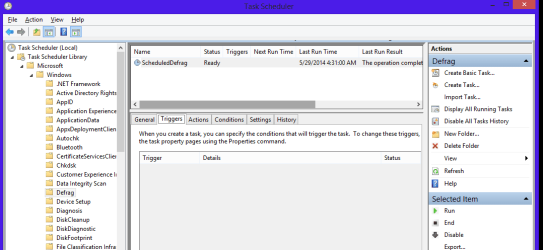
The ScheduledDefrag task in Win 8.1 has NO triggers. (see screen print 1)
The ScheduledDefrag task in Win 7 HAS a trigger.

In Win 8.1 Task History you can see the task ran on 5/26 and then on 5/29... (see screen print 2)
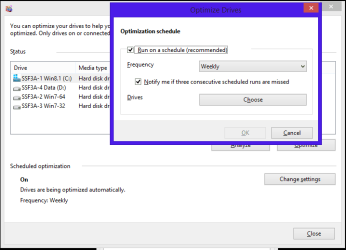
From what I see the defrag task runs every couple of days, not once a week (as I expected).
In Win 7 the defrag task runs once a week - as it should.

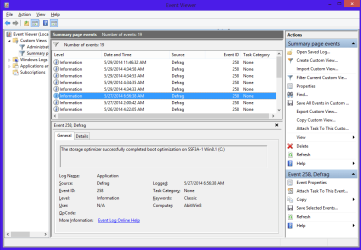
In Event History I found 2 defrag "Optimizer" events that ran on 5/27. (see screen print 3)
What ran to cause these events ????

The "event text" for these is:
The storage optimizer successfully completed boot optimization on SSF3A-1 Win8.1 (C)
The storage optimizer successfully completed analysis on SSF3A-1 Win8.1 (C)

I did find Shawn's tutorials in EF
Optimize Drives - Defrag HDD and TRIM SSD in Windows 8
Optimize Drives Schedule - Change in Windows 8

but I don't understand why "defrag/optimize" runs every couple of days and not weekly (see screen print 4)
And, what runs to cause the optimizer events that aren't listed in the defrag task history

:confused:

DFGSP01.PNG

DFGSP02.PNG

DFGSP03.PNG

DFGSP04.PNG
 

My Computer My Computer

Computer type
PC/Desktop
Computer Manufacturer/Model Number
home built
OS
Multi-Boot W7_Pro_x64 W8.1_Pro_x64 W10_Pro_x64 +Linux_VMs +Chromium_VM
CPU
AMD Athlon II x4 620
Motherboard
Gigabyte GA-MA785G-UD3H
Memory
6GB GSkill DDR2 800
Graphics Card(s)
AMD 4670 GPU + AMD 4200 IGP
Sound Card
on board Realtek ALC889A
Monitor(s) Displays
RCA 40" LCD TV, Insignia 32" LCD TV, HP 15" LCD monitor
Screen Resolution
1680 x 1050
Hard Drives
OCZ Vertex 3 120GB,
Samsung F3 1TB (3),
Several others - WD, Seagate, Hitachi, ...
PSU
Corsair 500 W
Case
Rosewill mid tower
Cooling
CM 90mm rifle
Keyboard
Gyration wireless, Logitech wireless, Dell USB wired
Mouse
Gyration wireless, Logitech wireless, V7 USB wired
Internet Speed
Spectrum - 100Mbps D / 10Mbps U
Antivirus
Avast, MBAM3, EMET, WinPatrol
Browser
Pale Moon, Firefox, IE
Other Info
2 multi-boot PC's
Mainly HTPC/Office/Gen purpose (no gaming).
Trendnet USB KVM.
LG DVD burner/Blue Ray Player.
Tray system for removable SATA backup drives.

Not currently OCd, under-volted.
I use Hybrid sleep, rarely re-boot or shutdown.

Hauppauge HD-PVR, Avermedia PCIe TV Tuner, Hauppauge PCI TV Tuner.

My Computer My Computer

Computer type
Laptop
Computer Manufacturer/Model Number
HP Pavilion dv6-6c10us
OS
x64 (6.3.9600) Win8.1 Pro & soon dual boot x64 (6.1.7601) Win7_SP1 HomePrem
CPU
AMD A6-3420M APU with Radeon(tm) HD Graphics
Motherboard
Hewlett-Packard 1805
Memory
6.00 GB
Graphics Card(s)
AMD Radeon(TM) HD 6520G
Sound Card
(1) AMD High Definition Audio Device (2) IDT High Definiti
Monitor(s) Displays
HP W2072a 20" LCD (1600 x 900) @ 60 Hz
Screen Resolution
1366 x 768 x 32 bits (4294967296 colors) @ 60 Hz
Hard Drives
ST640LM0 00 HM641JI SATA Disk Device
Keyboard
Logitech k520 wireless KB
Mouse
Logitech m320 wireless mouse (bundled with KB)
Internet Speed
15/5 | 54 MB Wireless 'n'
Antivirus
Realtime: Defender or Avast | On-demand: Malwarebytes, ESET
Browser
IE 11 on Win8, IE 10 on win 7
Other Info
Media: [Gimp, Audacity, VLC] || Comm: [WEmail 2012, Skype] || Productivity: [OpenOffice,| Textpad] || Utils: [Sysinternals, cCleaner, Speccy, Defraggler]
Something to check

On this Win 8.1 OS

I know there was at least one Restore Point (last I checked).
There are none now.
The space allocated for RPs was reset to 0, I know I set that to apx 10% earlier.

I'm not entirely familiar with Win 8 but it might be worth checking that SRP settings haven't been changed by some method unknown to you like using a tweaking program or registry cleaner. Anyway it's worth check.

If you look at the registry key here:

HKEY_LOCAL_MACHINE\SOFTWARE\Microsoft\Windows NT\CurrentVersion\SystemRestore

You should see RPLifeInterval - This value specifies, in seconds, the restore points Time to Live (TTL). When a restore point reaches this time and it is still on the system, it gets deleted. The default value is (7776000), which will be 90 days. Check the figure to see if it's different.


My Computer My Computer

Computer type
Laptop
Computer Manufacturer/Model Number
ASUS
OS
Microsoft Windows 7 Home Premium 64-bit 7601 Multiprocessor Free Service Pack 1
CPU
AMD C-60 APU with Radeon(tm) HD Graphics
Motherboard
ASUSTeK COMPUTER INC. X501U
Memory
4.00 GB
Graphics Card(s)
AMD Radeon HD 6290 Graphics
Sound Card
(1) AMD High Definition Audio Device (2) Realtek High Defi
Screen Resolution
1366 x 768 x 32 bits (4294967296 colors) @ 60 Hz
Hard Drives
Hitachi HTS545050A7E380 SATA Disk Device
Antivirus
Comodo CIS & FW, SecureAplus App Whitelisting, Threatfire
Browser
Cyberfox 64bit, Opera 64bit, Airfox
Other Info
Spy-The-Spy, HitmanPro.Alert, Norton Connect Safe, MJRegWatcher, BitDefender TrafficLight, Voodoo Shield, Zemana AntiMalware
This is not a Windows 7 only thread. This issue has been happening since Vista for sure. I believe XP used snapshots and not VSS? In any case, I have not seen XP users having this issue. It doesn't mean it doesn't happen, or that other issues can also cause loss of SR points. A Guy
 

My Computer My Computer

Computer type
PC/Desktop
OS
Windows 10 Home x64
CPU
INTEL Core i5-750 Quad-Core 3.37GHz
Motherboard
ASUS P7P55D
Memory
HyperX Fury Black Series 8GB (2 x 4GB) 1866Mhz
Graphics Card(s)
EVGA GeForce GTX 750 Superclocked 1GB 128-Bit GDDR5
Monitor(s) Displays
LG 32MA68HY 32" IPS
Screen Resolution
1920 x 1080
Hard Drives
Samsung 840 Evo 120GB, SEAGATE 500GB Barracuda® 7200.12, SATA 3 Gb/s, 7200 RPM, 16MB cache
PSU
ANTEC TruePower New TP-550, 80 PLUS, 550W
Case
ANTEC Three Hundred Illusion
Cooling
COOLER MASTER Hyper 212 Plus, 4 x 120mm 1 x 140mm Noctua's
Internet Speed
85 + Mbps
Antivirus
Avast
Browser
Vivaldi
I don't have a RPLifeInterval registry key in Win 8.1.
I checked again and the Restore Point is gone and System Restore max usage is reset to 0.

For now:
I set the max usage back to 10%.
I turned off scheduled defrag.
I'll keep an eye on it and see how it goes the next few days ...
 

My Computer My Computer

Computer type
PC/Desktop
Computer Manufacturer/Model Number
home built
OS
Multi-Boot W7_Pro_x64 W8.1_Pro_x64 W10_Pro_x64 +Linux_VMs +Chromium_VM
CPU
AMD Athlon II x4 620
Motherboard
Gigabyte GA-MA785G-UD3H
Memory
6GB GSkill DDR2 800
Graphics Card(s)
AMD 4670 GPU + AMD 4200 IGP
Sound Card
on board Realtek ALC889A
Monitor(s) Displays
RCA 40" LCD TV, Insignia 32" LCD TV, HP 15" LCD monitor
Screen Resolution
1680 x 1050
Hard Drives
OCZ Vertex 3 120GB,
Samsung F3 1TB (3),
Several others - WD, Seagate, Hitachi, ...
PSU
Corsair 500 W
Case
Rosewill mid tower
Cooling
CM 90mm rifle
Keyboard
Gyration wireless, Logitech wireless, Dell USB wired
Mouse
Gyration wireless, Logitech wireless, V7 USB wired
Internet Speed
Spectrum - 100Mbps D / 10Mbps U
Antivirus
Avast, MBAM3, EMET, WinPatrol
Browser
Pale Moon, Firefox, IE
Other Info
2 multi-boot PC's
Mainly HTPC/Office/Gen purpose (no gaming).
Trendnet USB KVM.
LG DVD burner/Blue Ray Player.
Tray system for removable SATA backup drives.

Not currently OCd, under-volted.
I use Hybrid sleep, rarely re-boot or shutdown.

Hauppauge HD-PVR, Avermedia PCIe TV Tuner, Hauppauge PCI TV Tuner.
You aren't dual booting are you?

A Guy
 

My Computer My Computer

Computer type
PC/Desktop
OS
Windows 10 Home x64
CPU
INTEL Core i5-750 Quad-Core 3.37GHz
Motherboard
ASUS P7P55D
Memory
HyperX Fury Black Series 8GB (2 x 4GB) 1866Mhz
Graphics Card(s)
EVGA GeForce GTX 750 Superclocked 1GB 128-Bit GDDR5
Monitor(s) Displays
LG 32MA68HY 32" IPS
Screen Resolution
1920 x 1080
Hard Drives
Samsung 840 Evo 120GB, SEAGATE 500GB Barracuda® 7200.12, SATA 3 Gb/s, 7200 RPM, 16MB cache
PSU
ANTEC TruePower New TP-550, 80 PLUS, 550W
Case
ANTEC Three Hundred Illusion
Cooling
COOLER MASTER Hyper 212 Plus, 4 x 120mm 1 x 140mm Noctua's
Internet Speed
85 + Mbps
Antivirus
Avast
Browser
Vivaldi
No - this system is TRIPLE boot.
:)
 

My Computer My Computer

Computer type
PC/Desktop
Computer Manufacturer/Model Number
home built
OS
Multi-Boot W7_Pro_x64 W8.1_Pro_x64 W10_Pro_x64 +Linux_VMs +Chromium_VM
CPU
AMD Athlon II x4 620
Motherboard
Gigabyte GA-MA785G-UD3H
Memory
6GB GSkill DDR2 800
Graphics Card(s)
AMD 4670 GPU + AMD 4200 IGP
Sound Card
on board Realtek ALC889A
Monitor(s) Displays
RCA 40" LCD TV, Insignia 32" LCD TV, HP 15" LCD monitor
Screen Resolution
1680 x 1050
Hard Drives
OCZ Vertex 3 120GB,
Samsung F3 1TB (3),
Several others - WD, Seagate, Hitachi, ...
PSU
Corsair 500 W
Case
Rosewill mid tower
Cooling
CM 90mm rifle
Keyboard
Gyration wireless, Logitech wireless, Dell USB wired
Mouse
Gyration wireless, Logitech wireless, V7 USB wired
Internet Speed
Spectrum - 100Mbps D / 10Mbps U
Antivirus
Avast, MBAM3, EMET, WinPatrol
Browser
Pale Moon, Firefox, IE
Other Info
2 multi-boot PC's
Mainly HTPC/Office/Gen purpose (no gaming).
Trendnet USB KVM.
LG DVD burner/Blue Ray Player.
Tray system for removable SATA backup drives.

Not currently OCd, under-volted.
I use Hybrid sleep, rarely re-boot or shutdown.

Hauppauge HD-PVR, Avermedia PCIe TV Tuner, Hauppauge PCI TV Tuner.
I'm serious, dual booting can delete SR points in 8. Do a search for deleing restore points at Eight Forums. A Guy
 

My Computer My Computer

Computer type
PC/Desktop
OS
Windows 10 Home x64
CPU
INTEL Core i5-750 Quad-Core 3.37GHz
Motherboard
ASUS P7P55D
Memory
HyperX Fury Black Series 8GB (2 x 4GB) 1866Mhz
Graphics Card(s)
EVGA GeForce GTX 750 Superclocked 1GB 128-Bit GDDR5
Monitor(s) Displays
LG 32MA68HY 32" IPS
Screen Resolution
1920 x 1080
Hard Drives
Samsung 840 Evo 120GB, SEAGATE 500GB Barracuda® 7200.12, SATA 3 Gb/s, 7200 RPM, 16MB cache
PSU
ANTEC TruePower New TP-550, 80 PLUS, 550W
Case
ANTEC Three Hundred Illusion
Cooling
COOLER MASTER Hyper 212 Plus, 4 x 120mm 1 x 140mm Noctua's
Internet Speed
85 + Mbps
Antivirus
Avast
Browser
Vivaldi
Back
Top