Solved Delete Folder

chuckhig

New member
Power User
VIP
Local time
3:39 AM
Messages
186
Location
Adirondack Mountains..upstate New York
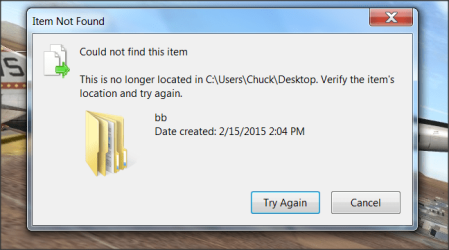
Cannot delete this folder. Says it does not exist. Re-named it and still no success. Any help appreciated. I am afraid to download software because of spyware. Thanks....Chuck
 

Attachments

  • Snap 2015-02-22 at 11.32.28.png
    Snap 2015-02-22 at 11.32.28.png
    39.8 KB · Views: 39

My Computer

OS
Windows 7 Home Premium 64 bit
Exactly what folder [on your desktop, correct?] are you trying to delete?
 

My Computer

Computer type
PC/Desktop
Computer Manufacturer/Model Number
Antec desktop; Acer Aspire laptops
OS
Windows 7 Professional 64-bit
CPU
Desktop i5; Acers i5 & i7
Memory
desktop 16GB; 1 Acer 8GB & 1 Acer 16GB
Hard Drives
1TB split into 2 equal partitions [OS and data] usable by RJS
Internet Speed
AT&T DSL
Browser
FF, GChrome, msIE
Other Info
Windows 7 Firewall, Emsisoft AM/AV, MSE [scan-only], SpywareBlaster, Ruiware/BillP combine

My Computer

Computer type
PC/Desktop
Computer Manufacturer/Model Number
Custom Built By Me.
OS
Windows 10 Pro 64 bit
CPU
AMD FX 9590 8 Core Black Edition
Motherboard
MSI 990FXA GAMING (MS-7893)
Memory
Corsair Vengeance 16GB DDR3
Graphics Card(s)
AMD Radeon (TM) R9 380 Gaming Series
Sound Card
AMD High Definition
Monitor(s) Displays
Samsung 32" 60Hz 4ms Curved PLS LED
Screen Resolution
1920 X 1080
Hard Drives
C: 223 GB SSD = E: 465 GB HDD = F: 931 GB HDD = G: 149 GB HDD = H: 931 GB HDD
PSU
EVGA Supernova NEX750B 750W ATX EPS12V 80PLUS Bronze
Case
Cool Master
Cooling
Noctua NH-D15 Premium Cooler with 2x NF-A15 PWM 140mm Fan
Internet Speed
Fiber Optic: Download 332.7 Mbps / Upload 331.5 Mbps
Antivirus
Windows Defender
Browser
Slimjet (64bit)
Hello chuckhig,

I once had a customer with the same problem as you.
It seems this is caused by the fact Windows does not like folders/files ending with a DOT, but NTFS allows all kinds of filenames:
blog.dotsmart.net/2008/06/12/solved-cannot-read-from-the-source-file-or-disk/

To remove the offending folder, execute in CMD:
Code:
RD /S "\\?\C:\Users\Chuck\Desktop\bb."
RD removes a directory, /S will make it also remove Subdirectories.

If that does not help, could you try executing Check disk:
Disk Check - Windows 7 Help Forums
That way you can verify if the cause could be Filesystem errors.

Else you could also get yourself a Linux mint Bootcd (I recommend Mate or Cinnamon) and remove the folder from there.
Main Page - Linux Mint
Don't install it, just run from the DVD.

Good luck ^^.
 
Last edited:

My Computer

Computer type
PC/Desktop
Computer Manufacturer/Model Number
Custom build
OS
Primary OS: Archlinux with Kde-Plasma5 x86-64. Secondary OS: Windows 8.1 x64. UEFI Setup.
CPU
i5-4570 3.2GHz
Motherboard
Asus H87-PLUS
Memory
8GiB
Graphics Card(s)
Nvidia GeForce GTX 660 (Msi TwinFrozr III)
Screen Resolution
1920 * 1080
Hard Drives
Samsung SSD 840 PRO 128Gib (Linux) [Is technically not a HDD]
WD Red 1TB (Data+Windows)
PSU
Corsair Gaming GS600 (600W)
Case
Zalman Z9 Plus
Internet Speed
46Mbps (5,75MBps) Down. 5Mbps (0,625MBps) Up.
Antivirus
Avast, but never really needed any AV though...
Browser
Firefox only ^^.
Nothing so far worked. Used unlocker and delete doctor. Afraid of command prompt. Will keep reading . I will get back. Thanks.

did you try 1--restarting machine? or 2 restart in 'safe mode' and try deleting?
 

My Computer

Computer type
PC/Desktop
Computer Manufacturer/Model Number
SALEON Systems V3.1
OS
Windows 7 Ultimate 32bit
CPU
Intel Core 2 Extreme QX6850
Motherboard
ASUSTeK P5G41-M LE
Memory
4 gb
Graphics Card(s)
NVIDIA GeForce 8400GS
Hard Drives
Intel 120 GB SSD, Seagate 250GB, Seagate 2TB
Antivirus
Comodo
Browser
Chrome
Started in safe mode..same result..used CMD with remove code and get message the file does not exist. Still working on this.

Ok, could you try the command again, but without the DOT at the end of the foldername:
Code:
RD /S "\\?\C:\Users\Chuck\Desktop\bb"
 

My Computer

Computer type
PC/Desktop
Computer Manufacturer/Model Number
Custom build
OS
Primary OS: Archlinux with Kde-Plasma5 x86-64. Secondary OS: Windows 8.1 x64. UEFI Setup.
CPU
i5-4570 3.2GHz
Motherboard
Asus H87-PLUS
Memory
8GiB
Graphics Card(s)
Nvidia GeForce GTX 660 (Msi TwinFrozr III)
Screen Resolution
1920 * 1080
Hard Drives
Samsung SSD 840 PRO 128Gib (Linux) [Is technically not a HDD]
WD Red 1TB (Data+Windows)
PSU
Corsair Gaming GS600 (600W)
Case
Zalman Z9 Plus
Internet Speed
46Mbps (5,75MBps) Down. 5Mbps (0,625MBps) Up.
Antivirus
Avast, but never really needed any AV though...
Browser
Firefox only ^^.
Yes,without the DOT worked. Thank you very much. This folder/file was originally an aircraft. Deleted it and this was left behind. Your patience is much appreciated. Life is good. Chuck
 

My Computer

OS
Windows 7 Home Premium 64 bit
Good to hear your problem is solved,

If you want to know, '\\?\' allows you to modify a file without the Windows filesystem Api getting in your way.

Have a fine day ^^.
 

My Computer

Computer type
PC/Desktop
Computer Manufacturer/Model Number
Custom build
OS
Primary OS: Archlinux with Kde-Plasma5 x86-64. Secondary OS: Windows 8.1 x64. UEFI Setup.
CPU
i5-4570 3.2GHz
Motherboard
Asus H87-PLUS
Memory
8GiB
Graphics Card(s)
Nvidia GeForce GTX 660 (Msi TwinFrozr III)
Screen Resolution
1920 * 1080
Hard Drives
Samsung SSD 840 PRO 128Gib (Linux) [Is technically not a HDD]
WD Red 1TB (Data+Windows)
PSU
Corsair Gaming GS600 (600W)
Case
Zalman Z9 Plus
Internet Speed
46Mbps (5,75MBps) Down. 5Mbps (0,625MBps) Up.
Antivirus
Avast, but never really needed any AV though...
Browser
Firefox only ^^.
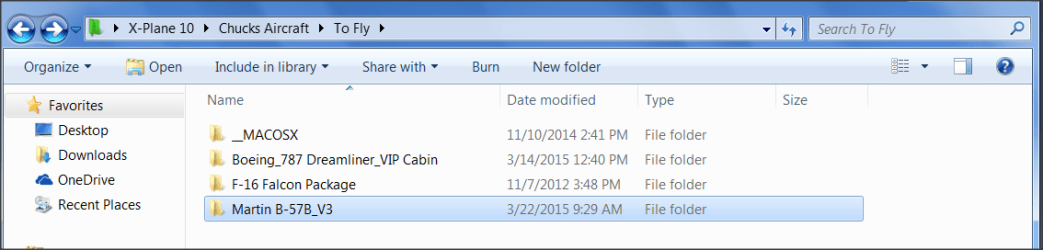
Did it again. Cannot figure the command to remove. Here is the location. This is where most of the problems start. Thanks again.
 

Attachments

  • Snap 2015-03-22 at 09.30.19.png
    Snap 2015-03-22 at 09.30.19.png
    25.9 KB · Views: 2

My Computer

OS
Windows 7 Home Premium 64 bit
Back
Top