Delete/Format OEM Partition on Clean Install?

sjabosi

New member
Local time
12:27 PM
Messages
4
Hi everyone, I have a Gateway desktop with Windows Vista that I'm trying to upgrade (clean install) to Win 7.
During the installation process, when it asks which drive I want to install Windows 7 on, I notice that in addition to the main ~600GB C: drive, there's a ~14GB OEM partition.

Can I safely format/delete and merge the OEM partition without any consequences? Or are there some important system files in that partition that I need to keep? I don't want to run into a problem like this guy.

Thanks!
 

My Computer

OS
Windows Vista
Before you wipe that partition, be sure to make your system recovery discs ... just in case.. ;)
 

My Computer

Computer type
PC/Desktop
Computer Manufacturer/Model Number
LENOVO K450 @3.0GHZ
OS
64-bit Windows 8.1 Pro
CPU
Core(TM) i5 CPU 4330 Haswell @ 3.20GHz
Motherboard
LENOVO
Memory
12.00 GB
Graphics Card(s)
Intel(R) HD Graphics
Sound Card
Intel HD integtrated
Monitor(s) Displays
HP 25' ISP Monitor
Screen Resolution
1900/1020
Hard Drives
(1) ST1000DM003-1CH162 (2) Generic STORAGE DEVICE USB Device (3) Generic STORAGE DEVICE USB Device
Internet Speed
100mb down/10mb up
Read your manual for the exact steps to creating the disks, or contact Gateway to see if they need to be mailed. You can also ask them then what exactly is on that OEM partition.

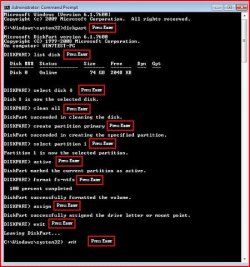
Once you have a path back to factory condition, I'd boot the Win7 installer and deep clean the HD before Custom installing with drive tools create and format your new partition(s). Just press Shift F10 as the DVD boots up, open a Command Line, type:

DISKPART
LIST DISK
SELECT DISK 0 (confirm this is target HD #)
CLEAN ALL
EXIT

Now return to Install Now to do Custom install with Drive tools to create New and Format before install.

The installer is nearly driver-complete, with newer arriving quickly via optional Windows Updates. Any missing drivers or favorite apps can then be found on the Support Downloads webpage for your model computer/device.
 
Thanks gregrocker, I followed your instructions but when I tried to install Windows 7 on the newly cleaned disk, I got Error 0x80300024 saying that Windows couldn't install on this drive.

I don't have multiple drives connected, only the main Disk 0. Any idea what I can do?
 

My Computer

OS
Windows Vista
Did you deep clean the HD before install using DISKPART CLEAN ALL cmd? Create and format partition using installer?

More things to check here: http://www.sevenforums.com/installation-setup/16826-error-0x80300024.html

Next: Does your BIOS need updating? What is the SATA controller setting? Try AHCI first, then IDE if necessary.
http://pcsupport.about.com/od/fixtheproblem/tp/clearcmos.htm
Reset the CMOS: http://pcsupport.about.com/od/fixtheproblem/tp/clearcmos.htm

Remove all but 2 gb of RAM, then try swapping sticks. Test your memory using memtest86 CD.

Test your HD using maker's diagnostics/repair CD full scan: http://www.tacktech.com/display.cfm?ttid=287
 
Yes, I cleaned the drive using the cmd prompts, but I didn't create the partition. How much space should I allocate to the new partition?
 

My Computer

OS
Windows Vista

My Computer

OS
ME/XP/Vista/Win7
I'm under the conclusion of wiping the whole drive. Although I have not tried it, a scratch box, ugly OEM version of WIN7 (not what came with your system) should be ok to use with a computer license. Therefore nuke the HDD.

The only time I had a hang up to upgrade was when I kept the OEM core. Why? Beats me. I did it on Saturday.
 

My Computer

OS
Win 7 Ult, Pro, HP both x86 & x64. SBS 2008. SBS 2003.
Back
Top