
Hi all,
i know this must have been asked a lot of times and i have also read a few posts similar to my requirement but they somehow dont answer my question; if they do; not completely ... here it goes...
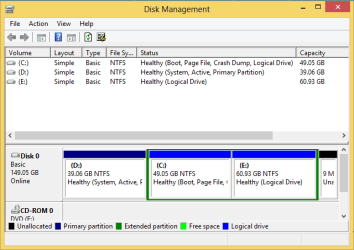
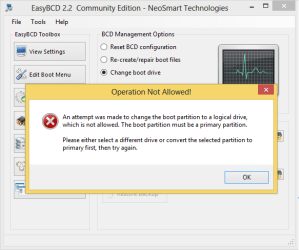
i have Win XP installed on [say C:]my PC, and D: has Windows 8; now i'd like to replace the XP with Win 7 keeping Windows 8 as it is .... now on disk management the XP is shown as Active and supposedly therefore has the bootmanger; so i tried using EasyBCD to move the bootmanger to my current Windows 8 partition but the software somehow does not allow me to. Any help is highly appreciated.
P.S - the screenshot shows the opposite since i am on Windows 8 and it is treating Windows 8 part as C:.
P.S - my future plans - once the partition [D:] is made as primary, will copy the boot manager to D: using EasyBCD and run Windows 7 CD on my C: to replace XP..... please let me know if that is how i should proceed !!!
Thanks in advance !!
i know this must have been asked a lot of times and i have also read a few posts similar to my requirement but they somehow dont answer my question; if they do; not completely ... here it goes...
i have Win XP installed on [say C:]my PC, and D: has Windows 8; now i'd like to replace the XP with Win 7 keeping Windows 8 as it is .... now on disk management the XP is shown as Active and supposedly therefore has the bootmanger; so i tried using EasyBCD to move the bootmanger to my current Windows 8 partition but the software somehow does not allow me to. Any help is highly appreciated.
P.S - the screenshot shows the opposite since i am on Windows 8 and it is treating Windows 8 part as C:.
P.S - my future plans - once the partition [D:] is made as primary, will copy the boot manager to D: using EasyBCD and run Windows 7 CD on my C: to replace XP..... please let me know if that is how i should proceed !!!
Thanks in advance !!
Attachments
Last edited:
My Computer
At a glance
Windows XP 32 bit3 GBNvidia 7200 GS 512 MB
- Computer type
- PC/Desktop
- OS
- Windows XP 32 bit
- Memory
- 3 GB
- Graphics Card(s)
- Nvidia 7200 GS 512 MB
- Browser
- Firefox


