Solved Deleted Program Data folder. How to restore Start Menu

ritratt

New member
Local time
5:29 PM
Messages
7
My program data folder in the windows drive was accidentally deleted. As a result, most of my start menu items are gone.
How can I restore my start menu and anything else that might be affected by the deletion of program data?
Thank you.
 

My Computer

OS
Windows 7
Download Recuva to see if you can retrieve the lost file.

Good Luck, if that doesn't work, you'll need to use System Restore.
 

My Computer

Computer Manufacturer/Model Number
Apple Macbook Pro (April 2009)
OS
W7 Ult. x64 | OS X
CPU
Intel Mobile Core 2 Duo 2.93Ghz [T9800 Penryn]
Motherboard
NVIDIA nForce 730i Rev. B1 [Mac-F2268EC8 (U2E1)]
Memory
4096MB Samsung DDR3 Dual Channel [PC3-8500F 1066Mhz]
Graphics Card(s)
NVIDIA GeForce 9600M GT 512MB [G96M Rev. C1]
Sound Card
SB X-Fi Surround 5.1 USB | Onboard Realtek (Disabled)
Monitor(s) Displays
Acer x223wbd 22" | Apple Anti-Glare 17" (Disabled)
Screen Resolution
{Current} 1440x900 {Acer} 1680x1050 {Apple} 1920x1200
Hard Drives
{Internal}
Seagate Momentus 320GB 2.5" 7200RPM [ST9320421AS]

{Externals}
LaCie 320GB USB 2.0 HDD [301284UR]
LaCie 750GB USB 2.0 FW400 eSATA HDD [301314U]
LaCie 1TB USB 2.0 HDD [301304UR]
PSU
Magsafe
Case
Aluminum/Unibody (MBP52)
Cooling
2 x 6000 RPM Fans
Keyboard
Logitech G-15v2 [PN 920-000379]
Mouse
Logitech G-9 [PN 910-000338]
Internet Speed
12Mbps/2.5Mbps w/ 24Mbps Speed Boost [Comcast]
Other Info
Logitech X-540 Speakers [PN 970223-0122]
Sennheiser PC-151 Headset
tried Recuva. Did not work. Restore point not set so cannot recover. Now what?
 

My Computer

OS
Windows 7
My program data folder in the windows drive was accidentally deleted. As a result, most of my start menu items are gone.
How can I restore my start menu and anything else that might be affected by the deletion of program data?
Thank you.


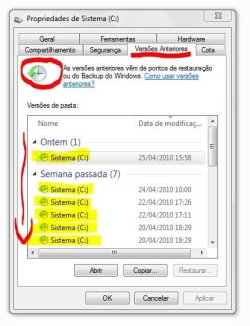
Go to windows drive, exactly where program data folder would be found. Right click mouse, "properties". Look each day "shadow", from today to yesterdays, until you find what you looking for!!! See attachment:


Hope it helps you!!!


"PLEASE REP ANYONE WHO HELPS YOU"
 

Attachments

  • Cap.JPG
    Cap.JPG
    45 KB · Views: 508

My Computer

Computer Manufacturer/Model Number
WALLONN7 / LIN BLACK SERIES II
OS
Windows 7 Ultimate x64 SP1
CPU
AMD PHENOM II X6 1090T 3.2GHz
Motherboard
GIGABYTE GA-890FXA-UD7
Memory
8GB G.SKILL RIPJAWS - F3-10666CL7D
Graphics Card(s)
SAPPHIRE ATI RADEON HD 5870 VAPOR X OC
Sound Card
REALTEK DOLBY HOME THEATER
Monitor(s) Displays
LED LG W2486L
Screen Resolution
1080p
Hard Drives
SEAGATE 1TB -ST31000528AS - AHCI MODE - AS SATA
PSU
ZALMAN ZM1000-HP 1000W
Case
THERMALTAKE XASER VI VG4000SWA
Cooling
140MM x3 / 120MM x1 AIR COOLING - THERMALTAKE
Keyboard
MICROSOFT DIGITAL MEDIA KEYBOARD 3000 - USB
Mouse
MICROSOFT BASIC OPTICAL MOUSE 2.0 - USB
Internet Speed
600KBPS
Other Info
MICROSOFT XBOX 360 CONTROLLER
I tried it and there is only one version of Windows in that list. However, thanks for the help.

I dont want the installed programs in my start menu. My major concern is to get back the default start menu items like accessories etc. Will it work if I copy the Program Data folders containing "Accessories" from another Windows 7 machine?
 

My Computer

OS
Windows 7
I tried it and there is only one version of Windows in that list. However, thanks for the help.

I dont want the installed programs in my start menu. My major concern is to get back the default start menu items like accessories etc. Will it work if I copy the Program Data folders containing "Accessories" from another Windows 7 machine?

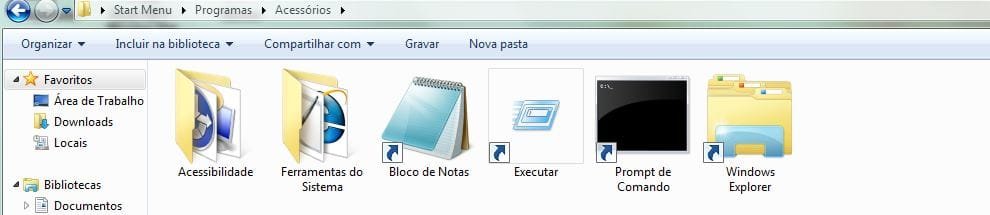
Yes, I think it will works but... not all "Accessories" default shortcus... Remember to paste into default folder - "C:\Users\User name\AppData\Roaming\Microsoft\Windows\Start Menu\Programs" - . And to use a 32bit copy to 32bit Windows, etc.

Try it and let us know if it works!!!

"PLEASE REP ANYONE WHO HELPS YOU"


Attachments

  • Capturar.JPG
    Capturar.JPG
    33.1 KB · Views: 181

My Computer

Computer Manufacturer/Model Number
WALLONN7 / LIN BLACK SERIES II
OS
Windows 7 Ultimate x64 SP1
CPU
AMD PHENOM II X6 1090T 3.2GHz
Motherboard
GIGABYTE GA-890FXA-UD7
Memory
8GB G.SKILL RIPJAWS - F3-10666CL7D
Graphics Card(s)
SAPPHIRE ATI RADEON HD 5870 VAPOR X OC
Sound Card
REALTEK DOLBY HOME THEATER
Monitor(s) Displays
LED LG W2486L
Screen Resolution
1080p
Hard Drives
SEAGATE 1TB -ST31000528AS - AHCI MODE - AS SATA
PSU
ZALMAN ZM1000-HP 1000W
Case
THERMALTAKE XASER VI VG4000SWA
Cooling
140MM x3 / 120MM x1 AIR COOLING - THERMALTAKE
Keyboard
MICROSOFT DIGITAL MEDIA KEYBOARD 3000 - USB
Mouse
MICROSOFT BASIC OPTICAL MOUSE 2.0 - USB
Internet Speed
600KBPS
Other Info
MICROSOFT XBOX 360 CONTROLLER
Here is a cleaned up version of 'C:\ProgramData\Microsoft\Windows\Start Menu' I think I removed all of my shortcuts from it. This is from a 64 bit version.

Start Menu Programs.zip

I'm not sure about the rest of the program data:(
 

My Computer

OS
Home Premium x64
CPU
Intel e7400 2.8GHz Dual Core, OC @ 3.36GHz
Motherboard
Gigabyte GA-EP43-DS3L/S3L
Memory
4GB DDR2 1066
Graphics Card(s)
Nvidia GeForce 9800 GT
Sound Card
Realtek Surround Onboard.
Monitor(s) Displays
ASUS VW224, 22 Inch and Samsung SyncMaster 713v
Screen Resolution
Main Screen @1680x1050, Secondary @ 1280x1024
Hard Drives
Western Digital WD3200AAKS 320GB 7200 RPM SATA 3.0Gb/s
PSU
Thermaltake Purepower W0100RU 500W
Case
Rosewill R5601-BK Screw-less
Cooling
Two 120mm fans and Stock CPU fans
Keyboard
Old Dell Keyboard my neighbor gave me.
Mouse
Logitech MX518
Internet Speed
6Kbps
Other Info
Logitech X-540 70 watts 5.1 Speakers
It worked perfectly!
I copied the content of Freakaziod's zip file into C:\ProgramData\Microsoft\Windows\Start Menu\Programs

Thanks a lot for all your help. This forum is helpful as well as active. I think I am going to refer to it in my blog. Cheers!

@Wallon
I did not try what you suggested but I think it should work as well. Thanks for the help though.
 

My Computer

OS
Windows 7
Billy you solved my trouble

thanks
 

My Computer

Computer Manufacturer/Model Number
HP Pavilion dv6 Notebook PC
OS
Windows 7 Ultimate 64-bit (6.1, Build 7601)
CPU
AMD Phenom(tm) II P960 Quad-Core Processor (4 CPUs), ~1.8GHz
Memory
6GB
Graphics Card(s)
AMD M880G with ATI Mobility Radeon HD 4250
Hard Drives
750 GB - All Full !
it's no problem :-)
 

My Computer

OS
Home Premium x64
CPU
Intel e7400 2.8GHz Dual Core, OC @ 3.36GHz
Motherboard
Gigabyte GA-EP43-DS3L/S3L
Memory
4GB DDR2 1066
Graphics Card(s)
Nvidia GeForce 9800 GT
Sound Card
Realtek Surround Onboard.
Monitor(s) Displays
ASUS VW224, 22 Inch and Samsung SyncMaster 713v
Screen Resolution
Main Screen @1680x1050, Secondary @ 1280x1024
Hard Drives
Western Digital WD3200AAKS 320GB 7200 RPM SATA 3.0Gb/s
PSU
Thermaltake Purepower W0100RU 500W
Case
Rosewill R5601-BK Screw-less
Cooling
Two 120mm fans and Stock CPU fans
Keyboard
Old Dell Keyboard my neighbor gave me.
Mouse
Logitech MX518
Internet Speed
6Kbps
Other Info
Logitech X-540 70 watts 5.1 Speakers
Back
Top