Deleting SYSTEM PROPERTIES/protection entry?

idahjo

New member
Member
VIP
Local time
9:58 PM
Messages
165
Not sure when or how it appeared that way, but how do I delete the (missing)SYSTEM(C) entry?

:oThanks!

missing_zps16f7568d.jpg
 
Last edited:

My Computer

Computer type
PC/Desktop
Computer Manufacturer/Model Number
Custom Build
OS
Microsoft Windows 7 Ultimate 64-bit 7601 Multiprocessor Free Service Pack 1
CPU
AMD Phenom(tm) II X3 720 Processor
Motherboard
Gigabyte Technology Co., Ltd. GA-MA785GPMT-UD2H
Memory
4.00 GB
Graphics Card(s)
ATI Radeon HD 4800 Series
Sound Card
(1) AMD High Definition Audio Device (2) Realtech H/D Audio
Screen Resolution
DELL 2405FPW (1920 x 1200 ) @ 75 Hz
Hard Drives
(1) Samsung SSD 840 Series ATA Device (2) WDC WD400BD-75MRA1 ATA Device
PSU
700w Kingwin Mach-1
Antivirus
Avast
Browser
Firefox

My Computer

Computer type
PC/Desktop
Computer Manufacturer/Model Number
Self built custom
OS
64-bit Windows 11 Pro for Workstations
CPU
Intel i7-8700K OC'd to 5 GHz
Motherboard
ASUS ROG Maximus XI Formula Z390
Memory
64 GB (4x16GB) G.SKILL TridentZ RGB DDR4 3600 MHz
Graphics Card(s)
ASUS ROG-STRIX-GTX1080TI-O11G-GAMING
Sound Card
Integrated
Monitor(s) Displays
2 x Samsung Odyssey G7 27"
Screen Resolution
2560x1440
Hard Drives
1TB Samsung 990 PRO M.2,
4TB Samsung 990 PRO PRO M.2,
TerraMaster F8 SSD Plus NAS
PSU
Seasonic Prime Titanium 850W
Case
Thermaltake Core P3
Cooling
Corsair Hydro H115i
Keyboard
Logitech wireless K800
Mouse
Logitech MX Master 4
Internet Speed
2 Gb/s Download and 100 Mb/s Upload
Antivirus
Malwarebyte Anti-Malware Premium
Browser
Google Chrome
Other Info
Logitech Z625 speaker system,
Logitech BRIO 4K Pro webcam,
HP Color LaserJet Pro MFP M477fdn,
APC SMART-UPS RT 1000 XL - SURT1000XLI,
Galaxy S23 Plus phone
That did it. Got rid of it. I just noticed that in the pix the other (C) drive [JOE-2-32x] did not show; there were 2 (C) drives showing, only one installed. If my memory serves there was a changing of the name on the (C) drive awhile back and I never noticed this. Thanks a million Brink, YOU DA MAN!

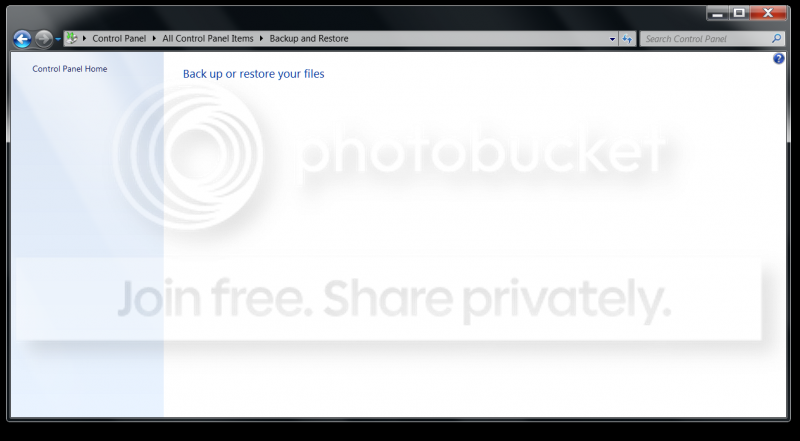
If you want to see another "ODD" thing; this is on another W-7 computer where the Backup and Restore screen <should> be displayed:
Backupamprestore_zps2e390732.png
 
Last edited:

My Computer

Computer type
PC/Desktop
Computer Manufacturer/Model Number
Custom Build
OS
Microsoft Windows 7 Ultimate 64-bit 7601 Multiprocessor Free Service Pack 1
CPU
AMD Phenom(tm) II X3 720 Processor
Motherboard
Gigabyte Technology Co., Ltd. GA-MA785GPMT-UD2H
Memory
4.00 GB
Graphics Card(s)
ATI Radeon HD 4800 Series
Sound Card
(1) AMD High Definition Audio Device (2) Realtech H/D Audio
Screen Resolution
DELL 2405FPW (1920 x 1200 ) @ 75 Hz
Hard Drives
(1) Samsung SSD 840 Series ATA Device (2) WDC WD400BD-75MRA1 ATA Device
PSU
700w Kingwin Mach-1
Antivirus
Avast
Browser
Firefox
Last edited:

My Computer

Computer type
PC/Desktop
Computer Manufacturer/Model Number
Self built custom
OS
64-bit Windows 11 Pro for Workstations
CPU
Intel i7-8700K OC'd to 5 GHz
Motherboard
ASUS ROG Maximus XI Formula Z390
Memory
64 GB (4x16GB) G.SKILL TridentZ RGB DDR4 3600 MHz
Graphics Card(s)
ASUS ROG-STRIX-GTX1080TI-O11G-GAMING
Sound Card
Integrated
Monitor(s) Displays
2 x Samsung Odyssey G7 27"
Screen Resolution
2560x1440
Hard Drives
1TB Samsung 990 PRO M.2,
4TB Samsung 990 PRO PRO M.2,
TerraMaster F8 SSD Plus NAS
PSU
Seasonic Prime Titanium 850W
Case
Thermaltake Core P3
Cooling
Corsair Hydro H115i
Keyboard
Logitech wireless K800
Mouse
Logitech MX Master 4
Internet Speed
2 Gb/s Download and 100 Mb/s Upload
Antivirus
Malwarebyte Anti-Malware Premium
Browser
Google Chrome
Other Info
Logitech Z625 speaker system,
Logitech BRIO 4K Pro webcam,
HP Color LaserJet Pro MFP M477fdn,
APC SMART-UPS RT 1000 XL - SURT1000XLI,
Galaxy S23 Plus phone

My Computer

Computer type
PC/Desktop
Computer Manufacturer/Model Number
Custom Build
OS
Microsoft Windows 7 Ultimate 64-bit 7601 Multiprocessor Free Service Pack 1
CPU
AMD Phenom(tm) II X3 720 Processor
Motherboard
Gigabyte Technology Co., Ltd. GA-MA785GPMT-UD2H
Memory
4.00 GB
Graphics Card(s)
ATI Radeon HD 4800 Series
Sound Card
(1) AMD High Definition Audio Device (2) Realtech H/D Audio
Screen Resolution
DELL 2405FPW (1920 x 1200 ) @ 75 Hz
Hard Drives
(1) Samsung SSD 840 Series ATA Device (2) WDC WD400BD-75MRA1 ATA Device
PSU
700w Kingwin Mach-1
Antivirus
Avast
Browser
Firefox
Great news. You're most welcome.

It was most likely from a conflict with both drives showing with C somehow.
 

My Computer

Computer type
PC/Desktop
Computer Manufacturer/Model Number
Self built custom
OS
64-bit Windows 11 Pro for Workstations
CPU
Intel i7-8700K OC'd to 5 GHz
Motherboard
ASUS ROG Maximus XI Formula Z390
Memory
64 GB (4x16GB) G.SKILL TridentZ RGB DDR4 3600 MHz
Graphics Card(s)
ASUS ROG-STRIX-GTX1080TI-O11G-GAMING
Sound Card
Integrated
Monitor(s) Displays
2 x Samsung Odyssey G7 27"
Screen Resolution
2560x1440
Hard Drives
1TB Samsung 990 PRO M.2,
4TB Samsung 990 PRO PRO M.2,
TerraMaster F8 SSD Plus NAS
PSU
Seasonic Prime Titanium 850W
Case
Thermaltake Core P3
Cooling
Corsair Hydro H115i
Keyboard
Logitech wireless K800
Mouse
Logitech MX Master 4
Internet Speed
2 Gb/s Download and 100 Mb/s Upload
Antivirus
Malwarebyte Anti-Malware Premium
Browser
Google Chrome
Other Info
Logitech Z625 speaker system,
Logitech BRIO 4K Pro webcam,
HP Color LaserJet Pro MFP M477fdn,
APC SMART-UPS RT 1000 XL - SURT1000XLI,
Galaxy S23 Plus phone
Great news. You're most welcome.

It was most likely from a conflict with both drives showing with C somehow.

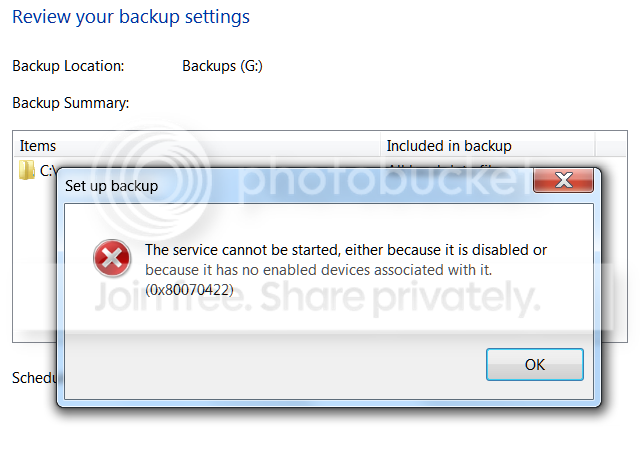
Those issues were in two computers. First was W-7 x32 and This is a W-7 x64. Now that I have the full Backup and Restore screen all of the features are accessible except the CHANGE SETTINGS, which gives me this error popup when I try schedule it. Apparently the deleting took more than data!

error_zps89135f41.png


Not a major problem as I can use the Acronis 13 instead... Always something, eh? :sarc:
 

My Computer

Computer type
PC/Desktop
Computer Manufacturer/Model Number
Custom Build
OS
Microsoft Windows 7 Ultimate 64-bit 7601 Multiprocessor Free Service Pack 1
CPU
AMD Phenom(tm) II X3 720 Processor
Motherboard
Gigabyte Technology Co., Ltd. GA-MA785GPMT-UD2H
Memory
4.00 GB
Graphics Card(s)
ATI Radeon HD 4800 Series
Sound Card
(1) AMD High Definition Audio Device (2) Realtech H/D Audio
Screen Resolution
DELL 2405FPW (1920 x 1200 ) @ 75 Hz
Hard Drives
(1) Samsung SSD 840 Series ATA Device (2) WDC WD400BD-75MRA1 ATA Device
PSU
700w Kingwin Mach-1
Antivirus
Avast
Browser
Firefox
Back
Top