Dell Dimension C521 Front-Panel

drennantrip

New member
Local time
10:31 AM
Messages
1
Location
Birmingham
Does any one have a diagram or a link to for a Dell C521 front panel pin out?
All I can find are ones for 34 pinout and I need the 40.

Thanks In Advance

:D
 

My Computer My Computer

OS
Windows 7
CPU
Intel CPU Dual Core E5400 2.7GHz 800FSB LGA775 2MB cache
Motherboard
MSI motherboard G41TM-E43 LGA775
Memory
PNY 2GB, Elixer 1GB
Graphics Card(s)
Nvidia 8500 GT PCI-Ex
Sound Card
OnBoard Realtek ALC888S
Monitor(s) Displays
AOC 831W
Hard Drives
Westen Digital 500GB 3.5" Sata internal hard drive
PSU
Jeantech 500W JN120F-500AP with 120mm fan
Case
NZXT DUET Classic Series Steel HTPC/Midtower
Last edited by a moderator:

My Computer My Computer

Computer type
PC/Desktop
Computer Manufacturer/Model Number
self build
OS
win 7 ultimate32bit, Win8.1pro wmc 32bit
CPU
amd phenom x4 9600
Motherboard
asus m2n32-sli deluxe
Memory
corsair twinxs 2x2gb
Graphics Card(s)
2x nvidia 1gb 8500gt
Sound Card
onboard
Monitor(s) Displays
23" PB Viseo 233d
Screen Resolution
1920x1080
Hard Drives
maxtor sata 500gb
maxtor sata 320gb
fujitsu sata200gb
PSU
oryxx tornado 750w
Case
thermaltake xaser lll
Cooling
artic freezer64 pro + 7 case fans

My Computer My Computer

Computer type
PC/Desktop
Computer Manufacturer/Model Number
self build
OS
win 7 ultimate32bit, Win8.1pro wmc 32bit
CPU
amd phenom x4 9600
Motherboard
asus m2n32-sli deluxe
Memory
corsair twinxs 2x2gb
Graphics Card(s)
2x nvidia 1gb 8500gt
Sound Card
onboard
Monitor(s) Displays
23" PB Viseo 233d
Screen Resolution
1920x1080
Hard Drives
maxtor sata 500gb
maxtor sata 320gb
fujitsu sata200gb
PSU
oryxx tornado 750w
Case
thermaltake xaser lll
Cooling
artic freezer64 pro + 7 case fans
Solution

Do you still want the PIN out for a Dell C521 40-pin Front Panel?

I have just completed the transplant operation of a standard ATX motherboard into my Dell C521 case, and worked out the pin-out for the front panel. All now working, with exception for one USB port, which was faulty before the transplant operation.
 

My Computer My Computer

OS
Windows 7
Hey BDRichardson do you still have the pinout for the C521 frontpanel? I traced the on-button, hdd-led, power-led and the diagnostic-led's, the rest is missing. I've got a E521 but I think it's based on the same frontpanel system. Thanks Caoz
 
Last edited:

My Computer My Computer

OS
Windows Vista 32bit Home Premium OEM DELL
CPU
Intel Core i7 870 (4C/8T) @ 2.93GHZ
Motherboard
Fujitsu-Siemens D2912-A12
Memory
4 GB (2x 2GB G.Skill DDR3-1333)
Graphics Card(s)
Powercolor HD5770 w/ Arctic Cooling Accelero L2 Pro @ OC
Sound Card
n/a
Monitor(s) Displays
LG FLATRON E2240T 21,5"
Screen Resolution
1920x1080 @ 60Hz
Hard Drives
Seagate 320 GB, 7200 rpm
PSU
Be Quiet! Dark Power Pro P9 550W
Case
Dell Dimension E521
Cooling
Boxed (still)
Keyboard
Logitech Classic Keyboard 200
Mouse
Logitech LX3 Optical Mouse
Internet Speed
6000mb/s
Other Info
http://www.sysprofile.de/id139303 <- hole profile
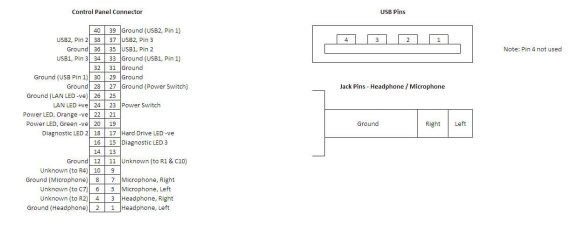
I believe the pin-out is as per the attached image. However, I suggest you proceed with great care. Personally, I spliced the original ribbon, and carefully soldered standard motherboard connectors to the appropriate leads. I then started the computer, and one by one, tested each item, ensuring that every LED, switch, socket, etc did not cause a hardware fault.

I found that one of the USB ports had blown on my control board. I suspect this was the original cause of my failed Dell motherboard. I still wonder to this day, whether in fact the Dell motherboard was actually fine, but the blown USB port was faulting out the Dell motherboard.

If you need any further clarification, or photos of the control board for your comparison's, then don't hesitate to ask.

Good luck
 

Attachments

  • Dell C521 Front Panel Wiring Schema.JPG
    Dell C521 Front Panel Wiring Schema.JPG
    43 KB · Views: 913

My Computer My Computer

OS
Windows 7
Wow, thanks for the diagram. I appreciate this very much. :)
 

My Computer My Computer

OS
Windows Vista 32bit Home Premium OEM DELL
CPU
Intel Core i7 870 (4C/8T) @ 2.93GHZ
Motherboard
Fujitsu-Siemens D2912-A12
Memory
4 GB (2x 2GB G.Skill DDR3-1333)
Graphics Card(s)
Powercolor HD5770 w/ Arctic Cooling Accelero L2 Pro @ OC
Sound Card
n/a
Monitor(s) Displays
LG FLATRON E2240T 21,5"
Screen Resolution
1920x1080 @ 60Hz
Hard Drives
Seagate 320 GB, 7200 rpm
PSU
Be Quiet! Dark Power Pro P9 550W
Case
Dell Dimension E521
Cooling
Boxed (still)
Keyboard
Logitech Classic Keyboard 200
Mouse
Logitech LX3 Optical Mouse
Internet Speed
6000mb/s
Other Info
http://www.sysprofile.de/id139303 <- hole profile
It helped a lot!
 

My Computer My Computer

OS
Windows Vista 32bit Home Premium OEM DELL
CPU
Intel Core i7 870 (4C/8T) @ 2.93GHZ
Motherboard
Fujitsu-Siemens D2912-A12
Memory
4 GB (2x 2GB G.Skill DDR3-1333)
Graphics Card(s)
Powercolor HD5770 w/ Arctic Cooling Accelero L2 Pro @ OC
Sound Card
n/a
Monitor(s) Displays
LG FLATRON E2240T 21,5"
Screen Resolution
1920x1080 @ 60Hz
Hard Drives
Seagate 320 GB, 7200 rpm
PSU
Be Quiet! Dark Power Pro P9 550W
Case
Dell Dimension E521
Cooling
Boxed (still)
Keyboard
Logitech Classic Keyboard 200
Mouse
Logitech LX3 Optical Mouse
Internet Speed
6000mb/s
Other Info
http://www.sysprofile.de/id139303 <- hole profile
You are lucky. Dell does not publish the front panel connector on the older models that used this type of connector. It has always been a "Proprietary undocumented" item. One other gotcha, it can vary from model to model thus if someone figures out the pinouts for one model, it may not apply to a different model.

Newer Dell's are using standard ATX connections.
 

My Computer My Computer

Computer type
PC/Desktop
Computer Manufacturer/Model Number
My Own Build
OS
Windows 10 64 bit
CPU
Intel i7 6700K
Motherboard
ASUS ROG Maximus VIII Hero
Memory
16GB Corsair Dominator
Graphics Card(s)
Intel CPU Graphics
Sound Card
RealTek
Monitor(s) Displays
27" Dell S2719dgf
Screen Resolution
2560X1440
Hard Drives
1 TB Samsung 850 EVO SSD for Win 10 Pro
500GB Samsung 850 EVO SSD for Win 10 Insider
2 TB drive for backup
PSU
EVGA Supernova 750G2
Case
BeQuiet Silent Base 600
Cooling
Deepcool Captain 120EX
Keyboard
Microsoft Wireless 2000
Mouse
Microsoft wireless
Internet Speed
100 MB/sec (Cable)
Antivirus
Microsoft Defender and Malwarebytes
Browser
Edge/Firefox
Other Info
Cakewalk (Sonar) by BandLab and Studio One 4.1 Pro recording studio software. MOTU 896Mk3 Hybrid recording interface, Frontier Tranzport wireless control unit, Behringer X-Touch Control Surface.
Five USB connected optical drives for CD Audio production using Nero BurningROM

My Computer My Computer

OS
Windows Vista 32bit Home Premium OEM DELL
CPU
Intel Core i7 870 (4C/8T) @ 2.93GHZ
Motherboard
Fujitsu-Siemens D2912-A12
Memory
4 GB (2x 2GB G.Skill DDR3-1333)
Graphics Card(s)
Powercolor HD5770 w/ Arctic Cooling Accelero L2 Pro @ OC
Sound Card
n/a
Monitor(s) Displays
LG FLATRON E2240T 21,5"
Screen Resolution
1920x1080 @ 60Hz
Hard Drives
Seagate 320 GB, 7200 rpm
PSU
Be Quiet! Dark Power Pro P9 550W
Case
Dell Dimension E521
Cooling
Boxed (still)
Keyboard
Logitech Classic Keyboard 200
Mouse
Logitech LX3 Optical Mouse
Internet Speed
6000mb/s
Other Info
http://www.sysprofile.de/id139303 <- hole profile
Ok guys, my bad. I thought my old E521 had HD Audio xD
But in fact it's AC'97...Front audio problem solved...USB is still missing, waiting for the right USB cable. Giving feedback soon...
 

My Computer My Computer

OS
Windows Vista 32bit Home Premium OEM DELL
CPU
Intel Core i7 870 (4C/8T) @ 2.93GHZ
Motherboard
Fujitsu-Siemens D2912-A12
Memory
4 GB (2x 2GB G.Skill DDR3-1333)
Graphics Card(s)
Powercolor HD5770 w/ Arctic Cooling Accelero L2 Pro @ OC
Sound Card
n/a
Monitor(s) Displays
LG FLATRON E2240T 21,5"
Screen Resolution
1920x1080 @ 60Hz
Hard Drives
Seagate 320 GB, 7200 rpm
PSU
Be Quiet! Dark Power Pro P9 550W
Case
Dell Dimension E521
Cooling
Boxed (still)
Keyboard
Logitech Classic Keyboard 200
Mouse
Logitech LX3 Optical Mouse
Internet Speed
6000mb/s
Other Info
http://www.sysprofile.de/id139303 <- hole profile
BDRichardson, i'm sorry, but i don't understand the USB issue on your diagram. I've got the usb mainboard connector, the usb extension cable and my frontpanel...Don't know where to put the cable on certain frontpanel pins. Maybe you can help me...

Greetings
 

My Computer My Computer

OS
Windows Vista 32bit Home Premium OEM DELL
CPU
Intel Core i7 870 (4C/8T) @ 2.93GHZ
Motherboard
Fujitsu-Siemens D2912-A12
Memory
4 GB (2x 2GB G.Skill DDR3-1333)
Graphics Card(s)
Powercolor HD5770 w/ Arctic Cooling Accelero L2 Pro @ OC
Sound Card
n/a
Monitor(s) Displays
LG FLATRON E2240T 21,5"
Screen Resolution
1920x1080 @ 60Hz
Hard Drives
Seagate 320 GB, 7200 rpm
PSU
Be Quiet! Dark Power Pro P9 550W
Case
Dell Dimension E521
Cooling
Boxed (still)
Keyboard
Logitech Classic Keyboard 200
Mouse
Logitech LX3 Optical Mouse
Internet Speed
6000mb/s
Other Info
http://www.sysprofile.de/id139303 <- hole profile
USB Connections

The mainboard connector has pins for two USB ports. I have labelled them USB1 (pins 1 to 4) and USB (pins 1 to 4). I drew a simple diagram of a USB plug/socket so that you can trace the correct pin from a socket or plug, to the correct pins on the mainboard connector. There may be some standard colours for the wires, but I do not know them.

The only problem I experienced was that one of my USB ports was faulty, and seemed OK until I attempted to connect a device, and Windows would then misbehave! So I just have a dead USB port on the front of my case.

If the point which you are trying make, is that you are unsure of how wire up the front USB ports, then you need to take the correct wires for each USB from the mainboard connector, and connect them correctly to a standard USB header. From my experience, standard ATX motherboards all have the same standard connectors for connecting each of the your additional ports, i.e. front ones from case. The following link might help clarify this point for you: Installing Frontal USB Ports | Hardware Secrets.

By all means, ask me some more questions if we still aren't understanding each other.
 

My Computer My Computer

OS
Windows 7

My Computer My Computer

OS
Windows Vista 32bit Home Premium OEM DELL
CPU
Intel Core i7 870 (4C/8T) @ 2.93GHZ
Motherboard
Fujitsu-Siemens D2912-A12
Memory
4 GB (2x 2GB G.Skill DDR3-1333)
Graphics Card(s)
Powercolor HD5770 w/ Arctic Cooling Accelero L2 Pro @ OC
Sound Card
n/a
Monitor(s) Displays
LG FLATRON E2240T 21,5"
Screen Resolution
1920x1080 @ 60Hz
Hard Drives
Seagate 320 GB, 7200 rpm
PSU
Be Quiet! Dark Power Pro P9 550W
Case
Dell Dimension E521
Cooling
Boxed (still)
Keyboard
Logitech Classic Keyboard 200
Mouse
Logitech LX3 Optical Mouse
Internet Speed
6000mb/s
Other Info
http://www.sysprofile.de/id139303 <- hole profile
They are the standard wiring identifiers (pinout) for each of the four wires , i.e. 5V, Data Negative, Data Positive and Ground. This is explained better here: USB - Wikipedia, the free encyclopedia. It is a straightforward task of wiring each terminal of the USB socket to the each corresponding wire of the mainboard connector.
 

My Computer My Computer

OS
Windows 7
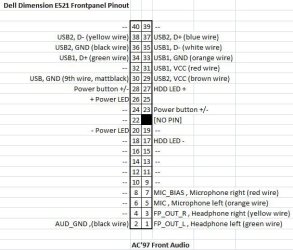
Hey guys, i was busy with my front panel and i traced all important wires. BTW BDRichardson it was no surprise that i didn't understand your diagram, cause it's not the same!
Here is my one.
Thanks for your help anyway!

Greetings Sven
 

Attachments

  • Dell Dimension E521 Frontpanel 40pin Pinout.jpg
    Dell Dimension E521 Frontpanel 40pin Pinout.jpg
    42.4 KB · Views: 155

My Computer My Computer

OS
Windows Vista 32bit Home Premium OEM DELL
CPU
Intel Core i7 870 (4C/8T) @ 2.93GHZ
Motherboard
Fujitsu-Siemens D2912-A12
Memory
4 GB (2x 2GB G.Skill DDR3-1333)
Graphics Card(s)
Powercolor HD5770 w/ Arctic Cooling Accelero L2 Pro @ OC
Sound Card
n/a
Monitor(s) Displays
LG FLATRON E2240T 21,5"
Screen Resolution
1920x1080 @ 60Hz
Hard Drives
Seagate 320 GB, 7200 rpm
PSU
Be Quiet! Dark Power Pro P9 550W
Case
Dell Dimension E521
Cooling
Boxed (still)
Keyboard
Logitech Classic Keyboard 200
Mouse
Logitech LX3 Optical Mouse
Internet Speed
6000mb/s
Other Info
http://www.sysprofile.de/id139303 <- hole profile
Oh well, there you go. Dell threw some more complexity into the equation. At least you got there in the end. For those few mad enough ones (like us) it was a little challenge, despite the slightly scrappy solution, but at least it works if you put some effort to it.
 

My Computer My Computer

OS
Windows 7
Appearntly, enough that I dont understand that diagram posted :confused:. Im tring to test wether the board works or not but, I cant seem to get the power button connected right :(. I dont see how you can have the positive at one pin an the ground at another. Unless your not useing two pin connectors. Not sure if the heatsink matters or not. I want to do something with this unit. E521 Also, I found it helpful spite not getting it working yet.
 

My Computer My Computer

OS
Windows 7 Pro 32 bit
I see what I was doing wrong know. Do I still need a heatsink in order to start the thing or not. I really want to make this into my next desktop pc or somethin.
 

My Computer My Computer

OS
Windows 7 Pro 32 bit
Back
Top