Dell Inspiron 1420 Audio Problems

DellUser2010

New member
Local time
10:03 PM
Messages
6
I recently installed all the necessary drivers (High Definition Audio Device) so my computer is certainly up to date. I know how to use this and have done this successfully before, well a friend did for me. I can't seem to find the right driver now or its corrupted, not sure. This problem re-occurred when I reinstalled Windows 7. Maybe someone here can help me, as I've never posted to any forum before. The audio plays just find through headphones, but the computer speakers don't work. This can't be a hardware issue, I'm almost certain it is an issue with the drivers. I found the driver at the Dell support site, and it still doesn't work. Please help!!!

-Nik
 

My Computer My Computer

Computer Manufacturer/Model Number
Dell Inspiron 1420
OS
Windows 7
open your audio properties and set your speakers for default playback device...Welcome to seven forums.... ;)
 

My Computer My Computer

Computer type
PC/Desktop
Computer Manufacturer/Model Number
LENOVO K450 @3.0GHZ
OS
64-bit Windows 8.1 Pro
CPU
Core(TM) i5 CPU 4330 Haswell @ 3.20GHz
Motherboard
LENOVO
Memory
12.00 GB
Graphics Card(s)
Intel(R) HD Graphics
Sound Card
Intel HD integtrated
Monitor(s) Displays
HP 25' ISP Monitor
Screen Resolution
1900/1020
Hard Drives
(1) ST1000DM003-1CH162 (2) Generic STORAGE DEVICE USB Device (3) Generic STORAGE DEVICE USB Device
Internet Speed
100mb down/10mb up
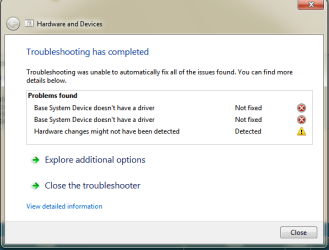
Still not working....

Maybe I didn't do this correctly but it still hasn't changed. I believe these are the problems now, i just can't fix them via Windows Update or whatever.
 

Attachments

  • screen.png
    screen.png
    12.9 KB · Views: 130

My Computer My Computer

Computer Manufacturer/Model Number
Dell Inspiron 1420
OS
Windows 7
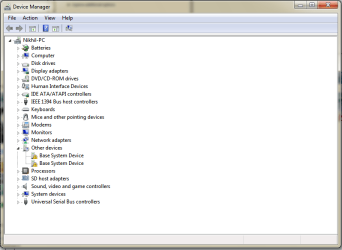
Open your device manager and make sure there are no yellow exclamation marks showing up... if there are, take a screenshot and post it...
 

My Computer My Computer

Computer type
PC/Desktop
Computer Manufacturer/Model Number
LENOVO K450 @3.0GHZ
OS
64-bit Windows 8.1 Pro
CPU
Core(TM) i5 CPU 4330 Haswell @ 3.20GHz
Motherboard
LENOVO
Memory
12.00 GB
Graphics Card(s)
Intel(R) HD Graphics
Sound Card
Intel HD integtrated
Monitor(s) Displays
HP 25' ISP Monitor
Screen Resolution
1900/1020
Hard Drives
(1) ST1000DM003-1CH162 (2) Generic STORAGE DEVICE USB Device (3) Generic STORAGE DEVICE USB Device
Internet Speed
100mb down/10mb up
Here it is... :mad:
 

Attachments

  • base device.png
    base device.png
    18.8 KB · Views: 392

My Computer My Computer

Computer Manufacturer/Model Number
Dell Inspiron 1420
OS
Windows 7
Does anyone know how I can go about re-installing my base system device under the audio section of the device manager?
 

My Computer My Computer

Computer Manufacturer/Model Number
Dell Inspiron 1420
OS
Windows 7
Most Dell's require the Dell (integrated audio) sound drivers to work correctly. I've seen a lot of users, on the Dell users forum, that have tried non-Dell drivers and many either do not work or do not work correctly.
The Dell driver downloads are here: Drivers & Downloads=
There is one SigmaTel Vista 32 bit driver, which should work OK on Win 7 32 bit. Dell does not support Windows 7 on this model so you are stuck with the Dell Vista driver, or a non-Dell driver that may not work correctly.

In addition to the sound driver, there are two Chipset Drivers listed. The chipset drivers are one of the most often skipped items on an install and most install problems can be traced back to not having the chipset drivers installed or installed in the correct sequence. For most Dell's the install sequence is (1) Install Windows (2) Install Dell Laptops System Software (on applicable models), (3) Install Chipset Drivers (4) Install Device Drivers including Sound, Video, Ethernet, etc.
 

My Computer My Computer

Computer type
PC/Desktop
Computer Manufacturer/Model Number
My Own Build
OS
Windows 10 64 bit
CPU
Intel i7 6700K
Motherboard
ASUS ROG Maximus VIII Hero
Memory
16GB Corsair Dominator
Graphics Card(s)
Intel CPU Graphics
Sound Card
RealTek
Monitor(s) Displays
27" Dell S2719dgf
Screen Resolution
2560X1440
Hard Drives
1 TB Samsung 850 EVO SSD for Win 10 Pro
500GB Samsung 850 EVO SSD for Win 10 Insider
2 TB drive for backup
PSU
EVGA Supernova 750G2
Case
BeQuiet Silent Base 600
Cooling
Deepcool Captain 120EX
Keyboard
Microsoft Wireless 2000
Mouse
Microsoft wireless
Internet Speed
100 MB/sec (Cable)
Antivirus
Microsoft Defender and Malwarebytes
Browser
Edge/Firefox
Other Info
Cakewalk (Sonar) by BandLab and Studio One 4.1 Pro recording studio software. MOTU 896Mk3 Hybrid recording interface, Frontier Tranzport wireless control unit, Behringer X-Touch Control Surface.
Five USB connected optical drives for CD Audio production using Nero BurningROM
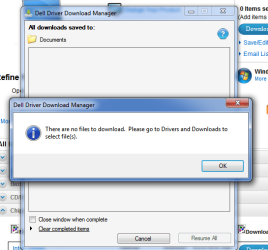
dowloading problems...

I can't seem to download any drivers from the Dell site because I keep getting this error message...
 

Attachments

  • latest screen.png
    latest screen.png
    25.9 KB · Views: 102

My Computer My Computer

Computer Manufacturer/Model Number
Dell Inspiron 1420
OS
Windows 7
I had the same challenge... Here is the solution that helped me out:

The symptom
Following a fresh install of Windows 7 (I haven't tried an in place upgrade as I just don't trust 'em !) the OS sees the Sigmatel device and reports it to be working, but the sound just doesn't work. Any attempt to download and install the latest Vista drivers also fails to cure the issue.

The fix
Download the latest x32 or x64 (as appropriate for your computer) Vista driver from the Dell website and leave the EXE in a folder somewhere
Or get them direct from us, click for the 32 bit driver or for the 64 bit driver
Right click computer, and choose manage, then device manager
In the Sound, Video and Game controller group you will see a device called "Windows High Defintion" - delete this by selecting and pressing delete
Now having removed this device from your system you should run the Dell Sigmatel Driver EXE you downloaded previously
Your system will prompt for a restart upon install
When you restart you will get the reassuring sound of the Windows 7 start up tune and all will now be well !

Hope this helps someone, took me an hour today to figure it out.

Source: SIGMATEL STAC 92XX C-Major HD Audio Drivers on Windows 7
 

My Computer My Computer

Computer Manufacturer/Model Number
Dell Inspiron 1420
OS
Windows 7 Ultimate 64Bit
CPU
Intel Core2Duo 1.8ghz
Memory
4gb
Thank you, my digital savior

This is the driver I was looking for, and it works. Thank you soo much tech guru.
 

My Computer My Computer

Computer Manufacturer/Model Number
Dell Inspiron 1420
OS
Windows 7
how u guy install win 7 64 bit?

i stuck at load driver b4 select drive to install windows.
how u guy pass the load driver step?
 

My Computer My Computer

Computer Manufacturer/Model Number
Dell Inspiron 1420
OS
windows 7
CPU
T7250, 2.0ghz 800Mhz FSB
Memory
3GB DDR2, 667Mhz
Graphics Card(s)
8400GS Nvidia
Error code 110

I imagine these instructions would work for me but when I try and run the sigmatel exe file I get an error code 110 saying it was not able to successfully unzip the file. Please help
 

My Computer My Computer

OS
Windows 7 Ultimate 32 bit
Many thanks to- hyp36rmax ,
I spent 4-5 hours on net, not able to fix the above problem, finally i am done after reading to this post, nice solution post. keep helping.

Thanks again and thanks to the site admin.

With warm regards,
Rudra Narayan Garnaik
www.garnaik.com
 

My Computer My Computer

Computer Manufacturer/Model Number
dell inspiron 1420
OS
win 7
Many thanks to- hyp36rmax ,
I spent 4-5 hours on net, not able to fix the above problem, finally i am done after reading to this post, nice solution post. keep helping.

Thanks again and thanks to the site admin.

With warm regards,
Rudra Narayan Garnaik
www.garnaik.com
 

My Computer My Computer

Computer Manufacturer/Model Number
dell inspiron 1420
OS
win 7
One comment, DO NOT use the Dell Download Manager to download drivers. Download each driver you want directly (individually). The Download Manager has caused many problems.
 

My Computer My Computer

Computer type
PC/Desktop
Computer Manufacturer/Model Number
My Own Build
OS
Windows 10 64 bit
CPU
Intel i7 6700K
Motherboard
ASUS ROG Maximus VIII Hero
Memory
16GB Corsair Dominator
Graphics Card(s)
Intel CPU Graphics
Sound Card
RealTek
Monitor(s) Displays
27" Dell S2719dgf
Screen Resolution
2560X1440
Hard Drives
1 TB Samsung 850 EVO SSD for Win 10 Pro
500GB Samsung 850 EVO SSD for Win 10 Insider
2 TB drive for backup
PSU
EVGA Supernova 750G2
Case
BeQuiet Silent Base 600
Cooling
Deepcool Captain 120EX
Keyboard
Microsoft Wireless 2000
Mouse
Microsoft wireless
Internet Speed
100 MB/sec (Cable)
Antivirus
Microsoft Defender and Malwarebytes
Browser
Edge/Firefox
Other Info
Cakewalk (Sonar) by BandLab and Studio One 4.1 Pro recording studio software. MOTU 896Mk3 Hybrid recording interface, Frontier Tranzport wireless control unit, Behringer X-Touch Control Surface.
Five USB connected optical drives for CD Audio production using Nero BurningROM
This driver and the solution worked perfectly!!!

Thank you very much... this solution worked perfectly on my Dell Inspiron 1420 with Windows 8!!! :D
 

My Computer My Computer

Computer Manufacturer/Model Number
Dell
OS
Windows 8
CPU
Centrino
Back
Top