Dell Inspiron 1545 F2 Wireless problem solved!

unpluggedjack

New member
Local time
8:01 AM
Messages
3
Has your Dell laptop got a broken keyboard... can't switch on wireless adapter by pressing F2?

This bugged me for months and didn't want to buy and fit a new keyboard. Finally figured out how to alter the BIOS settings to switch on the wifi card. Note you will need a usb keyboard plugged into the laptop to do this!

Reboot the laptop and press F2 on the external keyboard to enter the setup screen
find the wireless settings in the menu
there are two options here...
set it so that the wireless adapter is enabled but NOT that it can be toggled on/off via the switch (F2)
Apply then exit
When computer reboots right-click on network icon in system tray
open network and sharing centre
click on change adapter settings
right-click on WiFi adapter
choose connect/disconnect

Now treat yourself to a doughnut... you've just fixed it!
 

My Computer My Computer

At a glance

windows 8
Computer type
Laptop
Computer Manufacturer/Model Number
Dell Inspiron 1545
OS
windows 8

Attachments

  • Win keyboard.PNG
    Win keyboard.PNG
    8.9 KB · Views: 0
Last edited:

My Computer My Computer

At a glance

Microsoft Windows 7 Ultimate 32-bit 7601Intel(R) Pentium(R) Dual CPU E2160 @ 1.80GHz4.00 GB(1) VNC Mirror Driver (2) Intel(R) G33/G31 Ex...
Computer type
PC/Desktop
Computer Manufacturer/Model Number
Compac
OS
Microsoft Windows 7 Ultimate 32-bit 7601
CPU
Intel(R) Pentium(R) Dual CPU E2160 @ 1.80GHz
Motherboard
MSI Boston
Memory
4.00 GB
Graphics Card(s)
(1) VNC Mirror Driver (2) Intel(R) G33/G31 Express Chipset
Sound Card
Disabled
Monitor(s) Displays
Headless
Screen Resolution
1280 x 960 x 32 bits (4294967296 colors) @ 60 Hz
Hard Drives
ST3320820AS ATA Device
Keyboard
Headless
Mouse
Headless
Antivirus
Malwarebytes pro
Other Info
Also
Windows 8.1 Laptop and Desktop both Acer
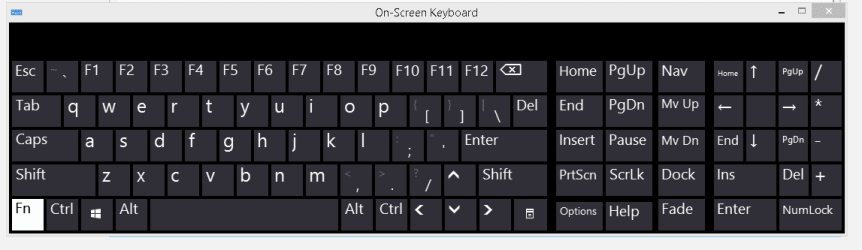
On-screen keyboard won't work for this particular issue unfortunately... at least not with the in-built one available in the accessibility settings (I'm on Win 8 btw although I realise this is a 7 Forum). It won't toggle the wireless switch for some reason. I even tried changing the behaviour of function keys from the BIOS but still couldn't get the on-screen keyboard to toggle wifi on/off.

So as you pointed out... I still ended up having to buy a new keyboard anyway! I don't take my laptop with me anywhere now I have a tablet so I was happy to just plug in a usb keyboard rather than pay for the laptop keyboard to be replaced. Although it's an easy DIY job apparently, I didn't have the confidence to try it myself....

I might try following the instructions in your link if I have a few moments to spare to see if this works.
 

My Computer My Computer

At a glance

windows 8
Computer type
Laptop
Computer Manufacturer/Model Number
Dell Inspiron 1545
OS
windows 8
On-screen keyboard won't work for this particular issue unfortunately... at least not with the in-built one available in the accessibility settings
I might try following the instructions in your link if I have a few moments to spare to see if this works.


It would be nice to know if you ever find a workaround especially for people out in the wild somewhere where the option of a usb keyboard is out of the question
 

My Computer My Computer

At a glance

Microsoft Windows 7 Ultimate 32-bit 7601Intel(R) Pentium(R) Dual CPU E2160 @ 1.80GHz4.00 GB(1) VNC Mirror Driver (2) Intel(R) G33/G31 Ex...
Computer type
PC/Desktop
Computer Manufacturer/Model Number
Compac
OS
Microsoft Windows 7 Ultimate 32-bit 7601
CPU
Intel(R) Pentium(R) Dual CPU E2160 @ 1.80GHz
Motherboard
MSI Boston
Memory
4.00 GB
Graphics Card(s)
(1) VNC Mirror Driver (2) Intel(R) G33/G31 Express Chipset
Sound Card
Disabled
Monitor(s) Displays
Headless
Screen Resolution
1280 x 960 x 32 bits (4294967296 colors) @ 60 Hz
Hard Drives
ST3320820AS ATA Device
Keyboard
Headless
Mouse
Headless
Antivirus
Malwarebytes pro
Other Info
Also
Windows 8.1 Laptop and Desktop both Acer
Back
Top