
Solved desktop context menu, options missing

M18XR2

New member
Member
Local time
4:02 PM
Messages
71
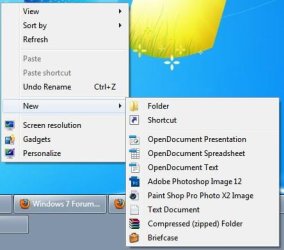
so i am very use to having rightclick on desktop and create new bitmap files on desktop and now that option has gone away and i do not know why. see attached picture.

as for the reason i can probably guess and its most likely because i installed adobe paintshop as well as corel paintshop pro and now im stuck.

anything i can do to get back that create new bmp options? and no i do not wish to create new paintshop file and having to do extra steps as saving it as .bmp, too much of a hassle and i use this function daily.

please help and thanks!
 

Attachments
  • Image1.jpg
    Image1.jpg
    27.8 KB · Views: 26

My Computer

OS
window 7 64 bit
Hello M18XR2,

You might see if using step 1 in the tutorial below to restore the New -> Bitmap image option may be able to help. :)
If not, then downloading and merging the .reg for the listed BMP option in the tutorial below may. It will restore the default associations for .bmp files.
Hope this helps,
Shawn
 

My Computer

Computer type
PC/Desktop
Computer Manufacturer/Model Number
Self built custom
OS
64-bit Windows 11 Pro for Workstations
CPU
Intel i7-8700K OC'd to 5 GHz
Motherboard
ASUS ROG Maximus XI Formula Z390
Memory
64 GB (4x16GB) G.SKILL TridentZ RGB DDR4 3600 MHz
Graphics Card(s)
ASUS ROG-STRIX-GTX1080TI-O11G-GAMING
Sound Card
Integrated
Monitor(s) Displays
2 x Samsung Odyssey G7 27"
Screen Resolution
2560x1440
Hard Drives
1TB Samsung 990 PRO M.2,
4TB Samsung 990 PRO PRO M.2,
TerraMaster F8 SSD Plus NAS
PSU
Seasonic Prime Titanium 850W
Case
Thermaltake Core P3
Cooling
Corsair Hydro H115i
Keyboard
Logitech wireless K800
Mouse
Logitech MX Master 4
Internet Speed
2 Gb/s Download and 100 Mb/s Upload
Antivirus
Malwarebyte Anti-Malware Premium
Browser
Google Chrome
Other Info
Logitech Z625 speaker system,
Logitech BRIO 4K Pro webcam,
HP Color LaserJet Pro MFP M477fdn,
APC SMART-UPS RT 1000 XL - SURT1000XLI,
Galaxy S23 Plus phone
Hello M18XR2,

You might see if using step 1 in the tutorial below to restore the New -> Bitmap image option may be able to help. :)If not, then downloading and merging the .reg for the listed BMP option in the tutorial below may. It will restore the default associations for .bmp files.Hope this helps,
Shawn

omg thank you so much, will do that as soon as possible when i get off work lol. currently held up cant create a backup image simply because i want everything in the image to work fine the way i wanted it. thank you with some timmy's donuts :)
 

My Computer

OS
window 7 64 bit
alrighty i tried using restoring bmp regedit but that did not help, options still not showing up. did i need to log off or restart computer?

edit: i restarted computer, but still no good. after removing it and restoring it with .reg and still no help. i also downloaded glary utilities, .bmp can be removed and will show up in glary if i use the restore .reg but even in glary with bmp box is checked, still no show on desktop with right click =(
 
Last edited:

My Computer

OS
window 7 64 bit
Did you also already try the second option to restore the default associations for .bmp files?
 

My Computer

Computer type
PC/Desktop
Computer Manufacturer/Model Number
Self built custom
OS
64-bit Windows 11 Pro for Workstations
CPU
Intel i7-8700K OC'd to 5 GHz
Motherboard
ASUS ROG Maximus XI Formula Z390
Memory
64 GB (4x16GB) G.SKILL TridentZ RGB DDR4 3600 MHz
Graphics Card(s)
ASUS ROG-STRIX-GTX1080TI-O11G-GAMING
Sound Card
Integrated
Monitor(s) Displays
2 x Samsung Odyssey G7 27"
Screen Resolution
2560x1440
Hard Drives
1TB Samsung 990 PRO M.2,
4TB Samsung 990 PRO PRO M.2,
TerraMaster F8 SSD Plus NAS
PSU
Seasonic Prime Titanium 850W
Case
Thermaltake Core P3
Cooling
Corsair Hydro H115i
Keyboard
Logitech wireless K800
Mouse
Logitech MX Master 4
Internet Speed
2 Gb/s Download and 100 Mb/s Upload
Antivirus
Malwarebyte Anti-Malware Premium
Browser
Google Chrome
Other Info
Logitech Z625 speaker system,
Logitech BRIO 4K Pro webcam,
HP Color LaserJet Pro MFP M477fdn,
APC SMART-UPS RT 1000 XL - SURT1000XLI,
Galaxy S23 Plus phone
Did you also already try the second option to restore the default associations for .bmp files?

no i havent try the 2nd method, but i managed to fix it solution was so simple why didnt i think of it earlier lol.

all i did was went to another laptop which had fresh window OS installed, went to the .bmp registry and export the entire thing, copy it to this laptop and import it and worked lol

thanks again for your time Brick! this forum is awesome and saved me a lot of time in window 7 settings/tweaks.
 

My Computer

OS
window 7 64 bit
That's great news. Yep, that's basically what the 2nd option is. :)
 

My Computer

Computer type
PC/Desktop
Computer Manufacturer/Model Number
Self built custom
OS
64-bit Windows 11 Pro for Workstations
CPU
Intel i7-8700K OC'd to 5 GHz
Motherboard
ASUS ROG Maximus XI Formula Z390
Memory
64 GB (4x16GB) G.SKILL TridentZ RGB DDR4 3600 MHz
Graphics Card(s)
ASUS ROG-STRIX-GTX1080TI-O11G-GAMING
Sound Card
Integrated
Monitor(s) Displays
2 x Samsung Odyssey G7 27"
Screen Resolution
2560x1440
Hard Drives
1TB Samsung 990 PRO M.2,
4TB Samsung 990 PRO PRO M.2,
TerraMaster F8 SSD Plus NAS
PSU
Seasonic Prime Titanium 850W
Case
Thermaltake Core P3
Cooling
Corsair Hydro H115i
Keyboard
Logitech wireless K800
Mouse
Logitech MX Master 4
Internet Speed
2 Gb/s Download and 100 Mb/s Upload
Antivirus
Malwarebyte Anti-Malware Premium
Browser
Google Chrome
Other Info
Logitech Z625 speaker system,
Logitech BRIO 4K Pro webcam,
HP Color LaserJet Pro MFP M477fdn,
APC SMART-UPS RT 1000 XL - SURT1000XLI,
Galaxy S23 Plus phone
Back
Top