Solved desktop, folders not working after update

cookiebun

New member
Local time
12:25 AM
Messages
25
I'm not even sure where to post this. Mu husband has the exact same PC hardware as mine. He recently installed a bunch of windows security updates and now his Windows installation is acting very odd.
1) He must type his log on password in all caps This should not be.
2) Right click on his desk top and he does not have the option "personalize". It's like Windows Explorer doesn't recognize that is the desk top and treats it as a weird folder.
3) Double click on a single icon actually selects many. Double click in the OS drive and it tries to open every last folder on the drive.
I used MSConfig to shut off some obvious excess he had starting at boot but that hasn't fixed anything.
He's already rolled the machine back 12 days before the update but it hasn't helped.
Please feel free to move this to the appropriate part of the forum. I've never seen any thing like this and have no idea where to start. Is it the Shell? Would that effect the mouse and keyboard?
help. :cry:
PS, there is now no way to type numbers.
 
Last edited:

My Computer My Computer

Computer type
PC/Desktop
Computer Manufacturer/Model Number
Dell
OS
Windows 7 Pro 64 bit
CPU
Intel Core i7 6700 @ 3.40GHz 23 °C Skylake 14nm Technology
Motherboard
Dell Inc. 0XJ8C4 (SOCKET 0)
Memory
16.0GB Dual-Channel Unknown @ 1063MHz (15-15-15-36)
Graphics Card(s)
4095MB NVIDIA GeForce GTX 745
Sound Card
Realtek Audio
Hi,

So you're having problems with both now?
Trashed our machines, avoid at all costs!
It does sound like the shell was affected.

Can you get to installed updates\control panel on either machine? If you can, use the search box in the upper right corner and search for the two most recent KB3207752 and KB3205394, right click on either one at a time and then click on uninstall let windows do its thing and then do the other.

You can also use the CMD prompt: Windows Update - Uninstall from Console Level

Make sure you reboot when asked and / or when done uninstalling. When back run a sfc /scannow option two #2 scan and repair
 

My Computer My Computer

Computer type
PC/Desktop
Computer Manufacturer/Model Number
Gateway DX4831-01e (Mid-Tower Desktop)
OS
Originally Win 7 Hm Prem x64 Ver 6.1.7600 Build 7601-SP1 | Upgraded to Windows 10 December 14, 2019
CPU
Intel i3 530 2.93GHz, 2933MHz 2 Cores 4 Logical Processors
Motherboard
Gateway H57M01 133 megahertz
Memory
6GB of 1,333MHz DDR3 SDRAM
Graphics Card(s)
32MB Intel Graphics Media Accelerator HD IGChip
Sound Card
Realtek High Definition Audio
Monitor(s) Displays
Gateway HX2000 20inch TFT active matrix TN
Screen Resolution
1600 x 900 x 59 hertz
Hard Drives
WDC WD10EADS-00M2B0 [HDD] (1000.20 GB) -- drive 0,
HL-DT-ST DVDRAM GH41N [CD-ROM dr]
Four card readers, and Four USB 2.0
PSU
300watts.
Case
Mid-Tower Desktop
Cooling
Stock from Gateway
Keyboard
Natural Ergonomic Keyboard 4000, see Other Info
Mouse
Orig. Gateway wore out now using Insignia USB wired optical
Internet Speed
Vz FIOS 10ms png 57.64Mbps down 65.53Mbps up Speedtest.org
Antivirus
Zamana Anti-logger with Anti-malware, MSE, Windows Firewall,
Browser
IE11.0.9600.19399-Upd ver11.0.135, Firefox 68.0.1 x64
Other Info
System Specs by Belarc.

BIOS: American Megatrends Inc. P01-A0 11/17/2009

Replaced the MS 'Natural' Standard PS/2 Enhanced 101-102 Keyboard with a new Natural Ergonomic Keyboard 4000 on August 1st 2014.

Canon Pixma MG3222 Printer.

Updated to IE11 on 12102015 | Fios Quantum Router g1100

Additional AV: SpywareBlaster, manual Mbam, SAS
Only my husband's PC is having problems. I don't run as much security software as he does.
We uninstall the update, reboot and the update is still there in the list of installed updates. There are two of them doing this on my husband's PC. We swapped out the keyboard on his PC and that seems to have fixed the numbers issue.
I only run Windows update about 3 times a year. I turned it back on via Services and instead of letting me select the updates I want to install, Microsoft, with out my permission, installed these 2 security updates. I've managed to remove one but the other remains. I have returned Windows Update to its completely disabled state on my PC. Other than be unable to uninstall the unwanted update on my machine, I am having no problems.
Honestly Microsoft, you wonder why you get sued in the E.U? :mad:
We are having a pet emergency at the moment so the Windows issue will have to wait till that resolves.
Thanks for the help.
 

My Computer My Computer

Computer type
PC/Desktop
Computer Manufacturer/Model Number
Dell
OS
Windows 7 Pro 64 bit
CPU
Intel Core i7 6700 @ 3.40GHz 23 °C Skylake 14nm Technology
Motherboard
Dell Inc. 0XJ8C4 (SOCKET 0)
Memory
16.0GB Dual-Channel Unknown @ 1063MHz (15-15-15-36)
Graphics Card(s)
4095MB NVIDIA GeForce GTX 745
Sound Card
Realtek Audio
Only my husband's PC is having problems. I don't run as much security software as he does.
We'll need to know what antivirus / anti-malware programs you're running on each machine.

We uninstall the update, reboot and the update is still there in the list of installed updates. There are two of them doing this on my husband's PC.
We'll need the number of each update, are they still KB3207752 and KB3205394?

We swapped out the keyboard on his PC and that seems to have fixed the numbers issue.
Good initiative, It's great that your solution for that worked!

I only run Windows update about 3 times a year. I turned it back on via Services and instead of letting me select the updates I want to install, Microsoft, with out my permission, installed these 2 security updates.
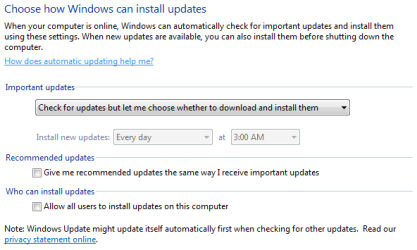
Make sure your Update settings are set as in my attachment after you turn the Update Service back on, just the action of you turning the service back on can re-set the way updates are handled. The setting is located at: Control Panel\All Control Panel Items\Windows Update\Change settings, you'll find Change settings 3rd down in the left panel:
wucook.PNG

If they're not you unwittingly did give permission.

  • Leave recommended unchecked to help sort the monthly updates.

  • Allow all users can be checked or unchecked it depends if you have other users use your machine.

I've managed to remove one but the other remains. I have returned Windows Update to its completely disabled state on my PC. Other than be unable to uninstall the unwanted update on my machine, I am having no problems.
Honestly Microsoft, you wonder why you get sued in the E.U? :mad:
We need to separate your problems, are both machines having the same update issue or is your update issue separate from the problem on your hubby's machine? And please, no disparaging remarks, they only serve to detract from finding your solution.

We are having a pet emergency at the moment so the Windows issue will have to wait till that resolves.
Thanks for the help.
You're welcome.
I am sorry to hear that your pet isn't feeling well, I hope it turns out well and take the time you need, I'll be here.
 
Last edited:

My Computer My Computer

Computer type
PC/Desktop
Computer Manufacturer/Model Number
Gateway DX4831-01e (Mid-Tower Desktop)
OS
Originally Win 7 Hm Prem x64 Ver 6.1.7600 Build 7601-SP1 | Upgraded to Windows 10 December 14, 2019
CPU
Intel i3 530 2.93GHz, 2933MHz 2 Cores 4 Logical Processors
Motherboard
Gateway H57M01 133 megahertz
Memory
6GB of 1,333MHz DDR3 SDRAM
Graphics Card(s)
32MB Intel Graphics Media Accelerator HD IGChip
Sound Card
Realtek High Definition Audio
Monitor(s) Displays
Gateway HX2000 20inch TFT active matrix TN
Screen Resolution
1600 x 900 x 59 hertz
Hard Drives
WDC WD10EADS-00M2B0 [HDD] (1000.20 GB) -- drive 0,
HL-DT-ST DVDRAM GH41N [CD-ROM dr]
Four card readers, and Four USB 2.0
PSU
300watts.
Case
Mid-Tower Desktop
Cooling
Stock from Gateway
Keyboard
Natural Ergonomic Keyboard 4000, see Other Info
Mouse
Orig. Gateway wore out now using Insignia USB wired optical
Internet Speed
Vz FIOS 10ms png 57.64Mbps down 65.53Mbps up Speedtest.org
Antivirus
Zamana Anti-logger with Anti-malware, MSE, Windows Firewall,
Browser
IE11.0.9600.19399-Upd ver11.0.135, Firefox 68.0.1 x64
Other Info
System Specs by Belarc.

BIOS: American Megatrends Inc. P01-A0 11/17/2009

Replaced the MS 'Natural' Standard PS/2 Enhanced 101-102 Keyboard with a new Natural Ergonomic Keyboard 4000 on August 1st 2014.

Canon Pixma MG3222 Printer.

Updated to IE11 on 12102015 | Fios Quantum Router g1100

Additional AV: SpywareBlaster, manual Mbam, SAS
Thanks for the replies everyone. We were finally able to remove the offending updates with your help.
The critter (pet rat) is better now too.
Husband's PC seems to be working normally at the moment.
 

My Computer My Computer

Computer type
PC/Desktop
Computer Manufacturer/Model Number
Dell
OS
Windows 7 Pro 64 bit
CPU
Intel Core i7 6700 @ 3.40GHz 23 °C Skylake 14nm Technology
Motherboard
Dell Inc. 0XJ8C4 (SOCKET 0)
Memory
16.0GB Dual-Channel Unknown @ 1063MHz (15-15-15-36)
Graphics Card(s)
4095MB NVIDIA GeForce GTX 745
Sound Card
Realtek Audio
I apologize for the late reply, but life intervened with a minor problem with our cat candy and she's okay now; It's great to hear that everything has turned out well for you.
 

My Computer My Computer

Computer type
PC/Desktop
Computer Manufacturer/Model Number
Gateway DX4831-01e (Mid-Tower Desktop)
OS
Originally Win 7 Hm Prem x64 Ver 6.1.7600 Build 7601-SP1 | Upgraded to Windows 10 December 14, 2019
CPU
Intel i3 530 2.93GHz, 2933MHz 2 Cores 4 Logical Processors
Motherboard
Gateway H57M01 133 megahertz
Memory
6GB of 1,333MHz DDR3 SDRAM
Graphics Card(s)
32MB Intel Graphics Media Accelerator HD IGChip
Sound Card
Realtek High Definition Audio
Monitor(s) Displays
Gateway HX2000 20inch TFT active matrix TN
Screen Resolution
1600 x 900 x 59 hertz
Hard Drives
WDC WD10EADS-00M2B0 [HDD] (1000.20 GB) -- drive 0,
HL-DT-ST DVDRAM GH41N [CD-ROM dr]
Four card readers, and Four USB 2.0
PSU
300watts.
Case
Mid-Tower Desktop
Cooling
Stock from Gateway
Keyboard
Natural Ergonomic Keyboard 4000, see Other Info
Mouse
Orig. Gateway wore out now using Insignia USB wired optical
Internet Speed
Vz FIOS 10ms png 57.64Mbps down 65.53Mbps up Speedtest.org
Antivirus
Zamana Anti-logger with Anti-malware, MSE, Windows Firewall,
Browser
IE11.0.9600.19399-Upd ver11.0.135, Firefox 68.0.1 x64
Other Info
System Specs by Belarc.

BIOS: American Megatrends Inc. P01-A0 11/17/2009

Replaced the MS 'Natural' Standard PS/2 Enhanced 101-102 Keyboard with a new Natural Ergonomic Keyboard 4000 on August 1st 2014.

Canon Pixma MG3222 Printer.

Updated to IE11 on 12102015 | Fios Quantum Router g1100

Additional AV: SpywareBlaster, manual Mbam, SAS
Back
Top