
How to Add or Remove a Default Desktop Icon in Windows 7
Information
This will show you how to add or remove the default Computer, User's Files, Network, Recycle Bin, or Control Panel desktop icons in Windows 7.
OPTION ONE
Through Desktop Icon Settings in Personalization
NOTE: This will only add the desktop icon for the current user (you), and not all users.
1. Right click on a empty area of the desktop and click on Personalize. (See screenshot below)
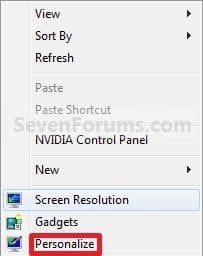
2. Click on the Change desktop icons link at the upper left corner. (See screenshot below)

3. To Add a Default Desktop Icon
A) In the top pane, check the desktop icons that you want to add. (See screenshot below step 5)
B) Go to step 5.
4. To Remove a Default Desktop Icon
A) In the top pane, uncheck the desktop icons that you want to remove. (See screenshot below step 5)
5. Click on OK. (See screenshot below)
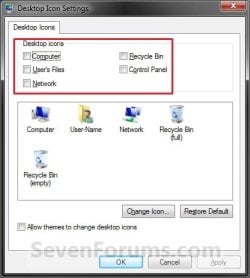
6. Close the Personalization window. (See screenshot below step 2)
OPTION TWO
Using a REG File Download
1. To Add the "Computer" Desktop Icon for Current User Only
A) Click on the Download button below to download the file below.
Add_Computer_Desktop_Icon.reg
Download
2. To Add the "Computer" Desktop Icon for All Users
A) Click on the Download button below to download the file below.
Add_Computer_Desktop_Icon_All_Users.reg
Download
3. To Remove the "Computer" Desktop Icon for All Users
A) Click on the Download button below to download the file below.
Remove_Computer_Desktop_Icon.reg
Download
4. To Add the "Users' Files" Desktop Icon for Current User Only
A) Click on the Download button below to download the file below.
Add_Users_Files_Desktop_Icon.reg
Download
5. To Add the "Users' Files" Desktop Icon for All Users
A) Click on the Download button below to download the file below.
Add_Users_Files_Desktop_Icon_All_Users.reg
Download
6. To Remove the "Users' Files" Desktop Icon for All Users
A) Click on the Download button below to download the file below.
Remove_Users_Files_Desktop_Icon.reg
Download
7. To Add the "Network" Desktop Icon for Current User Only
A) Click on the Download button below to download the file below.
Add_Network_Desktop_Icon.reg
Download
8. To Add the "Network" Desktop Icon for All Users
A) Click on the Download button below to download the file below.
Add_Network_Desktop_Icon_All_Users.reg
Download
9. To Remove the "Network" Desktop Icon for All Users
A) Click on the Download button below to download the file below.
Remove_Network_Desktop_Icon.reg
Download
10. To Add the "Recycle Bin" Desktop Icon for Current User Only
A) Click on the Download button below to download the file below.
Add_Recycle_Bin_Desktop_Icon.reg
Download
11. To Add the "Recycle Bin" Desktop Icon for All Users
A) Click on the Download button below to download the file below.
Add_Recycle_Bin_Desktop_Icon_All_Users.reg
Download
12. To Remove the "Recycle Bin" Desktop Icon for All Users
A) Click on the Download button below to download the file below.
Remove_Recycle_Bin_Desktop_Icon.reg
Download
13. To Add the "Control Panel" Desktop Icon for Current User Only
A) Click on the Download button below to download the file below.
Add_Control_Panel_Desktop_Icon.reg
Download
14. To Add the "Control Panel" Desktop Icon for All Users
A) Click on the Download button below to download the file below.
Add_Control_Panel_Desktop_Icon_All_Users.reg
Download
15. To Remove the "Control Panel" Desktop Icon for All Users
A) Click on the Download button below to download the file below.
Remove_Control_Panel_Desktop_Icon.reg
Download
16. Click on Save, and save the .reg file to the desktop.
17. Right click on the downloaded .reg file and click on Merge.
18. Click on Run, Yes, Yes, and OK when prompted.
19. Log off and log on, or restart the computer to apply.
20. When done, you can delete the downloaded .reg files if you like.
That's it,
Shawn
Related Tutorials
- How to Add or Remove the Desktop Toolbar on the Windows 7 Taskbar
- How to Turn Aero Peek On or Off in Windows 7
- How to Change or Restore Default Windows 7 Desktop Icons
- How to Prevent or Allow Themes to Change Windows 7 Desktop Icons
- How to Add or Remove the Libraries Desktop Icon in Windows 7
- How to Change the Default Libraries Icon in Windows 7
- How to Hide or Show Desktop Icons in Windows 7
- How to Allow or Prevent the Windows 7 Recycle Bin Icon to Display
- How to Pin the Recycle Bin to the Windows 7 Taskbar
- How to Pin Your User Files Folder to the Windows 7 Taskbar
- How to Pin the Control Panel to the Windows 7 Taskbar
- How to Pin Computer to the Windows 7 Taskbar
- How to Easily Change the Windows Desktop Icons Size
- How to Add or Remove the HomeGroup Desktop Icon in Windows 7
- How to Change the Default HomeGroup Icon in Windows 7
- How to Enable or Disable Changing Default Desktop Icons in Windows 7
- How to Turn Drop Shadows On or Off for Desktop Icons
- How to Create a "Desktop Icon Settings" Shortcut in Vista and Windows 7
- How to Hide or Show the Text of Desktop Icons in Windows 7
- How to Create a "Internet Explorer" Desktop Icon in Windows 7
Attachments
-
Add_Computer_Desktop_Icon.reg365 bytes · Views: 6,768
-
Remove_Computer_Desktop_Icon.reg697 bytes · Views: 4,785
-
Add_Users_Files_Desktop_Icon.reg365 bytes · Views: 3,552
-
Remove_Users_Files_Desktop_Icon.reg697 bytes · Views: 4,789
-
Add_Network_Desktop_Icon.reg365 bytes · Views: 2,459
-
Remove_Network_Desktop_Icon.reg697 bytes · Views: 3,362
-
Add_Recycle_Bin_Desktop_Icon.reg365 bytes · Views: 2,512
-
Remove_Recycle_Bin_Desktop_Icon.reg697 bytes · Views: 2,828
-
Add_Control_Panel_Desktop_Icon.reg365 bytes · Views: 2,370
-
Remove_Control_Panel_Desktop_Icon.reg697 bytes · Views: 5,182
-
Add_Control_Panel_Desktop_Icon_All_Users.reg695 bytes · Views: 3,729
-
Add_Network_Desktop_Icon_All_Users.reg695 bytes · Views: 4,230
-
Add_Recycle_Bin_Desktop_Icon_All_Users.reg695 bytes · Views: 4,171
-
Add_Users_Files_Desktop_Icon_All_Users.reg695 bytes · Views: 7,294
-
Add_Computer_Desktop_Icon_All_Users.reg695 bytes · Views: 15,501
Last edited:


