Desktop icons disappeared

jserenson

New member
Local time
7:11 AM
Messages
2
I just recovered from a problem where was running windows 7 32 bit upgraded from vista which had been running for a long time.
One day It no longer had a hard drive. The PVM file was corrupted.
After much todo I finally foung out it was caused by VMWare running in the background at the same time as Parallels.
So I decided to do a clean install with a 64 bit version of 7.0 Ultimate.
Things seemed to be going along okay.
After I had installed quite a few programs the icons started to disappear.
I have tried all the options outlined in the forum that I saw.
View display icons is checked
I tried running the batch file to delete the icons cache.
Still to no avail.
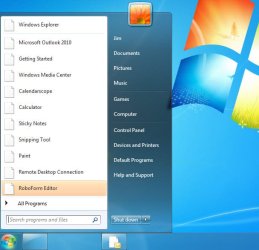
I could really use some help to get back to where I can see my icons on the Start menu, and taskbar.
If I right click on the items in the start menu that are like a white folder with no icon It kind of hangs.
I attached a couple of snapshots of the screens with no icons
Thanks for any help
 

Attachments
  • noicons.jpg
    noicons.jpg
    39.1 KB · Views: 11
  • noicons1.jpg
    noicons1.jpg
    31 KB · Views: 10
  • noicons2.jpg
    noicons2.jpg
    40.7 KB · Views: 6

My Computer

Computer Manufacturer/Model Number
Mac Pro
OS
windows 7 ultimate 64 bit running on parallels desktop 6.0
Tried system restore and rebuilding icon cache ?

If yes ans its still happening, Browse to the following locations:

HKEY_CLASSES_ROOT\lnkfile\shellex\IconHandler & HKEY_CLASSES_ROOT\piffile\shellex\IconHandler

Make sure they're not value-less (ie on the right side there should be someting called 'Default' with some alphanumeric data in it. IF they're not, then open notepad, copy the text in the code box below and save it as IconFix.reg, in the save as type field, make sure you select 'All files'. Double click it and select yes when prompted. Reboot.

Code:
Windows Registry Editor Version 5.00

[HKEY_CLASSES_ROOT\piffile\shellex\IconHandler]
"Default"="{00021401-0000-0000-C000-000000000046}"

[HKEY_CLASSES_ROOT\lnkfile\shellex\IconHandler]
"Default"="{00021401-0000-0000-C000-000000000046}"
 

My Computer

Computer Manufacturer/Model Number
HCL
OS
Winbdows 7 ultimate x64 | Ubuntu 12.04 x64 LTS
CPU
Core 2 Duo e7400 @ 2.90GHz
Motherboard
Gigabyte G31M-ES2L
Memory
3GB DDR2
Graphics Card(s)
Asus Nvidia GTX 560Ti 1GB
Sound Card
On-board
Monitor(s) Displays
HCL eZeeBee 18.5" LCD
Screen Resolution
1366x768 @ 60Hz
Hard Drives
Western Digital 320GB
PSU
Corsair CX500 V2 500W
Cooling
Stock
Keyboard
Stock
Mouse
Stock
Internet Speed
15-25kBps D/L | 10kBps U/L | Hey Don't laugh
this might be an obvious question but are you using a 64-bit system?
 

My Computer

Computer Manufacturer/Model Number
Acer Aspire 8735g
OS
Windows 7 Home Premium 64-bit
CPU
Intel Core 2 Duo T6600 @2.2 GHz
Motherboard
/
Memory
4GB RAM DDR3 so-DIMM
Graphics Card(s)
NVIDIA GeForce GT 240m 1GB
Sound Card
Realtek High Definition Audio
Monitor(s) Displays
18,4 HD+ LCD
Hard Drives
2 x 500 GB @5400 RPM
PSU
/
Case
Acer Aspire 8735g (laptop)
Cooling
/
Keyboard
Logitech Media Keyboard 600
Mouse
Logitech G3
Hi:
Thanks EzioAuditore

I checked both registry settings and they are okay.
I am running windows 7.0 ultimate 64 bit version.
 

My Computer

Computer Manufacturer/Model Number
Mac Pro
OS
windows 7 ultimate 64 bit running on parallels desktop 6.0
Are the icons being displayed now?
 

My Computer

Computer Manufacturer/Model Number
HCL
OS
Winbdows 7 ultimate x64 | Ubuntu 12.04 x64 LTS
CPU
Core 2 Duo e7400 @ 2.90GHz
Motherboard
Gigabyte G31M-ES2L
Memory
3GB DDR2
Graphics Card(s)
Asus Nvidia GTX 560Ti 1GB
Sound Card
On-board
Monitor(s) Displays
HCL eZeeBee 18.5" LCD
Screen Resolution
1366x768 @ 60Hz
Hard Drives
Western Digital 320GB
PSU
Corsair CX500 V2 500W
Cooling
Stock
Keyboard
Stock
Mouse
Stock
Internet Speed
15-25kBps D/L | 10kBps U/L | Hey Don't laugh
Back
Top