

- Local time
- 11:34 PM
- Messages
- 242
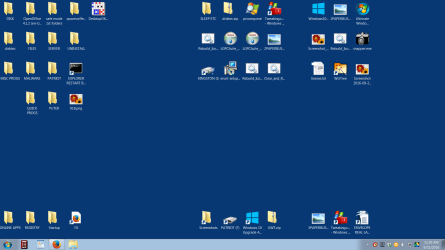
NOT GOIN TO BELIEVE THIS!!! Went to safe mode 32 bit. Had icons like 16 bit. HUH?
also had the squares around them like 16 bit. So being me I was fiddle F'n around and decided to do a CTRL+ scroll to resize those icons. when I resized smaller the squares disappeared & had a full desktop of perfect icons, Oh Oh Oh hurry reboot!
In regular mode 32 bit same thing.
Noe Mr B. what goin on?just take a few roots to make the icons caches work?
Hooray 4 US! Thanks or hanging in with me. James
also had the squares around them like 16 bit. So being me I was fiddle F'n around and decided to do a CTRL+ scroll to resize those icons. when I resized smaller the squares disappeared & had a full desktop of perfect icons, Oh Oh Oh hurry reboot!
In regular mode 32 bit same thing.
Noe Mr B. what goin on?just take a few roots to make the icons caches work?
Hooray 4 US! Thanks or hanging in with me. James
Attachments
My Computer
At a glance
win7 Home Premium x64
- Computer type
- PC/Desktop
- Computer Manufacturer/Model Number
- gateway
- OS
- win7 Home Premium x64
- Antivirus
- avast
- Browser
- Firefox


