
Solved Desktop Icons Moving

Dadeus welcome to Seven forums.
Try what I have in the snip below, right click an empty spot on your desktop. I tried it, moved some icons and they stayed where I put them after a reboot.
NOTE: Icons will not align in a straight line doing this, you can place them anywhere.
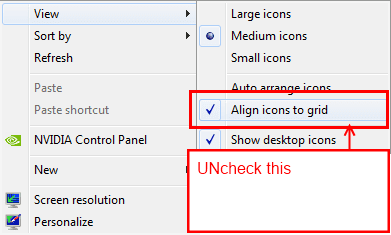
Untitled.png
 

My Computer

Computer type
PC/Desktop
Computer Manufacturer/Model Number
Home Built Desktop By DataTech
OS
Windows 7 Ultimate X64 SP1
CPU
Intel i5-2550K, Differing ~4.4-4.8GHz No built in GPU
Motherboard
ASUS P8Z68-V PRO/GEN3
Memory
16GB G.Skill Sniper 1866MHz @ 2133MHz 2x8GB
Graphics Card(s)
ASUS GTX650TIB-DC2OC-2GD5, (650TI Boost)
Sound Card
Onboard Realtek 5-1
Monitor(s) Displays
Samsung P2570HD
Screen Resolution
1920x1080
Hard Drives
Samsung 840 Pro 256GB SSD for OS, 500GB Seagate Constellation (Enterprise drive) for Data
PSU
Corsair HX650W
Case
Inwin Dragon Rider
Cooling
Hyper 212 EVO w/two Noctua fans, push-pull, @1300 RPM
Keyboard
E-Z Eyes, bright yellow keys with large characters
Mouse
steelseries SENSEI Laser Pro Gaming
Internet Speed
48-51Mbs Mbs down, 11 Mbs up Xfinity Cable
Antivirus
Norton Internet Security 2013
Browser
IE 10, Opera, Pale Moon if needed
Other Info
4 case fans, LG BluRay-RE, ASUS DVD-RW, Mr. Fusion power supply, 1.21 gigawatts.
Alas, that didn't help either. Thanks for the tip, though. Hopefully, one of these ideas will work.

I tried placing my icons with snap to grid on, then turning it off. I tried placing my icons with the snap to grid off before I moved them and neither helped. It looks like a rogue "Arrange icons by name" command is being sent periodically. I don't think it is a screen resolution issue anymore because reducing the resolution and then restoring it packs the icons in the upper left corner, not the entire left side of the screen.
 

My Computer

OS
windows xp-32
Odd for sure. Under Sort by what do you have?
 

My Computer

Computer type
PC/Desktop
Computer Manufacturer/Model Number
Home Built Desktop By DataTech
OS
Windows 7 Ultimate X64 SP1
CPU
Intel i5-2550K, Differing ~4.4-4.8GHz No built in GPU
Motherboard
ASUS P8Z68-V PRO/GEN3
Memory
16GB G.Skill Sniper 1866MHz @ 2133MHz 2x8GB
Graphics Card(s)
ASUS GTX650TIB-DC2OC-2GD5, (650TI Boost)
Sound Card
Onboard Realtek 5-1
Monitor(s) Displays
Samsung P2570HD
Screen Resolution
1920x1080
Hard Drives
Samsung 840 Pro 256GB SSD for OS, 500GB Seagate Constellation (Enterprise drive) for Data
PSU
Corsair HX650W
Case
Inwin Dragon Rider
Cooling
Hyper 212 EVO w/two Noctua fans, push-pull, @1300 RPM
Keyboard
E-Z Eyes, bright yellow keys with large characters
Mouse
steelseries SENSEI Laser Pro Gaming
Internet Speed
48-51Mbs Mbs down, 11 Mbs up Xfinity Cable
Antivirus
Norton Internet Security 2013
Browser
IE 10, Opera, Pale Moon if needed
Other Info
4 case fans, LG BluRay-RE, ASUS DVD-RW, Mr. Fusion power supply, 1.21 gigawatts.
Under "Arrange icons by" I only have the Show desktop Icons checked.
 

My Computer

OS
windows xp-32
In the right click desktop menu there is a Sort By which has some options.
 

My Computer

Computer type
PC/Desktop
Computer Manufacturer/Model Number
Home Built Desktop By DataTech
OS
Windows 7 Ultimate X64 SP1
CPU
Intel i5-2550K, Differing ~4.4-4.8GHz No built in GPU
Motherboard
ASUS P8Z68-V PRO/GEN3
Memory
16GB G.Skill Sniper 1866MHz @ 2133MHz 2x8GB
Graphics Card(s)
ASUS GTX650TIB-DC2OC-2GD5, (650TI Boost)
Sound Card
Onboard Realtek 5-1
Monitor(s) Displays
Samsung P2570HD
Screen Resolution
1920x1080
Hard Drives
Samsung 840 Pro 256GB SSD for OS, 500GB Seagate Constellation (Enterprise drive) for Data
PSU
Corsair HX650W
Case
Inwin Dragon Rider
Cooling
Hyper 212 EVO w/two Noctua fans, push-pull, @1300 RPM
Keyboard
E-Z Eyes, bright yellow keys with large characters
Mouse
steelseries SENSEI Laser Pro Gaming
Internet Speed
48-51Mbs Mbs down, 11 Mbs up Xfinity Cable
Antivirus
Norton Internet Security 2013
Browser
IE 10, Opera, Pale Moon if needed
Other Info
4 case fans, LG BluRay-RE, ASUS DVD-RW, Mr. Fusion power supply, 1.21 gigawatts.
I am using windows xp, which means I may be looking on the wrong site entirely. if so, my apologies.
 

My Computer

OS
windows xp-32
Ahh, I see, XP is a bit different and I forget exactly how the icons work in it, but should be similar. It may have its explorer setup to move icons back to a different location than you placed them.

You can try posting a new thread in this General Discussion and mention at the outset you're on XP. I'm sure some here still have it.:)
 

My Computer

Computer type
PC/Desktop
Computer Manufacturer/Model Number
Home Built Desktop By DataTech
OS
Windows 7 Ultimate X64 SP1
CPU
Intel i5-2550K, Differing ~4.4-4.8GHz No built in GPU
Motherboard
ASUS P8Z68-V PRO/GEN3
Memory
16GB G.Skill Sniper 1866MHz @ 2133MHz 2x8GB
Graphics Card(s)
ASUS GTX650TIB-DC2OC-2GD5, (650TI Boost)
Sound Card
Onboard Realtek 5-1
Monitor(s) Displays
Samsung P2570HD
Screen Resolution
1920x1080
Hard Drives
Samsung 840 Pro 256GB SSD for OS, 500GB Seagate Constellation (Enterprise drive) for Data
PSU
Corsair HX650W
Case
Inwin Dragon Rider
Cooling
Hyper 212 EVO w/two Noctua fans, push-pull, @1300 RPM
Keyboard
E-Z Eyes, bright yellow keys with large characters
Mouse
steelseries SENSEI Laser Pro Gaming
Internet Speed
48-51Mbs Mbs down, 11 Mbs up Xfinity Cable
Antivirus
Norton Internet Security 2013
Browser
IE 10, Opera, Pale Moon if needed
Other Info
4 case fans, LG BluRay-RE, ASUS DVD-RW, Mr. Fusion power supply, 1.21 gigawatts.
Britton30, I have solved my problem for the moment. As a last ditch effort, and due diligence trying to solve this problem, I used RegCleaner to scan my registry for unused entries. It found over 600 entries that were deemed safe to delete, so after backing up my registry I deleted them. My icons have stayed put for over a week now and everything works as it should. Hopefully, posting this won't reawaken the gremlin. I suspect rogue AutoArrange commands as the cuplrit.
 

My Computer

OS
windows xp-32
:thumbsup:
 

My Computer

Computer type
PC/Desktop
Computer Manufacturer/Model Number
Home Built Desktop By DataTech
OS
Windows 7 Ultimate X64 SP1
CPU
Intel i5-2550K, Differing ~4.4-4.8GHz No built in GPU
Motherboard
ASUS P8Z68-V PRO/GEN3
Memory
16GB G.Skill Sniper 1866MHz @ 2133MHz 2x8GB
Graphics Card(s)
ASUS GTX650TIB-DC2OC-2GD5, (650TI Boost)
Sound Card
Onboard Realtek 5-1
Monitor(s) Displays
Samsung P2570HD
Screen Resolution
1920x1080
Hard Drives
Samsung 840 Pro 256GB SSD for OS, 500GB Seagate Constellation (Enterprise drive) for Data
PSU
Corsair HX650W
Case
Inwin Dragon Rider
Cooling
Hyper 212 EVO w/two Noctua fans, push-pull, @1300 RPM
Keyboard
E-Z Eyes, bright yellow keys with large characters
Mouse
steelseries SENSEI Laser Pro Gaming
Internet Speed
48-51Mbs Mbs down, 11 Mbs up Xfinity Cable
Antivirus
Norton Internet Security 2013
Browser
IE 10, Opera, Pale Moon if needed
Other Info
4 case fans, LG BluRay-RE, ASUS DVD-RW, Mr. Fusion power supply, 1.21 gigawatts.
Hi re-awakening what might still be a very old and possibly not fully solved topic of icons on desktop constantly moving around as I still kept having the same problem without any success. So after a search into this seemingly common problem earlier on today, I tracked down what seemed to be this last thread on the topic and which I know is already very old and also marked as solved.

I too as the last member said have used Reg Cleaner (together with Wise Care 365) for ages without any problems and which I find are excellent, except they have never resolved this icon moving problem and had more or less given up. That is until a couple of hours ago when they suddenly and most mysteriously remained in place for the very first time ! So on the offchance that anyone else still has this problem and hasn't been able to solve it this was what happened. I use Win7 64bit.

I like to put jpeg home photos on desktop and which I change around regularly, only this time for some reason I re-arranged all the icons as well putting them all into a new position before I shut down. As I went to do so I suddenly remembered I wanted to put up a new pic I'd taken only a couple of days ago, so quickly uploaded the new desktop pic before finally shutting down.

Starting up my laptop an hour or so later I found all the icons were amazingly still where I'd left them which after so long was really puzzling but of course great ! Question is why ? My guess, and it's that and nothing more as I am and always will be a total amateur with all things computerised, is that shutting down immediately after uploading a new desktop pic would seem to fix icons into any new position as well ? I double checked with a new pic to test it and it worked again, however knowing me it must be for some completely different reason !

Be interested to know if this is the reason for anyone else having the same problem and if it works for them as well.

Hope this is of interest anyway....:)
 

My Computer

Computer type
Laptop
Computer Manufacturer/Model Number
HP Presario CQ 56
OS
Windows 7 Home Premium 64bit
Antivirus
Zone Alarm
Browser
Firefox
Back
Top